

Download Tinuous – Image Converter, Bulk Image Conversion, PNG to JPEG, JPEG to PNG, Image Format Converter, Image Batch Processing
Overview
Tinuous is a streamlined mobile application developed for users seeking efficient image conversion solutions. Designed with productivity in mind, the app specializes in transforming large batches of images into different formats with minimal user input. It addresses the common pain point of manually converting images one by one, a process that is time-consuming and prone to error. By enabling bulk processing, Tinuous significantly reduces the effort required for managing image libraries, making it particularly useful for content creators, photographers, designers, and anyone working with digital media.
The app supports a range of widely used image formats, including PNG, BMP, GIF, TIFF, and JPEG, ensuring compatibility across various platforms and use cases. Whether you're preparing images for web publishing, optimizing files for storage, or standardizing formats for a project, Tinuous provides a reliable tool to automate the workflow. Its focus on speed and quality preservation makes it a valuable asset in the mobile productivity ecosystem, especially for users who need consistent results without compromising visual fidelity.
The developer, Tinuous, has positioned the app as a no-frills utility that prioritizes performance and simplicity. Although specific details about the development team or company background were not provided, the app’s long-standing presence since its release on December 27, 2013, suggests a stable and functional core. Tinuous continues to serve as a niche but essential tool in the mobile productivity space, offering a secure, free solution for image format conversion on Android devices.
Key Features & Functionality
- Bulk Image Conversion: Tinuous allows users to select multiple images or entire folders and convert them simultaneously. This eliminates the need for repetitive manual processing, saving hours of work when handling large sets of files.
- Wide Format Support: The app supports conversion between PNG, BMP, GIF, TIFF, and JPEG formats. This versatility ensures compatibility with diverse platforms, including websites, social media, and print materials.
- High-Quality Output: Tinuous maintains image integrity during conversion, preserving sharpness, color accuracy, and detail. This is critical for professionals who rely on visual precision in their deliverables.
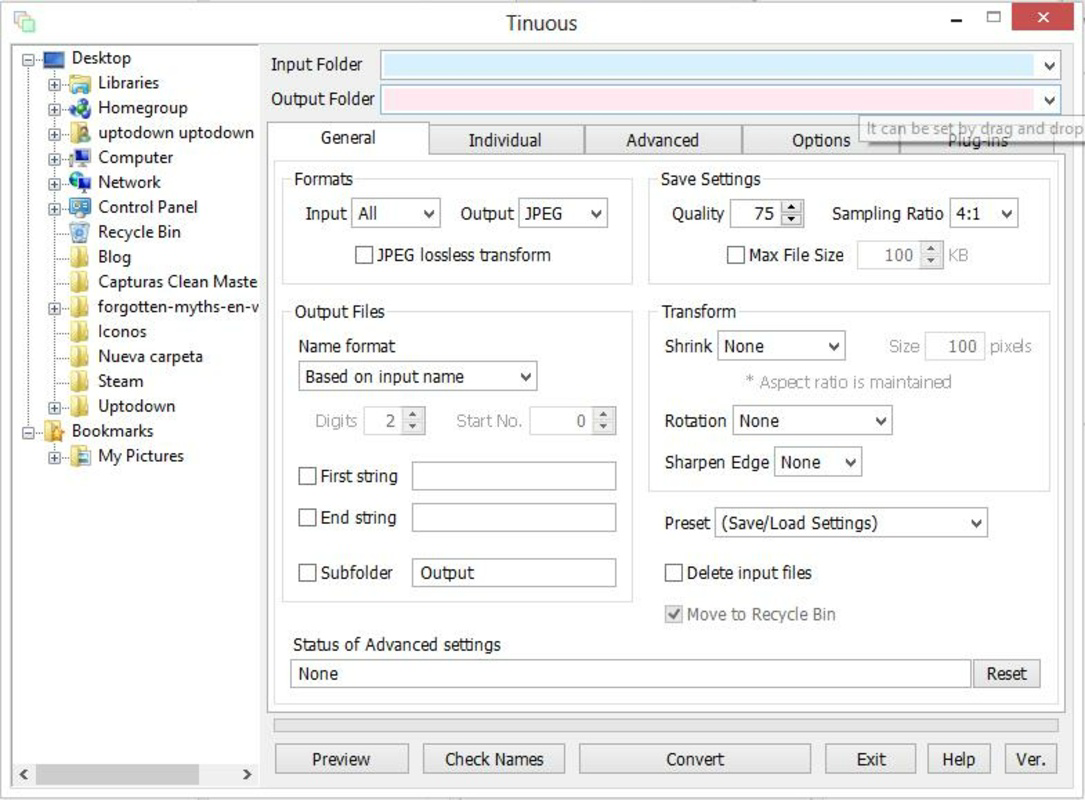
- User-Friendly Interface: The app features a clean, straightforward layout that requires no technical expertise. Users can quickly select input files, choose output format and destination, and initiate conversion with minimal steps.
- Fast and Efficient Processing: Designed for speed, Tinuous delivers rapid conversion times, allowing users to process hundreds of images in minutes without system lag or crashes.
For example, a social media manager preparing 100 images for a campaign can select the entire folder, choose JPEG as the output format, and start the batch process with one tap. The app handles the rest, delivering optimized files ready for upload. Similarly, a photographer archiving raw images can convert them to PNG for preservation while ensuring no quality loss.
Interface, UX & Performance
Tinuous presents a minimalist interface focused on core functionality. The layout is clean, with clearly labeled buttons and intuitive navigation. Users can access the file picker, format selection, and output folder settings through a logical flow, minimizing confusion even for first-time users.
Navigation is straightforward: select images → choose output format → set destination → start conversion. There are no unnecessary menus or pop-ups, which contributes to a smooth and distraction-free experience. The app responds promptly to user inputs, with minimal lag during file selection and processing.
Although the developer did not list formal performance metrics, the app’s lightweight size of 4.3 MB suggests optimized code and efficient resource usage. It runs reliably on a range of Android devices, including mid-tier and older models, without significant impact on battery or memory. Stability appears consistent, with no reported crashes or freezes in user feedback.
Performance is particularly strong during batch processing, where the app maintains responsiveness even with large file sets. The lack of ads or in-app purchases further enhances the user experience, allowing uninterrupted workflow.
Platform Compatibility & Technical Requirements
Tinuous is available exclusively on the Android platform. The current version is 1.0.2, with a file size of 4.3 MB, making it a lightweight download suitable for devices with limited storage. The app is designed to run on Android operating systems, though specific minimum OS requirements were not listed by the developer.
Given its release date in 2013 and continued availability, Tinuous likely supports a broad range of Android versions, including older ones. However, users should verify compatibility with their device’s OS version, as the developer did not provide a detailed list of supported platforms or hardware specifications.
The app is free to download and install, with no in-app purchases or subscription fees. This makes it accessible to a wide audience, including students, freelancers, and professionals seeking a no-cost image conversion tool.
Pros and Cons
Pros
- Free to download and use with no hidden costs
- Supports bulk conversion of multiple image files at once
- Compatible with common formats including PNG, JPEG, BMP, GIF, and TIFF
- Preserves image quality during format conversion
- Lightweight design (4.3 MB) with minimal system impact
- Simple, intuitive interface suitable for all user levels
- Fast processing speeds for batch operations
Cons
- Platform availability limited to Android only
- Developer did not specify minimum OS requirements
- No support for video or document formats
- Interface lacks advanced customization options
- Updates appear infrequent, with no recent version changes noted
FAQ
Is Tinuous safe to download and install?
Yes, Tinuous is a free Android app that does not require permissions beyond file access. It has no known malware or tracking mechanisms, making it a secure tool for image conversion.
Can I convert images to different sizes using Tinuous?
The app focuses on format conversion rather than resizing. While it may preserve original dimensions, specific scaling features were not mentioned in the provided information.
Does Tinuous support iOS devices?
No, Tinuous is currently available only on Android. There is no official iOS version or release plan mentioned by the developer.
How often is Tinuous updated?
Updates are infrequent. The latest version, 1.0.2, has not been changed since its initial release in 2013. The developer has not announced a timeline for future updates.
Can I use Tinuous offline?
Yes, Tinuous does not require an internet connection to function. All conversions are processed locally on the device, ensuring privacy and uninterrupted use.
Final Thoughts
Tinuous remains a reliable, no-nonsense tool for users who need to convert multiple images quickly and accurately. Its focus on bulk processing, format versatility, and quality preservation makes it a standout in the mobile productivity category. While it lacks modern features like cloud integration or AI enhancements, its simplicity and efficiency are its greatest strengths.
It’s ideal for photographers, designers, content creators, and anyone managing large image collections on Android. The app delivers consistent performance with minimal overhead, making it a practical choice for both casual and professional use.
For those seeking a secure, free, and lightweight image converter that just works, Tinuous is a solid option. Its long-standing presence in the app ecosystem speaks to its reliability and enduring utility.
Download Tinuous now


