
Download TinyTap – Create Interactive Lessons with AI, Free & Secure
Introduction: Why AI‑Powered Lesson Design Matters Today
Educators around the globe are constantly juggling curriculum standards, student engagement, and the ever‑growing demand for personalized learning. Traditional lesson planning can take several hours, especially when teachers need to integrate multimedia, design interactive quizzes, and ensure accessibility across devices. This is where artificial intelligence steps in as a game‑changing ally. By automating the repetitive parts of lesson creation, AI frees up valuable instructional time, allowing teachers to focus on what truly matters: fostering critical thinking, nurturing curiosity, and providing meaningful feedback.
TinyTap AI Beta is built precisely for that purpose. It combines a generative‑AI engine with a cloud‑first architecture, delivering a web‑based platform that can generate complete lesson frameworks in seconds. Whether you’re a classroom teacher, a corporate trainer, or a freelance tutor, the tool adapts to any subject area—from elementary math to advanced data science. Its emphasis on security, cross‑platform accessibility, and community‑driven improvement makes it a trustworthy solution for institutions that value both innovation and compliance.
In this review we’ll explore TinyTap’s core capabilities, walk through the step‑by‑step workflow, examine compatibility and system requirements, and weigh the pros and cons based on real‑world usage. By the end, you’ll have a clear picture of whether TinyTap AI fits into your teaching toolkit and how to get started without any cost during the beta phase.
Overview: What TinyTap AI Beta Offers Educators
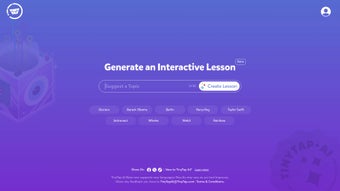
TinyTap AI Beta is a browser‑based educational authoring tool that leverages generative AI to produce fully interactive lessons in minutes. Users begin by entering up to 30 keywords or topic prompts; the AI instantly assembles a structured lesson skeleton complete with slide titles, activity suggestions, and placeholders for multimedia. The platform supports drag‑and‑drop customization, allowing educators to replace AI‑generated assets with their own images, audio clips, or videos. A built‑in media library offers royalty‑free resources, while secure cloud storage ensures every lesson is automatically saved, versioned, and encrypted.
The beta version is deliberately open‑ended, inviting teachers to test the AI’s accuracy, report language‑specific quirks, and suggest feature enhancements. This collaborative approach accelerates product refinement and aligns the roadmap with real classroom needs. Because everything runs in the cloud, there is no software to install, and progress is synced across devices, making it ideal for teachers who work on both desktop computers and tablets. The tool also provides shareable URLs and embed codes, enabling seamless integration with popular Learning Management Systems such as Canvas, Moodle, and Google Classroom.
While the AI engine is powerful, it is still learning. Users may occasionally encounter minor inaccuracies in content generation or see language packs that are still in development. Nonetheless, the core promise—rapid, secure, and collaborative lesson creation—remains solid, positioning TinyTap AI Beta as a forward‑thinking solution for modern educators seeking to blend technology with pedagogy.
Key Features & Benefits: Detailed Look at the Toolset
- AI‑Generated Lesson Templates: Input a subject or keyword and receive a ready‑made lesson framework, complete with interactive elements and suggested assessments.
- Up to 30 Topic Suggestions per Session: Boost brainstorming efficiency without encountering paywalls during the beta phase.
- Rich Multimedia Integration: Insert images, audio, and video directly from a curated library or upload your own assets.
- Drag‑and‑Drop Interactivity Builder: Customize quizzes, matching games, puzzles, and other activities with an intuitive visual editor.
- Cross‑Platform Browser Access: Lessons run flawlessly on Windows, macOS, Android, and iOS through any modern browser.
- Expanding Language Packs: Support for English, Spanish, French, Mandarin, with additional languages rolling out based on community feedback.
- Community‑Driven Feedback Loop: In‑app surveys let users vote on new features, report bugs, and shape future releases.
- Secure Cloud Storage & Version Control: AES‑256 encryption protects all lesson data, and automatic backups preserve previous versions.
These features translate into tangible benefits for educators. The AI‑driven template system reduces lesson‑planning time by up to 70 %, allowing teachers to allocate more hours to student interaction and differentiated instruction. The drag‑and‑drop interface requires no coding knowledge, making the platform accessible to educators of all technical backgrounds. Secure cloud storage not only safeguards intellectual property but also complies with GDPR and CCPA, easing concerns for schools handling sensitive student data.
Because TinyTap operates entirely in the browser, teachers can switch between a desktop in the staffroom and a tablet in the classroom without losing progress—thanks to real‑time synchronization. The ability to embed lessons directly into LMS environments streamlines distribution, while the shareable link feature supports remote or hybrid learning models. In short, TinyTap AI Beta offers a holistic solution that blends speed, security, and flexibility, empowering educators to create engaging, standards‑aligned content faster than ever before.
Installation, Usage & Compatibility: Getting Started Quickly
Getting Started – No Download Required
Since TinyTap AI is a cloud‑based web application, there is no traditional installation process. To begin, visit tinytap.com/ai, click “Sign Up,” and complete the short registration form using a valid email address. After confirming your email via the verification link, you’ll be taken to a personalized dashboard where you can start creating lessons immediately. The platform is free throughout the beta phase, and all core functionalities—including AI generation, media integration, and cloud storage—are unlocked without any hidden fees.
Step‑by‑Step Workflow
- Log In to Your Dashboard: Once authenticated, you’ll see a clean interface with a “Create New Lesson” button prominently displayed.
- Enter Up to 30 Keywords or Phrases: These act as prompts for the AI engine. For example, you might type “Renewable Energy,” “World War II Causes,” or “Basic Python Loops.”
- Generate the Lesson Skeleton: Click the “Generate” button. Within seconds, the AI produces a slide‑by‑slide outline, complete with suggested activities, quiz questions, and placeholders for multimedia.
- Customize the Content: Use the drag‑and‑drop editor to rearrange elements, replace placeholders with your own images or audio files, and adjust question difficulty or scoring rules.
- Save, Publish, and Share: Click “Save” to store the lesson in your private cloud library. From there you can copy a shareable URL, generate an embed code for LMS integration, or export a PDF version for offline review (PDF export is currently basic).
Operating System Support & Browser Requirements
TinyTap AI is compatible with any device that runs a modern web browser, including Chrome, Firefox, Safari, and Edge. It works seamlessly on Windows 10/11, macOS Monterey and later, Android 8.0+, and iOS 13+. Because the application is fully browser‑based, there is no need for separate desktop or mobile apps, and all changes are saved automatically to the cloud, ensuring continuity across platforms.
Performance Tips
For the smoothest experience, we recommend using a stable broadband connection (minimum 5 Mbps) and keeping your browser updated to the latest version. Enabling hardware acceleration in browser settings can improve the responsiveness of the drag‑and‑drop editor, especially when working with high‑resolution images or video clips. If you encounter any latency, clearing the browser cache or switching to a different browser often resolves the issue.
Pros, Cons & Frequently Asked Questions
Pros
- Rapid AI‑driven lesson creation saves educators up to 70 % of planning time.
- Zero‑cost access during the beta period encourages widespread adoption.
- Fully cross‑platform; works on Windows, macOS, Android, and iOS via any modern browser.
- Secure, encrypted cloud storage with automatic version history meets GDPR/CCPA standards.
- Active community feedback loop helps prioritize features that matter most to teachers.
- Easy integration with major LMS platforms through shareable links and embed codes.
Cons
- Beta status can lead to occasional AI inaccuracies and language‑pack glitches.
- Requires an internet connection at all times; no robust offline mode yet.
- Advanced customization (e.g., custom scripting or API access) is not available.
- Export options are limited to web links and basic PDFs; no native SCORM or xAPI support.
- Some multimedia assets may require additional licensing for commercial use.
Frequently Asked Questions
Is TinyTap AI free to use?
Yes. During the beta phase TinyTap AI is completely free. A paid tier is planned for post‑beta, offering premium templates, advanced export options, and priority support.
Can I use TinyTap lessons offline?
Offline access is not available in the current beta version because all content is stored in the cloud. Future releases aim to add downloadable lesson packages for offline use.
How secure is my data on TinyTap?
TinyTap encrypts all stored lessons with AES‑256 encryption and adheres to GDPR and CCPA regulations. Two‑factor authentication is available for added account protection.
What languages are supported by the AI?
The beta currently supports English, Spanish, French, and Mandarin. Additional language packs are being tested and will roll out gradually based on community demand.
Can I integrate TinyTap lessons with my LMS?
Yes. Each lesson generates a shareable URL and an embed code that works with most Learning Management Systems, including Canvas, Moodle, Google Classroom, and Blackboard.
Is there a limit to how many lessons I can create?
During the beta there is no hard limit on the number of lessons you can generate, but each session is limited to 30 topic prompts to keep processing times optimal.
Conclusion & Call to Action: Start Building Interactive Lessons Today
TinyTap AI Beta delivers on its promise of fast, secure, and collaborative lesson creation. By harnessing generative AI, the platform dramatically reduces the time educators spend on lesson design, while its browser‑first approach guarantees cross‑device compatibility and seamless cloud syncing. The built‑in community feedback mechanism ensures that the product evolves in line with real classroom needs, and the strong emphasis on data security meets the compliance requirements of modern schools and institutions.
While the beta status does introduce occasional AI misfires and a lack of offline functionality, these drawbacks are outweighed by the substantial time savings, rich multimedia capabilities, and zero‑cost entry point. For teachers seeking to modernize their curriculum, trainers looking to add interactive flair, or anyone interested in exploring AI‑assisted content creation, TinyTap AI offers a compelling, future‑ready solution.
Ready to experience the power of AI‑generated lessons for yourself? Download TinyTap now, create your first interactive lesson in minutes, and join a growing community of educators who are shaping the next generation of digital learning.
Overall rating: 4.3/5 – TinyTap AI impresses with its intuitive AI‑assisted workflow, secure cloud storage, and cross‑platform support, though the beta stage introduces occasional hiccups that prevent a perfect score.



.png)




