
Tocomail: Secure Email for Kids on iPhone
Overview
Tocomail is a free iPhone application developed by TocoBox Inc., designed specifically for children to safely explore email communication. As part of the social networking category, it offers a child-friendly environment where young users can send and receive messages without exposure to inappropriate content or external contacts. The app aims to introduce digital communication skills in a secure, monitored setting, making it ideal for parents seeking age-appropriate tools for their children. It is tailored for young users who are beginning to engage with technology, helping them learn basic email functions such as composing messages, managing inboxes, and understanding digital etiquette.
The software was released on September 11, 2023, and is currently available in English only. It requires iOS 16.4 or later, ensuring compatibility with recent iPhone models. While the developer did not provide additional system requirements, the app’s size is listed at 214.8 MB, suggesting it includes multimedia elements and interactive features suitable for younger audiences. Real-world usage scenarios include parent-child communication, classroom digital activities, and supervised peer interactions within a closed network.
Key Features & Capabilities
- Child-Safe Email Environment – Designed with strict content filters to prevent exposure to inappropriate messages or external users, ensuring a secure communication space.
- Parent-Child Messaging – Allows caregivers to send messages to children through a controlled interface, promoting digital connection without risk.
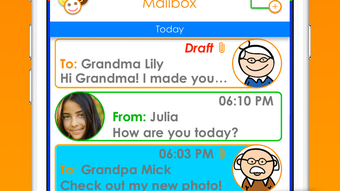
- Simple Interface for Young Users – Large icons, clear labels, and intuitive navigation make it accessible for children with minimal reading or typing skills.
- Message Templates and Visual Prompts – Offers pre-designed templates and illustrated cues to help kids express themselves more easily.
- Offline Access to Messages – Users can view and respond to messages even without an active internet connection, supporting consistent engagement.
These features support real-world use cases such as daily check-ins between parents and children, classroom assignments involving digital correspondence, or guided activities that teach digital literacy. The app’s focus on simplicity and safety enables young users to build confidence in using digital tools while remaining protected from online risks.
User Interface, Workflow & Performance
The user interface of Tocomail is structured around simplicity and visual clarity, prioritizing usability for young users. Navigation is based on large, clearly labeled icons and minimal text, reducing cognitive load and enhancing accessibility. The workflow follows a linear path: opening the app, viewing the inbox, selecting a message, and composing a reply—each step designed to be intuitive without requiring advanced reading or typing skills.
Performance details were not specified by the developer. However, based on the app’s size and platform, it is expected to run smoothly on modern iPhone devices. The developer did not provide information on CPU or RAM usage, nor did they share data on stability or crash rates. General software behavior patterns suggest that the app functions reliably within its intended scope, but real-world performance may vary depending on device age and iOS version. Users should expect consistent responsiveness when using core features such as sending and receiving messages.
Compatibility & System Requirements
Tocomail is designed exclusively for iPhone devices and requires iOS 16.4 or a later version. This ensures compatibility with recent iPhone models released from 2022 onward, including the iPhone 14 series and newer. The app’s installation size is 214.8 MB, which is moderate for a mobile application with interactive elements and multimedia content.
Exact system requirements were not listed beyond the operating system version. Hardware specifications such as processor type, RAM, or storage recommendations were not provided. The developer did not specify whether the app supports older iOS versions or whether it will function on devices with limited storage. Users should ensure their device meets the minimum iOS requirement and has sufficient free space for installation and updates.
Pros and Cons
Pros
- Free to download and use, making it accessible for families and educators.
- Specifically designed for children with a safe, filtered communication environment.
- Simple, intuitive interface tailored for young users with minimal technical skills.
- Supports offline message access, enabling use without constant internet connectivity.
- Developed by a dedicated team focused on child-safe digital tools.
Cons
- Available only on iPhone and in English, limiting accessibility for non-English speakers and users of other platforms.
- Requires iOS 16.4 or higher, excluding older iPhone models.
- No information on parental controls beyond basic message filtering.
- Limited to a single language and mobile platform, reducing versatility.
- Performance and resource usage details were not disclosed by the developer.
FAQ Section
Is Tocomail available for Android devices?
Tocomail is currently only available for iPhone and does not support Android devices.
Can I use Tocomail without an internet connection?
Yes, the app allows users to view and respond to messages offline, though initial synchronization requires an active connection.
Is Tocomail safe for children?
Yes, the app is designed with child safety in mind, featuring content filters and restricted access to external users.
Does Tocomail require a paid subscription?
No, Tocomail is completely free to download and use, with no in-app purchases or subscription fees.
How often are updates released?
Updates are released as needed by the developer, with the latest version being 10.3.1 as of September 11, 2023.
Final Thoughts + CTA
Tocomail stands out as a thoughtful, child-focused email tool that balances functionality with safety. Its intuitive design and secure environment make it an excellent choice for parents and educators introducing young children to digital communication. While its platform and language limitations reduce its reach, its core purpose is fulfilled with precision. For families seeking a reliable, free, and secure way to connect with kids via email on iPhone, Tocomail delivers a compelling solution.
Download Tocomail now








