
Screenshots

App details
- Version
- 2.5
- Size
- 4.05 MB
- Updated
- August 31, 2010
- Requires
- Mac OS X
- Language
- English
- License
- Trial version
- Developer
- Secondgearllc
- Category
- Mac OS
About Today
Download Today – Free iCal Event & Task Assistant for Mac
Introduction – A Quick‑Glance Dashboard for Your Mac Calendar
In a world where every minute counts, macOS users need a lightweight companion that can surface the day’s agenda without the overhead of opening full‑featured calendar apps. Today answers that call by acting as an iCal‑linked event and task assistant that lives in your menu bar or Dock. Once installed, it pulls events and tasks directly from iCal and Apple Mail, presenting them in a clean, widget‑like window that you can summon with a single click. Whether you’re juggling meetings, personal reminders, or recurring tasks, Today keeps the most relevant information front and center, letting you stay focused on the work at hand. The app respects the calendar you’re actively using in iCal, so only events from that specific calendar appear, preventing information overload. While it doesn’t replace iCal’s advanced scheduling features—such as alarms, attendees, or attachments—it provides a fast, secure, and free way to glance at your day’s commitments. By syncing seamlessly with Apple’s native apps, Today eliminates the risk of duplicate entries or missed updates, making it an indispensable tool for professionals, students, and anyone who prefers a streamlined daily workflow on macOS.
Features, Compatibility & Core Benefits
- Instant synchronization with iCal and Apple Mail – any event or task created in those apps appears instantly in Today.
- Menu‑bar and Dock access – launch the overview window with a single click, mimicking a native widget.
- Calendar filtering – respects the currently selected iCal calendar, showing only relevant items.
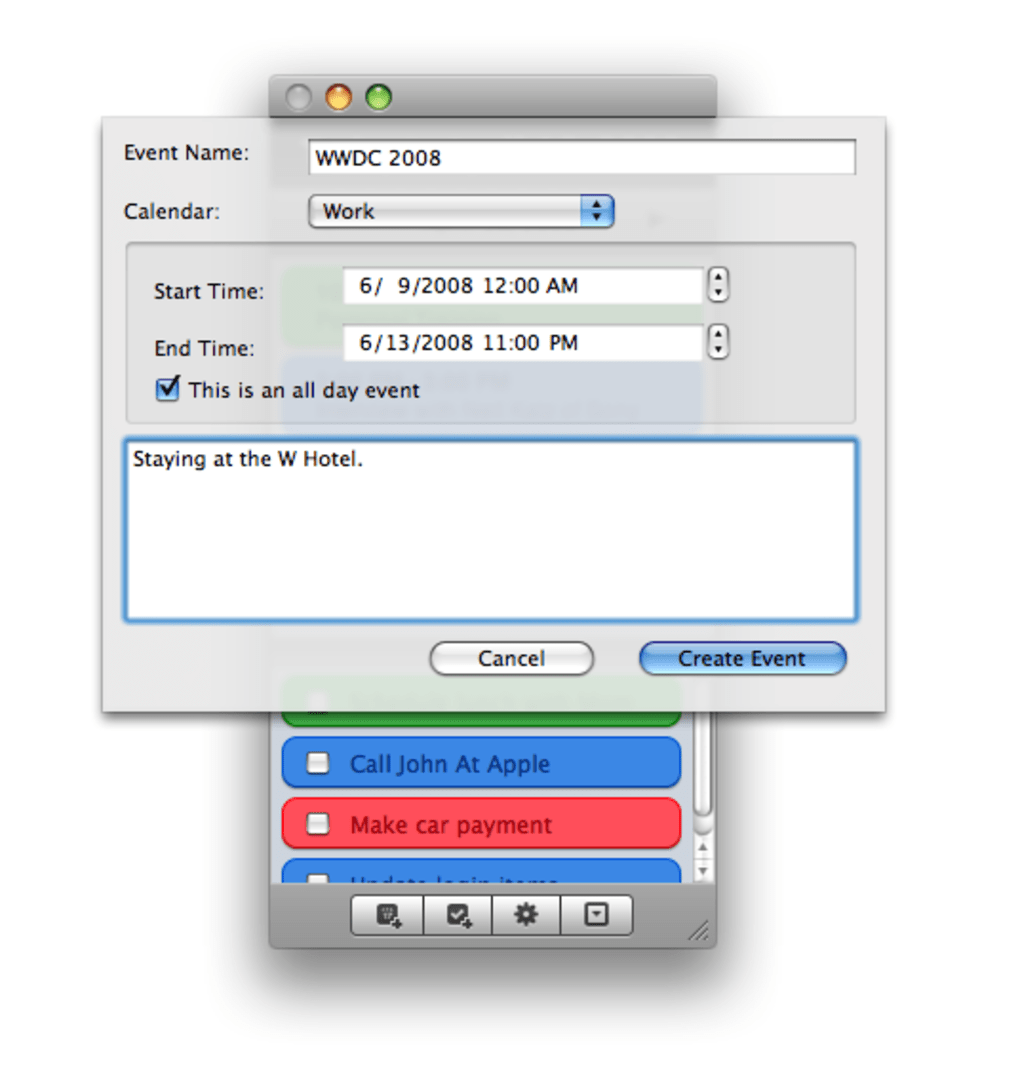
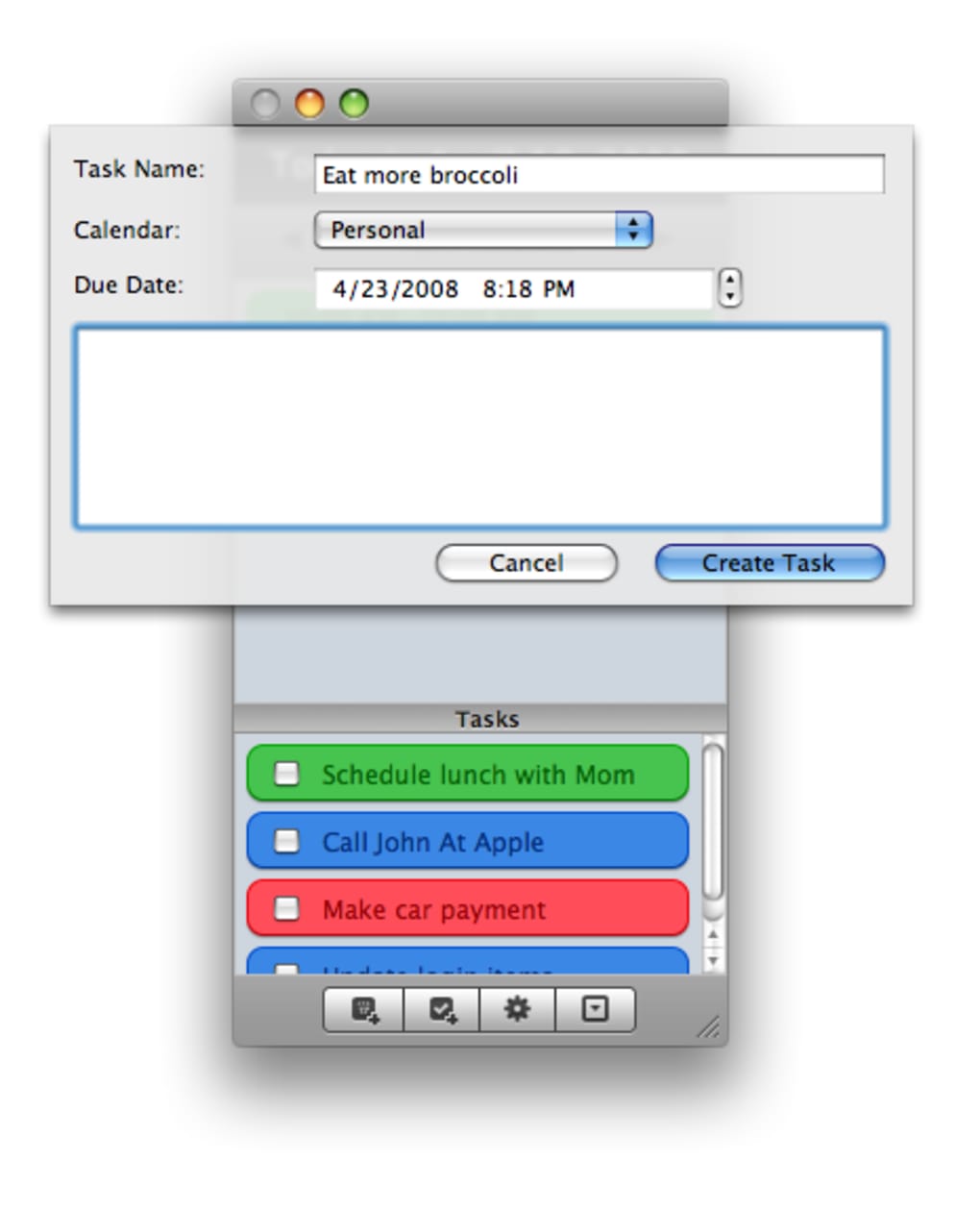
- Basic event and task creation – add new items directly from Today (no alarms, attendees, or attachments).
- Support for recurring events – create simple repeating tasks without leaving the app.
- Locale‑aware date and time formats – respects your system language and regional settings.
- Lightweight design – consumes minimal CPU and memory, preserving battery life on MacBooks.
- Free of charge – no hidden fees, trial periods, or premium upgrades.
Today is built specifically for macOS, supporting versions from macOS 10.10 Yosemite onward. Its macOS focus ensures full compatibility with native frameworks, guaranteeing smooth performance on both Intel‑based and Apple Silicon Macs. Because the app leverages Apple’s native Calendar and Mail APIs, users benefit from a secure data pipeline that never stores information on external servers. This design choice aligns with Apple’s privacy standards, making Today a trustworthy addition to any privacy‑conscious workflow. The seamless integration also means that changes made in iCal—such as moving an event to a different calendar—are reflected instantly, keeping the daily view accurate at all times. By providing a focused snapshot of the day, Today reduces the cognitive load associated with switching between full‑screen calendar windows and email clients, ultimately boosting productivity.
Installation, Everyday Usage & Practical Evaluation
Getting started with Today is straightforward. Download the installer from the official website, open the .dmg file, and drag the Today app into your Applications folder. The first launch may prompt macOS Gatekeeper to verify the developer; simply approve the request to continue. Once installed, you can add Today to the menu bar by opening the app and selecting “Show in Menu Bar” from the preferences pane. For dock enthusiasts, right‑click the app icon and choose “Options → Keep in Dock” for instant access.
Using Today is as simple as clicking its icon. The window presents a chronological list of today’s events and tasks, each labeled with its source calendar and a colour‑coded indicator. You can double‑click any item to jump straight to the corresponding entry in iCal, allowing quick edits or detailed views. Creating a new task or event is just as easy: click the “+” button, fill in the title, select the desired calendar, and hit “Save.” While the app does not support alarms, you can still rely on iCal’s native notifications for time‑sensitive reminders.
Pros
- Lightning‑fast access to daily agenda without opening iCal.
- Zero‑cost, no hidden subscription fees.
- Native macOS integration ensures high reliability and security.
- Low system resource usage – ideal for older Macs.
- Supports recurring events and respects user locale settings.
Cons
- No support for alarms, attendees, or file attachments.
- Limited to macOS – no Windows, Android, or iOS version.
- Basic creation interface may feel sparse for power users.
Overall, Today shines as a daily‑focus tool that complements iCal rather than replaces it. Its simplicity is both a strength and a limitation: users seeking a quick snapshot will love it, while those needing advanced scheduling may still turn to iCal for deeper functionality.
Frequently Asked Questions & Final Verdict
Is Today completely free or does it offer in‑app purchases?
Today is 100 % free. There are no hidden fees, trial periods, or premium upgrades. All features listed in the app are available to every user after download.
Can I sync Today with calendars other than iCal, such as Google Calendar?
Today reads events from iCal, which itself can aggregate external calendars like Google Calendar when you add them via the Internet Accounts preference pane. Once those calendars appear in iCal, Today will display them automatically.
Does Today support recurring tasks?
Yes, the app includes basic support for recurring events and tasks. You can set daily, weekly, or monthly recurrence when creating a new item.
Will using Today affect my Mac’s battery life?
No. Today is designed to be lightweight and runs efficiently in the background, consuming minimal CPU and RAM. Most users report no noticeable impact on battery life.
How do I remove or uninstall Today if I no longer need it?
Simply drag the Today app from the Applications folder to the Trash. If you added it to the menu bar, right‑click the icon and choose “Quit” before deleting.
Final Verdict: For Mac users who want a fast, secure, and cost‑free way to see today’s agenda at a glance, Today delivers exactly that. Its deep integration with iCal and Apple Mail guarantees that your data stays consistent across Apple’s ecosystem, while the minimalistic interface keeps distractions to a minimum. Although it lacks advanced scheduling tools like alarms or attendee management, its primary mission—to give you a clear, immediate snapshot of your day—remains flawlessly executed. If you value speed, privacy, and a clutter‑free daily overview, download Today today and streamline your macOS workflow.
Click here to download Today for free and start experiencing a more focused, organized day on your Mac.
Guides & Tutorials
How to install Today
- Click the Download button above.
- Once redirected, accept the terms and click Install.
- Wait for the Today download to finish on your device.
How to use Today
This software is primarily used for its core features described above. Open the app after installation to explore its capabilities.
User Reviews
No reviews yet. Be the first to share your experience.
You may also like
more
DiffusionBee
Generate unique art with this app DiffusionBee is a free and accessible artifici...

Excire Foto Light
Organize your snapshots Excire Foto Light is a free-to-download AI -powered phot...

Topaz Photo AI
Photo enhancement tool with AI Topaz Photo AI is a premium AI image editor for P...

anonymoX
Surf anonymously with Firefox anonymoX for Firefox is an add-on that gives you f...

DownThemAll
Download Them All! Downloading anything or everything on a webpage can be a labo...
.webp)
DuckDuckGo Privacy Essentials
A free program for Mac, by DuckDuckGo, Inc.. DuckDuckGo Privacy Essentials is a...
