
Screenshots
App details
- Version
- 14.5.0 | 14.0.9 | 14.0.7 | 14.0.6 | 14.0...
- Size
- 197.37 MB
- Updated
- May 6, 2025
- Requires
- Mac OS X
- Language
- English
- License
- Free
- Developer
- Tor Project
- Category
- Mac OS
About Tor Browser
Download Tor Browser – Secure Anonymous Browsing, Privacy Protection
Overview
In an era where every click can be logged, every connection can be inspected, and every data packet can be harvested, protecting your digital identity is no longer optional—it’s essential. Tor Browser answers that call by providing a free, open‑source tool that routes your internet traffic through a worldwide overlay network of volunteer‑run servers, known as “onion routers.” By encrypting each hop and stripping away identifying headers, Tor masks your IP address, making it extremely difficult for ISPs, advertisers, governments, or malicious actors to trace your online activity.
The browser is built on the hardened Firefox ESR codebase, but it ships with a suite of privacy‑first defaults: No third‑party cookies, disabled JavaScript (unless you enable it manually), and built‑in HTTPS‑Only mode. For business users, Tor offers a reliable way to exchange confidential information without exposing it to corporate firewalls or deep‑packet inspection tools. For everyday internet users, it means you can browse news sites, read forums, or communicate via instant messaging without leaving a digital fingerprint.
Tor’s user‑friendly interface lets you toggle anonymity on and off with a single click, eliminating the need for a full system reboot. A visual onion icon in the taskbar turns green once a secure circuit is established, giving you instant confidence that your traffic is being routed safely. While connection times can vary depending on network load, most users experience a quick handshake that’s comparable to a standard VPN connection. The built‑in Tor Detector lets you verify that your IP address is masked, ensuring you’re truly anonymous before you start browsing.
Key Features
- Onion Routing: Traffic is bounced through at least three random relays, encrypting data at each hop for maximum anonymity.
- Built‑in Tracker Blocking: Pre‑configured to block known tracking scripts, cookies, and fingerprinting techniques.
- HTTPS‑Only Mode: Forces encrypted connections whenever possible, reducing exposure to man‑in‑the‑middle attacks.
- Easy Circuit Switching: One‑click toggle to enable or disable Tor routing without restarting the browser.
- Geographic Relay Selection: Choose relays based on a world map, allowing you to route traffic through specific regions for added control.
- Tor Detector Integration: Verify your anonymity status in real time, confirming that your IP address is hidden.
- Cross‑Platform Support: Available for Windows, macOS, Linux, Android, and iOS (via Orbot integration).
- Open‑Source Transparency: Community‑reviewed code ensures no hidden backdoors or malicious components.
- Lightweight & Portable: Runs from a USB stick on Windows and macOS, leaving no traces on the host machine.
- Regular Security Updates: Frequent releases align with the latest Firefox ESR patches and Tor network improvements.
Installation, Usage, Compatibility & Pros & Cons
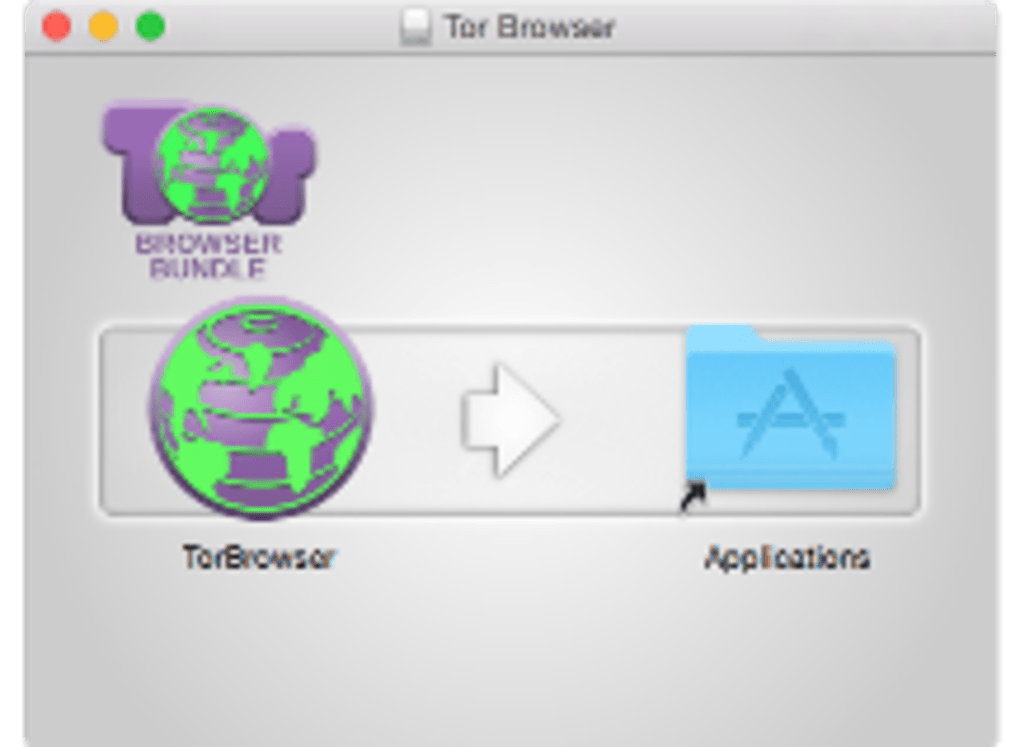
Getting started with Tor Browser is straightforward. Visit the official Tor Project download page, select the installer for your operating system, and run the executable. The installer automatically verifies the digital signature of the package, guaranteeing a secure, untampered download. For Windows users, the .exe installer creates a dedicated folder (usually C:\Program Files\Tor Browser) and adds a shortcut to the desktop. macOS users receive a .dmg file that mounts as a virtual drive; simply drag the Tor Browser app into the /Applications folder. Linux users can use the provided tar.xz archive or install via repository packages for Debian‑based distributions. Android and iOS users download the Tor Browser from Google Play or the Apple App Store, respectively, where it’s bundled with the Orbot proxy.
Once installed, launch the browser and you’ll be greeted by a brief “Connect” screen. The application automatically builds a circuit through the Tor network; this process may take a few seconds to a minute depending on current load. When the onion icon turns green, you’re ready to browse. The built‑in “New Identity” button wipes session data, cookies, and caches, giving you a fresh start without closing the program. For power users, the “Security Settings” slider lets you adjust the level of script blocking—from standard (allow most scripts) to safest (disable all scripts and media).
Compatibility: Tor Browser supports Windows 7 and newer, macOS 10.13 (High Sierra) onward, most modern Linux distributions, Android 7.0+, and iOS 12+. Because it’s based on Firefox ESR, it inherits the same system requirements: at least 1 GB of RAM and 200 MB of free disk space. The portable version works on any Windows or macOS machine without admin rights, making it ideal for travelers and corporate environments where software installation is restricted.
Pros
- Strong anonymity through multi‑hop onion routing.
- Free, open‑source, and regularly updated.
- Built‑in privacy defaults require minimal configuration.
- Cross‑platform availability, including portable versions.
- No need for a VPN subscription or additional proxy services.
Cons
- Potentially slower browsing speeds due to multiple relays.
- Some websites block Tor exit nodes, limiting access.
- JavaScript and media heavy sites may not function correctly on higher security levels.
- Learning curve for users unfamiliar with anonymity concepts.
- Not a replacement for end‑to‑end encrypted messaging services.
Frequently Asked Questions
Is Tor Browser really free?
Yes. Tor Browser is developed by the non‑profit Tor Project and distributed under the BSD license. There are no hidden fees, subscription plans, or paid upgrades.
Can Tor protect me from government surveillance?
Tor significantly raises the bar for surveillance by encrypting traffic through multiple relays. While no tool can guarantee 100 % immunity, using Tor makes large‑scale tracking far more difficult for nation‑state actors.
Will my internet speed be slower?
Because your data travels through at least three relays, you can expect a modest reduction in speed, especially for high‑bandwidth activities like video streaming. However, for typical web browsing, the impact is usually acceptable.
Can I use Tor Browser on a corporate network?
Many corporate firewalls block Tor exit nodes, but the portable version often bypasses restrictions. Always check your organization’s policy before using Tor for work‑related activities.
How often should I update Tor Browser?
Updates are released roughly every 4‑6 weeks, aligning with Firefox ESR patches. Enable automatic updates in the settings to stay protected with the latest security fixes.
Conclusion – Download Tor Browser Today
Whether you’re a journalist needing to protect sources, a traveler seeking safe Wi‑Fi usage, or simply a privacy‑conscious citizen, Tor Browser offers a robust, free, and open‑source solution for anonymous web browsing. Its seamless integration, strong encryption, and worldwide relay network make it one of the most reliable privacy tools available today. Click the download button below, install Tor, and take the first step toward reclaiming control over your digital footprint.
Guides & Tutorials
How to install Tor Browser
- Click the Download button above.
- Once redirected, accept the terms and click Install.
- Wait for the Tor Browser download to finish on your device.
How to use Tor Browser
This software is primarily used for its core features described above. Open the app after installation to explore its capabilities.
User Reviews
No reviews yet. Be the first to share your experience.
You may also like
more
DiffusionBee
Generate unique art with this app DiffusionBee is a free and accessible artifici...

Excire Foto Light
Organize your snapshots Excire Foto Light is a free-to-download AI -powered phot...

Topaz Photo AI
Photo enhancement tool with AI Topaz Photo AI is a premium AI image editor for P...

anonymoX
Surf anonymously with Firefox anonymoX for Firefox is an add-on that gives you f...

DownThemAll
Download Them All! Downloading anything or everything on a webpage can be a labo...
.webp)
DuckDuckGo Privacy Essentials
A free program for Mac, by DuckDuckGo, Inc.. DuckDuckGo Privacy Essentials is a...
