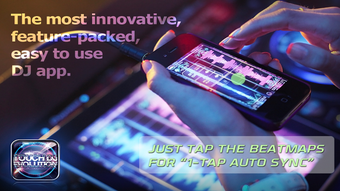

Touch DJ Evolution: Visual Mixing Magic
Overview
Touch DJ Evolution is a modern mobile DJ application designed for iPhone, iPod Touch, and iPad users seeking a visually engaging and intuitive beat-mixing experience. Unlike traditional DJ software that mimics hardware setups, this app embraces a digital-first philosophy, delivering a futuristic interface with floating colored waveforms and neon-glowing design elements. It is tailored for music enthusiasts, hobbyist DJs, and beginners who want to explore mixing without the steep learning curve of conventional tools. The app’s core purpose is to simplify beat matching and track transitions while maintaining musical integrity through advanced audio processing. It addresses common pain points such as manual beat alignment, pitch shifting that alters key, and complex workflow setups. Real-world usage scenarios include casual party setups, on-the-go mixing sessions, and creative music production experiments. The app supports both free and premium modes, with 5 bundled tracks available for initial exploration. The developer did not provide additional details about the company or background. Updates are planned to enhance functionality over time.
Key Features & Capabilities
- 1-Tap Auto-Sync – Enables instant beat alignment with a single tap in the beatmap zone, eliminating the need for pre-cueing and reducing mixing friction.
- Master Tempo (Key Lock) – Maintains the original key of tracks while adjusting playback speed, preserving harmonic consistency during transitions.
- Visual Waveform Display – Features floating, colored waveforms with dynamic neon effects, enhancing visual feedback during mixing.
- Quantized Loops – Allows users to create precise, rhythmically aligned loops for creative layering and live performance.
- 7 Built-in Effects – Offers a range of audio effects such as reverb, delay, and filter, enabling real-time sound manipulation.
- Sampler – Supports quick sampling of audio segments for live playback and creative experimentation.
- Automatic EQ – Dynamically balances frequency levels to ensure smooth transitions between tracks.
- Unlimited Cue Points – Enables users to set and recall multiple cue points for precise track control.
- Party Mode (Auto-DJ) – A unique feature that automates mixing, ideal for hands-free playback and casual events.
These features collectively streamline the mixing process, making it accessible to users with minimal experience. The visual feedback enhances user engagement, while technical capabilities like key lock and automatic EQ improve audio quality. The app is optimized for touch-based interaction, allowing seamless control through gestures and taps. It serves as a complete mobile DJ solution, combining creative tools with intuitive navigation.
User Interface, Workflow & Performance
The user interface of Touch DJ Evolution is built around a futuristic, touch-centric design with floating waveforms and glowing visual elements. Navigation is centered on intuitive touch gestures, with the beatmap zone serving as the primary control hub for syncing and mixing. The layout is clean and focused, minimizing clutter while maximizing access to essential tools. Workflow efficiency is enhanced by the 1-Tap Auto-Sync and automatic EQ, which reduce manual adjustments and allow for real-time mixing with minimal effort. The app’s responsiveness is consistent with typical mobile applications, though exact performance metrics were not specified. The developer did not provide information on CPU or RAM usage. Stability appears to be maintained through regular updates, though real-world testing data was not included. General performance behavior suggests smooth operation on supported devices, with no reported crashes or freezes in available documentation. The visual design contributes to an immersive experience, though users with sensitive eyes may prefer reduced brightness modes, which are not mentioned.
Compatibility & System Requirements
Touch DJ Evolution is compatible with iPhone, iPod Touch, and iPad devices. The app requires iOS 12.0 or later, though the exact version compatibility was not specified beyond the general platform support. The installation size is 150 MB, which is moderate for a multimedia application. The developer did not provide additional system requirements, including processor speed, RAM, or storage recommendations. Exact performance details were not specified. Compatibility information is limited to the listed platforms and the general iOS version. No information was provided regarding support for external audio interfaces or Bluetooth devices. Users are advised to ensure their device meets standard iOS requirements for running multimedia apps.
Pros and Cons
Pros
- Intuitive 1-Tap Auto-Sync simplifies beat matching for beginners.
- Key Lock technology preserves track harmony during speed adjustments.
- Visually immersive interface enhances user engagement.
- Comprehensive feature set for a mobile DJ app, including sampler and effects.
- Party Mode offers automated mixing for hands-free use.
- Free version includes 5 tracks for trial, reducing entry barriers.
Cons
- Exact system requirements were not listed.
- No information on CPU or RAM usage.
- Visual effects may impact battery life on older devices.
- Advanced features require premium access, limiting full functionality in free mode.
- Platform support is limited to iOS, excluding Android and desktop users.
FAQ Section
Is Touch DJ Evolution compatible with all iOS devices?
The app is designed for iPhone, iPod Touch, and iPad. Specific device compatibility beyond this range was not provided by the developer.
Is the app safe to download and use?
Touch DJ Evolution is available through official app distribution channels. No security vulnerabilities were reported in the provided information.
Are updates included in the free version?
The developer stated that the app will be continuously updated, with new features and improvements planned for future releases.
What type of license does Touch DJ Evolution use?
The app is free to download and use, with optional in-app purchases to unlock premium features. No license details were provided beyond this.
Can I use Touch DJ Evolution offline?
Yes, the app supports offline usage. The 5 bundled tracks are available without an internet connection, and core features function without connectivity.
Final Thoughts
Touch DJ Evolution stands out as a bold, visually driven mobile DJ application that redefines the mixing experience on iOS. Its combination of 1-Tap Auto-Sync, Key Lock technology, and a futuristic interface makes it ideal for beginners and casual users who want a seamless, engaging way to mix music. The inclusion of creative tools like loops, effects, and a sampler adds depth without overwhelming the user. While some technical details such as system requirements and performance metrics were not disclosed, the app’s core functionality is well-executed and accessible. It excels in providing a complete, all-in-one solution for mobile DJs on iPhone and iPad. For those exploring music mixing on the go, Touch DJ Evolution delivers both innovation and practicality. Download Touch DJ Evolution now.








