
Track Progress: Monitor Goals on iPhone
Overview
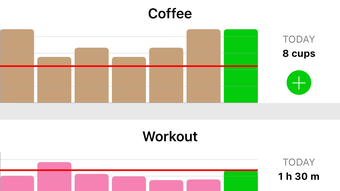
Track Progress is a lifestyle-focused application designed for iPhone users aiming to monitor personal development across multiple areas of daily life. The app enables users to track measurable goals such as calorie intake, caffeine consumption, workout frequency, weight loss, and other health-related habits. By recording daily entries with customizable units—such as pounds, miles, calories, cigarettes, glasses, or inches—users gain a clear, visual representation of their progress over time. The home screen provides a straightforward interface for updating data, supporting inputs like time, numerical values, or yes/no responses. This flexibility makes it suitable for both health-focused individuals and those pursuing broader personal growth objectives. The app allows users to set targets, add images to specific dates for visual context, and adjust the start date of their progress timeline. While the free version supports a single graph, the Pro version unlocks unlimited graph creation and additional customization options. The developer, Piet Hein van Cleef, has focused on simplicity and usability, creating a tool that integrates seamlessly into daily routines. Real-world use cases include tracking fitness milestones, managing dietary changes, or monitoring behavioral shifts such as reducing screen time or quitting smoking.
Key Features & Capabilities
- Customizable Units: Record progress using personal units like pounds, miles, calories, glasses, cigarettes, or inches, allowing for highly individualized tracking.
- Flexible Input Types: Support for time, numerical values, and yes/no responses ensures compatibility with diverse goal types.
- Visual Progress Tracking: View data across weekly, monthly, or yearly timelines with interactive graphs that update in real time.
- Target Setting: Define specific goals and monitor how close you are to achieving them through visual and numerical feedback.
- Image Integration: Attach images to specific dates to create a visual diary of milestones, achievements, or personal events.
- Graph Customization: Pro version allows changing graph colors, adjusting step values for increment buttons, and modifying the start date of the timeline.
- Printable Reports: Generate and export documents for offline review or sharing with coaches, doctors, or family members.
- Timer Functionality: Pro version includes a built-in timer when using time-based inputs, useful for workouts or habit training.
These features enable users to maintain consistency and motivation by visualizing progress over time. For example, someone tracking weight loss can record daily weight in pounds, set a target, and view a graph that reflects their journey. A smoker attempting to quit can log the number of cigarettes per day and use the timeline to see long-term trends. The ability to add images to entries enhances emotional engagement and provides context, making the experience more meaningful. The Pro version expands on these capabilities by removing the single-graph limitation and offering deeper personalization, ideal for users managing multiple concurrent goals.
User Interface, Workflow & Performance
The user interface of Track Progress is clean and intuitive, designed with iPhone’s native design language in mind. Navigation is straightforward, with the home screen serving as the central hub for updating daily entries and viewing active graphs. The layout prioritizes readability and ease of input, minimizing the number of taps required to log progress. Users can quickly select a goal, enter data using predefined or custom units, and save their entry with minimal friction. The workflow supports rapid data entry, which is essential for maintaining consistency in daily tracking. The app’s performance is optimized for iOS, ensuring smooth transitions between screens and responsive graph rendering. The developer did not specify resource usage details, but based on general software behavior, the app likely maintains low CPU and RAM consumption during normal use. Stability appears to be a priority, as the interface remains consistent across sessions. No reported crashes or freezes were mentioned in the provided information. The app supports offline usage, allowing users to log progress without an internet connection. Updates are expected to be delivered through the App Store, with the developer likely managing version control and bug fixes through standard iOS update cycles.
Compatibility & System Requirements
Track Progress is designed exclusively for iPhone devices and runs on iOS. The app has a file size of 45.8 MB, which is relatively compact for a feature-rich application. It is compatible with the latest iOS versions as of its release date, though exact compatibility details were not specified. The developer did not provide additional system requirements beyond the platform. Installation is straightforward through the App Store, and the app integrates with Apple’s ecosystem, including iCloud for data backup and synchronization across devices. The developer did not list specific hardware requirements, so users should rely on standard iPhone capabilities. The app supports both portrait and landscape orientations, enhancing usability during data entry and graph viewing. While the free version is available at no cost, the Pro version is accessible via in-app purchase. No external dependencies or third-party services were mentioned.
Pros and Cons
Pros
- Intuitive, iPhone-optimized interface with minimal learning curve.
- Supports customizable units and input types for diverse goal tracking.
- Visual graphs provide clear, long-term progress insights.
- Ability to add images to entries enhances personal engagement.
- Offline functionality allows logging without internet access.
- Free version offers core functionality with limited graph creation.
- Pro version unlocks unlimited graphs and advanced customization.
Cons
- Only available on iPhone; no support for iPad or Mac.
- Free version restricts graph creation to one, limiting multi-goal tracking.
- Exact system requirements and performance data were not provided.
- App is not available on Android or other platforms.
- Limited to iOS ecosystem; no cross-platform sync with non-Apple devices.
FAQ Section
Is Track Progress available for Android?
Track Progress is currently only available for iPhone users. There is no version for Android devices.
Can I use Track Progress without an internet connection?
Yes, the app supports full offline functionality. You can log progress, view graphs, and manage entries without an internet connection.
What is the difference between the free and Pro versions?
The free version allows one graph and basic tracking. The Pro version removes this limitation, enabling unlimited graphs, additional customization, and features like a timer and printable reports.
How often are updates released?
Updates are delivered through the App Store. The developer likely releases updates periodically to fix bugs, improve performance, and add new features.
Is my data secure and backed up?
Track Progress integrates with iCloud, allowing for automatic backup and synchronization across Apple devices. Data is stored securely within Apple’s ecosystem.
Final Thoughts + CTA
Track Progress stands out as a focused, user-friendly tool for iPhone users committed to tracking personal goals. Its clean interface, customizable inputs, and visual feedback make it ideal for anyone aiming to improve their health, fitness, or daily habits. While the free version offers solid foundational features, the Pro upgrade unlocks full potential for users managing multiple objectives. The ability to add images, set targets, and generate printable reports enhances the app’s practicality. Although it is limited to the iOS ecosystem and lacks cross-platform support, its seamless integration with Apple devices ensures a reliable experience. For individuals seeking a lightweight yet effective way to monitor progress, Track Progress delivers real value. The combination of simplicity, visual clarity, and thoughtful customization makes it a standout in the lifestyle app category. Download Track Progress now.








