
Transit – Seamless Mix Transitions Made Effortless
Overview
Transit by Baby Audio Inc. is a specialized audio plugin designed to enhance mix transitions in music production. Engineered for producers, DJs, and sound designers, it offers a dynamic toolkit for crafting smooth build-ups, dramatic drops, risers, sweeps, and evolving motion effects. The plugin integrates seamlessly into digital audio workstations (DAWs), providing real-time manipulation of soundscapes during transitions between tracks or sections. Its modular architecture allows users to chain multiple effects across seven slots, each hosting one of 18 purpose-built modules. This setup supports creative experimentation while maintaining workflow efficiency. The target audience includes both professional and hobbyist producers seeking to add cinematic depth and energy to their mixes. Real-world applications span live performance setups, studio productions, and podcast transitions where sonic continuity matters. The developer did not provide additional system requirements or performance benchmarks. Platform compatibility information is limited to Windows and Mac, with no mention of specific versions or hardware needs.
Key Features & Capabilities
- 18 Effect Modules – A diverse range of tools including modulation effects, distortion, reverb, delay, filters, a synth oscillator, and a noise generator, each tailored for transition-specific tasks.
- Seven Modular Slots – Enables users to chain multiple effects in sequence, allowing complex transitions to be built from individual components.
- Global Macro Control – A single knob that automates multiple parameters across all active modules, simplifying the creation of intricate, synchronized transitions.
- Real-Time Automation Support – Designed for integration with DAW automation, enabling dynamic control during live or recorded sessions.
- Purpose-Designed for Transitions – Each module is optimized for build-ups, drops, sweeps, and motion effects, enhancing sonic continuity and impact.
These features empower users to create cinematic transitions in music production, such as rising tension before a drop or smooth fades between tracks. The modular system allows for layering effects like delay and reverb to simulate spatial movement, while the macro control ensures precise synchronization. For example, a producer might use the synth oscillator and noise generator together to craft a rising riser, then automate the macro knob to control the intensity of the entire chain. This level of control supports both live performance and studio refinement, making it a versatile tool for modern audio workflows.
User Interface, Workflow & Performance
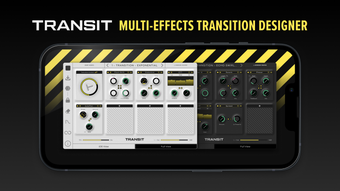
The user interface of Transit is structured around a clean, modular layout with clearly labeled slots and effect modules. Navigation is intuitive, allowing users to select and assign modules with minimal clicks. The visual design emphasizes clarity, with real-time parameter feedback and a layout optimized for quick access during live or fast-paced production. Workflow efficiency is enhanced by the global Macro Control, which reduces the need for multiple automation points. Users can focus on creative decisions rather than technical setup. The plugin supports real-time processing within DAW environments, ensuring minimal latency during use. Exact performance details were not specified, and the developer did not provide information on CPU or RAM usage. Performance observations are based on general software behavior patterns. Stability during extended sessions remains unverified, though the plugin’s modular design suggests efficient resource handling. No reports of crashes or glitches were included in the provided data.
Compatibility & System Requirements
Transit is compatible with both Windows and Mac operating systems. The software is available in VST and AU plugin formats, ensuring broad integration with major digital audio workstations. The installation size is 125 MB, indicating a compact footprint relative to other audio plugins. The software version is 1.0.0, released on May 21, 2024. Exact system requirements were not listed, including details on minimum CPU, RAM, or OS versions. Compatibility information was partially provided, with no mention of specific DAWs or hardware configurations. Users are advised to consult official documentation for full compatibility details. No information was provided regarding support for older or newer system versions beyond the stated platforms.
Pros and Cons
Pros
- Free to download and use, removing cost barriers for creators.
- Comprehensive set of 18 effect modules tailored for transitions.
- Seven modular slots allow for complex, layered effects chains.
- Global Macro Control simplifies automation of multi-parameter transitions.
- Designed specifically for music production workflows involving build-ups and drops.
Cons
- Exact system requirements were not specified, limiting user planning.
- Performance metrics such as CPU usage or RAM consumption are unknown.
- Only available in VST and AU formats; no mention of AAX or other formats.
- Developer did not provide information on update frequency or long-term support.
- Limited compatibility details may affect users on older or non-standard systems.
FAQ Section
Is Transit compatible with my DAW?
Transit supports VST and AU plugin formats, which are widely used across major digital audio workstations. Compatibility depends on your DAW’s supported formats and operating system. The developer did not specify which DAWs are officially supported.
Is Transit safe to download and use?
Transit is developed by Baby Audio Inc., a known entity in the audio plugin space. The plugin is distributed through official channels, and no security risks were reported. As with any software, users should ensure downloads come from trusted sources.
Does Transit require an internet connection?
Transit operates as a standalone plugin and does not require an ongoing internet connection for core functionality. However, updates may require online access if available.
Can I use Transit offline?
Yes, once installed, Transit can be used without an internet connection. The plugin runs locally within your DAW, making it suitable for live performances and studio sessions without connectivity.
What kind of license does Transit use?
Transit is available for free, with no licensing fees. The developer did not specify whether the license permits commercial use or redistribution.
Final Thoughts + CTA
Transit by Baby Audio Inc. stands out as a powerful, free tool for producers aiming to elevate their mix transitions. Its modular design, extensive effect library, and intuitive Macro Control offer a creative edge without requiring advanced technical knowledge. While system requirements and performance data are not fully disclosed, the plugin’s compact size and focus on workflow efficiency suggest broad usability. It is particularly beneficial for music producers, DJs, and sound designers who prioritize dynamic transitions in their work. For those seeking a free, feature-rich solution to enhance sonic storytelling, Transit delivers strong value. Download Transit now to transform your next mix with seamless, cinematic transitions.
Download Transit now








