
Screenshots
App details
- Updated
- January 13, 2025
- Requires
- Chrome
- License
- Full
- Developer
- translateimages
- Category
- Web Apps
About TranslateImage
Download TranslateImage – AI Image Translation Tool for 130+ Languages
Overview
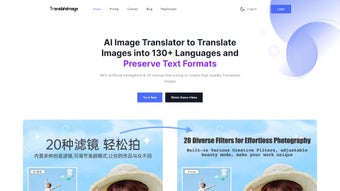
TranslateImage is a cloud‑native, AI‑driven application that transforms static visual assets into fully localized versions in a matter of seconds. By combining a state‑of‑the‑art Optical Character Recognition (OCR) engine with neural‑network translation models, the service can read any text embedded in pictures, PDFs, screenshots, or scanned documents and instantly render that text in more than 130 languages. What truly differentiates TranslateImage from generic translation utilities is its ability to erase the original wording, intelligently inpaint the background, and then re‑insert the translated characters while preserving the original typography, spacing, and overall design aesthetic. This means marketers can adapt campaign banners, product packaging, UI mock‑ups, and instructional manuals without the need to recreate the graphics from scratch. The interface is deliberately minimalist, offering a drag‑and‑drop upload zone, a language selector, and a real‑time preview. Security is baked in: all file transfers are encrypted with TLS 1.3, and every uploaded image is automatically purged from the servers after 24 hours. Whether you are a solo freelancer needing a single banner translated or a multinational corporation processing thousands of images each month, TranslateImage delivers a fast, accurate, and visually consistent solution that keeps your brand’s visual identity intact across every market.
Key Features of TranslateImage
- 130+ language support: From Mandarin and Arabic to regional dialects such as Brazilian Portuguese, the platform covers the most widely spoken languages and many niche tongues, enabling truly global reach.
- Advanced OCR engine: Trained on millions of real‑world samples, it recognises text in complex fonts, curved layouts, and low‑resolution images with a detection accuracy that frequently exceeds 95 %.
- Layout‑preserving translation: The AI respects original spacing, alignment, and style cues, ensuring the translated image looks as if it were originally designed in the target language.
- Background inpainting: Before new text is placed, the tool removes the source characters and fills the void with matching textures, eliminating any ghosting or artifacts.
- Original format retention: Output files retain the same resolution, colour profile, and file type (PNG, JPG, SVG, PDF) as the source, so downstream workflows remain unchanged.
- Batch processing: Upload up to 50 images (or a zip archive) in a single session and receive a consolidated zip file containing all translated assets.
- Secure, cloud‑based workflow: TLS 1.3 encryption protects data in transit, while automatic deletion after 24 hours guarantees privacy and compliance with GDPR and CCPA.
- API access: Developers can generate API keys and call RESTful endpoints to integrate TranslateImage directly into CMS platforms, design pipelines, or automated localisation scripts.
- User‑friendly dashboard: The drag‑and‑drop area, progress bar, and side‑by‑side before‑after preview make the experience intuitive for non‑technical users.
- Customizable fonts & styles: Choose from a curated library of fonts that mimic the original design, or upload your own typefaces for perfect brand consistency.
Installation, Setup, and How to Use TranslateImage
Step‑by‑step guide for first‑time users
Because TranslateImage is a pure web application, there is no software to download or install on your computer. All you need is a modern browser (Chrome, Edge, Firefox, or Safari) and an active internet connection. The following workflow walks you through the entire process, from account creation to final download, and includes tips that help you get the most out of the AI engine.
- Create a free account: Navigate to the TranslateImage homepage, click “Sign Up,” and provide a valid email address. After setting a password, confirm your registration via the link sent to your inbox. This step unlocks the dashboard and allows you to track usage.
- Select a subscription plan: The free tier grants up to 10 images per month with a small watermark. Paid plans (Starter, Professional, Enterprise) raise the limits, remove watermarks, and unlock API calls. Choose the plan that aligns with your projected workload and complete the checkout using a secure payment gateway.
- Upload your image: Once logged in, you’ll see a large drag‑and‑drop zone. Drop a PNG, JPG, SVG, or PDF file, or click “Browse” to locate it on your device. The platform immediately analyses the image, extracts any embedded text, and generates a preview.
- Pick the target language: Use the dropdown menu to select one of the 130+ supported languages. For regional variants, such as “Spanish – Mexico,” simply expand the parent language node.
- Adjust translation settings (optional): Enable “Preserve original font” to keep the exact typeface, or upload a custom font file for brand‑specific lettering. The “Inpaint background” toggle lets you decide whether the AI should automatically fill the erased area or leave it untouched for manual editing later.
- Start the translation: Click the “Translate” button. The system runs three internal stages – OCR extraction, language conversion, and background inpainting – each reflected in the progress bar. Typical processing time ranges from 3 seconds for simple icons to 60 seconds for high‑resolution PDFs.
- Review and download: When finished, a side‑by‑side comparison appears. Zoom in to verify character accuracy and layout fidelity. If everything looks correct, click “Download” to save the file in its original format. The download lands in your browser’s default folder.
- Batch mode (advanced users): For bulk projects, click “Batch Upload,” select multiple files or a zip archive, and specify a common target language. The service processes each image sequentially and returns a single zip file containing all translated assets.
- API integration (developers): From the dashboard, generate an API key and follow the documentation to submit images programmatically. Responses include direct URLs to the translated images, enabling seamless embedding into existing workflows.
Because all heavy‑lifting happens on the cloud, you never need to install bulky OCR libraries or language packs locally. Updates to the OCR model and translation engines are rolled out automatically, guaranteeing that you always benefit from the latest AI improvements without manual intervention.
Compatibility, Pros & Cons, and Frequently Asked Questions
Supported Platforms
TranslateImage runs entirely inside a web browser, which makes it compatible with any operating system that supports modern JavaScript and HTML5 standards. Officially supported environments include:
- Windows 10/11 – Chrome, Edge, Firefox
- macOS 12+ – Safari, Chrome, Firefox
- Linux distributions with up‑to‑date browsers (e.g., Ubuntu 22.04, Fedora 38)
- iOS 14+ – Safari, Chrome
- Android 9+ – Chrome, Firefox
Because no client‑side installation is required, mixed‑device teams can collaborate on the same translation projects without worrying about version mismatches or OS‑specific bugs.
Pros & Cons
Pros
- Lightning‑fast AI OCR and translation for over 130 languages.
- Preserves original layout, fonts, and image dimensions for a native look.
- Background inpainting eliminates visual artifacts and saves manual editing time.
- End‑to‑end encryption and automatic data deletion ensure strong security.
- Pure web‑based workflow works on Windows, macOS, Linux, iOS, and Android.
- Batch processing and API access support large‑scale localisation projects.
- Free tier available for occasional users or quick trials.
Cons
- Free version adds a watermark, which may be unsuitable for public‑facing assets.
- Very large or highly complex images can require longer processing times.
- Internet connection is mandatory; offline use is not currently supported.
- Custom font matching may need manual fine‑tuning for obscure typefaces.
- Subscription pricing, while competitive, might be a hurdle for micro‑businesses.
FAQ (itemscope itemtype="https://schema.org/FAQPage")
How accurate is the OCR on low‑resolution images?
TranslateImage’s OCR model has been trained on a diverse dataset that includes low‑resolution samples. It typically extracts text from images as small as 72 dpi with an accuracy of around 90 %. For optimal results, we recommend providing images of at least 150 dpi, good contrast, and minimal visual noise.
Can I translate multiple images at once?
Yes. The “Batch Upload” feature lets you drop up to 50 images (or a zip archive) in a single session. The system processes each file sequentially and returns a consolidated zip file containing every translated output while preserving the original file names.
Is my data safe during processing?
All uploads travel over TLS 1.3, are stored on hardened servers, and are automatically purged after 24 hours. TranslateImage complies with GDPR, CCPA, and other major data‑privacy regulations, ensuring that your proprietary images are never retained longer than necessary.
Can I use TranslateImage offline?
Currently the platform requires an active internet connection because the OCR and translation engines run on cloud‑based GPUs. An offline version is not offered at this time, but the service is optimized for low‑latency connections, so processing is usually completed within seconds.
How do I integrate TranslateImage into my existing workflow?
After generating an API key from your dashboard, you can call the RESTful endpoints to submit images and receive JSON responses that include URLs to the translated files. This makes it straightforward to embed TranslateImage into content‑management systems, design automation pipelines, or continuous localisation scripts.
Conclusion and Call to Action
If you regularly need to adapt visual content for international audiences—whether you are a marketer tweaking banner ads, a technical writer localising user manuals, or a UI/UX designer preparing multilingual mock‑ups—TranslateImage offers a purpose‑built, AI‑powered solution that eliminates the tedious manual re‑creation of assets. Its combination of high‑accuracy OCR, seamless background inpainting, and meticulous layout preservation ensures that your translated images look as polished as the originals. Security‑first architecture, cross‑platform accessibility, and flexible pricing tiers make it suitable for freelancers, agencies, and large enterprises alike. Start with the free tier to test the watermark‑free preview, then upgrade to a paid plan to unlock unlimited batch processing, API integration, and priority support. Click the button below to create your account instantly—no download, no installation, just a fast, reliable translation workflow that keeps your brand consistent worldwide.
Start Translating with TranslateImage NowTranslateImage impresses with its speed and visual fidelity. The AI handles complex layouts without breaking the design, and the security model gives peace of mind for sensitive documentation. The only drawback is the watermark on the free plan, but the paid options are reasonably priced for the value delivered.
Guides & Tutorials
How to install TranslateImage
- Click the Download button above.
- Once redirected, accept the terms and click Install.
- Wait for the TranslateImage download to finish on your device.
How to use TranslateImage
This software is primarily used for its core features described above. Open the app after installation to explore its capabilities.
User Reviews
No reviews yet. Be the first to share your experience.
You may also like
more
3D AI Studio
3D AI Studio Overview 3D AI Studio is a web-based AI-powered tool developed by S...

3D textures by Polycam
Generate Realistic 3D Textures Effortlessly 3D Textures by Polycam is an innovat...

3DAiLY
Customizable 3D Modeling Tool: 3DAiLY 3DAiLY is an online platform that harnesse...

3DFY
Revolutionizing 3D Model Creation: 3DFY Review 3DFY is an AI-powered service, de...

AI Dungeon
AI Dungeon: Deep Learning Text Adventure AI Dungeon is an artificial intelligenc...

Alpha3D
A subscription-based program for Web apps, by alpha3d. Alpha3D is a subscription...
