

Download Tropy – Free Research Photo Management Tool for Windows
Introduction & Overview
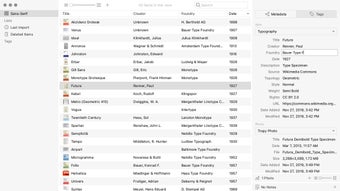
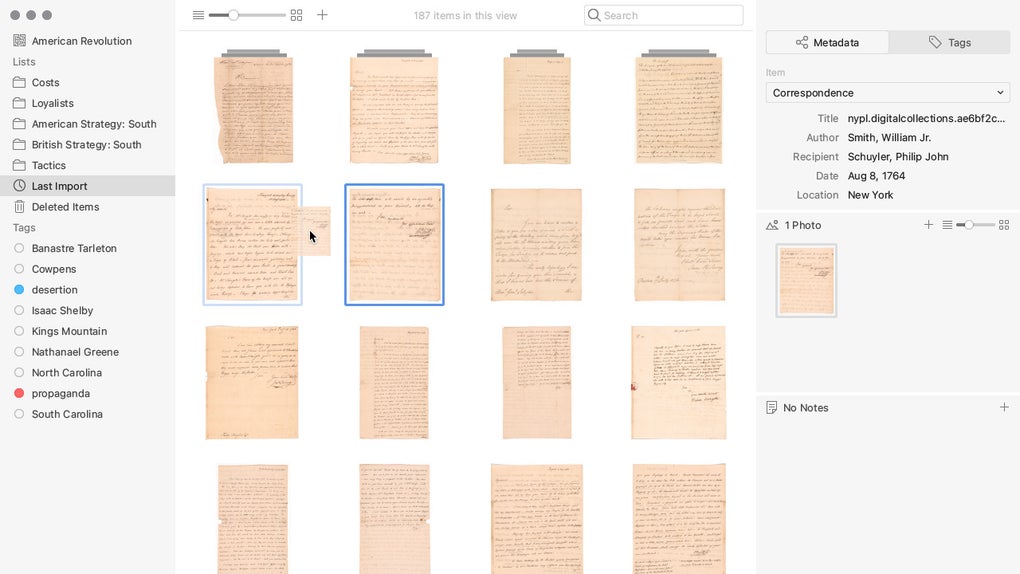
Tropy is a free, open‑source multimedia software built by the Roy Rosenzweig Center for History and New Media. Designed specifically for archival researchers, historians, and anyone who works with large collections of photographs, Tropy turns a chaotic folder of images into a searchable, well‑documented research database. The program runs on Windows and offers a clean, modern interface that eliminates the need for generic file names like “IMG_00123.jpg.” Instead, each photograph can be turned into a structured item that holds rich metadata, custom templates, and detailed annotations. This shift from a file‑system mindset to a data‑centric workflow dramatically reduces the time spent hunting for a source, allowing scholars to focus on analysis and writing.
Beyond simple renaming, Tropy empowers users with powerful tagging, list creation, and template customization. Researchers can build a template that mirrors the fields required by their institution—such as creator, date, provenance, and physical description—and then apply it to every photo with a single click. The built‑in annotation tools let you transcribe handwritten notes, highlight specific image sections, and even enhance image clarity without leaving the application. Because it is free and regularly updated, Tropy offers a secure, community‑driven alternative to commercial photo‑management suites that often require costly licenses.
Whether you are cataloguing nineteenth‑century newspaper clippings, documenting oral‑history photographs, or simply organizing a personal archive of travel snaps for a research project, Tropy provides a flexible, scalable solution. Its emphasis on metadata standards means that exported data can be easily shared with citation managers, digital humanities platforms, or institutional repositories, keeping your workflow interoperable and future‑proof.
Key Features That Make Tropy Stand Out
- Customizable Templates: Create reusable metadata templates that match the requirements of any archive or publication style.
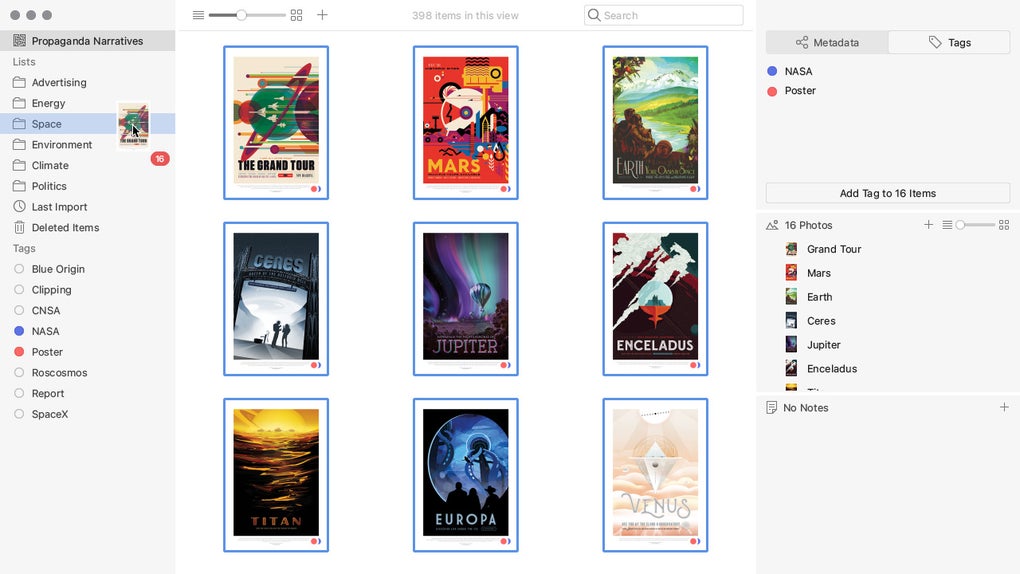
- Robust Tagging System: Apply multiple tags per item, filter instantly, and build hierarchical tag structures for nuanced organization.
- Batch Import & Auto‑Metadata Extraction: Drag‑and‑drop entire folders; Tropy reads EXIF data and populates fields automatically.
- In‑App Annotation Tools: Highlight text, draw shapes, add comments, and adjust brightness/contrast without leaving the software.
- Linked Lists & Collections: Group items into themed lists, create cross‑referencing links, and generate printable reports.
- Export Options: Export to CSV, JSON, or Zotero compatible formats, ensuring seamless migration to other research tools.
- Secure, Open‑Source Architecture: Free to download, community‑maintained, and regularly patched for security and performance.
- Search‑Ready Metadata: Full‑text search across all fields, tags, and annotations for instant retrieval of any source.
- Multi‑Language Support: Interface available in several languages, catering to an international research community.
- Regular Updates: Automatic update notifications keep the software current with the latest features and bug fixes.
These features collectively address the pain points that many researchers experience when dealing with large image collections. The ability to attach detailed, structured data directly to each photograph removes the reliance on external spreadsheets or handwritten logs. Moreover, Tropy’s export capabilities mean that the data you invest time in curating can be reused across multiple projects, saving countless hours in the long run.
Another notable advantage is the seamless integration with citation managers such as Zotero. By exporting a CSV that includes all the metadata, you can import the entire collection into your bibliography software, linking each image directly to its citation entry. This workflow not only saves time but also reduces the risk of citation errors—a critical concern in academic publishing.
Installation, Usage Guide & Compatibility
Step‑by‑Step Installation
Downloading and installing Tropy on a Windows machine is straightforward. Follow these steps:
- Visit the official Tropy website and click the “Download for Windows” button.
- Save the installer (an .exe file) to your preferred download folder.
- Run the installer and follow the on‑screen prompts—accept the license agreement, choose an installation directory, and click “Install.”
- Once installation completes, launch Tropy from the desktop shortcut or Start menu.
- The first launch will prompt you to create a new project. Name your project (e.g., “19th‑Century Newspapers”) and choose a storage location.
Getting Started with Your First Project
After creating a project, you can begin importing images. Drag a folder of photos directly into the main window or use the “Import” button located in the toolbar. Tropy will automatically generate an item for each image, preserving the original file name as a fallback identifier. From there, you can assign a template, add tags, and start annotating.
To create a template, click “Templates” in the left sidebar, then “New Template.” Define fields such as “Creator,” “Date,” “Location,” and any custom notes you need. Save the template, then apply it to selected items via the right‑click context menu. This process dramatically speeds up data entry, especially when working with hundreds of photos.
Compatibility (itemprop="operatingSystem")
Tropy is currently optimized for Windows 10 and Windows 11 (64‑bit). Although the core codebase is cross‑platform, the official stable release is only packaged for Windows. The development team has announced plans for macOS and Linux builds in future releases, and the community can compile the source code for those platforms if needed. For users on macOS or Linux, a web‑based version is not yet available, so Windows remains the primary environment for full feature access.
System requirements are modest: a dual‑core processor, 2 GB of RAM (4 GB recommended for large collections), and at least 200 MB of free disk space for the application itself. Because Tropy stores images in their original format, you’ll need additional storage proportional to the size of your photo archive. The software is compatible with common image formats, including JPEG, PNG, TIFF, and RAW files, making it suitable for both digitised archives and high‑resolution camera outputs.
Pros & Cons – An Objective Assessment
Pros
- Completely free and open‑source, eliminating licensing costs.
- Highly customizable metadata templates tailored to specific research needs.
- Powerful tagging and list features for granular organization.
- Built‑in annotation tools reduce reliance on external image editors.
- Export options that integrate smoothly with citation managers.
- Regular updates and an active community ensuring long‑term support.
- Searchable metadata across all fields for rapid source retrieval.
Cons
- Official stable release limited to Windows; macOS/Linux users must wait for future versions.
- No cloud‑sync built into the core app—users must rely on third‑party services for backup.
- Learning curve for creating complex templates can be steep for beginners.
- Large image collections may require additional hardware resources for optimal performance.
- Limited built‑in image editing capabilities compared to dedicated editors like Photoshop.
Overall, the advantages of Tropy far outweigh its drawbacks for most scholars. The free price tag and depth of metadata handling make it a compelling alternative to commercial digital asset management tools. While the lack of native cloud sync may concern some, the ability to store project folders in a cloud‑based folder (e.g., OneDrive or Dropbox) provides a simple workaround. Researchers who need cross‑platform support should monitor the project’s roadmap, as community contributions are already laying the groundwork for macOS and Linux releases.
FAQ – Frequently Asked Questions
Is Tropy really free or are there hidden costs?
Tropy is 100 % free and open‑source. There are no subscription fees, no premium tiers, and no hidden charges. All features, including template creation, tagging, and export, are available to every user.
Can I use Tropy on macOS or Linux?
The official stable build is currently Windows‑only. However, the source code is public, and community members have compiled experimental versions for macOS and Linux. Future official releases are planned for those platforms.
How does Tropy handle large image collections?
Tropy stores references to the original image files, so the application itself remains lightweight. For very large collections, it’s advisable to keep images on a fast SSD and ensure you have at least 4 GB of RAM to maintain smooth performance.
Can I export my metadata to citation managers like Zotero?
Yes. Tropy can export project data as CSV or JSON files, which can be imported directly into Zotero, EndNote, or other reference management tools. This makes it easy to link each image to a bibliographic entry.
Is there a cloud backup or synchronization feature?
Tropy does not include built‑in cloud sync, but you can store the entire project folder in a cloud‑based directory such as OneDrive, Google Drive, or Dropbox. The application will read the files from that location without any additional configuration.
Conclusion & Call to Action
If you’re looking for a secure, free, and highly customizable solution to manage research photographs, Tropy delivers exactly what modern scholars need. Its template‑driven metadata system, powerful tagging, and built‑in annotation tools streamline the entire workflow from image capture to citation. While Windows‑only support currently limits cross‑platform use, the open‑source nature ensures that the community can extend the software to other operating systems in the near future.
Ready to transform the way you organize archival images? Download Tropy today and start building a searchable, well‑documented photo archive that will save you hours of manual file management. Take advantage of the free features, join the active user community, and keep your research data both secure and easily shareable.








