
Screenshots
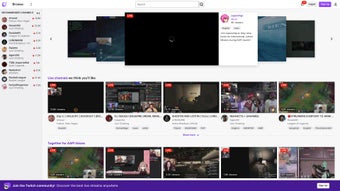
App details
- Version
- 8.61.5
- Updated
- September 25, 2024
- Requires
- macOS 10.15
- Language
- English
- License
- Free
- Developer
- Twitch Interactive Inc.
- Category
- Mac OS
About Twitch
Download Twitch – Free Video Game Streaming, Live Chat & Community Hub
Twitch has cemented its place as the world’s premier live‑streaming platform for gamers, creators, and fans who crave real‑time interaction. Owned by Amazon, Twitch began as a niche service for broadcasting video‑game play‑throughs, but today it hosts millions of channels spanning e‑sports, music, talk shows, and creative arts. The platform blends high‑quality live video, an interactive chat overlay, and a robust ecosystem of subscriptions, bits, and donations that let viewers support their favorite streamers directly. A standout feature of the desktop client is its integrated game library manager, which automatically detects installed games and offers quick launch shortcuts. Twitch Prime members enjoy a rotating selection of free games each month, delivered straight to the client. Whether you’re a casual viewer looking for entertaining gameplay, an aspiring streamer wanting a global stage, or a community leader seeking tools for fan engagement, Twitch provides a secure, constantly updated environment that adapts to a wide range of interests. This review breaks down the core features, installation steps, system requirements, and the pros and cons that define the Twitch experience in 2025.
Key Features & Benefits
- Live video streaming with sub‑second latency for smooth gameplay broadcast.
- Integrated chat that supports emotes, moderation tools, and custom badges.
- Channel subscriptions, Bits, and Prime Gaming rewards for monetization.
- Video‑on‑demand clips and highlights that automatically generate from live streams.
- Desktop game library manager that detects installed titles and offers one‑click streaming.
- Prime Gaming monthly free game drops and exclusive in‑game loot.
- Multi‑track audio support for streamers who want separate voice and game sound channels.
- Robust analytics dashboard for partners to track viewership, revenue, and audience demographics.
- Mobile apps for iOS and Android that let viewers watch, chat, and even go live on the go.
- Community tools such as raids, host mode, and squad streaming for collaborative broadcasts.
Installation, Compatibility & Frequently Asked Questions
Step‑by‑Step Installation & First‑Time Setup
1. Visit the official Twitch website or the Microsoft Store (Windows) / Mac App Store (macOS) and click “Download.”
2. Run the installer; Windows users will receive an .exe file, while macOS users get a .dmg package.
3. Follow the on‑screen prompts: accept the license agreement, choose an installation folder (default is recommended), and click “Install.”
4. After installation, launch Twitch. The first launch triggers an automatic update to ensure you have the latest security patches.
5. Create a new account with an email address, or sign in using Amazon, Google, or Facebook credentials.
6. Complete the two‑factor authentication setup for added security.
7. Customize your profile, enable notifications, and link your Prime Gaming account to start receiving free game drops.
Operating System Compatibility
Twitch’s desktop client supports Windows 10/11 (64‑bit) and macOS 10.15 (Catalina) or newer. Mobile apps are available for iOS 13+ and Android 8+. The web version works on any modern browser, including Chrome, Edge, Firefox, and Safari, making it accessible on virtually any device with an internet connection.
Pros & Cons
Pros
- Low‑latency streaming creates an engaging real‑time experience.
- Rich monetization options for creators of all sizes.
- Seamless integration with Amazon Prime benefits.
- Strong community moderation tools keep chats safe.
- Cross‑platform support ensures viewers can watch on any device.
Cons
- High CPU usage during high‑resolution streaming may affect older PCs.
- Revenue split can be less favorable for small creators compared to newer platforms.
- Algorithmic discovery sometimes favors large partners, making growth slower for newcomers.
- Occasional latency spikes during massive e‑sports events.
- Limited offline video editing tools; streamers need third‑party software for post‑production.
FAQ – Twitch Streaming & Viewing
Is Twitch free to use?
Yes, anyone can download Twitch, create an account, and watch streams at no cost. Premium features like ad‑free viewing and Prime Gaming perks require a subscription.
Can I stream on Twitch from a mobile device?
Absolutely. The iOS and Android apps include a “Go Live” button that lets you broadcast directly from your phone’s camera, with optional external mic support.
What internet speed is recommended for a stable stream?
For 1080p at 60 fps, Twitch recommends an upload speed of at least 6 Mbps. Lower resolutions (720p) work well with 3 Mbps.
How does Twitch Prime benefit my channel?
Prime Gaming provides free monthly game drops for viewers and unlocks a free subscription slot for streamers, helping increase follower loyalty.
Is my data safe when I download Twitch?
Twitch uses Amazon’s secure cloud infrastructure, regular security patches, and two‑factor authentication to protect user accounts and personal data.
Conclusion & Call to Action
Twitch remains the undisputed leader in live‑gaming entertainment, offering a free, secure, and constantly updated platform that serves both viewers and creators. Its blend of low‑latency streaming, robust chat interaction, and a mature monetization ecosystem makes it an essential tool for anyone serious about gaming culture. While the high CPU demand and revenue split may pose challenges for newcomers, the extensive feature set—including Prime Gaming perks and cross‑device accessibility—delivers undeniable value. If you’re ready to join the world’s largest gaming community, download Twitch today, set up your profile, and start exploring the endless streams that await. Whether you’re watching your favorite pro, supporting a small indie creator, or launching your own channel, Twitch gives you the stage to share, connect, and grow.
Guides & Tutorials
How to install Twitch
- Click the Download button above.
- Once redirected, accept the terms and click Install.
- Wait for the Twitch download to finish on your device.
How to use Twitch
This software is primarily used for its core features described above. Open the app after installation to explore its capabilities.
User Reviews
No reviews yet. Be the first to share your experience.
You may also like
more
DiffusionBee
Generate unique art with this app DiffusionBee is a free and accessible artifici...

Excire Foto Light
Organize your snapshots Excire Foto Light is a free-to-download AI -powered phot...

Topaz Photo AI
Photo enhancement tool with AI Topaz Photo AI is a premium AI image editor for P...

anonymoX
Surf anonymously with Firefox anonymoX for Firefox is an add-on that gives you f...

DownThemAll
Download Them All! Downloading anything or everything on a webpage can be a labo...
.webp)
DuckDuckGo Privacy Essentials
A free program for Mac, by DuckDuckGo, Inc.. DuckDuckGo Privacy Essentials is a...
