

Download Ubercaster – Podcasting Made Easy, Free, Secure Tool
Overview
Ubercaster positions itself as the all‑in‑one podcasting studio for creators who want to blend the immediacy of radio with the reach of a blog. Built around a colorful, rounded interface, the program guides you through every stage of the podcast production pipeline – from capturing raw audio to polishing edits, managing multiple tracks, encoding files, and finally publishing them to the web. While the learning curve can feel steep for users unfamiliar with multi‑track editors, Ubercaster compensates with a library of tutorial videos and an intuitive drag‑and‑drop workflow that makes it possible to assemble a professional‑sounding episode in minutes. The software also integrates tightly with macOS AudioUnits, caching them on first launch to speed up subsequent sessions and providing a “Reset AudioUnit Cache” option for troubleshooting. Recent updates have improved handling of special characters in chapter titles, tightened error handling during the release process, and fixed minor UI glitches. In short, Ubercaster delivers a robust, end‑to‑end podcasting solution that aims to be both powerful and approachable, albeit at a premium price point.
Key Features & Capabilities
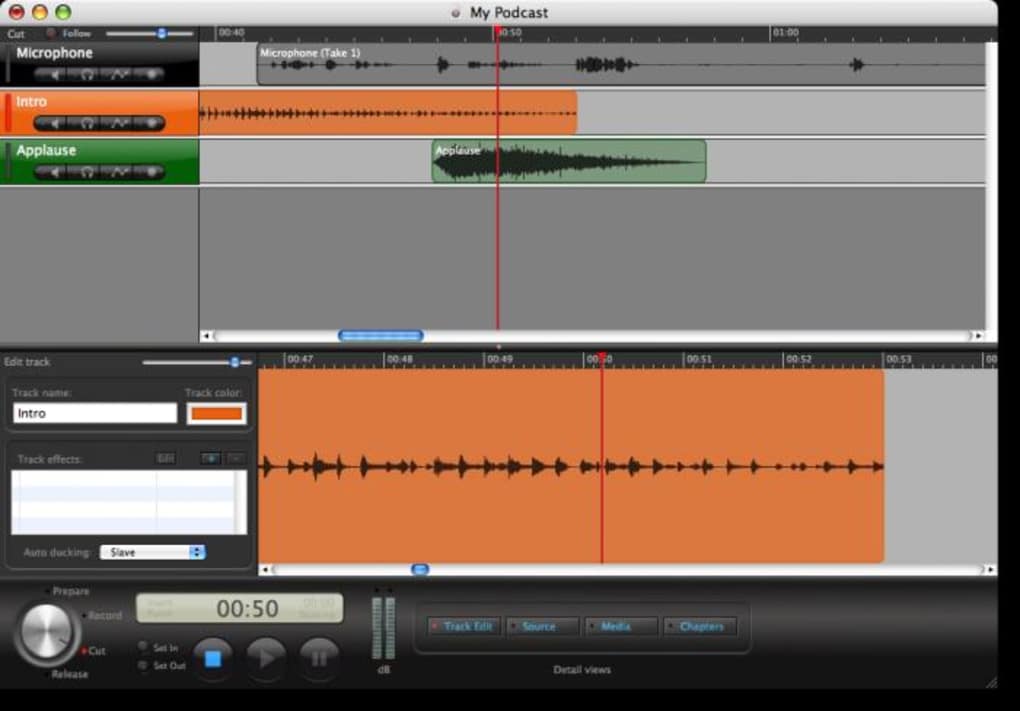
- Multi‑Layer Timeline: Create separate layers for voice‑overs, background music, and sound effects, then arrange them on an intuitive timeline.
- Drag‑and‑Drop Import: Import existing audio files directly into the workspace; the system supports WAV, MP3, AIFF, and AAC formats.
- Built‑In Recording: Capture live voice through any compatible microphone, with real‑time monitoring and level meters.
- AudioUnit Integration: Automatic detection and caching of installed AudioUnits, with a fast‑track reset option for advanced users.
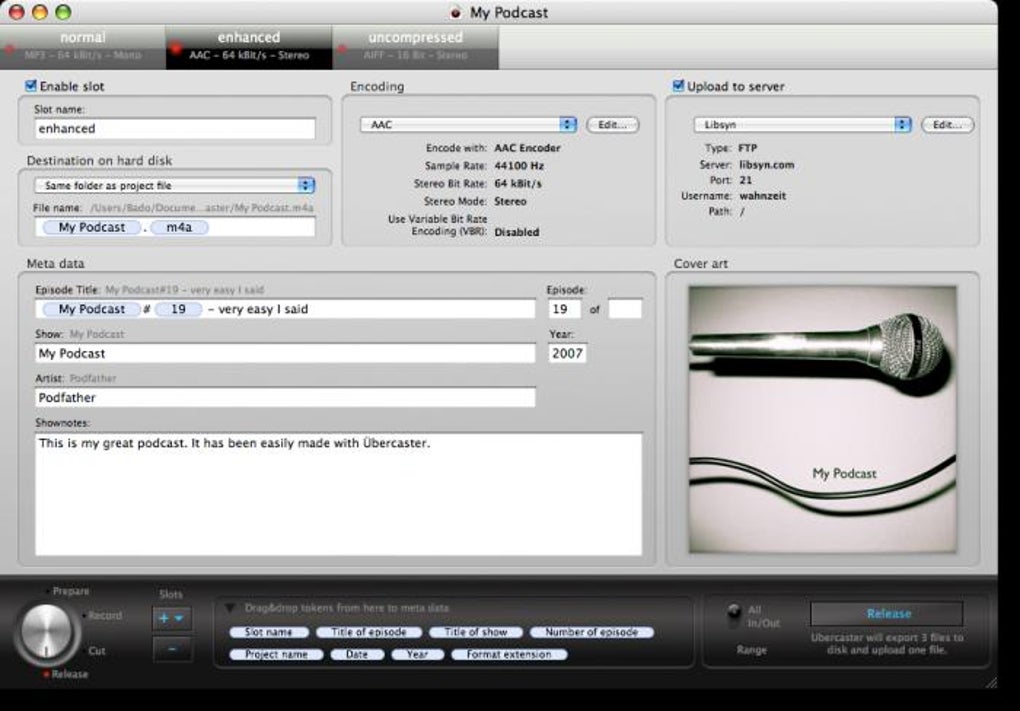
- One‑Click Encoding: Export episodes in optimal podcast formats (MP3 128‑320 kbps, AAC, OGG) with customizable bitrate settings.
- Publishing Workflow: Directly publish to popular hosting platforms or generate RSS feeds, complete with chapter markers and metadata.
- Tutorial Library: Access step‑by‑step video guides from the developer website, covering everything from basic recording to advanced editing tricks.
- Cross‑Project Management: Store and organize multiple podcast series within the same application, each with its own folder structure.
- Secure Updates: Automatic background updates ensure you always have the latest bug fixes and feature enhancements.
- Customizable Interface: Choose from several color themes and layout presets to match your workflow preferences.
Installation, Compatibility & Usage Instructions
System Requirements
Ubercaster is currently available for macOS 10.15 (Catalina) and later. The software leverages the native AudioUnit framework, so a Mac with at least 8 GB RAM and a dual‑core processor is recommended for smooth performance. While a Windows version is under development, macOS users can enjoy full functionality today.
Step‑by‑Step Installation
- Visit the official Ubercaster website and click the Download Free Trial button.
- Open the .dmg file, drag the Ubercaster icon into the Applications folder, and confirm any security prompts.
- Launch Ubercaster; the first‑time wizard will guide you through AudioUnit caching and initial preferences.
- Register your license key (USD 80) to unlock the full feature set, or continue with the 14‑day trial to explore core capabilities.
Basic Workflow
After launching Ubercaster, you’ll be greeted by the “Studio” view. Follow these steps to produce your first episode:
- Create a New Project: Click File → New Project and name your series.
- Add Layers: Use the + Layer button to add Voice, Music, and Effects tracks.
- Import Media: Drag existing audio files onto the appropriate layers or record directly using the Record button.
- Edit Clips: Trim, split, and fade clips using the context menu or keyboard shortcuts (⌘ + T for trim, ⌘ + F for fade).
- Apply Effects: Insert AudioUnit plugins (e.g., compressors, equalizers) by right‑clicking a layer and selecting Insert Effect.
- Set Metadata: Open the Metadata panel to add episode title, description, author, and chapter markers.
- Export & Publish: Choose File → Export, select your desired format, and then click Publish to upload to your host or generate an RSS feed.
For advanced users, the Preferences → Advanced tab offers options to reset the AudioUnit cache, customize keyboard shortcuts, and adjust rendering quality. The built‑in Help Center also provides searchable articles and links to community forums.
Pros and Cons
What Users Love
- Comprehensive multi‑track editing that rivals professional DAWs.
- Seamless integration with macOS AudioUnits, reducing the need for third‑party plugins.
- One‑click publishing workflow simplifies distribution to major podcast platforms.
- Rich tutorial library lowers the barrier for beginners.
- Regular, secure updates keep the software current without manual intervention.
Areas for Improvement
- Price point of USD 80 may be prohibitive for hobbyist podcasters.
- Windows version is not yet available, limiting cross‑platform adoption.
- Initial launch can be slower on older Macs due to AudioUnit scanning.
- Lack of built‑in cloud storage requires manual backup of project files.
- Some users report a learning curve when navigating the layered timeline for the first time.
Ubercaster delivers a powerful, all‑in‑one podcast creation suite that feels at home on a Mac. Its strengths lie in its intuitive multi‑track workflow and deep AudioUnit support, making it a solid choice for creators who want professional sound without juggling multiple apps. The main drawback is the price, which places it out of reach for many beginners, but the feature set justifies the cost for serious podcasters.
Frequently Asked Questions
Is Ubercaster compatible with Windows?
Currently, Ubercaster is only available for macOS. A Windows version is planned for a future release, but no exact timeline has been announced.
Can I use Ubercaster for free?
Ubercaster offers a 14‑day free trial with full feature access. After the trial, a one‑time purchase of USD 80 unlocks the complete application.
Does Ubercaster support cloud backup?
The software does not include built‑in cloud storage. Users are encouraged to back up project folders to services like iCloud, Dropbox, or Google Drive manually.
What audio formats can I export?
Ubercaster can export MP3 (128‑320 kbps), AAC, OGG, and uncompressed WAV/AIFF files. Export presets simplify the process for typical podcast distribution.
How does the AudioUnit caching improve performance?
During the first launch, Ubercaster scans all installed AudioUnits and stores their metadata in a cache file. Subsequent launches read this cache, reducing startup time dramatically. The cache can be reset if new plugins are added or removed.
Conclusion & Call to Action
Ubercaster stands out as a polished, feature‑rich solution for podcasters who demand control over every element of their audio production. Its layered timeline, robust AudioUnit support, and streamlined publishing tools make it a compelling choice for both newcomers and seasoned creators. While the USD 80 price tag may deter casual hobbyists, the depth of functionality justifies the investment for anyone serious about building a professional podcast brand. If you’re ready to elevate your show with a powerful, all‑in‑one studio, download Ubercaster today and start crafting episodes that sound studio‑grade from day one.








