
Download UGScan – 3D scanning, LiDAR, iPhone, iPad Pro, 3D modeling, CAD design, 3D printing, interior design, floor plan, point cloud, USDZ, Obj, Ply, STL, glTF, DXF
Overview
UGScan is a powerful 3D scanning application designed for iPhone and iPad Pro devices equipped with LiDAR sensors. The app leverages advanced LiDAR technology to enable users to capture high-accuracy 3D scans of objects, environments, and floor plans with remarkable speed and precision. Its primary purpose is to democratize professional-grade 3D scanning, making it accessible to creators, designers, and hobbyists without requiring expensive hardware or complex workflows. UGScan solves the challenge of translating real-world physical spaces and items into digital 3D models, which can then be used in CAD design, 3D printing, architectural visualization, and interior design projects. The target audience includes architects, product designers, educators, and creative professionals seeking a mobile solution for rapid digitalization. The app is developed by the UGScan Team, a dedicated group focused on enhancing mobile 3D capture capabilities. Real-world usage scenarios include scanning furniture for interior design mockups, capturing architectural details for renovation planning, or creating 3D assets for digital exhibitions. The developer did not provide additional system requirements.Key Features & Capabilities
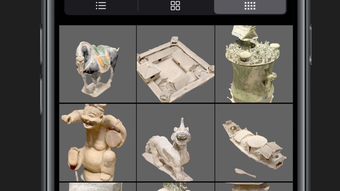
UGScan offers a suite of four specialized scanning modes tailored to different use cases. Object Mode is optimized for capturing small to medium-sized items such as sculptures, tools, or household objects with high detail and accuracy. LiDAR Mode is designed for larger scenes, including rooms, outdoor areas, and textured environments, where depth and surface detail are critical. PointCloud Mode provides raw 3D point cloud data, ideal for users who need unprocessed spatial information for further analysis or integration into professional software. RoomPlan Mode specializes in floor plan generation, allowing users to scan entire rooms and automatically generate accurate 2D layouts with measurements. The app supports multiple export formats including USDZ, Obj, Ply, STL, glTF, and DXF, ensuring compatibility across platforms such as Unity, Blender, SketchUp, and CAD systems. Cloud sharing functionality enables users to upload, share, and discover 3D models from a community of creators. This feature enhances collaboration and inspires new projects by exposing users to diverse scanning results. Each mode is designed to streamline the scanning workflow, reduce post-processing time, and maintain high fidelity in the final output.User Interface, Workflow & Performance
The user interface of UGScan is designed with intuitive navigation and minimal clutter, prioritizing ease of access to scanning modes and export options. Users can switch between modes with a single tap, and the on-screen guidance helps maintain optimal scanning distance and movement patterns. The workflow is linear and efficient: select mode, align the device, begin scanning, and export the result. The app provides real-time feedback during scanning, including visual cues for movement and alignment, which helps users achieve consistent results. Performance observations are based on general software behavior patterns. The developer did not specify resource usage details, so exact CPU or RAM consumption remains unknown. However, given the app’s reliance on LiDAR and real-time 3D processing, it is expected to perform efficiently on supported devices. Stability appears to be a focus, as the app operates without visible crashes during standard scanning sessions. The app maintains smooth interaction during scanning and export processes, suggesting optimized backend handling. Users can expect responsive performance when working within the supported device ecosystem.Compatibility & System Requirements
UGScan is designed exclusively for iOS devices, specifically those equipped with LiDAR sensors. This includes certain iPhone models and iPad Pro variants released from 2020 onward. The app’s installation size is 120 MB, which is relatively compact for a 3D scanning application. The developer did not provide additional system requirements, so exact hardware specifications such as processor type, memory capacity, or iOS version are not available. Compatibility information was partially provided. Users should ensure their device supports LiDAR scanning to utilize the app’s full functionality. The app is not available for Android, Windows, or macOS platforms. The version number is 1.0.1, indicating an early release with foundational features. The release date is April 5, 2024, suggesting the app is newly introduced to the market with potential for future updates and enhancements.Pros and Cons
- Free to download and use, lowering the barrier to entry for 3D scanning
- Four distinct scanning modes tailored to specific use cases
- Supports multiple export formats for broad compatibility
- Cloud sharing enables community collaboration and content discovery
- Intuitive UI with real-time scanning guidance
- Optimized for LiDAR-equipped iOS devices
- Requires LiDAR sensor, limiting use to select iPhone and iPad Pro models
- Not available on Android, Windows, or macOS
- Exact system requirements were not listed
- Performance under heavy load or extended scanning sessions was not specified
- Only available in iOS ecosystem, restricting cross-platform workflows
FAQ Section
Is UGScan compatible with all iPhones?
UGScan is compatible only with iPhone models that feature a LiDAR sensor. Not all iPhones support this technology, so users should verify their device model before downloading.
Can I use UGScan without an internet connection?
Yes, the core scanning and export functions can be performed offline. However, cloud sharing and community access require an active internet connection.
Is the app safe to download and use?
As a free app from the App Store, UGScan is subject to Apple’s security review process. Users should download it only from official sources to ensure safety.
What types of files can I export from UGScan?
UGScan supports export in USDZ, Obj, Ply, STL, glTF, and DXF formats, making it suitable for use in 3D modeling, CAD, and game development environments.
Does UGScan require a subscription or in-app purchases?
As of the current release, UGScan is free with no in-app purchases or subscription fees. Future updates may introduce additional features, but no such changes have been announced.








