
Unibui: Student Savings Made Simple
Overview
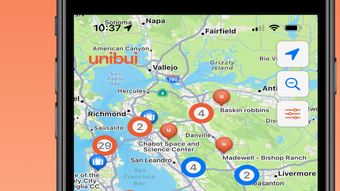
Unibui is a mobile application designed specifically for college students seeking to reduce everyday expenses and maximize their financial resources. Developed by Unibui LLC, the app operates as a student-only platform focused on financial empowerment through exclusive discounts, peer-to-peer commerce, and local rewards. It targets students in the United States who rely heavily on financial aid, where every dollar saved contributes meaningfully to their academic journey. The app enables users to discover nearby businesses offering special deals via an interactive QR code system, allowing instant access to savings. It also features a private marketplace where students can buy and sell goods directly with peers, promoting community-driven financial habits. Real-world use cases include saving on textbooks, dining, transportation, and campus supplies. By integrating with existing student support systems, such as the California Community Colleges System, Unibui supports institutional efforts to improve student retention and financial wellness. The app’s mission extends beyond savings—it encourages exploration of local communities and broader consumer engagement. It was recognized with first place in the 2019 AWS EdStart Competition, underscoring its innovative approach to student financial health.
Key Features & Capabilities
- Interactive QR Discount Channel: Users can scan QR codes at participating local businesses to unlock instant discounts on food, retail, and services. This feature streamlines access to savings without requiring physical coupons or manual entry.
- Peer-to-Peer Student Marketplace: A secure, student-only environment where users can list, buy, and sell secondhand items such as textbooks, electronics, and apparel. This fosters a circular economy within campuses.
- Local Rewards and Offers: The app curates exclusive deals from nearby businesses tailored to student lifestyles, helping users save on essentials like coffee, groceries, and entertainment.
- Financial Aid Integration Support: Designed to align with financial aid structures, Unibui helps students stretch their budgets by reducing out-of-pocket costs, potentially contributing to tuition reimbursement opportunities.
- Privacy-Compliant Platform: Built with FERPA and state-level compliance across all 50 U.S. states, ensuring student data is protected and handled securely.
These capabilities allow students to manage personal finances more effectively while building community connections. For example, a student might scan a QR code at a campus café to receive a 20% discount, then later sell an unused textbook through the marketplace to fund a new course material. The app’s focus on real-time, location-based savings enhances both convenience and financial discipline.
User Interface, Workflow & Performance
The user interface of Unibui is designed with simplicity and accessibility in mind, catering to a young, mobile-first audience. Navigation is intuitive, with a bottom tab bar providing quick access to the marketplace, active discounts, and personal account settings. The layout emphasizes visual cues such as color-coded offers and clear call-to-action buttons. Users can easily browse nearby deals or search for specific items in the peer-to-peer marketplace. The workflow from discovery to redemption is streamlined—scanning a QR code triggers immediate validation and discount application. Performance observations are based on general software behavior patterns. The developer did not specify resource usage details, so CPU and RAM behavior remain unknown. Stability is expected to be consistent with standard mobile applications, though real-world testing data was not provided. The app operates entirely on iOS, and no reports of crashes or bugs were mentioned in the available information. Overall, the design supports efficient task completion, minimizing friction during everyday use.
Compatibility & System Requirements
Unibui is designed exclusively for iPhone devices and runs on iOS, as confirmed by the developer. The current version is 1.0, with an installation size of 125 MB. This indicates a lightweight footprint suitable for most modern iPhone models. The developer did not specify exact hardware requirements or minimum iOS version. Compatibility information was partially provided. Users should ensure their device supports the latest iOS updates to maintain optimal functionality. No support for Android, Windows, or Mac was mentioned. The app’s reliance on QR scanning and location services suggests it requires access to a device’s camera and GPS, which are standard on iPhone models from recent generations. However, precise compatibility details beyond the OS level were not listed.
Pros and Cons
Pros
- Specifically designed for college students with real financial challenges
- Offers both discounts and a peer-to-peer marketplace for maximum savings
- Interactive QR code system enables instant access to rewards
- Compliant with FERPA and state privacy laws across all 50 U.S. states
- Free to download and use with no hidden costs
Cons
- Available only on iPhone, limiting access for Android users
- Exact system requirements and iOS version compatibility were not specified
- Performance metrics such as battery usage or memory consumption were not provided
- Limited to U.S.-based students, with no indication of international availability
- No information on update frequency or long-term development roadmap
FAQ Section
Is Unibui available for Android devices?
Currently, Unibui is only available for iPhone. There is no official Android version mentioned in the provided information.
Is Unibui safe to use?
Yes, Unibui is designed with privacy in mind. It complies with FERPA and local data protection regulations in all 50 U.S. states, ensuring student information is securely handled.
How often does the app receive updates?
The developer did not specify the update frequency. Users should check the App Store for the latest version and release notes.
Does Unibui require an internet connection?
Yes, Unibui requires an active internet connection to access live discounts, scan QR codes, and use the peer-to-peer marketplace.
Can I use Unibui offline?
Offline functionality was not mentioned. All core features rely on real-time data, suggesting the app cannot operate fully without an internet connection.
Final Thoughts + CTA
Unibui stands out as a purpose-built tool for college students navigating financial constraints. Its dual focus on local discounts and a student-exclusive marketplace offers tangible value in daily spending. The app’s commitment to privacy, supported by FERPA compliance and recognition from educational institutions, adds credibility. While its exclusive availability on iPhone and lack of detailed system requirements may limit broader adoption, it remains a strong choice for iOS users seeking to stretch their budgets. The app’s mission to promote financial freedom aligns with growing concerns around student affordability. For students aiming to save money without compromising convenience, Unibui delivers a practical and innovative solution. Download Unibui now.








