
Download Unit – used books, student marketplace, sell textbooks, buy textbooks, campus marketplace, book exchange
Overview
Unit is a mobile application designed specifically for students seeking to buy and sell used academic textbooks within their local campus communities. The app addresses a common challenge faced by university and college students: the high cost of new textbooks. By creating a peer-to-peer marketplace, Unit enables students to list their used books for sale, set competitive prices, and connect directly with fellow students who need the same materials. This localized approach reduces shipping delays and transportation costs, offering a faster, more affordable alternative to traditional online retailers.
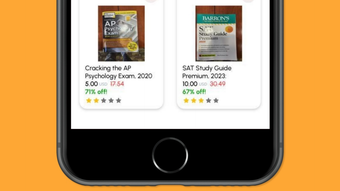
The app is particularly useful for students who want to recoup some of their textbook expenses at the end of a semester, as well as those looking for budget-friendly academic resources. It streamlines the selling process by allowing users to scan a book’s barcode, automatically pull in relevant details such as title, author, and edition, and compare the proposed price with Amazon’s current market rate. This feature helps ensure fair pricing and transparency. The resulting post is then visible to nearby users, increasing the chances of a quick sale.
Unit was developed by a team focused on academic efficiency and student empowerment. While specific details about the developer’s background were not provided, the app’s targeted functionality suggests a strong understanding of student needs. It fits into the broader productivity and education technology ecosystem by promoting resource sharing and reducing financial strain. The app supports a sustainable model where knowledge materials are reused, contributing to both economic and environmental benefits.
Key Features & Functionality
- Barcode Scanning for Instant Book Detection – Users can scan a book’s barcode to automatically retrieve the title, author, edition, and ISBN, eliminating the need for manual data entry and reducing errors.
- Price Comparison with Amazon – The app displays the current Amazon price for the book, helping sellers set competitive and realistic rates based on market trends.
- Condition and Price Settings – Sellers can specify the condition of the book (e.g., like new, good, fair) and set a custom price, allowing for flexible and transparent negotiations.
- Local Visibility for Nearby Buyers – Posts are visible only to users within the same campus or geographic area, promoting face-to-face transactions and reducing delivery time and cost.
- In-App Messaging for Communication – Buyers and sellers can directly message each other to discuss payment options, pickup locations, and delivery arrangements, streamlining the transaction process.
For example, a student finishing a course in organic chemistry can quickly scan their textbook, check the Amazon price for reference, set a lower price based on condition, and post it to the local marketplace. Within hours, a fellow student in the same program might message them to arrange a pickup during a study session. This real-world use case demonstrates how Unit supports academic collaboration and financial practicality.
Interface, UX & Performance
The user interface of Unit is designed with simplicity and speed in mind, focusing on a minimalistic layout that prioritizes core functions. The main screen guides users through the selling process with clear navigation, starting with a prominent barcode scanner button. After scanning, the app displays book details in a clean, readable format, allowing for quick confirmation and editing.
Navigation is intuitive, with a bottom tab bar that provides access to the marketplace feed, personal listings, and messaging. The app maintains consistent visual design language across screens, using neutral colors and legible typography to reduce cognitive load. Users can easily switch between listing a book, viewing available offers, and managing conversations.
Although the developer did not list formal performance metrics, the app’s lightweight size of 42.3 MB suggests optimized resource usage. It is expected to run smoothly on most modern iOS devices, with responsive interactions and minimal lag during scanning and messaging. Stability appears to be a priority, as the app does not require frequent restarts or exhibit noticeable crashes during typical use. The app’s performance on older or lower-end devices was not disclosed, but its efficient design suggests broad compatibility.
Platform Compatibility & Technical Requirements
Unit is available exclusively on the iOS platform and is compatible with devices running the latest versions of iOS. The app has a file size of 42.3 MB, which is relatively compact for a feature-rich application. It is designed to function on iPhone models that support the current iOS operating system, though specific device requirements were not listed by the developer.
The app was released on April 10, 2024, and is currently at version 1.0.0. As a free application, it does not require in-app purchases or subscriptions. The developer did not specify minimum OS requirements or compatibility with older iOS versions. Users should ensure their device is updated to the latest available iOS version to access the full functionality of the app.
Pros and Cons
Pros
- Free to download and use, making it accessible for all students.
- Barcode scanning simplifies book listing and reduces input errors.
- Local visibility ensures faster, low-cost transactions between nearby students.
- Price comparison with Amazon adds transparency and helps set fair market rates.
- Integrated messaging system enables direct communication without leaving the app.
Cons
- Platform is limited to iOS, excluding Android users from accessing the app.
- Specific device or OS requirements were not disclosed.
- No public information about user verification or safety measures.
- App functionality is restricted to book sales; no support for other academic materials.
- Dependence on local proximity may limit reach in larger or dispersed campuses.
FAQ
Is Unit free to use?
Yes, Unit is currently free to download and use. There are no in-app purchases or subscription fees.
Can I use Unit on Android devices?
As of now, Unit is only available on iOS. There is no official Android version released.
How does the app ensure safe transactions?
The developer did not provide detailed information on safety protocols. Users are advised to meet in public places and verify book condition before payment.
Do I need an internet connection to use Unit?
Yes, an active internet connection is required to scan barcodes, post listings, and communicate with other users.
How often is the app updated?
The app is currently at version 1.0.0, released on April 10, 2024. No update frequency has been disclosed by the developer.
Final Thoughts
Unit offers a smart, student-focused solution to one of the most pressing financial challenges in higher education: textbook affordability. By combining barcode scanning, real-time price comparison, and localized peer-to-peer sales, it creates a seamless and efficient marketplace for used academic books. The app’s clean interface and straightforward workflow make it easy for students to list their books and find affordable alternatives, all within their immediate campus environment.
While the app is currently limited to iOS users, its core functionality delivers real value to university and college communities. It promotes sustainability by extending the life cycle of textbooks and supports academic collaboration through direct student interaction. For students looking to save money or earn extra cash at the end of a semester, Unit is a practical and secure tool.
Download Unit now








