

تفصیل
Group Your Users
- Add descriptions to user groups
- Assign colors to user groups
- View all users in a group
- Add users to more than one group at a time
The User Groups plugin does not modify user capabilities, limit access, or anything like that. This plugin does one thing, and does it well: create groups and organize your users by that group.
Works beautifully with the Rich Text Tags plugin for adding WYSIWYG descriptions to the User Groups.
اسکرین شاٹس

The User Groups screen is just like the Categories screen, but with a color selector! 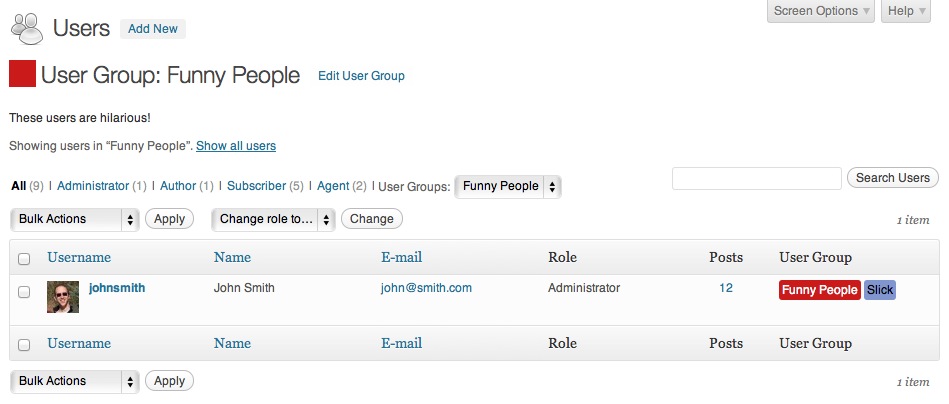
View all users in a group, as well as the group description 
Edit the Group once it is created 
How the user groups look in the User Profile screen


انسٹالیشن
- Upload the User Groups plugin folder to the
/wp-content/plugins/directory - Activate the plugin through the ‘Plugins’ menu in WordPress
- Create User Groups by going to Users > Groups
- Add users to an User Group by visiting their profile page and selecting checkboxes of the groups you’d like to add them to
عمومی سوالات
- Does this plugin limit user access to (anything)
-
Nope.
جائزے

ستمبر 28, 2020
Can I display the group archive on the site front page?

ستمبر 3, 2016
Great plugin!

ستمبر 3, 2016
I installed it according to instructions.
It reports that there are no groups (yet?).
It will not let me use any of it’s functions because I am "not authorized”.
No easy to find instructions provided for authorizing the first (admin) user…
Oh well…
شراکت دار اور ڈیویلپرز
“User Groups” اوپن سورس سافٹ ویئر ہے۔ مندرجہ ذیل لوگوں نے اس پلگ ان میں حصہ لیا:
شراکت دار

“User Groups” کا اپنی زبان میں ترجمہ کریں۔
ڈویلپمینٹ میں دلچسپی ہے؟
کوڈ براؤز کریں، ایس این وی ریپوزیٹری کو چیک کریں یا ڈویلپمینٹ لاگ کو سبسکرائب کریں بذریعہ آر ایس ایس۔
چینج لاگ
1.3 & 1.3.1 on April 11, 2016
- Fixed: User Groups lost when users update own profile
- Fixed: Compatibility with WordPress 4.2 – 4.5
- Added: Translation strings
- Fixed: Additional sanitization
- Fixed: Colorpicker in Edit User Group screen
1.2.2 on June 11, 2015
- Fixed: PHP notices
- Fixed: When a User Group color wasn’t set, the group would not display in the Users table column
- Fixed: Potential security issue with
add_query_arg()– learn more (please update!)
1.2.1
- Implemented fix for a few bugs reported on WordPress Codex
- Fixed: User Groups with no users are viewable
1.1.1
- Fixed minor PHP message as reported here
1.1
- Added bulk editing of user groups
1.0
- Liftoff!
