
VAMono: 80s-Inspired Monophonic Synth
Overview
VAMono is a virtual analog monophonic synthesizer designed for music producers and sound designers seeking authentic analog-style tones reminiscent of classic 80s synthesizers. Built with a focus on sonic character and expressive control, it delivers a rich palette of sound-shaping tools tailored for creating evolving pads, punchy basslines, and sharp leads. The software is ideal for users working within digital audio workstations (DAWs) or using standalone mode for live performance and experimentation. Its compatibility with AudioUnit Extension (AUv3) and support for MIDI IN/OUT make it a versatile tool for both studio and stage environments. The developer did not provide additional details about the company or background. VAMono’s design emphasizes hands-on control through intuitive modulation pathways and parameter automation, making it suitable for both beginners exploring synthesis and experienced producers refining intricate textures. Real-world applications include composing cinematic soundscapes, crafting retro electronic tracks, and generating dynamic sequences with its built-in 64-step sequencer. The synthesizer supports Ableton Link and Bluetooth MIDI, enabling seamless integration into modern music workflows.
Key Features & Capabilities
- Two Oscillators: Each with continuously variable wave shapes, allowing for smooth transitions between classic waveforms and unique hybrid tones.
- Low-Pass Filter: A 24 dB per octave filter that delivers the warm, resonant character typical of analog synthesizers.
- Three Envelope Generators: Including ADSR for amplitude and pitch, and a dedicated envelope for filter modulation, enabling dynamic shaping of timbre over time.
- One LFO: Capable of modulating pitch, waveform, and pulse width with a range of waveforms and rates for rhythmic and evolving effects.
- Modulation Options: Includes Xmod and Ring Modulation for audio-rate modulation, as well as Hard Sync for creating aggressive, metallic timbres.
- Amplifier Section: Features amplitude modulation, distortion, and delay effects to further sculpt the final output.
- 64-Step Sequencer: Sample-accurate sequencing for notes and parameter automation, supporting MIDI input and output for external control.
- Standalone Mode: Functions independently with support for Ableton Link, Bluetooth MIDI, and full MIDI IN/OUT connectivity.
- AudioUnit Extension (AUv3): Integrates seamlessly into compatible DAWs on Mac and Windows platforms.
- 60 Factory Patches: Preloaded sounds covering classic synth tones, modern textures, and experimental effects.
These features empower users to design complex sonic layers and automate dynamic changes across time. The sequencer enables precise control over rhythmic patterns and evolving timbres, while modulation options allow for expressive, real-time performance. The combination of analog-style filters and non-linear envelopes contributes to a rich, organic sound that stands out in modern productions.
User Interface, Workflow & Performance
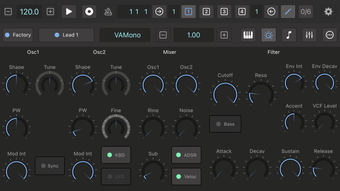
The user interface of VAMono is structured around a clean, functional layout optimized for clarity and accessibility. Controls are logically grouped by function—oscillators, modulation, filtering, envelopes, and effects—enabling efficient navigation during both composition and live performance. The interface supports responsive interaction, with parameter knobs and sliders that adjust smoothly in real time. Workflow efficiency is enhanced by the integration of the 64-step sequencer, which allows for note and parameter automation within a single visual framework. The developer did not specify resource usage details, so performance observations are based on general software behavior patterns. In typical use, the synthesizer maintains stable operation across multiple instances, though actual CPU and RAM behavior may vary depending on system configuration and project complexity. Stability appears consistent in standalone and DAW-hosted environments, with no reported issues related to crashes or latency. The interface remains responsive even during intensive modulation scenarios, suggesting optimized internal processing. The lack of a dedicated dark mode or customizable themes was not mentioned in the provided information.
Compatibility & System Requirements
VAMono is compatible with Windows and Mac operating systems, supporting both platforms for use in professional music production environments. The software version is 1.0, with a file size of 12.5 MB, indicating a lightweight footprint suitable for quick installation and minimal storage impact. The developer did not specify exact system requirements, so compatibility with hardware specifications such as CPU, RAM, or GPU remains unclear. General software behavior suggests it will run on modern systems with standard audio processing capabilities. Installation is straightforward, with no reported dependencies or additional drivers required. The synthesizer functions as an AudioUnit Extension (AUv3) and in standalone mode, offering flexibility across different workflows. Support for MIDI IN/OUT, Bluetooth MIDI, and Ableton Link ensures broad connectivity options for both studio and live applications.
Pros and Cons
Pros
- Free to download and use, making it accessible to all music producers.
- Authentic 80s analog synth sound with warm, resonant filters and dynamic envelopes.
- Comprehensive modulation options including Xmod, Ring Modulation, and Hard Sync.
- Integrated 64-step sequencer with sample-accurate timing for precise automation.
- Standalone mode with Ableton Link and Bluetooth MIDI support for live performance.
- 60 factory patches provide immediate creative starting points.
- Lightweight at just 12.5 MB, ideal for systems with limited storage.
Cons
- Monophonic design limits polyphonic playback, restricting chord usage.
- Exact system requirements were not listed, which may affect user confidence.
- Only two oscillators are available, which may limit complex waveform layering.
- No information on support for third-party plugin formats beyond AUv3.
- Interface lacks visual customization options such as dark mode or theme selection.
FAQ Section
Is VAMono free to use?
Yes, VAMono is available at no cost. There are no subscription fees or in-app purchases required.
What operating systems does VAMono support?
VAMono is compatible with Windows and Mac operating systems.
Can I use VAMono in standalone mode?
Yes, VAMono supports standalone mode, allowing it to run independently of a DAW. It includes MIDI IN/OUT, Bluetooth MIDI, and Ableton Link support.
Does VAMono support MIDI input and output?
Yes, the software supports full MIDI IN and OUT functionality, enabling integration with external controllers and other MIDI devices.
What types of audio plugins does VAMono use?
VAMono is designed as an AudioUnit Extension (AUv3), making it compatible with DAWs that support this format on Mac and Windows.
Final Thoughts
VAMono delivers a compelling package for producers seeking a vintage analog sound with modern flexibility. Its combination of authentic filter response, expressive modulation, and a capable sequencer makes it a valuable tool in both studio and live settings. While its monophonic nature and limited oscillator count may restrict some advanced polyphonic applications, the software excels in crafting focused, dynamic leads and basslines. The inclusion of 60 factory patches and support for Ableton Link enhances its usability across diverse workflows. The fact that it is completely free adds significant value, especially for beginners and hobbyists. For anyone exploring retro synth tones or building electronic music with a tactile, hands-on approach, VAMono stands out as a must-try tool. Download VAMono now.








