
Precision Violin Tuning for iPhone
Overview
ViolinTuner is a mobile application designed to assist violinists in achieving accurate tuning with minimal effort. Developed by Hsing-Fu Hsueh, the app serves as a digital tuning solution tailored specifically for the violin. It addresses the common challenge of maintaining proper pitch across the instrument’s four strings, a critical step for both beginners and experienced players. The software is positioned within the Multimedia category, focusing on music-related utility tools. Its primary function is to provide real-time pitch feedback, enabling users to adjust their strings based on visual indicators. The app also integrates a metronome, broadening its utility beyond tuning to include rhythmic practice support. This dual-purpose design makes it suitable for musicians practicing at home, in studios, or on the go. The app’s interface is optimized for the iPhone, ensuring responsiveness and clarity on mobile screens. While the developer did not provide additional system requirements, the application is designed to operate efficiently on compatible iOS devices. Real-world usage scenarios include pre-performance tuning, daily practice sessions, and music education settings.
Key Features & Capabilities
- Real-time Pitch Detection: The app analyzes the sound produced by each violin string and displays the current pitch in real time, helping users identify whether a string is sharp or flat.
- Frequency Selection: Users can choose the reference frequency at the top of the screen, allowing for customization based on standard or alternate tuning settings.
- String-Specific Tuning Indicators: Each of the four violin strings is monitored individually, with visual feedback indicating pitch accuracy.
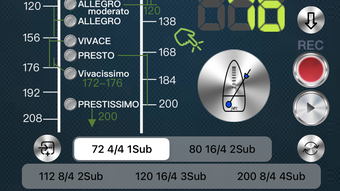
- Integrated Metronome: A built-in metronome supports 18 different beat modes, ranging from slow to fast tempos, aiding in rhythmic development during practice.
- Segment Beat Function: This feature allows users to define specific measures or sections for tempo practice, enhancing focused rehearsal.
- Pendulum Display Mode: The metronome includes a visual pendulum that mimics traditional mechanical metronomes, providing intuitive timing cues.
- Timing Display: Users can track the duration of practice sessions with a visible timer, promoting structured practice routines.
Usage Examples
Violinists can use the tuner during warm-up sessions to ensure their instrument is in tune before playing. The metronome can be set to a steady beat for scales or complex passages, helping maintain consistent timing. The segment beat function is particularly useful for practicing difficult sections in isolation. The pendulum display adds a tactile, visual rhythm that supports concentration during extended practice.
User Interface, Workflow & Performance
ViolinTuner features a clean, minimalist interface optimized for touch interaction on iPhone devices. The layout is divided into clear sections: frequency settings at the top, tuning options in the center, and real-time pitch indicators below. Navigation is intuitive, with all essential controls accessible from a single screen. The workflow is streamlined—users select their desired tuning, play a string, and receive immediate visual feedback. The app does not display performance metrics or resource usage details, but based on its lightweight design and file size of 14.4 MB, it is likely to operate smoothly on supported devices. The developer did not specify resource usage details, and no performance benchmarks were provided. Stability during extended use remains unverified, though the app’s simple functionality suggests low risk of crashes. Overall, the user experience appears focused on clarity and ease of use, minimizing distractions during practice.
Compatibility & System Requirements
ViolinTuner is designed for iPhone devices and runs on iOS, as confirmed by the provided information. The software version is 1.1, released on April 11, 2024. The installation size is 14.4 MB, indicating a lightweight footprint. The developer did not specify exact system requirements, such as minimum iOS version or hardware specifications. Compatibility information was partially provided, with no details on whether the app supports older iPhone models or newer devices. Users should ensure their device meets the general requirements for running iOS applications. No additional compatibility notes were included in the release details.
Pros and Cons
Pros
- Free to download and use, with no in-app purchases or ads mentioned.
- Simple, intuitive interface ideal for beginners and casual users.
- Combines tuning and metronome functions in one compact tool.
- Real-time pitch feedback enhances tuning accuracy.
- Lightweight application at only 14.4 MB.
- Supports multiple beat modes and advanced metronome features.
Cons
- Platform is limited to iPhone only; no support for iPad or Mac.
- No information provided on background operation or audio input sensitivity.
- Exact performance details and stability under prolonged use were not specified.
- Limited to violin tuning; not applicable for other instruments.
FAQ Section
Is ViolinTuner available for Android devices?
The app is currently only available for iPhone, as stated in the provided information. There is no indication of Android support.
Does the app require an internet connection to function?
ViolinTuner operates offline. The tuner and metronome functions do not rely on network connectivity, making it suitable for use in practice rooms or remote locations.
Can I use ViolinTuner with other string instruments?
The app is specifically designed for violin tuning. While it may detect pitches from other instruments, it is not optimized for them and does not include tuning presets for alternatives.
Is the metronome feature customizable?
Yes, the metronome supports 18 different beat modes and includes a segment beat function, pendulum display, and timing display for enhanced practice control.
How often does the app receive updates?
The latest version, 1.1, was released on April 11, 2024. The update frequency is not specified, but users can expect improvements based on developer activity.
Final Thoughts + CTA
ViolinTuner delivers a focused, reliable solution for violinists seeking accurate tuning and rhythmic practice support. Its dual functionality as a tuner and metronome, combined with a clean interface and free access, makes it a compelling choice for students, educators, and amateur musicians. While platform limitations and lack of detailed system specifications are notable, the app’s lightweight design and core features fulfill their intended purpose effectively. For anyone looking to maintain pitch precision and improve timing, this tool offers practical value without complexity. The absence of ads or paid features further enhances its appeal. Download ViolinTuner now.








