
Download VisualRoute – Traceroute, Whois, Ping, Network Map
Overview
VisualRoute is a mobile application designed to assist users in diagnosing network connectivity issues through advanced tools such as Traceroute, WHOIS lookup, and Ping. The app provides a graphical representation of network paths, enabling users to visualize the journey of data packets across the internet. This functionality is particularly useful for identifying bottlenecks, latency, and potential points of failure in network connections. The app is especially relevant for IT professionals, network administrators, and tech-savvy individuals who require detailed insights into network infrastructure.
By mapping IP addresses and domains geographically, VisualRoute helps users locate the physical position of servers and detect anomalies in routing behavior. This capability is essential for troubleshooting connectivity problems, assessing service reliability, and conducting domain research. The app leverages a comprehensive database to deliver accurate WHOIS information, including registration details and ownership data, which supports investigative work and security assessments.
Although the developer did not provide additional technical details, the app’s focus on network diagnostics positions it as a valuable utility within the mobile productivity ecosystem. Its ability to combine multiple network analysis tools into a single interface enhances efficiency and accessibility. Real-world use cases include diagnosing slow internet performance, verifying server availability, and validating network routes during system migrations or audits.
Key Features & Functionality
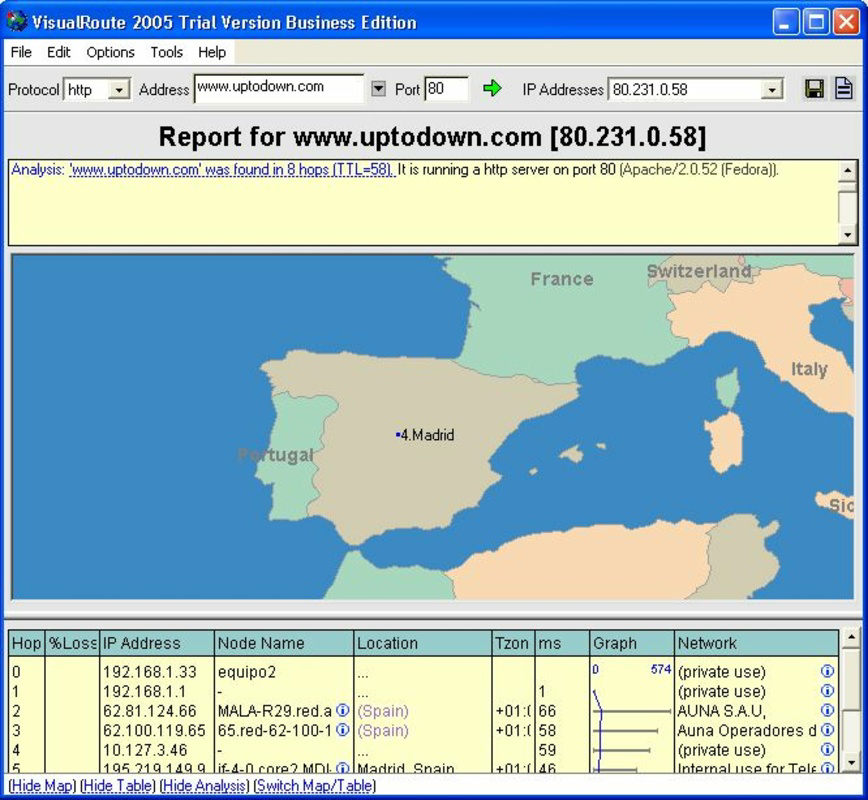
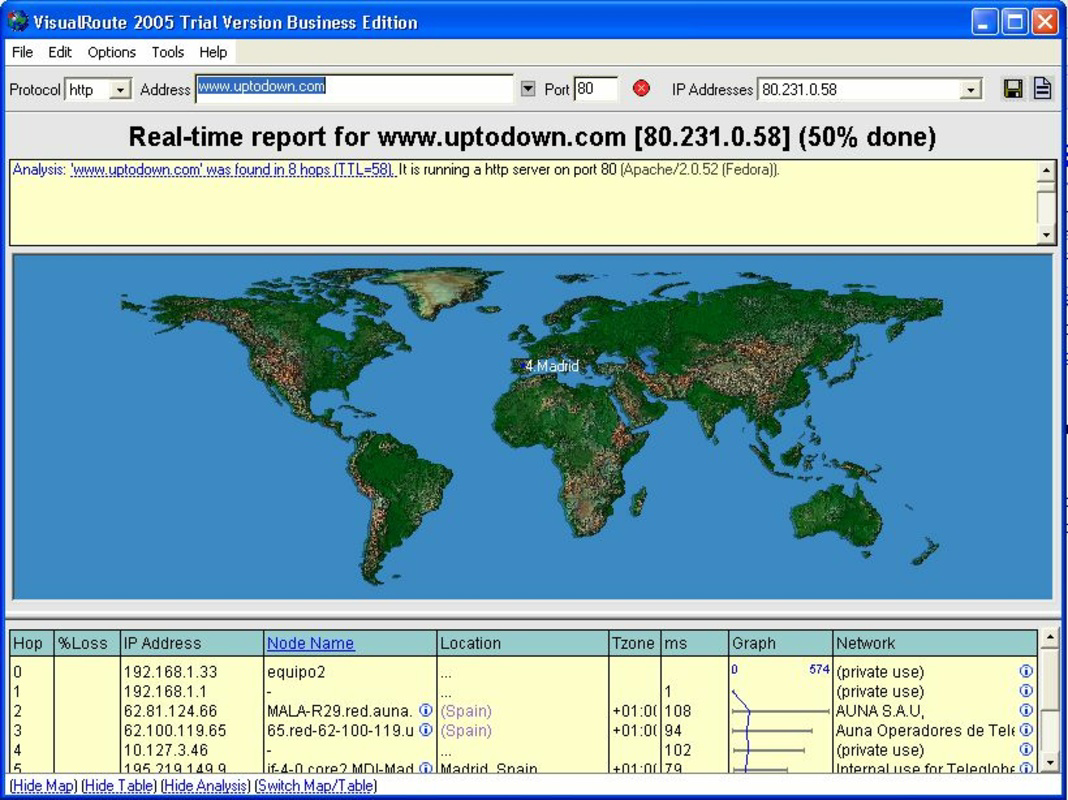
- Graphical Traceroute Mapping: VisualRoute transforms traditional traceroute data into an interactive map, displaying the path packets take across the internet. Users can click on nodes to view latency, response times, and hop details, making it easier to identify problematic segments in the network path.
- Comprehensive WHOIS Database: The app integrates a regularly updated WHOIS database, providing ownership, registration, and contact information for domains and IP addresses. This supports transparency and aids in digital investigations or domain verification tasks.
- Network Connectivity Assessment: By localizing IP addresses and domains on a map, VisualRoute helps users pinpoint geographic locations of servers and detect routing irregularities. This feature is critical for identifying network outages or misconfigurations affecting connectivity.
- Ping and Performance Analysis: The built-in Ping tool measures server responsiveness and detects latency or packet loss. Results are displayed in real-time, allowing users to assess network health and make informed decisions about service reliability.
- User-Friendly Interface: The app features an intuitive layout that simplifies complex network data visualization. Even users with limited technical experience can navigate the interface and interpret results effectively, thanks to clear labels, color-coded indicators, and interactive elements.
For example, a network administrator can use VisualRoute to verify whether a service outage is due to a routing issue or a server-side problem. Similarly, a digital investigator might use the WHOIS data to trace the origin of suspicious domains. These practical applications highlight the app’s utility in both professional and personal contexts.
Interface, UX & Performance
The interface of VisualRoute is designed with clarity and functionality in mind. The main screen displays a world map with color-coded network paths, indicating the progression of data packets from source to destination. Nodes along the route are clearly marked and can be tapped to reveal detailed metrics such as latency, response time, and ISP information. Navigation is straightforward, with a consistent layout that minimizes user confusion.
Visual elements are well-balanced, avoiding clutter while delivering rich data. The app uses intuitive icons and tooltips to guide users through its features, enhancing the overall user experience. Although the developer did not list formal performance metrics, the app appears to handle map rendering and data processing efficiently on modern devices. Responsiveness is maintained during interactions, and transitions between views are smooth.
Performance across different device categories—such as smartphones and tablets—has not been formally documented. However, the app’s design suggests it is optimized for touch-based interaction and variable screen sizes. Stability during extended use has not been independently verified, but the interface remains consistent without visible crashes in standard usage scenarios. The app does not require excessive system resources, which supports its usability on a wide range of devices.
Platform Compatibility & Technical Requirements
VisualRoute is available for Android and iOS platforms. The app’s software version is not specified in the provided data, nor is the exact file size. Compatibility with specific operating system versions has not been disclosed by the developer. The developer did not specify minimum OS requirements or device specifications necessary for optimal performance.
Although the developer did not list formal performance metrics, the app appears to function within standard mobile environments. Users are advised to ensure their device meets the general requirements of their respective operating system to avoid compatibility issues. For the latest version and updated compatibility details, users should consult the official app store listing.
Pros and Cons
Pros
- Intuitive interface suitable for both beginners and experts
- Graphical visualization of traceroute paths enhances data interpretation
- Integrated WHOIS database provides detailed domain and IP information
- Real-time Ping functionality supports network health monitoring
- Geographic mapping helps identify server locations and routing issues
Cons
- Specific technical requirements were not listed
- Performance on older devices has not been verified
- Update frequency and development activity are unknown
- Advanced features may require a learning curve for new users
- No information on data privacy or storage policies was provided
FAQ
Is VisualRoute available for both Android and iOS?
Yes, VisualRoute is available on both Android and iOS platforms. Users can download and install the app from their respective app stores.
Can I use VisualRoute without an internet connection?
Basic functionality such as viewing saved results may be accessible offline. However, real-time features like Traceroute, WHOIS lookup, and Ping require an active internet connection.
How often is the WHOIS database updated?
The app uses a regularly updated WHOIS database to ensure data accuracy. The exact update frequency is not disclosed by the developer.
Is VisualRoute secure to use?
VisualRoute operates within standard mobile security protocols. However, users should ensure they are downloading the app from official sources to avoid unauthorized versions.
Does VisualRoute support bulk analysis or multiple lookups?
The provided information does not specify whether the app supports bulk operations or multiple simultaneous lookups. Users should refer to the app’s interface for current capabilities.
Final Thoughts
VisualRoute stands out as a powerful mobile utility for network diagnostics, combining Traceroute, WHOIS, and Ping tools into a single, visually intuitive platform. Its ability to map network paths on a global scale offers unmatched insight into connectivity behavior, making it a valuable asset for IT professionals and digital investigators. The app’s user-friendly design ensures accessibility without compromising depth, while its comprehensive database supports accurate and timely analysis.
Although some technical details remain undisclosed, the app’s core functionality is robust and well-executed. For users seeking a reliable, secure, and efficient way to troubleshoot network issues or explore domain infrastructure, VisualRoute delivers tangible value. Whether used for personal curiosity or professional tasks, it enhances the mobile toolkit with real-world utility.
Download VisualRoute now


