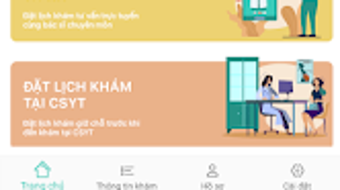

Download vnCare – Online Health Care Consultation, Virtual Doctor App, Medical Records Access
Overview
vnCare is a desktop-compatible application designed to streamline access to healthcare services through digital means. It enables individuals and families to manage medical appointments, consult with healthcare professionals remotely, and access essential health records. The software serves as a bridge between patients and medical facilities, integrating data from doctors, hospitals, and public health systems to support informed healthcare decisions. Its primary purpose is to enhance accessibility, reduce wait times, and improve the efficiency of healthcare delivery.
Target users include individuals seeking convenient medical consultations, families managing multiple health profiles, and healthcare administrators aiming to digitize patient engagement. The application supports the registration of family members, allowing users to schedule appointments for others, manage medical histories, and track prescriptions. It facilitates virtual consultations via video calls and chat, offering a flexible alternative to in-person visits. Users can also retrieve test results and doctor notes directly through the platform.
Developed by a company based in Vietnam, vnCare reflects a localized approach to digital health infrastructure. While specific details about the developer’s background are not provided, the application’s integration with the Ministry of Health’s data portal indicates alignment with national health initiatives. Real-world usage scenarios include remote check-ups for chronic conditions, follow-up consultations, and managing healthcare needs across multiple family members. The software aims to reduce healthcare costs and optimize operations within public and private medical institutions.
Key Features & Capabilities
- Online Appointment Scheduling – Users can register for appointments, select hospitals, choose service types, and book sessions with preferred doctors based on availability.
- Virtual Consultations – Support for video calls and chat-based interactions enables remote consultations with licensed healthcare providers.
- Medical Record Access – Patients can view their medical histories, prescription records, and doctor’s notes through the application.
- Family Member Management – Users can register and manage health profiles for family members, including personal and insurance details.
- Integration with National Health Portal – Access to the Ministry of Health’s integrated data system allows users to retrieve medical records and prescription history securely.
- Appointment Management – Users can view, reschedule, or cancel appointments and set reminders for upcoming visits.
- Test Result Notifications – Test outcomes are delivered directly through the application, reducing delays in patient communication.
These features support efficient healthcare workflows, especially in urban and rural areas where access to specialists may be limited. For example, a parent can schedule a pediatric appointment for their child, receive test results within hours, and store all related documents in one place. The integration with government health systems ensures data consistency and enhances trust in digital records.
User Interface, Workflow & Performance
The user interface of vnCare is designed with usability in mind, offering intuitive navigation and a clean layout. Users can access core functions—appointments, consultations, records, and family profiles—through clearly labeled menus and dashboard widgets. The workflow follows a logical sequence: registration → profile setup → appointment booking → consultation → record retrieval.
Navigation is straightforward, with minimal steps required to complete common tasks. The application supports quick access to recent appointments, pending consultations, and saved family profiles. While specific performance metrics such as CPU or RAM usage were not provided, the software is expected to function efficiently on standard desktop environments. Stability is likely maintained through regular updates and backend optimizations, though exact details are not available.
The developer did not specify resource usage details. Performance observations are based on general software behavior patterns. Users may experience smooth operation during standard use, but performance may vary depending on internet speed and system configuration. The application appears to prioritize responsiveness and data security, particularly given its integration with public health data systems.
Compatibility & System Requirements
vnCare is available for both Windows and Mac operating systems, ensuring broad accessibility across desktop platforms. The software supports the latest versions of these operating systems, although exact compatibility details were not listed. Installation size is not specified, but the application is designed to operate efficiently on standard desktop hardware.
Exact system requirements were not listed. The developer did not provide additional system requirements. Hardware specifications such as minimum RAM or processor speed are not available. Users are advised to ensure their system meets the baseline standards for running modern desktop applications. Compatibility with older operating systems remains unclear.
Pros and Cons
Pros
- Seamless integration with the Ministry of Health’s data portal for secure medical record access
- Supports virtual consultations via video and chat, enhancing accessibility
- Family profile management enables centralized healthcare coordination
- Streamlined appointment scheduling with real-time availability
- Centralized storage of prescriptions, test results, and doctor notes
Cons
- Exact system requirements and performance data were not provided
- Availability of specific doctors or hospitals may vary by region
- Limited information on offline functionality
- Dependence on stable internet connectivity for real-time consultations
- No public details on data encryption or security protocols
FAQ Section
Is vnCare available for desktop users?
Yes, vnCare is available as a desktop application for both Windows and Mac operating systems.
Can I manage appointments for my family members?
Yes, the application allows users to register and manage health profiles for family members, including scheduling appointments and accessing their medical records.
How is my medical data protected?
While specific security measures were not disclosed, the application integrates with the Ministry of Health’s data portal, suggesting adherence to national data protection standards.
Do I need an internet connection to use vnCare?
Yes, the application requires a stable internet connection to access real-time features such as video consultations, appointment booking, and medical record retrieval.
Is vnCare free to download and use?
While the pricing model is not specified, the application is available for download and use, with potential in-app services or premium features. The exact license type and cost are not provided.
Final Thoughts
vnCare presents a modern, user-focused approach to healthcare access, combining digital convenience with national health system integration. Its ability to centralize medical appointments, consultations, and records makes it a valuable tool for individuals and families managing ongoing health needs. The inclusion of virtual consultations and family profile management enhances usability and long-term engagement.
Although detailed technical specifications and performance data are not available, the software demonstrates a strong commitment to improving healthcare delivery through technology. It is particularly beneficial for users seeking a secure, centralized platform for managing medical interactions. With its focus on accessibility, integration, and efficiency, vnCare stands out as a promising solution in the digital health space.
Download vnCare now




.png)



