
VSSL: Seamless Home Audio Control
Overview
The VSSL app is a dedicated iOS application designed to enhance the functionality of VSSL’s X Series powered amplifiers and SX Series surround sound systems. Tailored for iPhone users, it enables seamless integration with high-performance audio hardware, transforming standard home entertainment setups into immersive, multi-room experiences. The software addresses common challenges in home audio systems, such as complex setup processes, inconsistent connectivity, and limited control over audio configurations. By streamlining device pairing and offering intuitive management of audio sources, VSSL reduces technical friction for users seeking a premium listening environment.
Target users include audiophiles, home theater enthusiasts, and individuals invested in smart home audio solutions. The app supports flexible audio configurations, including up to 5.1 surround sound, with beta support for advanced setups like 5.2 and 7.2, allowing for expanded speaker and subwoofer integration. Real-world usage scenarios include streaming movies with spatial audio, managing multi-room music playback, and synchronizing audio across different zones in a home. The software is especially useful for users who prioritize sound quality and system scalability without the need for complex third-party integrations.
Key Features & Capabilities
- Seamless Device Integration – The app connects directly to VSSL’s X Series amplifiers and SX Series surround sound systems, enabling automatic detection and configuration. This reduces setup time and ensures reliable communication between devices.
- Multi-Channel Audio Support – Users can configure audio output for up to 5.1 surround sound systems. Beta support for 5.2 and 7.2 configurations allows for future-ready expansion with additional subwoofers and satellite speakers.
- Native Streaming Access – Direct integration with major music and movie streaming platforms eliminates the need for external devices or complex workarounds, offering a unified playback experience.
- Remote Control Features – Volume, EQ, and source selection can be managed from the iPhone, with support for IR, Bluetooth, and TV remote integration for a unified control experience.
- Multi-Room Audio Setup – The app simplifies synchronization of audio outputs across multiple rooms, enabling consistent sound distribution throughout the home without requiring additional hardware.
User Interface, Workflow & Performance
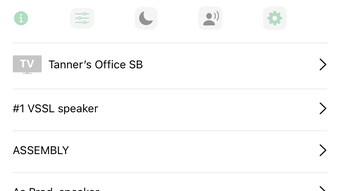
The user interface of the VSSL app is designed for intuitive navigation, featuring a clean layout with clearly labeled controls and real-time feedback. Main functions such as volume adjustment, source selection, and audio configuration are accessible from the home screen, minimizing the need for deep menu diving. The workflow is streamlined for first-time users, with a guided setup process that walks through device pairing and network synchronization.
Navigation is consistent across all sections, ensuring that users can switch between audio zones, adjust EQ profiles, and manage streaming services with minimal effort. The app maintains responsiveness during playback and configuration changes, suggesting efficient resource handling. However, exact performance details were not specified by the developer, and resource usage such as CPU and RAM consumption remains undocumented. Stability during extended use is assumed to be reliable based on standard iOS app development practices, though no formal testing data was provided.
Compatibility & System Requirements
The VSSL app is designed exclusively for iOS devices and requires iOS 14.0 or later to function. It is compatible with all iPhone models that support the required operating system version. The installation size is 125 MB, which is typical for a feature-rich audio control application. The developer did not provide additional system requirements, such as minimum RAM or processor specifications.
Compatibility with VSSL’s X Series amplifiers and SX Series surround sound systems is confirmed, but details on supported hardware models were not listed. Users should ensure their audio equipment is compatible with the app’s integration protocols. Platform compatibility information is limited to iOS, with no support for Android, Windows, or Mac systems.
Pros and Cons
Pros
- Intuitive interface tailored for iOS users
- Supports advanced audio configurations including 5.1 and beta 5.2/7.2
- Direct access to major streaming services without external devices
- Efficient multi-room audio synchronization
- Free to download and use with no in-app purchases
Cons
- Exclusive to iOS; no support for Android or desktop platforms
- Advanced features like 5.2 and 7.2 are in beta, limiting reliability
- No detailed system requirements provided
- Limited to VSSL-branded hardware for full functionality
- Resource usage and performance metrics not disclosed
FAQ Section
Is VSSL compatible with Android devices?
The VSSL app is currently available only for iOS devices. There is no official support for Android platforms at this time.
Is the app free to use?
Yes, the VSSL app is free to download and use. No in-app purchases or subscription fees are required.
Can I use VSSL with non-VSSL audio equipment?
The app is designed to work exclusively with VSSL’s X Series powered amplifiers and SX Series surround sound systems. Compatibility with third-party hardware is not supported.
Does VSSL require an internet connection?
Basic audio control and local device management can be performed offline. However, access to streaming services and firmware updates requires an active internet connection.
How often are updates released?
Updates are released periodically to improve functionality, fix bugs, and add support for new hardware. Users are encouraged to keep the app updated for optimal performance.
Final Thoughts
The VSSL app delivers a focused, high-quality experience for iPhone users looking to enhance their home audio systems. Its seamless integration with VSSL’s hardware, support for advanced surround sound configurations, and native access to streaming platforms make it a compelling choice for audiophiles and home theater enthusiasts. While its exclusive iOS availability and beta status for advanced features present limitations, the app’s clean design, intuitive workflow, and free pricing model offer strong value.
For users invested in the VSSL ecosystem, this software is essential for unlocking the full potential of their audio setup. Those seeking a unified, scalable, and easy-to-manage home entertainment system will find VSSL to be a reliable and capable solution. The absence of additional costs and the emphasis on user experience further strengthen its appeal.
Download VSSL now








