

Download VxTerm – terminal emulator, SSH, Telnet, SFTP, serial connection, network management, device management, lightweight terminal, portable terminal, low entry barrier
Overview
VxTerm is a compact terminal emulator and simulation tool tailored for engineers working in hardware, network, and software environments. Designed with functionality and accessibility in mind, it enables seamless connectivity to network devices, Linux servers, security equipment, and storage systems through widely used protocols such as Telnet, SSH, SFTP, and Serial. Its primary purpose is to streamline remote device and system management, offering a reliable solution for professionals who require direct command-line access without the overhead of complex software installations.
The app serves as a critical utility in the engineering workflow, particularly for those managing infrastructure across diverse environments. Whether troubleshooting a server configuration, configuring a router, or accessing embedded systems via serial ports, VxTerm provides a straightforward interface for executing commands and transferring files. Its lightweight nature—under 7MB—makes it ideal for use on older or resource-constrained systems, including Windows XP, where many legacy tools are still in operation.
Target users include network administrators, embedded systems developers, system engineers, and IT professionals who rely on terminal-based interactions. The developer, VxTerm, has focused on creating a tool with minimal friction: no installation required, no dependencies, and immediate usability. This low entry barrier enhances its value in fieldwork, on-site support, and rapid deployment scenarios. In the broader productivity app ecosystem, VxTerm stands out as a niche but essential utility for technical users who prioritize efficiency, portability, and compatibility.
Key Features & Functionality
- Multi-Protocol Support: VxTerm enables connections using Telnet, SSH, SFTP, and Serial protocols. This versatility allows engineers to interact with a wide range of devices—from industrial controllers to enterprise servers—without switching between multiple tools.
- Lightweight and Portable: At just 7MB, the application is designed for easy transport. It runs directly from a USB drive or local folder without installation, making it ideal for engineers who work across multiple machines or need a consistent environment on the go.
- User-Friendly Interface: The interface is simple and intuitive, minimizing the learning curve. Even users with limited terminal experience can navigate sessions, manage connections, and execute commands efficiently.
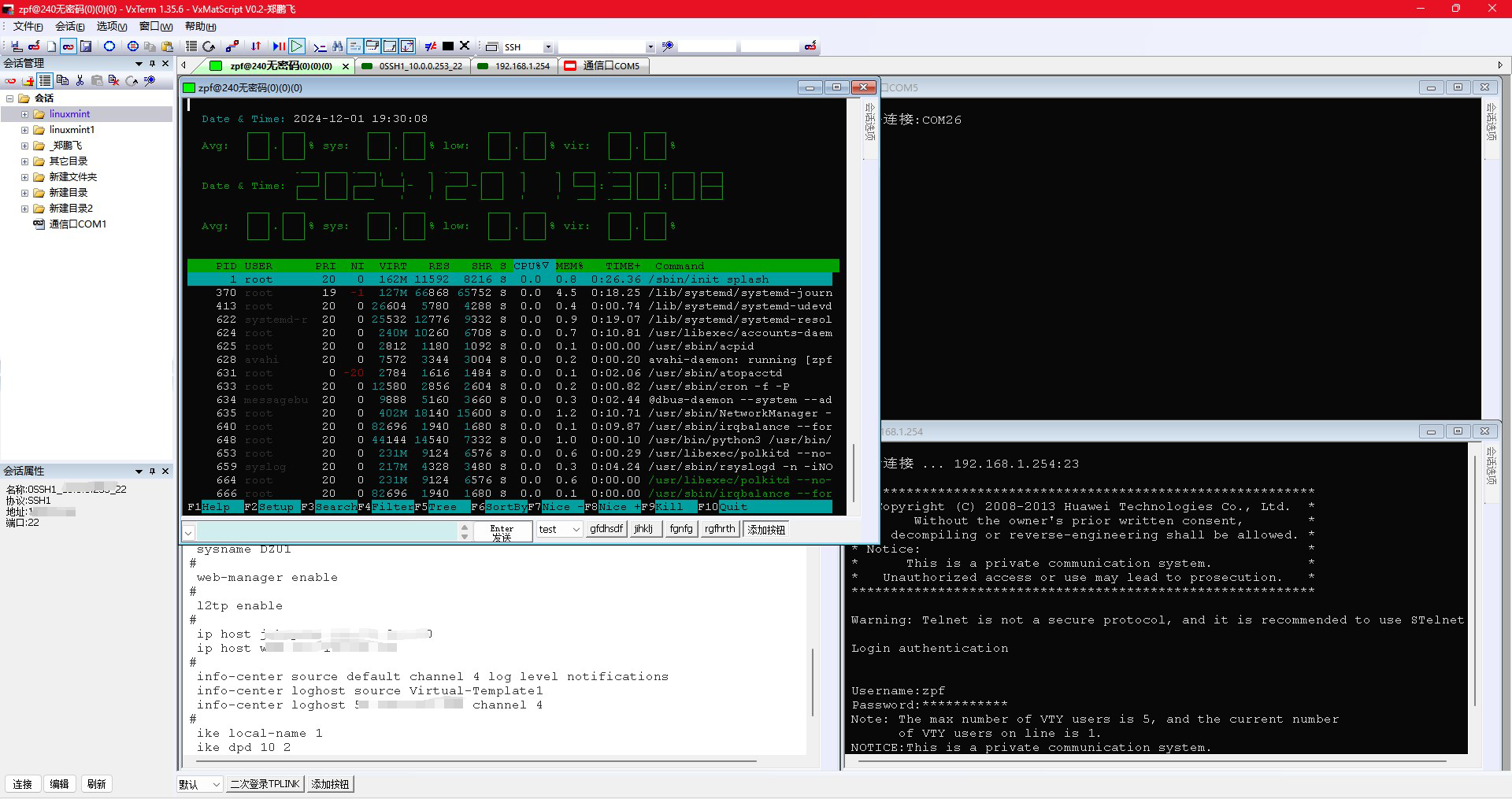
- Multi-Session Management: Users can open and manage multiple terminal sessions simultaneously through a tabbed interface. This feature supports concurrent monitoring and control of several devices, significantly improving workflow efficiency.
- No Dependencies Required: VxTerm operates independently, requiring no external libraries, runtime environments, or system-level configurations. This ensures compatibility across diverse Windows environments, including older versions.
For example, a network engineer can use VxTerm to simultaneously SSH into a core switch, SFTP a configuration file, and connect to a serial console of a firewall—all within a single window. The ability to switch between tabs instantly enhances productivity and reduces context-switching overhead. Similarly, an embedded developer can use the serial connection feature to debug firmware on a microcontroller without installing additional drivers or software.
Interface, UX & Performance
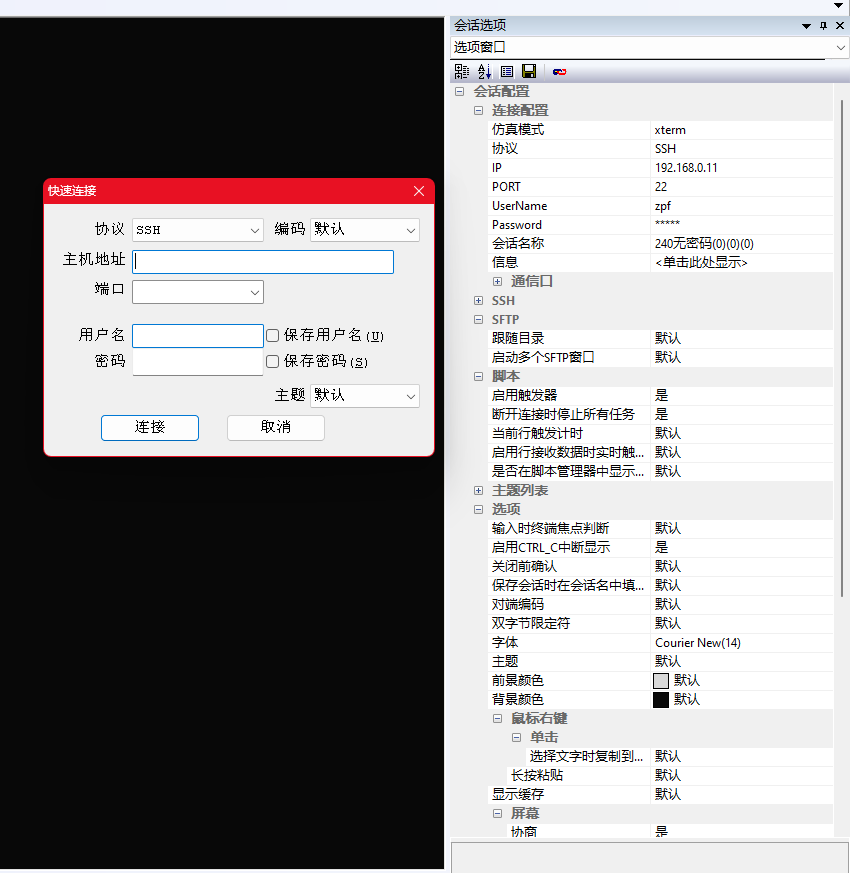
The user interface of VxTerm is designed around clarity and efficiency. It features a clean, minimal layout with a central terminal window, session tabs, and a straightforward toolbar for connection management. Navigation is intuitive, with logical grouping of functions such as new session, connection settings, and session switching. The visual style is functional rather than decorative, prioritizing readability and usability over aesthetic flair.
Performance is optimized for responsiveness and stability. Although the developer did not list formal performance metrics, the application’s lightweight design suggests low CPU and memory usage, which contributes to smooth operation even on older hardware. The application maintains consistent responsiveness during active sessions, with minimal lag during command execution or file transfers.
Compatibility across device categories is broad due to its minimal footprint and reliance on standard Windows APIs. It runs without issues on modern Windows systems and is explicitly noted to support legacy platforms like Windows XP. The lack of installation requirements further enhances its reliability, as users avoid potential permission conflicts or registry changes. Overall, the UX is consistent and predictable, making it suitable for both quick tasks and extended work sessions.
Platform Compatibility & Technical Requirements
VxTerm is available exclusively for Windows platforms. The application runs on Windows operating systems, though specific minimum OS versions were not listed. Given its compatibility with Windows XP, it is likely designed to function across a wide range of Windows environments, including Windows 7, 8, 10, and 11.
The file size is 7 MB, which is exceptionally small for a full-featured terminal emulator. This compact size contributes to its portability and fast startup times. The app is distributed as a standalone executable, requiring no installation or additional software components.
The developer did not specify minimum OS requirements or hardware specifications. However, the application’s lightweight nature and lack of dependencies suggest it is suitable for systems with limited resources. Users should ensure their Windows environment supports running .exe files from local or removable drives.
Pros and Cons
Pros
- Extensive protocol support including SSH, Telnet, SFTP, and Serial
- Under 7MB in size, making it highly portable
- Runs without installation or dependencies
- Supports legacy systems like Windows XP
- Intuitive interface with multi-tab session management
Cons
- Platform limited to Windows only
- Developer did not provide detailed technical specifications
- No visible update frequency or changelog
- Mobile or cross-platform availability not confirmed
- Limited to desktop use; no touch or mobile interface
FAQ
Is VxTerm free to download and use?
Yes, VxTerm is available at no cost. The app is distributed as a free tool for engineers and technical professionals.
Can I use VxTerm on older Windows systems like Windows XP?
Yes, the application is designed to run on Windows XP, making it suitable for legacy environments where modern software may not be supported.
Does VxTerm require installation?
No, VxTerm operates as a portable application. It can be run directly from a USB drive or local folder without installation.
Is VxTerm secure for SSH and SFTP connections?
VxTerm supports standard security protocols such as SSH and SFTP, which provide encrypted communication. Users should ensure they use strong authentication methods and verify host keys to maintain security.
Can I run multiple terminal sessions at once?
Yes, VxTerm supports multiple sessions through a tabbed interface, allowing users to manage several connections simultaneously.
Final Thoughts
VxTerm delivers a focused, efficient solution for engineers who need reliable terminal access across diverse systems. Its lightweight design, broad protocol support, and zero-installation model make it a standout tool in the productivity space. While limited to Windows, its compatibility with legacy systems and ease of use offer significant advantages for professionals managing network and embedded devices.
For system administrators, network engineers, and embedded developers, VxTerm represents a low-friction, high-value utility. Its ability to run on minimal hardware and operate without dependencies ensures consistent performance in real-world scenarios. The lack of a steep learning curve and the presence of multi-session support further enhance its appeal.
Download VxTerm now


