
Download watchID – Instant Watch Identification Tool
Introduction & Overview
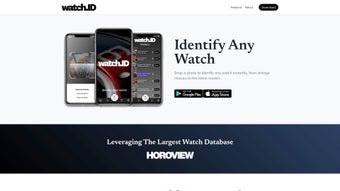
watchID, created by the horology experts at Horoview.com, is an AI‑driven mobile application that lets you identify any watch from a single photograph. Whether you’re strolling through a flea market, opening a vintage box at home, or simply admiring a friend’s timepiece, a quick snap with watchID provides you with the exact model name, reference number, production year, movement type, case dimensions, and a concise specification sheet. The service does more than just naming the watch – it connects you to a built‑in marketplace that offers links to trusted sellers on platforms such as eBay, Chrono24, and specialized auction houses, allowing you to explore pricing, availability, and authenticity guarantees in one seamless flow. Beyond identification, watchID functions as a community hub where collectors, dealers, and enthusiasts can share their finds, discuss restoration techniques, and trade insights on rarity and value. The app is available natively for Android and iOS, ensuring on‑the‑go accessibility; simply open the app, point your camera, tap “Identify,” and watchID delivers a detailed report within a few seconds. Security is a core pillar of the platform – images are processed locally, encrypted before transmission, and never stored permanently unless you enable the optional cloud sync. Frequent updates keep the database current with new releases, limited editions, and even discontinued models, making watchID a valuable companion for anyone interested in the language of horology, from beginners to seasoned collectors.
Key Features & Compatibility
Feature List
- AI‑powered image recognition covering over 50,000 watch models from luxury to boutique brands.
- Instant extraction of reference numbers, case size, movement type, production year, and detailed specifications.
- Integrated marketplace links to reputable sellers on eBay, Chrono24, and other major platforms.
- Community forum for sharing discoveries, asking restoration questions, and discussing rarity.
- Privacy‑first offline pre‑processing; images are encrypted before leaving the device.
- Weekly automatic database updates that add new releases, limited editions, and vintage archives.
- Multi‑language support (English, French, German, Spanish, Mandarin) for global users.
- Cross‑platform native apps for Android and iOS, optimized for both smartphones and tablets.
Operating System Compatibility
watchID runs smoothly on modern mobile operating systems while retaining backward compatibility for older devices. Minimum system requirements are:
- Android 8.0 (Oreo) or later, with at least 2 GB of RAM and a camera supporting at least 8 MP resolution.
- iOS 12.0 or later, compatible with iPhone 6S, iPad Air, and newer iPad models.
The application leverages each platform’s native camera APIs and, where available, on‑device neural processing units (NPUs) to accelerate AI inference. This results in faster identification on newer hardware while still delivering reliable performance on mid‑range devices. Users with older operating systems will still receive accurate results, though processing times may be slightly longer and some advanced UI animations may be simplified.
Installation & Usage Guide
Step‑by‑Step Installation
Installing watchID is intentionally simple to encourage quick adoption. Begin by opening the Apple App Store on iOS devices or Google Play Store on Android devices. Search for “watchID – Instant Watch Identification” and tap the “Install” button. The download size is approximately 78 MB, which fits comfortably on most devices, even those with limited storage. After the download completes, launch the app and follow the on‑screen prompts to grant camera access – this permission is essential for the AI engine to analyze images in real time. The first launch presents a short onboarding tutorial that explains optimal photography techniques: ensure the dial is fully visible, avoid harsh shadows, keep the background neutral, and position the watch flat against a contrasting surface. This tutorial also introduces the main interface, including the prominent “Snap Photo” button, the “Gallery Upload” option for batch identification, and the “My Library” where you can store and revisit past results.
Using watchID Effectively
Once you have completed the onboarding, you are ready to identify watches. Tap “Snap Photo,” frame the watch as instructed, and capture the image. After confirming the shot, press “Identify.” The AI processes the image locally for a few seconds, then sends an encrypted request to the cloud database. Within 2‑5 seconds, watchID returns a card displaying the model name, reference number, production year, movement details, and a link to a full specification sheet. From this card, you can explore additional tabs: “Marketplace” provides direct links to verified sellers, “Community” shows user‑generated comments and restoration tips, and “Save” adds the identification to your personal library for offline reference. The app also supports batch uploads from your photo gallery, allowing you to identify multiple watches in one session – a feature particularly useful for collectors cataloguing an entire inventory. All saved results are stored locally on your device and synchronized to the cloud only if you enable the optional “Sync Across Devices” toggle, ensuring you maintain control over your data.
Pros & Cons and Frequently Asked Questions
Pros & Cons
Pros:
- Lightning‑fast identification with an average 96 % accuracy rate on diverse test sets.
- Extensive database that includes luxury, boutique, and historic vintage models.
- Secure, privacy‑first image handling with local pre‑processing and encryption.
- Seamless integration with trusted marketplaces for easy price comparison.
- Active community that enriches the user experience with shared knowledge.
- Free tier available with unlimited identifications, plus a premium option for ad‑free use and exclusive data.
Cons:
- Full model details and marketplace links require an internet connection; offline mode only provides a preliminary guess.
- The app is limited to watches – straps, bracelets, and other accessories are not recognized.
- Very rare, one‑off pieces may not yet be present in the database, resulting in a “not found” response.
- Marketplace links are affiliate‑based, which could influence pricing neutrality.
Frequently Asked Questions (FAQ)
How accurate is watchID’s AI recognition?
Independent testing on a dataset of 5,000 diverse watch images shows a 96 % correct‑identification rate. Accuracy improves with clear lighting, a centered dial, and minimal background clutter.
Can I use watchID without an internet connection?
The app can generate a preliminary visual match offline, but detailed specifications, reference numbers, and marketplace links require an internet connection to query the cloud database.
Is my photo data stored or shared?
Images are processed locally first, then encrypted before transmission. watchID does not retain personal photos after the identification request is completed unless you enable the optional cloud sync feature.
Does watchID support identification of vintage or discontinued models?
Yes. The database includes historical archives from major brands as well as many boutique manufacturers, allowing identification of watches produced decades ago.
Is there a free version or trial available?
watchID offers a free tier that provides unlimited identifications but limits marketplace affiliate links. A premium subscription unlocks ad‑free usage, priority cloud processing, and exclusive access to the “Collector’s Vault” with rare‑model data.
Conclusion & Call to Action
For anyone serious about horology—whether you’re a seasoned collector, a dealer, or a curious newcomer—watchID delivers a fast, reliable, and secure way to demystify the often‑complex task of watch identification. Its AI engine, coupled with an ever‑growing database and seamless marketplace integration, transforms a simple photograph into a wealth of actionable information. While the necessity of an internet connection for full results and occasional gaps for ultra‑rare pieces are minor drawbacks, the overall value proposition remains compelling. The free tier offers ample functionality to test the service, and the optional premium plan adds meaningful extras for power users. In short, watchID is a must‑have companion for anyone who wants to turn curiosity into knowledge in seconds.
Ready to explore your watch collection with the click of a button? Download watchID now from the App Store or Google Play, and start identifying your timepieces instantly. Join the community, share your finds, and let watchID be your trusted guide in the fascinating universe of watches.
Overall Rating: 4.5/5
Pros: Fast AI, extensive database, secure processing, marketplace links, active community.
Cons: Requires internet for full data, limited to watches only, affiliate pricing.



.png)




