
Download WeatherPro Lite – Weather Forecast, 7-Day Forecast, Weather Alerts, Global Satellite Radar, iCloud Sync
Overview
WeatherPro Lite is a free weather application designed for iPhone users seeking reliable, real-time weather data across more than 2 million global locations. Developed by MeteoGroup, the app delivers comprehensive 7-day forecasts and detailed weather reports tailored to both casual users and weather enthusiasts. Its primary purpose is to provide accurate, up-to-date meteorological information with a focus on usability and visual clarity. The app serves individuals who need to monitor weather conditions for travel planning, outdoor activities, or daily decision-making. Whether tracking seasonal changes, preparing for extreme weather, or staying informed about local conditions, WeatherPro Lite aims to deliver timely insights. The integration of worldwide alerts and warning levels enhances its utility during severe weather events. Additionally, the ability to sync unlimited favorite locations via iCloud ensures that users can maintain access to weather data for multiple destinations. The app’s design emphasizes readability and aesthetic appeal, combining smooth animations with an intuitive layout to create a pleasant user experience.
Key Features & Capabilities
- 7-Day Forecasts – Provides detailed predictions for temperature, humidity, wind speed, and precipitation over a seven-day period, enabling users to plan ahead with confidence.
- Global Coverage – Offers weather data for over 2 million locations worldwide, ensuring broad accessibility regardless of geographic location.
- Real-Time Alerts – Delivers worldwide weather alerts and warning levels to help users prepare for extreme conditions such as storms, heatwaves, or heavy snowfall.
- iCloud Sync – Allows users to save and sync an unlimited number of favorite locations across devices using iCloud, ensuring consistent access to key weather data.
- Interactive Widgets – Includes customizable widgets for the iPhone home screen, offering quick access to current conditions and upcoming forecasts.
- Webcams & Weather Photos – Features live webcams and user-submitted weather photos from around the world, adding a visual context to forecast data.
- Weather News – Delivers curated news updates related to climate trends, weather events, and meteorological developments.
- Netatmo Integration – Enables connection to personal Netatmo weather stations, providing hyper-localized and highly accurate data for users with compatible hardware.
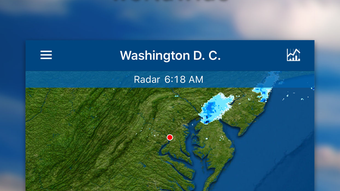
- Global Satellite & Animated Radar – Offers satellite imagery and animated radar coverage for the USA, Australia, and much of Europe, supporting dynamic storm tracking and precipitation monitoring.
User Interface, Workflow & Performance
WeatherPro Lite features a clean, modern interface optimized for the iPhone platform, emphasizing clarity and visual engagement. The layout is structured to present essential weather data at a glance, with intuitive navigation between locations and forecast timelines. Users can quickly switch between their favorite cities or view current conditions in their current location. The app incorporates smooth animations and transitions, enhancing the overall experience without compromising responsiveness. While specific performance metrics such as CPU or RAM usage were not disclosed, the app is described as lightweight, suggesting efficient resource management. The workflow is streamlined for daily use, allowing users to access forecasts, alerts, and additional content with minimal taps. Stability is expected to be consistent with standard iOS applications, though no official data on crash rates or background performance was provided. The developer did not specify resource usage details, so real-world behavior may vary depending on device configuration and network conditions.
Compatibility & System Requirements
WeatherPro Lite is designed for the iPhone platform and is available as a free download. The application is compatible with iOS devices supporting the latest versions of the operating system. The developer did not provide specific details regarding installation size or hardware requirements. Compatibility information was partially provided, indicating support for iPhone models capable of running the current iOS release. Exact system requirements were not listed, so users should ensure their device meets the minimum OS version required for the app to function. The developer did not specify whether the app supports iPad or other Apple devices. For users seeking precise compatibility details, it is recommended to check the App Store listing for the most up-to-date information.
Pros and Cons
Pros
- Free to download and use with no in-app purchase barriers
- Extensive global coverage across over 2 million locations
- Comprehensive 7-day forecasts with detailed meteorological data
- iCloud sync enables seamless access across multiple Apple devices
- Visual enhancements such as animations and live webcams improve engagement
- Supports Netatmo personal weather stations for hyper-local accuracy
- Includes animated radar and satellite imagery for key regions
Cons
- App is limited to iPhone; no support for iPad or other platforms
- Advanced radar and satellite features are restricted to select regions (USA, Australia, Europe)
- No information on background performance or battery impact
- Developer did not disclose exact file size or system requirements
- Some features like weather news and webcams may require consistent internet connectivity
FAQ Section
Is WeatherPro Lite available for free?
Yes, WeatherPro Lite is available as a free download on the iPhone App Store. The app does not require a paid subscription to access core features such as 7-day forecasts and global weather data.
Can I use WeatherPro Lite offline?
While the app may cache recent weather data for limited offline viewing, full functionality requires an active internet connection. Features such as live webcams, animated radar, and real-time alerts depend on continuous connectivity.
Does WeatherPro Lite support multiple devices?
Yes, users can sync unlimited favorite locations across devices using iCloud. This allows seamless access to weather information on multiple iPhones or Apple devices linked to the same account.
Is WeatherPro Lite safe to download?
Yes, the app is distributed through the official Apple App Store, which enforces strict security and privacy guidelines. As with any third-party app, users should ensure they are downloading from the verified source to maintain device security.
How often does WeatherPro Lite update its data?
The app updates weather data regularly throughout the day, typically every 15 to 30 minutes, depending on the source and location. Real-time alerts are triggered as new information becomes available from global meteorological networks.
Final Thoughts
WeatherPro Lite stands out as a visually appealing and functionally rich weather solution for iPhone users. With its extensive global coverage, reliable 7-day forecasts, and support for personalized location syncing, it caters well to both everyday users and weather-conscious individuals. The inclusion of real-time alerts, live webcams, and regional radar imagery adds significant value, especially for those monitoring dynamic weather patterns. While the app is limited to the iPhone platform and certain advanced features are region-restricted, its free access and lightweight design make it a compelling choice. For anyone seeking a trustworthy, feature-packed weather app on iOS, WeatherPro Lite delivers a strong performance. Download WeatherPro Lite now.








