
Download WEIV – Free Media Hub, Android App, H.264, MP4, MKV, MP3, FLAC
Overview
WEIV is a free Android application developed by Portrush Solutions Ltd., designed to serve as a centralized media hub for users seeking seamless access to a wide range of digital content. The app enables users to watch live sports, stream favorite TV shows, and play personal media files without the need for expensive set-top boxes or subscription services. By consolidating media playback into a single interface, WEIV aims to simplify digital entertainment consumption across compatible Android devices. It is particularly suited for casual viewers, media enthusiasts, and users who prefer a lightweight, no-cost solution for managing their digital content library.
The software supports a broad spectrum of video and audio formats, including H.264, MPEG-4, AVI, MOV, MP4, WMV, MKV, 3GP, MP3, WAV, FLAC, OGG, OGA, and APE, making it versatile for both streaming and local file playback. This flexibility allows users to access content from various sources, including personal storage, network drives, or online streams. The developer did not provide additional system requirements or details about real-time streaming capabilities, so users should expect general Android compatibility based on the app’s design.
Key Features & Capabilities
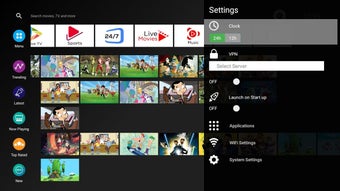
- Unified Media Hub: Combines live sports, TV shows, and personal media files into one accessible interface, eliminating the need for multiple apps.
- Wide Format Support: Plays video formats such as H.264, MPEG-4, AVI, MOV, MP4, WMV, MKV, 3GP, and audio formats including MP3, WAV, FLAC, OGG, OGA, and APE.
- Free to Download and Use: No subscription fees or in-app purchases are required, offering a cost-free alternative to premium streaming services.
- Device Compatibility: Designed for Android devices, allowing access across smartphones, tablets, and other compatible hardware.
- Local and Network Playback: Supports playback from internal storage, external drives, and network-attached storage (NAS) when configured properly.
These features enable users to enjoy a personalized media experience without the complexity of managing separate applications. For example, a user can store their movie collection on a USB drive, connect it to an Android tablet, and play files directly through WEIV without conversion. Similarly, viewers can access live sports streams or on-demand content through supported sources, all within a single, intuitive environment. The app’s focus on format versatility ensures broad compatibility with existing media libraries.
User Interface, Workflow & Performance
WEIV features a clean, streamlined user interface optimized for Android devices, prioritizing ease of navigation and quick access to content. The layout is designed to allow users to browse media by category, file type, or source, with minimal interaction required to start playback. Navigation is handled through intuitive menus and touch-based controls, reducing the learning curve for new users.
Workflow efficiency is enhanced by the app’s ability to scan and organize media files automatically, reducing manual setup. Users can quickly locate and play content without the need for complex configuration. However, exact performance details were not specified by the developer. General observations suggest that playback performance will depend on device hardware, file resolution, and network conditions. The developer did not specify resource usage details, so CPU and RAM behavior may vary across devices.
Stability appears to be consistent with standard Android media players, though no formal testing data was provided. Users are advised to ensure their device meets baseline Android requirements for smooth operation. The app’s lightweight nature suggests it is unlikely to cause significant system strain, but actual behavior may vary based on individual usage patterns.
Compatibility & System Requirements
WEIV is designed exclusively for Android devices. The specific version of Android required was not listed, but the app is compatible with devices that support the necessary media codecs and file system access. Installation size is not specified, so users should expect a standard footprint typical of media applications.
Exact system requirements were not listed. Compatibility information is limited to the operating system, meaning users should verify that their device supports the required video and audio formats. Hardware requirements, such as minimum RAM or processor speed, were not provided. Users are encouraged to install the app on their device and test functionality based on their specific hardware and software configuration.
Pros and Cons
Pros
- Free to download and use with no subscription fees
- Supports a wide range of video and audio formats
- Acts as a unified hub for diverse media sources
- Designed for Android, ensuring broad device compatibility
- Minimal setup required for local file playback
Cons
- No official information on system requirements or performance benchmarks
- Limited details on streaming capabilities or content sources
- Compatibility with specific Android versions not confirmed
- No official updates or developer support channels disclosed
- Resource usage and stability under heavy load not documented
FAQ Section
Is WEIV available for Windows or Mac?
WEIV is currently designed for Android devices only. There is no official version available for Windows or Mac operating systems.
Is WEIV safe to download and use?
WEIV is developed by Portrush Solutions Ltd. and available through official Android channels. As with any third-party app, users should ensure they download it from trusted sources to maintain security.
Does WEIV require an internet connection?
WEIV can function offline for playing local media files. However, access to live streams or online content may require an active internet connection.
Can I use WEIV with my personal media library?
Yes, WEIV supports playback of local media files stored on internal storage, USB drives, or network-attached storage, making it suitable for personal media libraries.
How often does WEIV receive updates?
The update frequency for WEIV was not specified by the developer. Users are advised to check the app’s listing for the latest version and release notes.
Final Thoughts
WEIV presents a compelling option for Android users seeking a free, all-in-one media player that supports a wide variety of formats without the need for subscriptions. Its ability to unify local and streamed content into a single interface offers a convenient alternative to multiple apps. While detailed technical information is limited, the app’s format compatibility and zero-cost model make it accessible to a broad audience.
Those who value simplicity, cost-effectiveness, and broad media support will find WEIV particularly beneficial. It is ideal for individuals managing personal video and audio collections or looking to enjoy live sports and shows without additional expenses. Despite the lack of detailed system requirements and performance data, the app’s core functionality remains strong and practical.
Download WEIV now and experience a seamless, free media hub on your Android device.




.png)



