
Download WideMail – widescreen Mail.app plugin for macOS
Overview
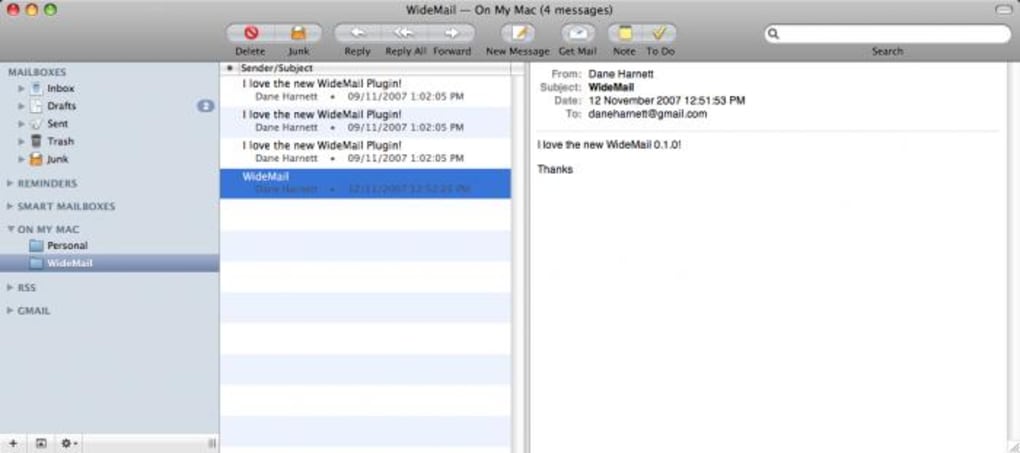
WideMail is a third‑party plug‑in that completely reshapes Apple’s native Mail.app into a widescreen‑friendly, two‑column layout. While the default Mail interface relies on a horizontal three‑pane view (mailbox list, message list, message preview), WideMail flips that design into a vertical split that mimics the look of Microsoft Exchange or many modern web‑mail services. The result is a more spacious, glanceable workspace where your inbox and message content sit side‑by‑side, making it easier to scan, sort, and reply to large volumes of email without constantly scrolling between panes. The plug‑in integrates directly into the Apple Mail preferences, giving you full control over column width, colour scheme, line spacing and font style. Although the plug‑in is not officially supported by Apple, it fills a long‑standing gap in macOS’s email experience: the ability to toggle between horizontal and vertical layouts on‑the‑fly. Users who spend the bulk of their day reading and composing messages report a noticeable boost in productivity, especially on widescreen iMacs and external 4K monitors. WideMail is distributed as a free download, but the developer encourages donations to fund ongoing updates and bug‑fixes. Keep in mind that, like many community‑driven extensions, stability can vary between macOS releases; occasional crashes may occur, particularly after major OS upgrades. Nonetheless, for anyone who craves a more flexible, full‑screen email workspace, WideMail offers a compelling, low‑cost solution.
Key Features and Benefits
- Vertical two‑column view: Transforms the default three‑pane layout into a side‑by‑side mailbox and message preview, maximizing use of widescreen monitors.
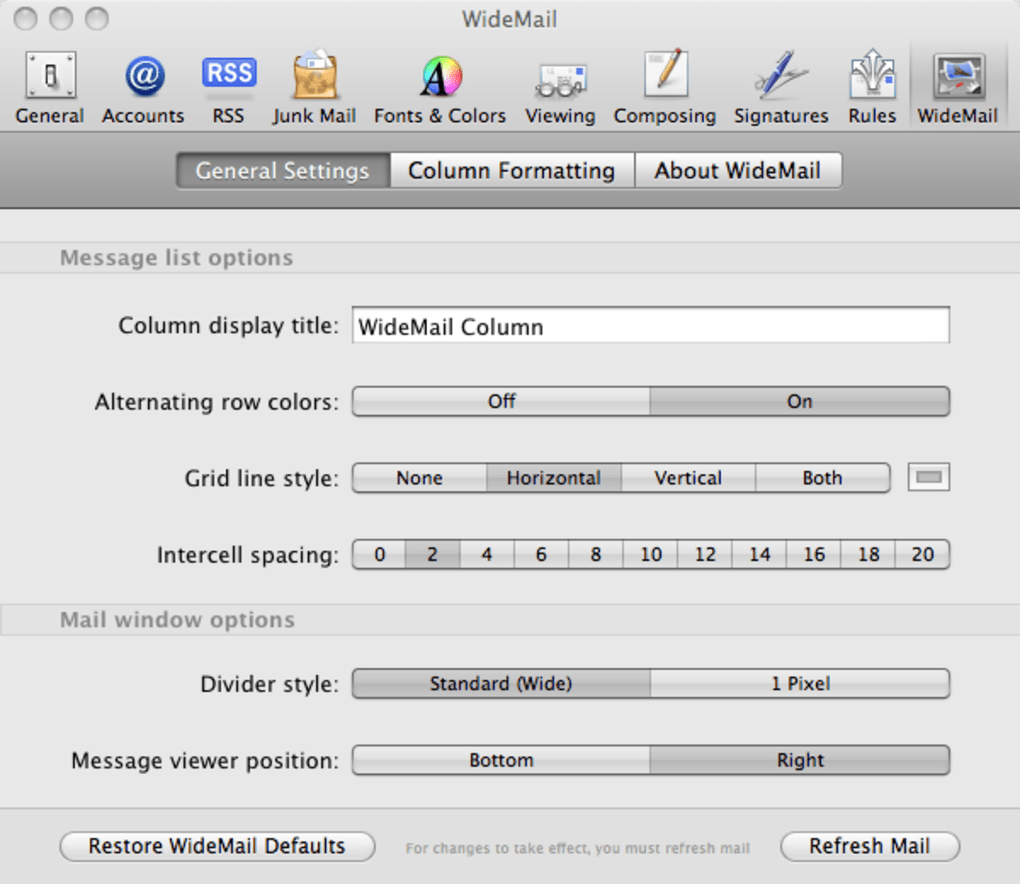
- Customisable column width and spacing: Adjust the proportion of the mailbox list versus the preview pane directly from Mail preferences.
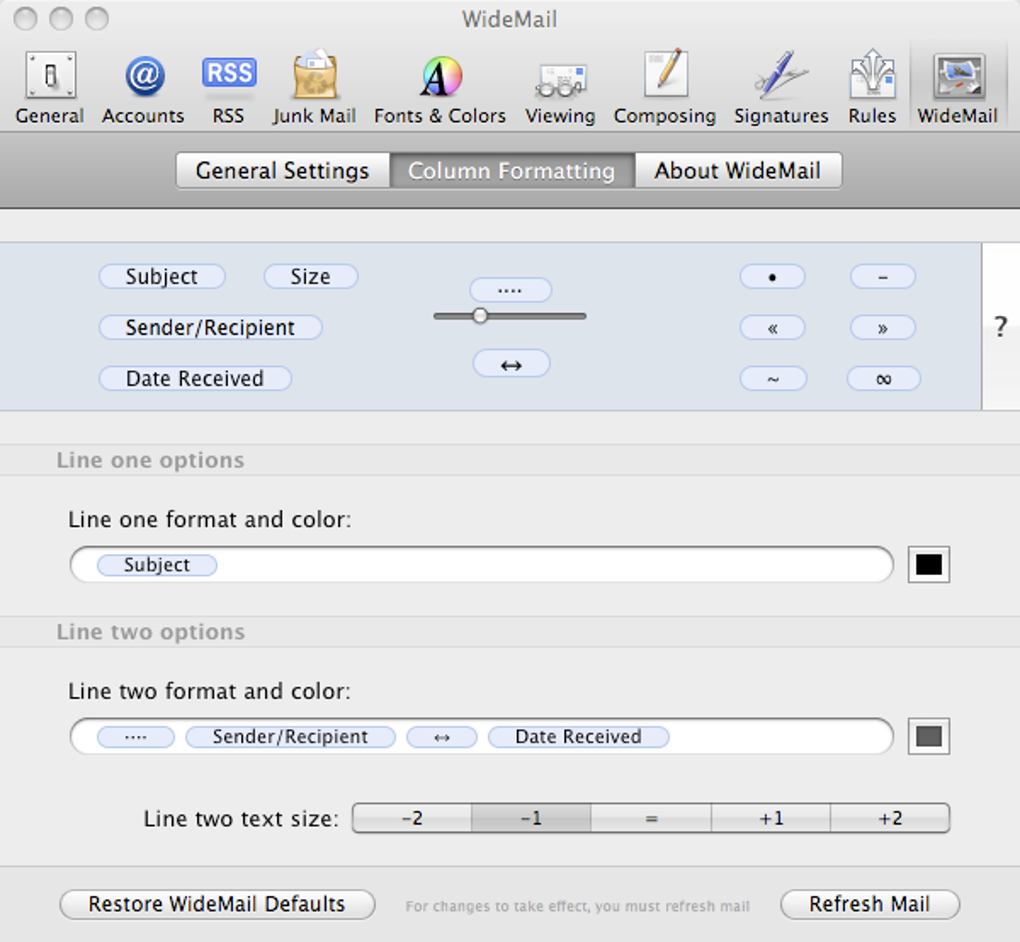
- Colour and style options: Choose from light, dark, or custom colour palettes; modify font size, line height and background shading for optimal readability.
- Full‑screen optimisation: Enables a true full‑screen mode where the plug‑in hides the macOS menu bar and Dock, providing an immersive email experience without distraction.
- Seamless integration with existing Mail rules: All Smart Mailboxes, rules and signatures remain functional, ensuring no workflow disruption.
- Easy toggle between layouts: Switch back to Apple’s default horizontal view with a single click, giving you flexibility for occasional one‑off tasks.
- Lightweight and free: The plug‑in adds only a few megabytes to your system and does not require a subscription, making it an economical upgrade for any macOS user.
Beyond the raw feature list, WideMail delivers tangible productivity gains. Email power users often complain about “screen real estate” when using a traditional three‑pane layout on a 16:9 monitor; the middle pane (message list) can dominate the screen, leaving the preview area cramped. By re‑orienting the interface vertically, WideMail lets you read longer emails without scrolling, while still keeping the folder hierarchy visible. This arrangement mirrors the layout of many popular web‑mail services (Gmail, Outlook.com), reducing the learning curve for users transitioning between platforms. Additionally, the plug‑in’s custom colour schemes can alleviate eye strain during long sessions, especially when paired with macOS’s Night Shift mode. For teams that rely on rapid email triage—such as support desks, sales reps, or developers—WideMail can shave seconds off each message handling cycle, translating into noticeable time savings over weeks and months.
Installation, Usage & Compatibility
Step‑by‑step installation guide
- Visit the official WideMail download page and click the Download for macOS button.
- Once the
.dmgfile finishes downloading, open it and drag theWideMail.pluginfile into the/Library/Mail/Bundles/folder (you may need administrator rights). - Restart Apple Mail. A new “WideMail” entry will appear under the Mail > Preferences > General tab.
- Check the box labeled “Enable WideMail vertical view” and click Apply.
- Close the preferences window; the Mail interface will automatically reload in the new two‑column layout.
How to use WideMail effectively
After activation, you’ll notice the mailbox list now occupies the left side of the window, while the message preview occupies the right. To fine‑tune the layout, go back to Mail > Preferences > WideMail. Here you can slide the “Column Width” bar to allocate more space to either pane, select a colour theme, and adjust the line spacing for the preview pane. For users who switch between multiple monitors, the plug‑in remembers the last used settings per display, allowing you to have a compact view on a laptop screen and a spacious view on a 27‑inch iMac.
Supported operating systems
WideMail is built for macOS 10.15 (Catalina) and later, including macOS Ventura and macOS Sonoma. While the plug‑in works on both Intel‑based Macs and Apple Silicon (M1, M2, etc.), users on older macOS versions (e.g., Mojave) may need to upgrade or use a legacy version of the plug‑in that is no longer actively maintained.
Stability considerations
Because WideMail modifies core Mail UI components, occasional instability can arise—especially after a major macOS update that changes Mail’s internal APIs. The developer recommends keeping a backup of your Mail preferences and disabling the plug‑in temporarily if you encounter crashes. In most cases, a simple reinstall after an OS update restores full functionality. The community forum is active, and users often share quick fixes for version‑specific issues. Overall, while not 100 % crash‑proof, WideMail provides a reliable experience for daily email work when kept up‑to‑date.
Pros, Cons & Frequently Asked Questions
Pros
- Transforms Mail.app into a widescreen‑optimised, vertical layout.
- Fully customisable colours, fonts and column widths.
- Free download with optional donation support.
- Works seamlessly with existing Mail rules, signatures and Smart Mailboxes.
- Easy toggle back to Apple’s default view.
Cons
- Potential instability after macOS updates; occasional crashes reported.
- Not officially supported by Apple, so troubleshooting relies on community help.
- Limited to macOS; no Windows, Android or iOS version available.
- Advanced customisation requires editing a hidden preferences file for power users.
FAQ – WideMail
Is WideMail compatible with macOS Ventura?
Yes. The latest WideMail release (v2.4) has been tested on macOS Ventura and works without issues. Users should download the most recent version from the official site to ensure compatibility.
Can I use WideMail on an M1 Mac?
Absolutely. WideMail runs natively on Apple Silicon, and performance is comparable to Intel Macs. No Rosetta translation is required.
Will WideMail affect my existing email accounts or signatures?
No. WideMail only modifies the visual layout of Mail.app. All accounts, signatures, rules and Smart Mailboxes remain untouched.
How do I revert to the default Mail.app layout?
Open Mail > Preferences > WideMail and uncheck “Enable WideMail vertical view.” Restart Mail.app and the classic three‑pane layout returns.
Is there a paid version of WideMail with additional features?
Currently WideMail is offered as a free plug‑in. The developer has hinted at a future “Pro” tier that may include advanced theming and automated backup tools, but as of now no paid version exists.
Overall, WideMail earns a solid four‑star rating. Its visual overhaul and customisation options dramatically improve the Mail.app experience on modern widescreen Macs, while the occasional stability hiccup keeps it from a perfect score. For power users who value flexibility over guaranteed stability, WideMail is a worthwhile addition.
Conclusion & Call to Action
If you spend a large portion of your day navigating through inboxes, the default three‑pane Mail.app layout can feel cramped on large monitors. WideMail solves that problem by delivering a clean, vertical two‑column interface that maximises screen real estate, lets you read messages in full‑screen mode, and offers deep visual customisation—all without costing a dime. While the plug‑in isn’t officially supported by Apple and may exhibit occasional instability after major OS upgrades, the active community and straightforward reinstall process keep downtime to a minimum. In short, WideMail bridges a long‑standing gap in macOS’s email ecosystem, giving users the choice between horizontal and vertical views. Download WideMail today, give your Mail.app a fresh widescreen makeover, and experience a smoother, more productive email workflow.
Click here to download WideMail now and start using a more efficient Mail.app layout instantly.








