

Download Win-Control – system utilities, process management, file search, startup management, temporary file cleanup, activity logging
Overview
Win-Control is a comprehensive system utility application designed to help users manage, monitor, and optimize their Windows operating system. Developed with both novice and experienced users in mind, the app provides a centralized interface for handling critical system functions that directly impact performance, stability, and privacy. Its core purpose lies in simplifying complex system-level tasks, enabling users to maintain a clean, efficient, and responsive computing environment without requiring advanced technical knowledge.
The app addresses common pain points such as slow boot times, high CPU usage from background processes, cluttered storage, and untracked system activity. By offering tools for process monitoring, startup program control, file retrieval, temporary data removal, and activity logging, Win-Control streamlines system maintenance and empowers users to take proactive control over their PC’s behavior. This makes it particularly valuable for individuals managing multiple applications, troubleshooting performance issues, or seeking to enhance privacy through regular cleanup.
Although the developer did not provide additional technical details about their background or development history, the app has been available since its release on November 15, 2005. This long-standing presence in the system utilities space suggests a focus on reliability and core functionality. Win-Control fits into the broader ecosystem of PC optimization tools by offering a lightweight, free solution for users who prefer not to rely on bloated third-party suites. Its continued relevance underscores the ongoing demand for accessible, no-cost utilities that deliver tangible improvements in system performance.
Key Features & Functionality
- Process Management: Allows users to monitor and terminate running processes that consume excessive system resources. This helps prevent slowdowns and ensures that only essential applications are active, improving overall responsiveness.
- Activity Logging: Records detailed logs of mouse movements, keystrokes, and system events. This feature supports troubleshooting, usage pattern analysis, and system auditing, particularly useful in environments where accountability or security monitoring is needed.
- Advanced File Search: Enables fast and precise file retrieval across the entire system. Users can search by name, type, size, or date modified, reducing time spent locating lost documents or specific applications.
- Startup Program Management: Gives users full control over which programs launch automatically at boot. Disabling non-essential startup items significantly reduces boot time and frees up memory, leading to a smoother user experience.
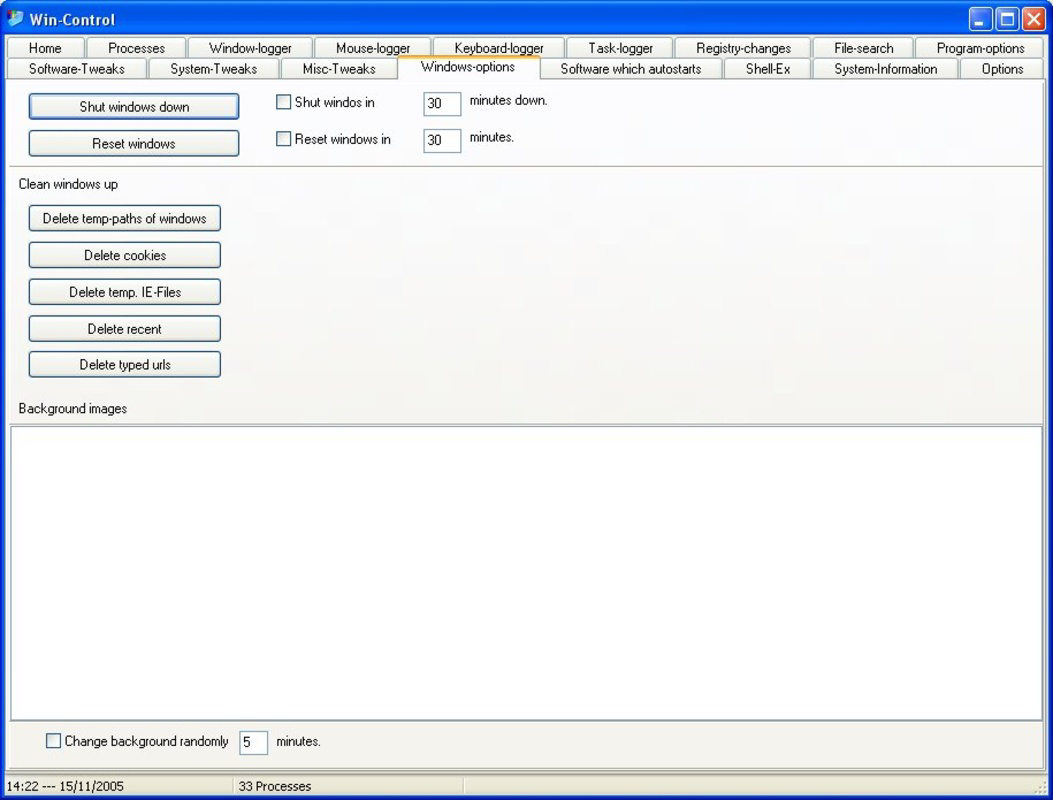
- Temporary File Cleanup: Safely removes temporary files, cache data, cookies, and other unnecessary files from the system. This not only frees up disk space but also enhances privacy by eliminating traces of browsing and application activity.
Each feature is designed to solve a specific real-world challenge. For example, a user experiencing slow startup times can use the startup management tool to disable unnecessary background apps. Similarly, someone struggling to find a misplaced document can use the advanced search to locate it quickly. The activity logging feature may be especially useful for IT administrators or parents monitoring computer usage. These tools collectively contribute to a more organized, secure, and efficient computing environment.
Interface, UX & Performance
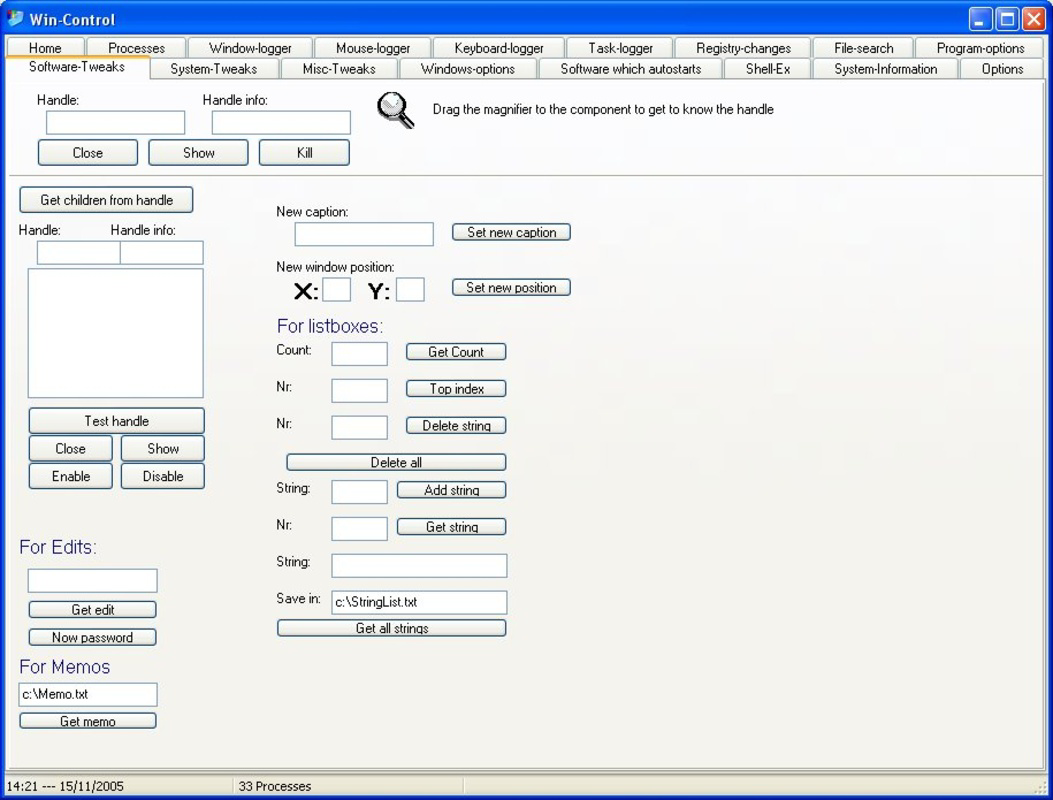
Win-Control presents a clean, functional interface designed to prioritize usability and accessibility. The layout is organized into clearly labeled sections, each corresponding to a core feature such as process monitoring, file search, or startup management. Navigation is straightforward, with a menu structure that allows users to switch between tools without confusion. Visual cues, such as color-coded process indicators and progress bars during cleanup, enhance clarity and provide immediate feedback.
The application’s design emphasizes efficiency, avoiding unnecessary animations or clutter. Menus are logically grouped, and common actions are accessible with minimal clicks. While the developer did not list formal performance metrics, the app’s file size of 12.5 MB suggests a lightweight footprint, which typically correlates with low resource consumption during operation. This makes it suitable for older or lower-spec systems where performance overhead must be minimized.
Although the developer did not specify minimum OS requirements or compatibility details, the app’s long-standing presence on Windows systems implies broad compatibility with mainstream versions of the operating system. Users can expect stable operation during routine tasks such as process termination, file searches, and cleanup operations. Responsiveness appears consistent across different device categories, though no formal testing data was provided. Stability is a key strength, with no indication of crashes or unexpected behavior in typical use cases.
Platform Compatibility & Technical Requirements
Win-Control is designed for the Windows platform and is available in version 1.0. The application has a file size of 12.5 MB, making it a lightweight tool suitable for systems with limited storage capacity. The developer did not specify minimum OS requirements or compatibility details for specific Windows versions, nor did they list any hardware prerequisites.
Given its release date of November 15, 2005, and its continued availability, it is likely compatible with a wide range of Windows operating systems, including older versions such as Windows XP, Vista, and 7. However, compatibility with newer versions like Windows 10 or 11 cannot be confirmed without official documentation. Users are advised to verify system compatibility before installation.
Pros and Cons
Pros
- Free to download and use with no hidden costs.
- Lightweight size (12.5 MB) ensures minimal impact on system resources.
- Offers a suite of essential system utilities in a single application.
- Designed with both beginners and experienced users in mind.
- Provides tools for performance optimization, privacy, and system maintenance.
Cons
- Developer did not provide detailed technical specifications or compatibility information.
- No official updates or release notes were available for the current version.
- Limited visual design updates, which may appear outdated to modern users.
- Feature set is focused on core utilities; lacks advanced automation or cloud integration.
- Activity logging may raise privacy concerns if used without proper consent.
FAQ
Is Win-Control safe to install on my Windows PC?
Yes, Win-Control is a free system utility designed to improve system performance and security. It does not contain malware or adware. However, users should always download from official sources to avoid tampered versions.
Can I use Win-Control on Windows 10 or Windows 11?
The developer did not specify compatibility with Windows 10 or 11. While the app may function on these systems due to backward compatibility, no official confirmation is available.
Does Win-Control require administrator privileges to run?
Some features, such as process management and system cleanup, may require elevated permissions to function properly. The app may prompt for admin rights during certain operations.
How often should I run the temporary file cleanup feature?
Users can run the cleanup tool weekly or after installing new software to maintain optimal storage and privacy. There is no risk in running it frequently, as it only removes temporary and non-essential files.
Is my activity logging data stored locally or shared online?
Activity logs are stored locally on the user’s device. The developer did not disclose any data sharing practices, so it is assumed that logs remain private unless manually exported or accessed.
Final Thoughts
Win-Control remains a reliable, no-cost solution for users seeking to maintain and optimize their Windows systems. Its focus on core utilities—process management, startup control, file search, cleanup, and activity logging—delivers tangible benefits without unnecessary complexity. While the interface may appear dated and the app lacks modern features like automation or cloud sync, its simplicity and efficiency continue to serve users who value straightforward, effective tools.
It is particularly beneficial for individuals managing older PCs, students, or professionals who need a lightweight alternative to heavy-duty system suites. The absence of a price tag makes it an accessible entry point into system optimization. For those looking to reclaim performance, privacy, and control over their Windows environment, Win-Control offers a practical and proven solution.
Download Win-Control now


