
Fix Reddit Server Error Fast With These Simple Steps


 3 min. read
  Published on

Reddit server errors can stop you from browsing your favorite communities and reading posts. However, steps below will help you restore access quickly.
Table of contents
How can I fix Reddit server error?
1. Check if Reddit is down
- Open your browser and search for “Reddit status” on a trusted outage tracker.
- Review the latest reports to confirm if others face the same problem.
- If a major outage is reported, wait for Reddit to resolve it.
You can also review detailed tips for the Reddit connection failure issue if the site will not load at all.
2. Restart your internet connection
- Turn off Wi Fi on your device or unplug your router and modem.
- Wait 30 to 60 seconds before turning the equipment back on.
- Reconnect to the internet and try opening Reddit again.
If problems persist, check whether your network has restrictions. Some users encounter messages like your request has been blocked due to network policy, which can indicate a controlled or filtered connection.
3. Clear browser cache and cookies
- Open your browser settings.
- Go to the Privacy and security section.
- Select Clear browsing data.

- Check Cookies and cached images, then confirm.
- Restart the browser and reload Reddit.

If errors continue after clearing data, some setups may show a Reddit user agent error. Adjusting browser settings or testing another browser can help.
4. Try a different browser or device
- Install another browser such as Edge, Chrome, or Firefox.
- Log in to Reddit in the new browser.
- If it works there, update or reinstall your main browser.
5. Disable VPN or proxy
- Open your VPN or proxy settings.
- Disconnect from the current server or disable the service.
- Refresh Reddit to check if the error is resolved.
6. Update the Reddit app
- Open the App Store or Google Play Store.

- Search for Reddit.
- Tap Update if a newer version is available.
- Relaunch the app and try again.

7. Reinstall Reddit app
- Uninstall the Reddit app from your device.
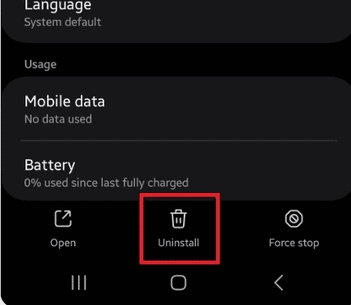
- Restart your phone or tablet.
- Reinstall Reddit from the official app store.
- Sign in with your account again.

FAQ
It often happens because Reddit’s servers are overloaded, under maintenance, or your internet connection is unstable.
Yes, some VPN servers are blocked. Disabling the VPN or switching servers can help confirm if it is the cause.
Use a reliable status tracker to see if there are widespread reports that match your local time.
If nothing helps, it is likely a platform side issue. Waiting for an official fix is the best option.
Conclusion
A Reddit server error can interrupt your browsing, but most cases are temporary. By checking the platform’s status, refreshing your connection, clearing browser data, or reinstalling the app, you can usually solve the problem in minutes. If the issue stems from a broader outage, the most effective step is to wait for service to be fully restored.

Read our disclosure page to find out how can you help Windows Report sustain the editorial team. Read more



Improve this guide





User forum
0 messages