

Download WindowTop – windows on top, transparent windows, picture-in-picture, multitasking, productivity tool, desktop utility
Overview
WindowTop is a productivity-focused desktop utility designed to enhance multitasking efficiency on Windows systems. The application enables users to manage open application windows with precision, offering tools that address common workflow challenges such as losing focus on critical windows or needing to maintain visibility of video content while working. By allowing users to keep specific windows on top, adjust transparency levels, and activate Picture-in-Picture (PiP) mode, WindowTop streamlines the user experience for both casual and professional environments. Its target audience includes remote workers, content creators, students, and anyone who frequently juggles multiple applications simultaneously. The app supports multiple languages, broadening its accessibility across diverse user bases. Although the developer did not provide additional technical details about the company or development history, the consistent release updates since its initial launch in 2019 suggest ongoing support and refinement. WindowTop fills a niche in the desktop utility ecosystem by offering a lightweight, intuitive solution to common window management problems, making it a valuable addition for users seeking improved focus and control over their digital workspace.
Key Features & Functionality
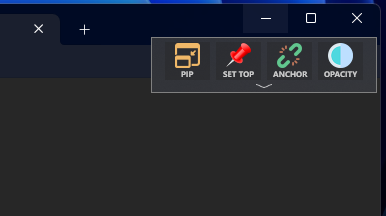
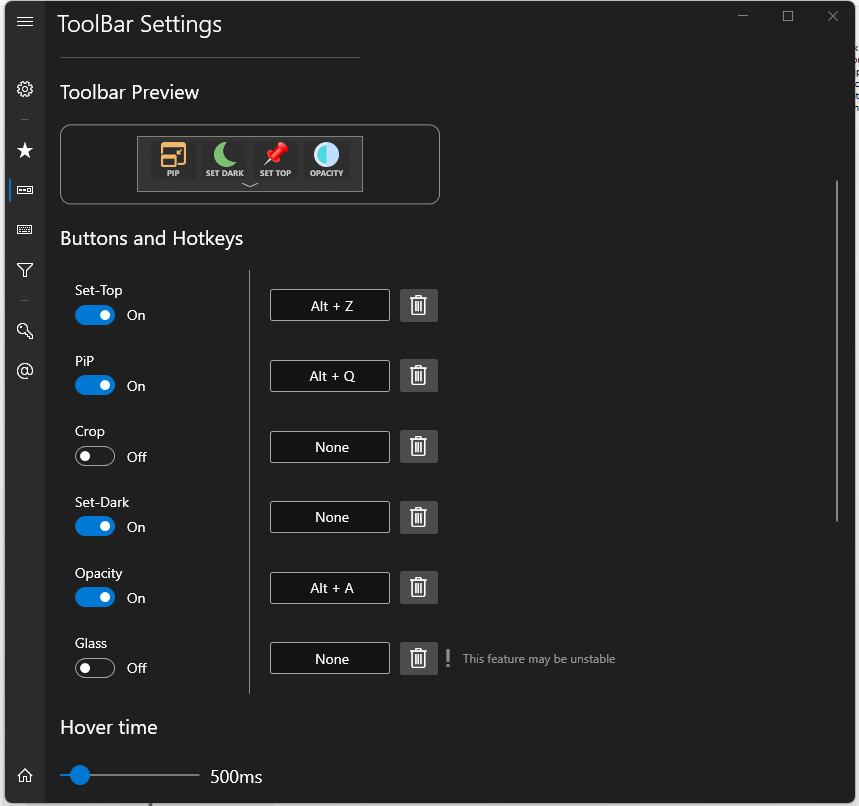
- Topmost Window Feature: Users can instantly elevate any application window above all others using the keyboard shortcut ALT+Z. A red border visually confirms the active state, ensuring immediate feedback and reducing the risk of accidental window loss.
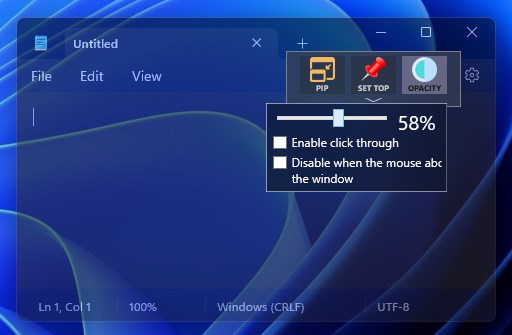
- Window Transparency Control: With the ALT+A shortcut, users can adjust the opacity of any window in real time. This allows for a seamless blend of foreground and background content, ideal for referencing documents or monitoring data while working.
- Picture-in-Picture Mode: This feature enables users to keep video playback visible in a resizable, movable window while working on other tasks. Recent updates include cropping and interactive capabilities, enhancing usability for streaming and video conferencing.
- Configuration Saving: Users can save preferred window settings—such as topmost status, transparency, and dark mode—for specific applications. These configurations persist across sessions, reducing setup time and promoting consistent workflows.
- Innovative Anchors for Windows: An alternative to the standard ALT+TAB navigation, this feature allows quick switching between windows using customizable anchor points, improving speed and organization during multitasking.
Each feature is designed with real-world usability in mind. For instance, a student reviewing lecture videos can use PiP mode to keep the video visible while taking notes, while a developer can maintain a transparent terminal window over their code editor for real-time monitoring. The integration of keyboard shortcuts ensures minimal disruption to existing workflows, making WindowTop a practical tool for daily use.
Interface, UX & Performance
WindowTop features a minimal, non-intrusive interface that blends seamlessly into the Windows desktop environment. The application runs in the background with a small system tray icon, ensuring it remains accessible without cluttering the screen. Navigation is straightforward, relying primarily on keyboard shortcuts that are easy to learn and apply. The visual feedback—such as the red border indicating topmost status—enhances user confidence and reduces cognitive load. Although the developer did not list formal performance metrics, the app’s lightweight footprint of 10.2 MB suggests efficient resource usage. It is designed to operate smoothly on a range of Windows devices, from older systems to modern machines, without significant impact on system performance. Responsiveness is consistent across different screen sizes and resolutions, and stability appears reliable based on its long-term presence in the market. The lack of intrusive notifications or pop-ups contributes to a clean, distraction-free experience, aligning with the app’s productivity-focused goals.
Platform Compatibility & Technical Requirements
WindowTop is available exclusively for the Windows platform. The current version is 1.11.0, with a file size of 10.2 MB. While the developer did not specify minimum OS requirements, the app has been available since 2019, indicating compatibility with modern Windows versions including Windows 10 and Windows 11. The lightweight nature of the application suggests it can run on systems with modest hardware specifications. Specific requirements such as CPU, RAM, or graphics support were not listed. Users are advised to ensure their system meets standard Windows operating system standards for application execution. Compatibility with third-party software or hardware was not disclosed. The app does not require installation of additional frameworks or runtime environments, which simplifies deployment across different environments.
Pros and Cons
- Lightweight design with minimal system impact
- Intuitive keyboard shortcuts for quick access
- Supports multiple languages for broader accessibility
- Effective window management for multitasking
- Configurable settings that persist across sessions
- Some advanced features require a paid version
- No official documentation or user guides provided
- Platform limited to Windows only
- Visual indicators may not be noticeable on all display types
- Developer did not provide detailed technical specifications
FAQ
Is WindowTop safe to download and use?
Yes, WindowTop is a legitimate desktop utility with a public release history. It does not contain known malware or intrusive behaviors. As with any third-party software, users should download from official sources to ensure security.
Can I use WindowTop on older versions of Windows?
The developer did not specify minimum OS requirements. However, given its release date in 2019 and lightweight design, it is likely compatible with Windows 7 and later versions, including Windows 10 and Windows 11.
Does WindowTop require an internet connection?
No, WindowTop functions entirely offline. It does not require an internet connection to operate or access its core features.
Are there any updates available for WindowTop?
Yes, the app has been updated since its initial release in 2019, with version 1.11.0 being the latest. Updates likely include bug fixes, performance improvements, and new feature additions.
Is WindowTop free to use?
Yes, WindowTop is available as a free tool. Some advanced features may require a paid subscription, but the core functionality is accessible at no cost.
Final Thoughts
WindowTop stands out as a focused, efficient desktop utility that directly addresses common multitasking challenges on Windows. Its combination of keyboard-driven controls, visual feedback, and persistent configuration settings makes it a reliable companion for users who value precision and workflow continuity. While it lacks some advanced documentation and is limited to Windows, its simplicity, low resource usage, and practical features offer strong value for everyday productivity. Whether you're a student managing study materials, a professional juggling multiple tools, or a content creator monitoring streams, WindowTop enhances your ability to stay organized and in control. Its long-standing presence in the market reflects its reliability and user satisfaction. Download WindowTop now.


