
Winker: Streamline Condo Management
Overview
Winker is a free iPhone application designed to streamline condominium management through automation and digital transparency. Developed by Rede Domus LTDA - ME, the app targets residential communities seeking to improve internal communication, operational efficiency, and resident engagement. It serves as a centralized platform for managing daily routines such as visitor authorization, party hall reservations, move scheduling, and access to essential documents like bylaws and financial reports.
The app enables residents to interact directly with condo managers, receive real-time notifications about package deliveries, and monitor security camera feeds. Financial transparency is a core feature, supported by an interactive balance sheet that simplifies access to monthly fees, maintenance schedules, and contract details. Residents can also pay dues, manage fines, and register service providers through the app’s integrated system.
Winker’s functionality extends to utility tracking, including water and gas meter readings, and integration with remote doorman systems and access controls. All messages are tracked with delivery and read status, ensuring accountability. However, access requires that the condominium already be registered in Winker’s database, meaning individual users cannot initiate registration independently.
Key Features & Capabilities
- Visitor Authorization – Residents can approve guest entries remotely, improving security and convenience.
- Party Hall & Move Scheduling – Users can reserve shared spaces and schedule moves directly through the app.
- Financial Transparency – Interactive balance sheet provides real-time access to condo finances, contracts, and maintenance costs.
- Monthly Fee Payments – Residents can view and pay their dues in-app, reducing administrative overhead.
- Security Camera Access – Authorized users can view live or recorded footage from the building’s surveillance system.
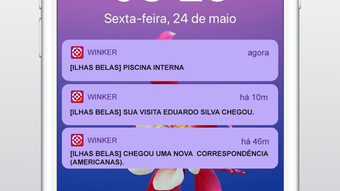
- Staff Directory & Notifications – Access to a list of condo staff and real-time alerts for package arrivals and other updates.
- Service Provider Registration – Condo administrators can register and manage vendors and maintenance teams.
- Utility Tracking – Track and submit water and gas meter readings digitally.
- Remote Access Control Integration – Works with doorman systems and electronic access points for seamless entry.
- Message Tracking – All communications generate notifications and include delivery and read status visibility.
These features collectively support a more organized, secure, and transparent living environment. For example, a resident can authorize a delivery driver’s entry while away from home, check the status of a maintenance request, and pay their monthly fee—all within the same app. The integration of financial data and access control enhances trust and operational efficiency across the community.
User Interface, Workflow & Performance
Winker features a clean, intuitive interface tailored for mobile use on iPhone devices. Navigation is structured around core functions such as communications, scheduling, finance, and security, allowing users to access key tools with minimal taps. The layout emphasizes clarity, with clearly labeled sections and consistent iconography.
Workflow efficiency is enhanced by the app’s centralized design—residents can complete multiple tasks without switching between platforms. For instance, a user can review the monthly fee summary, approve a visitor, and check the security feed in under a minute. The app’s performance is optimized for iOS, ensuring smooth transitions between screens and responsive interactions.
Resource usage details were not specified by the developer. However, the app’s 45.7 MB size suggests a lightweight footprint, which typically correlates with efficient memory and CPU usage on modern iPhones. Stability and uptime are expected to align with standard iOS application standards, though real-world performance may vary based on device model and network conditions.
Compatibility & System Requirements
Winker is designed exclusively for iPhone devices and runs on iOS, as specified in the product details. The current version is 1.0.0, with an installation size of 45.7 MB. The developer did not provide additional system requirements, including minimum iOS version or hardware specifications.
Compatibility information is limited to the platform and version listed. Users should ensure their device meets Apple’s standard requirements for running the latest iOS updates. The app’s reliance on backend services means that full functionality may depend on a stable internet connection and proper configuration by the condominium administrator.
Pros and Cons
Pros
- Free to download and use, reducing entry barriers for condominiums.
- Comprehensive suite of tools for resident communication and management.
- Integrated financial transparency with an interactive balance sheet.
- Supports remote access control and security camera viewing.
- Centralized platform for payments, scheduling, and document access.
- Real-time notifications and message tracking improve accountability.
Cons
- Requires condo-level registration; individual users cannot join independently.
- Limited to iPhone; no support for Android or desktop platforms.
- Exact system requirements were not disclosed by the developer.
- Performance details and resource usage were not specified.
- Dependent on administrator setup for full functionality.
FAQ Section
Is Winker available for Android devices?
Winker is currently designed exclusively for iPhone. There is no official Android version available at this time.
Can I use Winker if my condominium is not registered?
No. Registration as a resident requires that the condominium already be registered in Winker’s database. Individual users cannot initiate the registration process.
Is the app secure and private?
Winker ensures secure communication through encrypted messaging and access controls. All data is managed within the app’s ecosystem, and access is restricted to authorized residents and staff.
How often does Winker receive updates?
Update frequency is not publicly specified. However, the developer may release updates to improve functionality, security, and compatibility with new iOS versions.
Can I use Winker offline?
While some features may be accessible offline, full functionality—such as real-time notifications, message tracking, and access to live camera feeds—requires an active internet connection.
Final Thoughts
Winker offers a powerful, free solution for condominiums aiming to modernize their management systems. Its blend of communication tools, financial transparency, and access control integration creates a seamless experience for residents and administrators alike. The app’s focus on automation and real-time updates enhances trust and efficiency within residential communities.
While limited to iPhone users and dependent on condo-level registration, its core features are well-aligned with the needs of modern co-living environments. For condominiums seeking a centralized, secure, and cost-effective platform, Winker delivers strong value.
Download Winker now to experience smarter, more transparent condominium management.








