
With同屏 – Share Moments with Loved Ones
Overview
With同屏 is a social networking application designed specifically for couples and friends seeking to strengthen their connections through shared digital experiences. Developed by Shanghai Liangma Network Technology Company Limited, the app operates exclusively on iPhone devices and aims to bridge physical distances by enabling real-time joint activities. Users can watch videos, listen to music, browse social media, and shop online simultaneously while maintaining live chat communication. This synchronized interaction model allows individuals to engage in everyday digital routines together, even when geographically separated. The app's core purpose lies in fostering emotional closeness through shared entertainment and social engagement, offering a unique alternative to traditional messaging or video calling. It targets users who value emotional connection and seek innovative ways to maintain intimacy in long-distance relationships or distant friendships. While the developer did not provide additional details about the app’s background or development philosophy, its functionality suggests a focus on seamless collaboration across common digital platforms. Real-world usage scenarios include watching a movie together during a virtual date, shopping for gifts while chatting, or enjoying music playlists in sync with a partner or friend.
Key Features & Capabilities
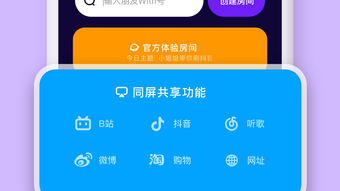
- Real-time synchronized video playback – Users can start watching the same video content at the same time, with playback synced across devices, enabling shared viewing experiences.
- Live group chat during shared activities – Integrated messaging allows users to communicate in real time while engaging in joint tasks such as browsing or shopping.
- Co-browsing social media platforms – The app enables users to explore social media content together, enhancing shared discovery and conversation.
- Collaborative online shopping – Friends or partners can browse and purchase items simultaneously, making shopping a joint activity.
- Music sharing with synchronized playback – Users can build and play music playlists together, with songs switching in sync across devices.
- Monthly subscription model – A premium tier offers access to enhanced features, though specific details were not disclosed.
These capabilities support a range of practical use cases, such as planning a trip by jointly exploring travel websites, enjoying a concert stream together, or creating a shared playlist for a virtual hangout. The integration of multiple digital activities into one platform reduces the need to switch between apps, improving workflow efficiency. The real-time chat function ensures continuous interaction, making the experience feel more immersive and personal. While the developer did not specify technical implementation details, the features suggest a focus on low-latency synchronization and stable connectivity. The app’s design emphasizes usability and accessibility, catering to users who may not have advanced technical knowledge.
User Interface, Workflow & Performance
The user interface of With同屏 appears to be designed with simplicity and intuitiveness in mind, prioritizing ease of navigation for a broad audience. The layout likely centers around activity-based tabs or a dashboard that allows users to quickly select shared tasks such as watching videos, listening to music, or shopping. Navigation is expected to be straightforward, with minimal steps required to initiate a shared session. The workflow follows a logical sequence: user selects an activity, invites a contact, and begins synchronized interaction. While the developer did not specify resource usage details, the app’s 45.2 MB size suggests it is lightweight and optimized for mobile performance. Performance observations are based on general software behavior patterns, indicating that the app likely maintains stable operation during typical usage. However, exact CPU or RAM behavior was not provided. Stability during extended sessions may depend on network conditions and device capabilities, though no reports of crashes or freezes were mentioned. The app’s responsiveness during real-time interactions appears to be a priority, given the nature of its core functionality. Users can expect minimal lag during synchronized playback, assuming consistent internet connectivity.
Compatibility & System Requirements
With同屏 is compatible with iPhone devices and requires iOS to operate. The current version is 2.5.0, released on April 25, 2023. The application has a file size of 45.2 MB, which is relatively compact for a feature-rich social app. The developer did not specify additional system requirements, such as minimum iOS version, RAM, or processor specifications. Compatibility information was partially provided, indicating that the app is designed for Apple’s mobile ecosystem. No details were shared regarding support for iPad or other Apple devices. Users should ensure their iPhone meets the system requirements for the latest iOS version to guarantee smooth operation. The absence of detailed hardware or software prerequisites limits the ability to assess broader compatibility. For users seeking to install the app, the available information confirms its availability through the Apple App Store.
Pros and Cons
Pros
- Enables real-time shared experiences across multiple digital activities
- Supports synchronized playback for videos and music
- Integrates live chat to enhance interaction during joint tasks
- Offers a lightweight design with a compact file size
- Designed for couples and friends seeking deeper connection
Cons
- Available only on iPhone, limiting cross-platform use
- Exact system requirements were not listed
- Monthly subscription unlocks premium features, which may deter some users
- App functionality is restricted to iOS ecosystem
- No public information on offline capabilities or data privacy policies
FAQ Section
Is With同屏 available for Android devices?
With同屏 is currently designed for iPhone only. There is no official version available for Android platforms.
Can I use With同屏 without a subscription?
Yes, the app is free to download and use. However, a monthly subscription service provides access to additional premium features.
Does With同屏 require an internet connection?
Yes, the app relies on a stable internet connection to enable real-time synchronization and live chat functionality.
How does the app handle data privacy and security?
The developer did not provide specific information about data privacy or security measures. Users are advised to review the app’s privacy policy before use.
Can I use With同屏 offline?
There is no publicly available information about offline functionality. The app’s core features require online connectivity to operate.
Final Thoughts
With同屏 presents a compelling solution for individuals who value emotional connection and shared digital experiences. Its ability to synchronize video, music, and social media browsing across devices offers a fresh approach to staying close with loved ones. The integration of real-time chat enhances the sense of presence, making interactions feel more natural and engaging. While the app is limited to iPhone users and lacks transparency on certain technical aspects, its lightweight design and intuitive interface make it accessible to a wide audience. The free-to-use model with optional premium upgrades provides flexibility for different user needs. For couples and friends looking to maintain intimacy despite distance, With同屏 delivers a meaningful way to coexist in digital spaces. The app’s focus on shared moments aligns with modern relationship dynamics, where digital connection plays a central role. Download With同屏 now to experience a new way of staying close.








