

Description
The #1 Premium Elementor Widget Library for Creating Professional Websites
Spider Elements is the most comprehensive Elementor addons collection, featuring 24+ powerful widgets to transform your website design. Perfect for agencies, freelancers, entrepreneurs, and web designers who want stunning results without coding.
Why Choose Spider Elements Over Other Elementor Addons?
✓ Carefully Crafted Widgets – Every widget is designed with UX in mind
✓ Active Development – Regular updates and new features
✓ Excellent Support – Responsive community and support team
✓ Performance Focused – Lightweight code for fast loading
✓ Future-Proof – Compatible with latest Elementor versions
✓ Trusted by Thousands – Used on thousands of professional websites
Video Overview – See Spider Elements in Action
🔗 USEFUL LINKS
Essential Tools for Web Designers & Developers
Spider Elements provides the widgets you need to build professional websites faster. From blogs to testimonials, timelines to image galleries, every widget is crafted for maximum usability and visual impact.
Core Widgets Available (Free Version)
Content & Layout Widgets
– Accordion – Organize and manage content with smooth collapsible sections, perfect for FAQs, guides, and comprehensive resource documentation. Enhance user experience with elegant accordion functionality.
– Blog Grid – Display your WordPress posts beautifully with multiple customizable layouts, built-in pagination, and responsive design. Perfect for showcasing blog content across all devices.
– Timeline – Show important events and milestones in chronological order with an intuitive visual timeline. Ideal for company history, project phases, and journey storytelling.
– List Items – Create organized, stylish lists with custom icons and detailed descriptions. Perfect for services, features, advantages, and organized content presentation.
– Icon Box – Highlight key features and services with eye-catching custom icons and compelling text. Great for showcasing features, benefits, and value propositions elegantly.
Visual & Media Widgets
– Video Popup – Embed videos in sleek, professional pop-up windows without page reload. Enhance user engagement with smooth video experiences and modal presentation.
– Team Carousel – Showcase team members in dynamic, interactive carousels with smooth transitions. Perfect for displaying staff, employees, and team introductions professionally.
– Testimonials – Display customer reviews, feedback, and success stories in elegant, responsive designs. Build trust with visitor testimonials and compelling social proof.
– Counter – Animate impressive statistics and achievement numbers with engaging visual effects. Perfect for displaying metrics, achievements, and impressive business accomplishments.
– Integrations – Highlight compatible tools, platforms, and partner integrations with professional styling. Showcase technology partnerships and supported services effectively.
Premium Widgets (Pro Version)
Interactive & Animation Widgets
– Box Hover – Add stylish hover effects with smooth animations and transitions. Enhance user engagement and interactivity with professional animation effects.
– Flip Box – Create dynamic flip effects that reveal hidden content on interaction. Perfect for showcasing before-after, features, or additional information creatively.
– Image Hover – Bring images to life with engaging and professional hover effects. Perfect for portfolios, galleries, and visual content enhancement.
– Feature Box – Showcase key features and services in attention-grabbing layouts. Ideal for highlighting product features and service benefits prominently.
– Hotspot – Add interactive points on images to highlight details and provide information. Great for product demos, educational content, and interactive presentations.
Advanced Content Widgets
– Image Slider – Create beautiful, responsive image slideshows with smooth transitions. Perfect for galleries, portfolios, and showcasing multiple images effectively.
– Video Playlist – Organize and play multiple videos in an interactive playlist. Ideal for tutorials, video content libraries, and multimedia presentations.
– Marquee Slider – Display scrolling content in visually appealing ways with continuous movement. Perfect for announcements, testimonials, and dynamic content display.
– Stack Image – Display images in creative stacked layouts with impressive visual effects. Great for before-after comparisons and artistic image presentations.
– Cheat Sheet – Create quick reference guides and cheat sheets for easy navigation. Perfect for organizing complex information in an accessible format.
– Skill Showcase – Highlight skills, services, and expertise with sleek professional designs. Ideal for portfolios, resumes, and professional showcases.
– Accordion Articles – Advanced collapsible content organization for complex articles. Perfect for organizing extensive content with improved readability.
– Tabs – Keep content organized with tabbed navigation and smooth transitions. Ideal for organizing information into manageable, interactive sections.
– Alerts Box – Display important announcements with custom styling and visual emphasis. Perfect for alerts, notices, messages, and urgent information display.
Quick Features Overview
User-Friendly Design
– Intuitive controls and settings
– Real-time preview while editing
– Drag-and-drop simplicity
Performance Optimized
– Fast loading times
– Lightweight code
– Optimized for all devices
Developer Friendly
– Clean, well-documented code
– Easy customization hooks
– Regular updates and support
Quick Start Guide
- Install and activate Spider Elements
- Open any page with Elementor editor
- Search for “Spider Elements” in the widget panel
- Drag widgets onto your page
- Customize with live preview
Need Help?
– 📚 Full Documentation
– 🎥 Video Tutorials
– 🚀 Live Demo
– ⭐ Upgrade to Pro
WHAT’S NEXT?
If you like Spider Elements, then consider checking out our other WordPress Plugins:
EazyDocs – Powerful knowledge base plugin to easily create and manage professional documentation, wikis, and helpdesk sections.
Antimanual – AI-powered assistant that automates content creation, documentation, and support, transforming static sites into dynamic experiences.
Advanced Accordion Block – Lightweight Gutenberg block for creating visually appealing, organized accordion sections with extensive styling options.
Changeloger – Transform plain text changelogs into visually stunning, organized representations with pagination and version links.
Forumax – Standalone, feature-rich community forum plugin with voting, private replies, and Elementor integration.
Jobus – Comprehensive job board solution transforming your site into a recruitment platform with dashboards and ATS.
About Spider Elements
Spider Elements is developed by Spider Themes, a dedicated team of WordPress developers passionate about creating high-quality Elementor addons and tools.
Screenshots
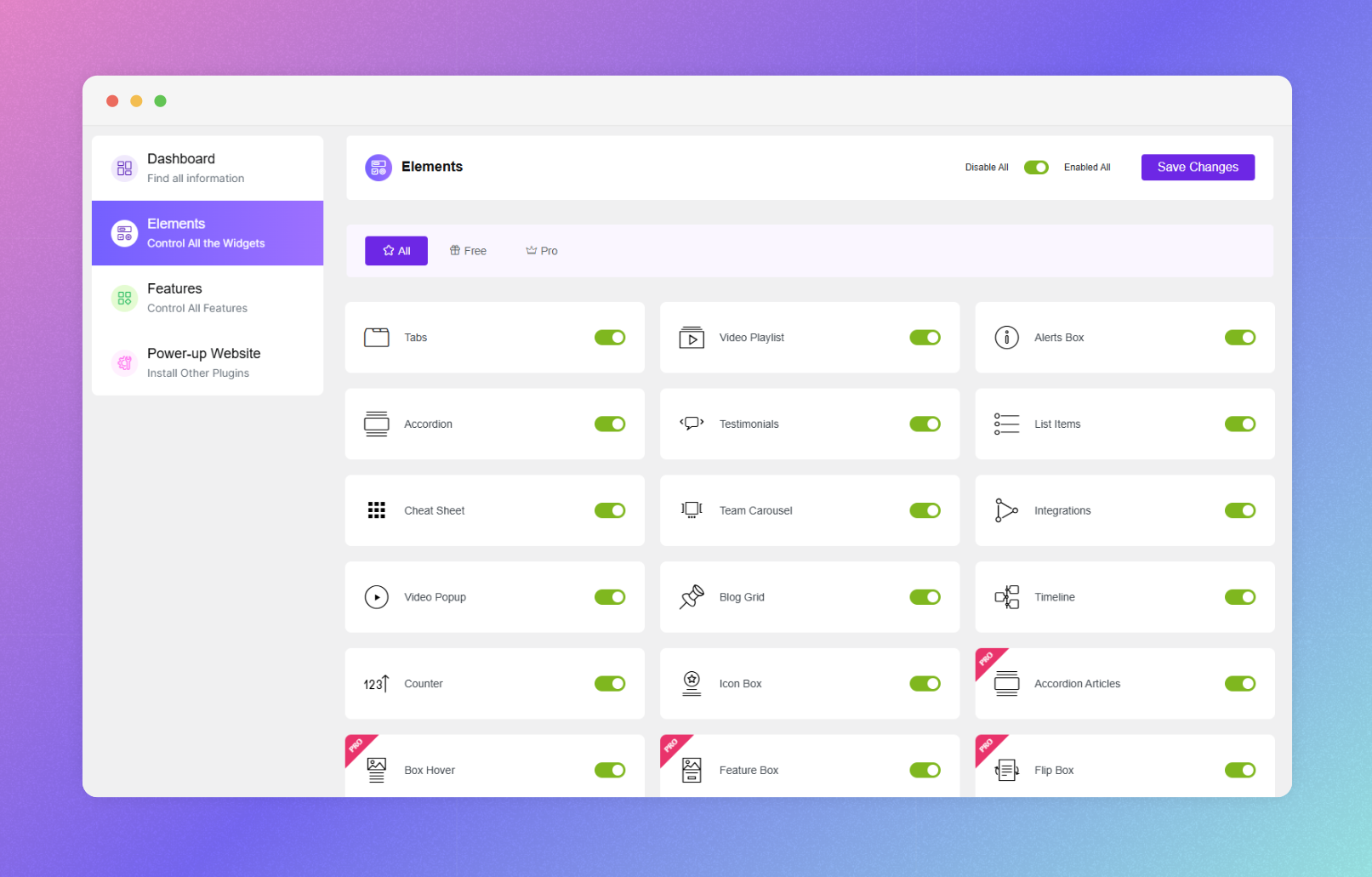
Spider Elements Dashboard with all available widgets 
Blog Grid Widget with multiple layout options 
Team Carousel Widget showcasing team members 
Counter Widget with animated statistics 
Accordion Widget for organized content 
Icon Box Widget with custom icons and styling 
Testimonials Widget displaying customer reviews 
Integration Widget showing platform compatibility 
List Items Widget with icons and descriptions 
Timeline Widget showing chronological events 
Video Popup Widget for media embedding


Installation
Minimum Requirements
– WordPress 5.0 or higher
– PHP 7.4 or higher
– Elementor 3.0.0 or higher
– MySQL 5.6 or higher
Recommended
– PHP 8.0 or higher for best performance
– WordPress memory limit of 256 MB or higher
Installation Steps
- Go to Plugins > Add New in your WordPress admin
- Search for “Spider Elements”
- Click Install Now and then Activate
- Open any page with Elementor
- Search for “Spider Elements” in the widget panel
- Start dragging widgets to your page
Alternative: Manual Installation
- Download the spider-elements.zip file
- Go to Plugins > Add New > Upload Plugin
- Select and upload the spider-elements.zip file
- Click Activate Plugin
- Start using Spider Elements widgets in Elementor
After installation, you’ll see a “Spider Elements” category in your Elementor widget panel with all available widgets.
FAQ
-
Do I need Elementor to use Spider Elements?
-
Yes, Elementor is required. Spider Elements is an addon plugin that works exclusively with Elementor (both free and Pro versions).
-
Will Spider Elements work with my WordPress theme?
-
Absolutely! Spider Elements works with any WordPress theme that supports Elementor, including Astra, OceanWP, GeneratePress, and all other standard themes.
-
Is Spider Elements compatible with Elementor Pro?
-
Yes, it’s fully compatible with both Elementor free and Elementor Pro versions.
-
Can I use Spider Elements widgets on all pages?
-
Yes! You can use Spider Elements widgets on any page, post, or custom post type that Elementor supports.
-
How many widgets does Spider Elements include?
-
Spider Elements includes 10+ widgets in the free version and 24+ total widgets in the Pro version.
-
Are there preset designs for the widgets?
-
Yes! Each widget includes multiple preset designs that you can customize further using the live editor.
-
Do I need to know how to code to use Spider Elements?
-
No! Spider Elements is completely beginner-friendly. Everything can be done through the visual Elementor editor with drag-and-drop functionality.
-
Is Spider Elements mobile responsive?
-
Yes, all widgets are fully responsive and optimized for mobile, tablet, and desktop devices.
-
How often is Spider Elements updated?
-
We release regular updates with new features, improvements, and bug fixes. You’ll receive updates automatically.
-
Why is the Elementor editor not loading?
-
This is usually a server PHP memory issue. Try increasing your PHP memory limit to 512MB in wp-config.php or contact your hosting provider to increase:
* PHP memory limit = 512M
* max_execution_time = 300 -
Where can I get support?
-
Visit our Documentation or check our Demo & Tutorials.
-
Can I get a refund if I’m not satisfied?
-
Yes, we offer a 30-day money-back guarantee on Pro purchases.
-
What’s included in the Pro version?
-
The Pro version includes 14+ additional premium widgets plus advanced features and priority support.
Reviews


Contributors & Developers
“Spider Elements – Premium Elementor Widgets & Addons Library” is open source software. The following people have contributed to this plugin.
Contributors


Translate “Spider Elements – Premium Elementor Widgets & Addons Library” into your language.
Interested in development?
Browse the code, check out the SVN repository, or subscribe to the development log by RSS.
Changelog
1.8.0 (11 January 2026)
New: Revamped Dashboard UI with modern design system and quick stats
New: Added Search functionality for Widgets and Features with real-time filtering
New: Added Toast notification system for better user feedback on save
New: Added keyboard shortcuts (Ctrl+S to save, Ctrl+F to search)
Improved: System Requirements section with zebra striping and better visibility
Improved: Sidebar navigation active states and hover effects
Tweaked: Refined typography, spacing, and micro-interactions across the dashboard
1.7.0 (11 December 2025)
New: Added submenu items for improved dashboard navigation
Fixed: Tab switcher functionality issue in the Spider Elements dashboard
Tweaked: Minor UI enhancements and general performance improvements across the dashboard
Improved: Enhanced RTL dashboard layout for better usability
Security: Implemented LFI (Local File Inclusion) protection to prevent unauthorized file access
Updated: Freemius SDK updated to 2.13.0
1.6.7 (11 November 2025)
Fixed: Blog title function issue resolved to ensure proper display
Fixed: Nonce field name mismatch corrected in filters.php for secure form handling
Fixed: Missing Elementor Utils class import causing fatal error in Video Playlist widget rendering
Fixed: Video Playlist widget showing raw paragraph tags in description by replacing esc_html with wp_kses_post
Tweaked: Adjusted alert margins in CSS for improved visual spacing
Secured: Added nonce verification for form submissions to strengthen security
Secured: Added proper sanitization in nonce verification for safer data validation
Updated: Dashboard templates modified to maintain consistent field naming conventions
1.6.6 (1 October 2025)
Fixed: Vulnerability issues
Tweaked: Spider Elements widget prefix (SE) has been removed
Updated: Freemius SDK updated to 2.12.2
1.6.5 (23 Jun 2025)
New: Added pagination and show/hide options to presets 1, 2, 3, and 4 of the Blog Grid widget
Fixed: Free and Pro Widget and features checked issue on Dashboard
Fixed: Testimonials ratting issue layout 3,4 and 6
Fixed: Tabs widget dark mood issue
Tweaked: Blog carousel nav arrow
Tweaked: ID added in the sticky tabs
Tweaked: SE prefix added before Widgets name
1.6.4 (15 May 2025)
Fixed: Resolved Pagination issue of Blog grid widget
Tweaked: Compatibility with docy dark mode
Updated: Freemius SDK updated to 2.12.0
