

Description
Linguator AI – Auto Translate & Create Multilingual Sites is an all-in-one multilingual WordPress plugin designed for site owners who want to reach a global audience without recurring fees, external SaaS platforms, or complex setups.
Translate your posts, pages, menus, categories, custom post types, media, and SEO data using AI, and refine translations manually when needed, all from your WordPress dashboard.
Want multilingual content without paying for monthly translation credits?
Linguator uses Chrome’s built-in AI and Google Translate, so you can generate high-quality translations without external API keys or subscriptions.
AI Translation Made Easy for WordPress
-
Easy to install and use: Linguator is quick to install and beginner-friendly, allowing you to get started in minutes. Simply install the plugin, run the setup wizard, select your languages, and start translating. No coding required.
-
Built for maximum compatibility: Linguator is built for maximum compatibility across the WordPress ecosystem. It works seamlessly with popular editors such as Elementor, Gutenberg, and the Classic Editor. Whether you’re translating WooCommerce product pages, custom post types, or Elementor landing pages.
-
Multilingual SEO: The plugin follows WordPress and Google best practices. Each language version of your content contains, language-specific URLs with SEO-friendly permalink structures. Metadata can be translated helping search engines properly index your site in multiple languages and improve your global visibility.
-
Translation Quality: Linguator allows you to generate fast AI-powered translations while still giving you full control. You can manually edit translations to improve accuracy or match your tone, translate specific blocks or widgets inline, and use glossary support to maintain consistent terminology across your site.
Multilingual & AI Translation Features
-
AI-Powered Automatic Translation: Save hours of manual work!. Linguator uses powerful AI translation engines to automatically translate your posts and pages into multiple languages — giving you high-quality, natural translations in one click.
-
Manual + Automatic Translation Control: Translate your content automatically using AI, or fine-tune it manually for complete accuracy — Linguator gives you both options for full flexibility.
-
Elementor Page Translation: Translate entire Elementor pages, including all sections, widgets, and content, without losing styles or design.
-
Gutenberg Block Compatibility: Automatically translate content within Gutenberg blocks, including core blocks and popular third-party blocks like Spectra, Kadence, Stackable, Otter, and Essential.
-
Bulk Translation: Instantly translate multiple posts, pages, or products at once with a single click, saving time and effort.
-
Inline Translation: Translate specific widgets or blocks of content directly within the editor, without translating the entire page, using advanced AI-powered translation tools.
-
Media and Menu Translation Management: Translate image titles, captions, alt text, and descriptions to match each language. Create separate navigation menus per language and let visitors switch between them.
-
Language Switcher: Add a language switcher to your site with multiple display options, including Classic, Block-based, and Elementor widget styles, to easily switch languages.
Trusted by 80,000+ users worldwide, Linguator is built by experts in AI translation — the same team behind LocoAI – Auto Translate for Loco Translate.
With 580+ five-star reviews, our plugins are proven to deliver quality and user satisfaction.
Service Provider
This plugin offers AI translation services via Chrome’s built-in AI APIs. Learn more about Chrome AI using the links below.
Screenshots
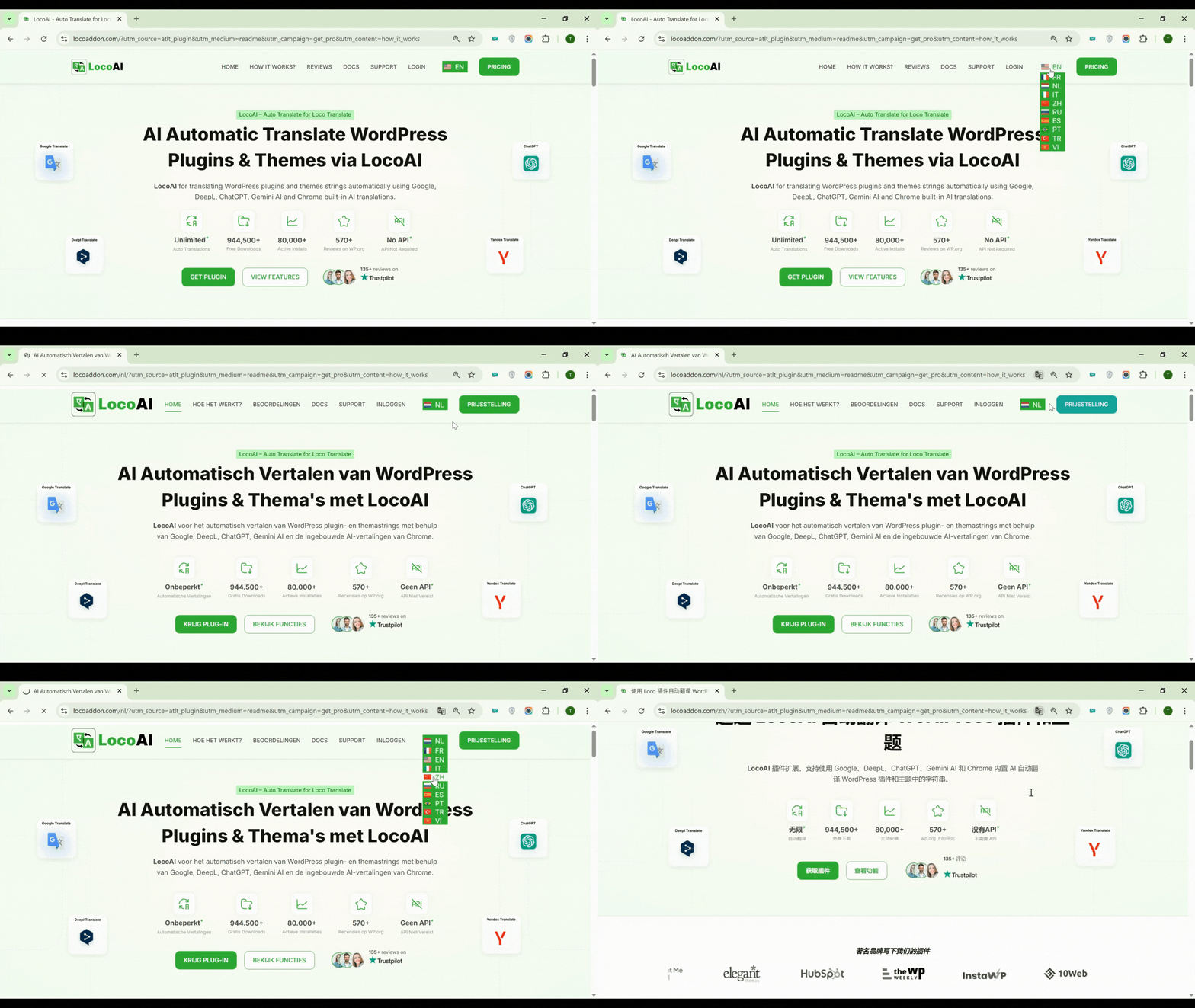
Linguator Language Switcher Preview. 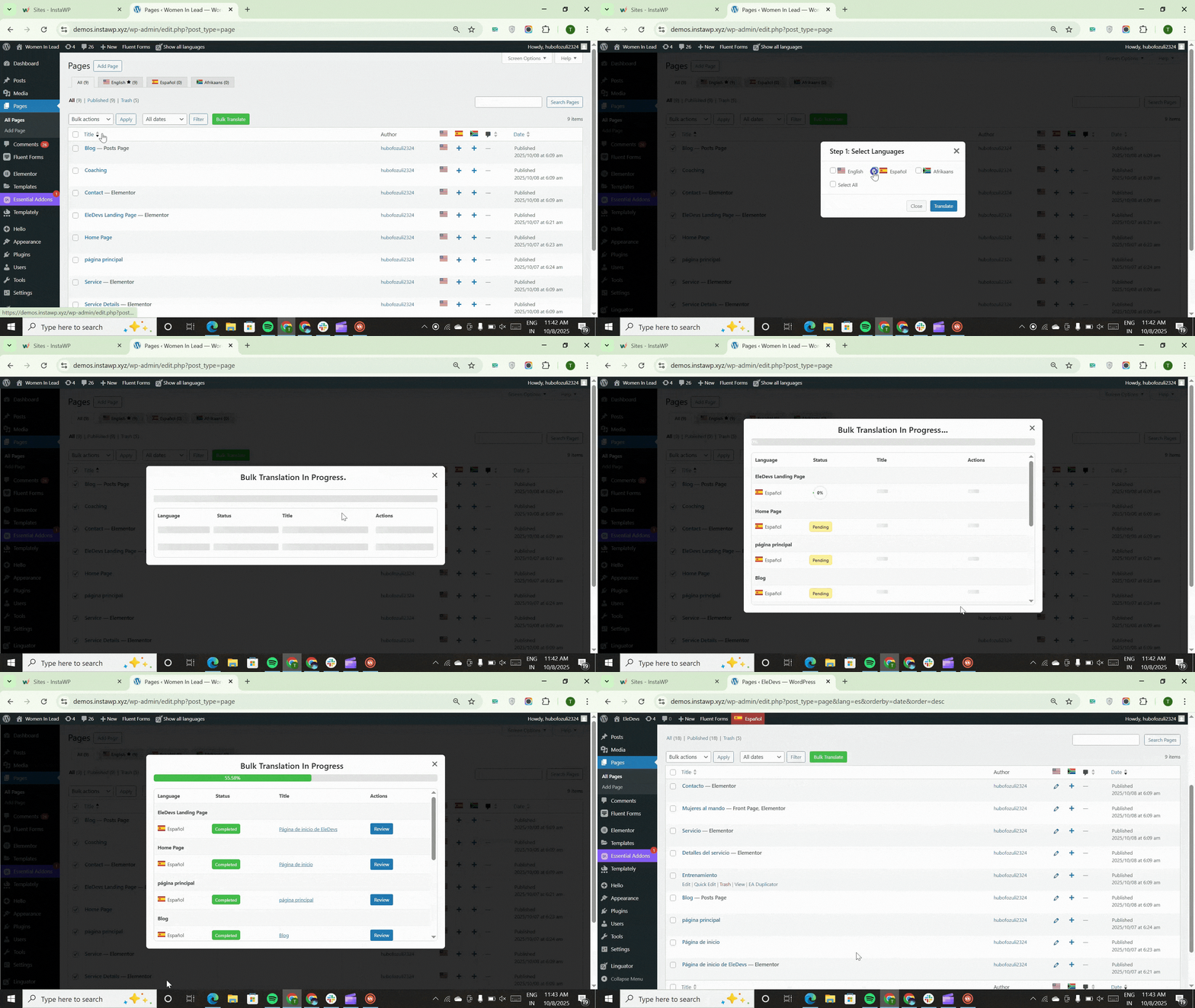
Bulk Pages/Post Translation Preview. 
Gutenberg Page Translation Preview. 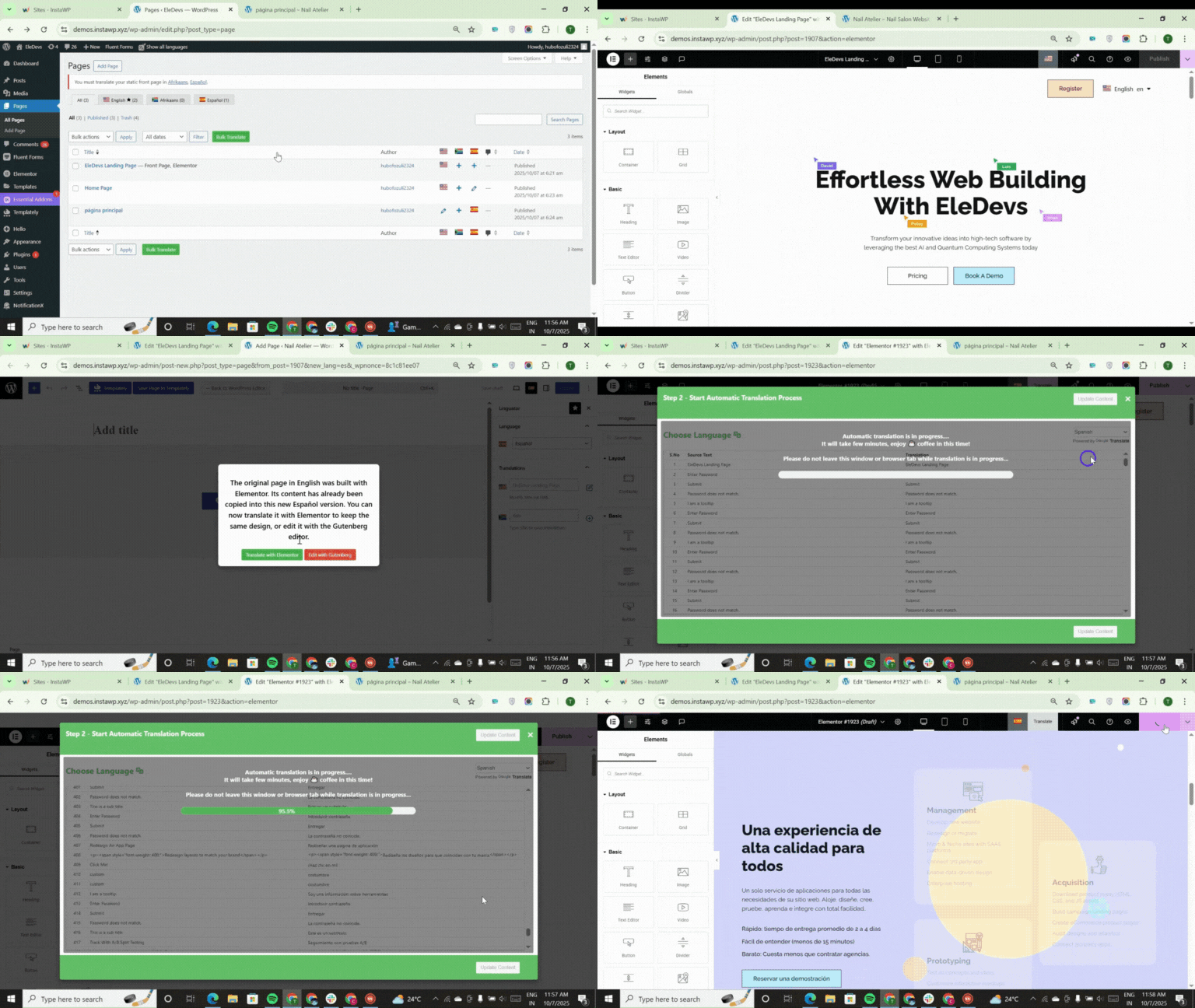
Elementor Page Translation Preview. 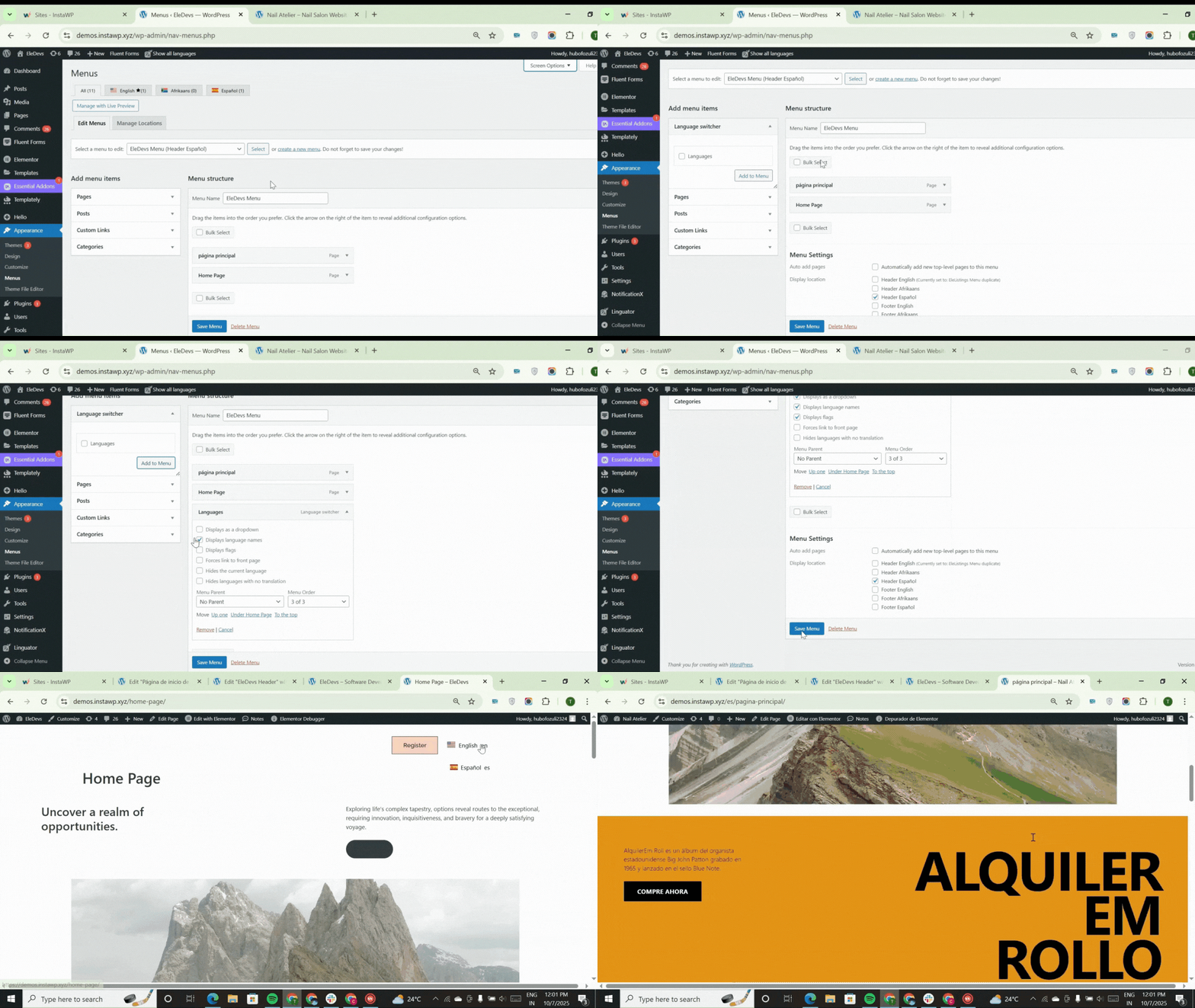
Menu and language configuration.


Blocks
This plugin provides 1 block.
- Language switcher
Installation
- Log in to your WordPress dashboard.
- Navigate to the Plugins section.
- Search for “Linguator”.
- Click Install and then Activate the plugin.
That’s it! Linguator AI – Auto Translate & Create Multilingual Sites is now installed and activated. You can start translating your website automatically using the power of AI.
Language Configuration
When you first activate Linguator, a simple Setup Wizard will guide you through configuring your multilingual website.
Follow these steps to complete the setup:
- Choose the main language for your website. This will be the fallback language shown when a visitor’s preferred language isn’t available.
- Select additional languages you want to support from the list of available languages.
- Decide how different language versions will appear in your URLs (e.g., subdirectories like /fr/ or query parameters like ?lang=fr).
- Turn on this option to automatically translate media details such as title, alt text, caption, and description for each selected language.
- Choose your preferred translation source — Google Translate or Chrome’s built-in AI translator — to handle your translations.
- Choose how and where the language switcher will appear on your website so visitors can easily switch between languages.
That’s it! The setup configuration has been successfully completed. You can now start translating your website content and make it fully multilingual.
FAQ
-
Transition Notice
-
Translate Words is now maintained by Cool Plugins and will gradually evolve into our modern AI multilingual plugin, Linguator AI.
The current Translate Words feature set will remain available until approximately 31st December 2026. After this period, the plugin will fully transition to Linguator.
If you want to continue using a manual string translation workflow, we recommend migrating to the Loco Translate plugin, which offers enhanced stability, better performance, and active development.
You are not required to take immediate action. Your website will continue working normally during the transition period. A detailed migration panel is included inside the plugin settings with all guidance and support information.
-
Which languages are supported?
-
Linguator supports all languages that WordPress supports, including RTL languages.
-
Is it compatible with all WordPress themes?
-
Yes, Linguator is designed to work with any properly coded WordPress theme.
-
Does it work with Elementor and Gutenberg?
-
Yes, the Linguator plugin fully supports the translation of page editors like Gutenberg and Elementor. You can translate your content directly within these editors.
-
Yes. You can create and manage separate navigation menus for each language and let visitors switch between them.
-
Where can I place the Language Switcher on my site?
-
You can place it in menus, sidebars, headers, footers, or any widget-ready area. If you use Elementor, you can add it directly to your page or template using the Elementor widget.
-
Can I translate media, such as images and videos?
-
Yes. Linguator allows you to translate media metadata, including image titles, alt text, captions, and descriptions, ensuring your content is fully localized.
-
Can it detect the visitor’s browser language?
-
Yes. Linguator includes an option to automatically detect the visitor’s browser language and display the site in that language.
-
How many languages can I add with Linguator?
-
There is no limit. You can add as many languages as you want to your website using Linguator.
-
How can I report security bugs?
-
You can report security bugs through the Patchstack Vulnerability Disclosure Program. The Patchstack team help validate, triage, and handle any security vulnerabilities. Report a security vulnerability.
-
Why Use Linguator?
-
- Simple and Familiar Interface – Built with WordPress standards in mind, Linguator feels natural and easy to use, even for beginners.
- AI Power Without Extra Cost – Leverage AI translation features for free — no need to pay for costly external AI credits.
- No Monthly Fees or SaaS Dependency – Linguator runs fully inside WordPress — once installed, it’s yours! No external API or subscription required.
- Fully Compatible with Elementor & Gutenberg – Translate visually designed pages effortlessly without breaking layouts.
- Save Time with AI-Powered Translation – Instantly translate your posts, pages, and menus using advanced AI translation technology.
- Reach a Global Audience – Translate your content into multiple languages and expand your website’s reach worldwide.
- Build Trust with Localized Content – Speak to visitors in their own language to increase engagement and conversions.
- SEO-Optimized for Multilingual Sites – Generate search-friendly URLs for every language to improve visibility in Google.
- Lightweight & Optimized for Speed – Linguator is built with performance in mind and doesn’t slow down your pages or website loading time.
Reviews


Contributors & Developers
“Linguator AI – Auto Translate & Create Multilingual Sites” is open source software. The following people have contributed to this plugin.
Contributors


Translate “Linguator AI – Auto Translate & Create Multilingual Sites” into your language.
Interested in development?
Browse the code, check out the SVN repository, or subscribe to the development log by RSS.
Changelog
Translate Words is evolving to Linguator, our new AI-based multilingual solution.
The current functionality will remain available until around 31st December 2026.
If you prefer a manual string translation workflow, we recommend Loco Translate.
Version 2.0.5 | 14 January 2026
- Fixed Undefined constant error.
Version 2.0.4 | 13 January 2026
- Code Improvemnets.
- Added Categories Filter in Quick Edit option.
- Fixed incorrect URLs.
Version 2.0.3 | 7 January 2026
- Fixed incorrect initial date in the deactivation form.
Version 2.0.2 | 7 January 2026
- Fixed Wrong initial version bug.
- Fixed a JSON error occurring during the initial plugin setup.
Version 2.0.1 | 5 January 2026
- Fixed undefined array key issue.
Version 2.0.0 (Major Update) | 3 January 2026
- Translate Words is now under new ownership by Cool Plugins and is actively maintained.
- Introduced LinguatorAI, a modern AI-based multilingual plugin.
- Added Translate Words feature deprecation Notice.
- Recommended Loco Translate for users who prefer a manual string translation workflow.
- Added AI-powered automatic translation engine with support for Google Translate and Local AI.
- Added real-time translation support for Gutenberg, Elementor, and Classic Editor.
- Added Bulk Translation Tool for posts, pages, and taxonomies with progress tracking.
- Added Inline Translation Mode to translate content block-by-block with live preview.
- Added Page Translation Module including SEO titles and meta descriptions.
- Added Advanced Language Management Panel with unlimited languages, RTL support, and browser language detection.
- Added Language Switcher Options – widget, block, Elementor widget, and menu integration.
- Added Custom Field Translation Manager for ACF and meta-based fields.
- Improved migration guidance and helpful links.
- Improved stability and minor internal improvements.
- General cleanup and maintenance.
Version 1.2.6 | 6 February 2024
- Improved the previous fix. It did not pick up translations where words or phrases contained punctuation.
Version 1.2.5 | 30 January 2024
- Tweaked replacements to only replace whole words and not parts of words.
Version 1.2.4 | 4 March 2023
- Fixed PHP 8.2 error.
Version 1.2.3 | 1 January 2023
- Fixed undefined array key notice in the admin area.
Version 1.2.2 | 12 July 2022
- Applied case-sensitive replacements first, followed by case-insensitive ones.
Version 1.2.1 | 22 May 2022
- Fixed an issue where new translations were not saving properly.
- Reduced duplication to prevent the issue from recurring.
Version 1.2.0 | 24 January 2022
- Fix bug with the remove button not working. Thanks @capbussat for the suggested fix and others for the reports!
Version 1.1.1 | 23 November 2021
- Escaped JavaScript output.
Version 1.1 | 23 November 2021
- Added support for translating Gutenberg editor strings using JavaScript localization.
Version 1.0.2 | 3 May 2021
- Updated register_setting to use updated properties.
- Fixed translation string replacement.
Version 1.0.1 | 30 April 2021
- Simplified string replacement logic for better performance.
Version 1.0.0 | 30 April 2021
- Initial release.
