
ReactJS State is a built-in object used to store and manage data that changes over time in a component. It allows React components to respond dynamically to user actions and application events.
- State is mutable and can be updated using setState or the useState hook.
- When state changes, React automatically re-renders the component.
- State helps control dynamic content like form inputs, UI toggles, and fetched data.
Syntax:
const [state, setState] = useState(initialState);- state: The current state value.
- setState: A function that is used to update the state.
- initialState: The initial value that the state will hold when the component is first rendered.
Creating State Object
Creating a state in React is essential to building dynamic and interactive components. We can create a state object within the constructor of the class component.
import React from 'react';

class MyComponent extends React.Component {
    constructor(props) {
        super(props);
        this.state = {
            brand: 'Ford', // Example property in the state
        };
    }

    render() {
        return (
            <div>
                <h1>My Car</h1>
                {/* Other component content */}
            </div>
        );
    }
}

export default MyComponent;
- The MyComponent class extends React.Component, and inside the constructor, it initializes the component's state with a brand property set to 'Ford'.
- The render() method returns JSX that displays an <h1> heading with the text "My Car" and renders the component's content.
Updating State in React
We are using the ES6 thick arrow function format to take the previous state and props of the component as parameters and are updating the counter. The same can be written using the default functional way as follows.
// Filename - index.js

import React from "react";
import ReactDOM from "react-dom/client";

class App extends React.Component {
    constructor(props) {
        super(props);
        this.state = {
            count: 0,
        };
    }

    increment = () => {
        this.setState((prevState) => ({
            count: prevState.count + 1,
        }));
    };

    decrement = () => {
        this.setState((prevState) => ({
            count: prevState.count - 1,
        }));
    };

    render() {
        return (
            <div>
                <h1>
                    The current count is :{" "}
                    {this.state.count}
                </h1>
                <button onClick={this.increment}>
                    Increase
                </button>
                <button onClick={this.decrement}>
                    Decrease
                </button>
            </div>
        );
    }
}

const root = ReactDOM.createRoot(
    document.getElementById("root")
);
root.render(
    <React.StrictMode>
        <App />
    </React.StrictMode>
);
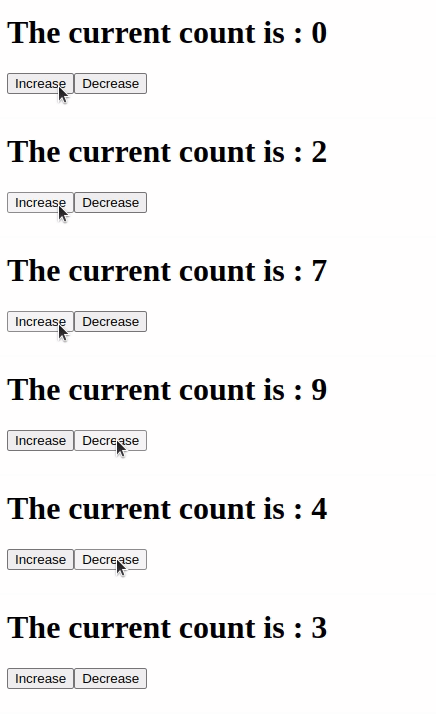
Output:
State vs Props
While both state and props store data in React, they serve different purposes:
State | Props |
|---|---|
Stores data that belongs to a component. | .Data passed from a parent to a child component. |
Can be changed within the component. | Read-only and cannot be changed by the child. |
Controlled by the component itself. | Controlled by the parent component. |
Used for managing dynamic and interactive data. | Used for sharing data between components. |
Updated using setState or useState. | Cannot be updated directly. |
Used when data needs to change. | Used when data is fixed for a component. |

