


Best CRM Software of 2026
Updated January 14, 2026 at 5:34 AM

Written by Andrew Blair
Content Analyst

Edited by Caroline Rousseau
Senior Editor

Reviewed by Marty Moore
Senior Advisor

Talk with us for a free 15-min consultation
Expert advisors like Jacqueline, who have helped 1,000+ companies, can find the right software for your needs.
- All Software
- Software Advice FrontRunners
- Popular Comparisons
- Buyer's Guide
- Frequently Asked Questions
CRM software helps sales, marketing, and support teams manage customer relationships, track interactions, and improve retention. With 900 tools built for varied operational models and integration and regulatory needs, picking the right tool can be tough. To help you narrow it down, I worked with our CRM software advisors to curate a list of recommended productsi and a list of the CRM software Frontrunners based on user reviews. For further information, read my CRM software buyer's guide.
CRM Software
Sort by
Reviews: Sorts listings by the number of user reviews we have published, greatest to least.
Average Rating: Sorts listings by overall star rating based on user reviews, highest to lowest.
Alphabetically (A-Z): Sorts listings by product name from A to Z.

Sales Cloud is equipped with customer relationship management (CRM) functionality that encompasses lead management, marketing au...Read more about Salesforce Sales Cloud


Salesforce Sales Cloud's Best Rated Features
See All
Salesforce Sales Cloud's Worst Rated Features
See All

Claritysoft is a cloud-based customer relationship management (CRM) solution designed for midsize and large enterprise businesse...Read more about Claritysoft CRM


Claritysoft CRM's Best Rated Features
See All
Claritysoft CRM's Worst Rated Features
See All

LeadMaster is a SaaS-based all-in-one lead management solution that offers capabilities to capture, track and follow up with lea...Read more about LeadMaster


monday CRM is a sales platform that helps businesses streamline sales cycle. The platform caters to a range of industries, such ...Read more about monday CRM
monday CRM's Best Rated Features
See All
monday CRM's Worst Rated Features
See All

Kintone is a cloud-based, customizable workflow management platform suitable for businesses of all sizes. The key features of th...Read more about kintone
kintone's Best Rated Features
See All
kintone's Worst Rated Features
See All
Software Advice FrontRunners 2026

(18748)

(6952)

(5800)

(517)

(1282)

(643)

(843)

(3041)

(613)

(906)
Best for Customization

- Key FeaturesSalesforce Sales Cloud's scoreCategory average
Activity Dashboard
4.524.46 category average
Contact Management
4.464.51 category average
Sales Reports
4.444.41 category average
- Screenshots


Highly Rated for Automation

Zoho CRM

- Key FeaturesZoho CRM's scoreCategory average
Activity Dashboard
4.564.46 category average
Contact Management
4.414.51 category average
Sales Reports
4.314.41 category average
- Screenshots


Highly Rated for Quick Implementation


- Key FeaturesHubSpot Service Hub's scoreCategory average
Activity Dashboard
4.04.46 category average
Contact Management
4.614.51 category average
- Screenshots


Best for Integrations

Dynamics 365

- Key FeaturesDynamics 365's scoreCategory average
Activity Dashboard
4.384.46 category average
Contact Management
4.424.51 category average
- Screenshots


Highly Rated for Mobile app

Klaviyo

- Key FeaturesKlaviyo's scoreCategory average
Activity Dashboard
4.224.46 category average
Contact Management
4.354.51 category average
- Screenshots


Highly Rated for Quick Adoption/Easy Adoption

Odoo

- Key FeaturesOdoo 's scoreCategory average
Activity Dashboard
4.324.46 category average
Contact Management
4.144.51 category average
Sales Reports
4.224.41 category average
- Screenshots


Most Used By E-Learning


- Key FeaturesLess Annoying CRM's scoreCategory average
Activity Dashboard
4.714.46 category average
Contact Management
4.874.51 category average
- Screenshots


Most Rated for SMBs

Act!

- Key FeaturesAct!'s scoreCategory average
Activity Dashboard
4.394.46 category average
Contact Management
4.404.51 category average
- Screenshots


Best for User Interface

Pipedrive

- Key FeaturesPipedrive's scoreCategory average
Activity Dashboard
4.214.46 category average
Contact Management
4.444.51 category average
Sales Reports
4.404.41 category average
- Screenshots


Most Used By Marketing and Advertising

Nutshell

- Key FeaturesNutshell's scoreCategory average
Activity Dashboard
5.04.46 category average
Contact Management
4.444.51 category average
- Screenshots


- Key FeaturesEngageBay CRM's scoreCategory average
Activity Dashboard
4.734.46 category average
Contact Management
4.664.51 category average
- Screenshots


- Key FeaturesKylas Sales CRM's scoreCategory average
Activity Dashboard
4.834.46 category average
Contact Management
4.774.51 category average
- Screenshots


monday CRM

- Key Featuresmonday CRM's scoreCategory average
Activity Dashboard
4.584.46 category average
Contact Management
4.484.51 category average
Sales Reports
5.04.41 category average
- Screenshots


- Key FeaturesBigin by Zoho CRM's scoreCategory average
Activity Dashboard
4.574.46 category average
Contact Management
4.584.51 category average
Sales Reports
4.04.41 category average
- Screenshots


Copper

- Key FeaturesCopper's scoreCategory average
Activity Dashboard
4.114.46 category average
Contact Management
4.384.51 category average
- Screenshots


- Key FeaturesSalesforce Starter's scoreCategory average
Activity Dashboard
4.384.46 category average
Contact Management
4.664.51 category average
- Screenshots


Bitrix24

- Key FeaturesBitrix24's scoreCategory average
Activity Dashboard
3.474.46 category average
Contact Management
4.374.51 category average
- Screenshots


Keap

- Key FeaturesKeap's scoreCategory average
Activity Dashboard
4.504.46 category average
Contact Management
4.204.51 category average
- Screenshots


folk

- Key Featuresfolk's scoreCategory average
Contact Management
4.384.51 category average
Sales Reports
4.04.41 category average
- Screenshots


Vanillasoft

- Key FeaturesVanillasoft's scoreCategory average
Activity Dashboard
5.04.46 category average
Contact Management
4.514.51 category average
Sales Reports
4.04.41 category average
- Screenshots


Agile CRM

- Key FeaturesAgile CRM's scoreCategory average
Activity Dashboard
4.04.46 category average
Contact Management
3.884.51 category average
- Screenshots


Ricochet360

- Key FeaturesRicochet360's scoreCategory average
Activity Dashboard
4.944.46 category average
Contact Management
4.604.51 category average
- Screenshots


Insightly

- Key FeaturesInsightly's scoreCategory average
Activity Dashboard
5.04.46 category average
Contact Management
4.354.51 category average
- Screenshots


Methodology
The research for the best CRM software list was conducted in October 2025. We evaluated data (user reviews and demand signals) from the past 24 months as of the research date. Read the complete methodology.
Popular CRM Comparisons


Buyer's Guide
This detailed guide will help you find and buy the right customer relationship management software for you and your business.
Last Updated on October 16, 2025Here's what we'll cover:
What you need to know about CRM software
Essential features of CRM software
Benefits and competitive advantages of using CRM software
How to choose the best CRM software for your business
More resources for your CRM journey
What you need to know about CRM software
CRM software helps organizations better manage their interactions with customers via features such as contact management, interaction tracking, and lead management. By improving operational procedures, enhancing employee value, and increasing management visibility, it helps firms streamline their processes and deliver more value to their customers.
To give you an idea of the market, we have over 1,000 different CRM vendors on our site, we’ve published over 9,000 reviews for CRM products [1], and we've spoken to nearly 3,000 CRM software buyers in the past year alone. [2]
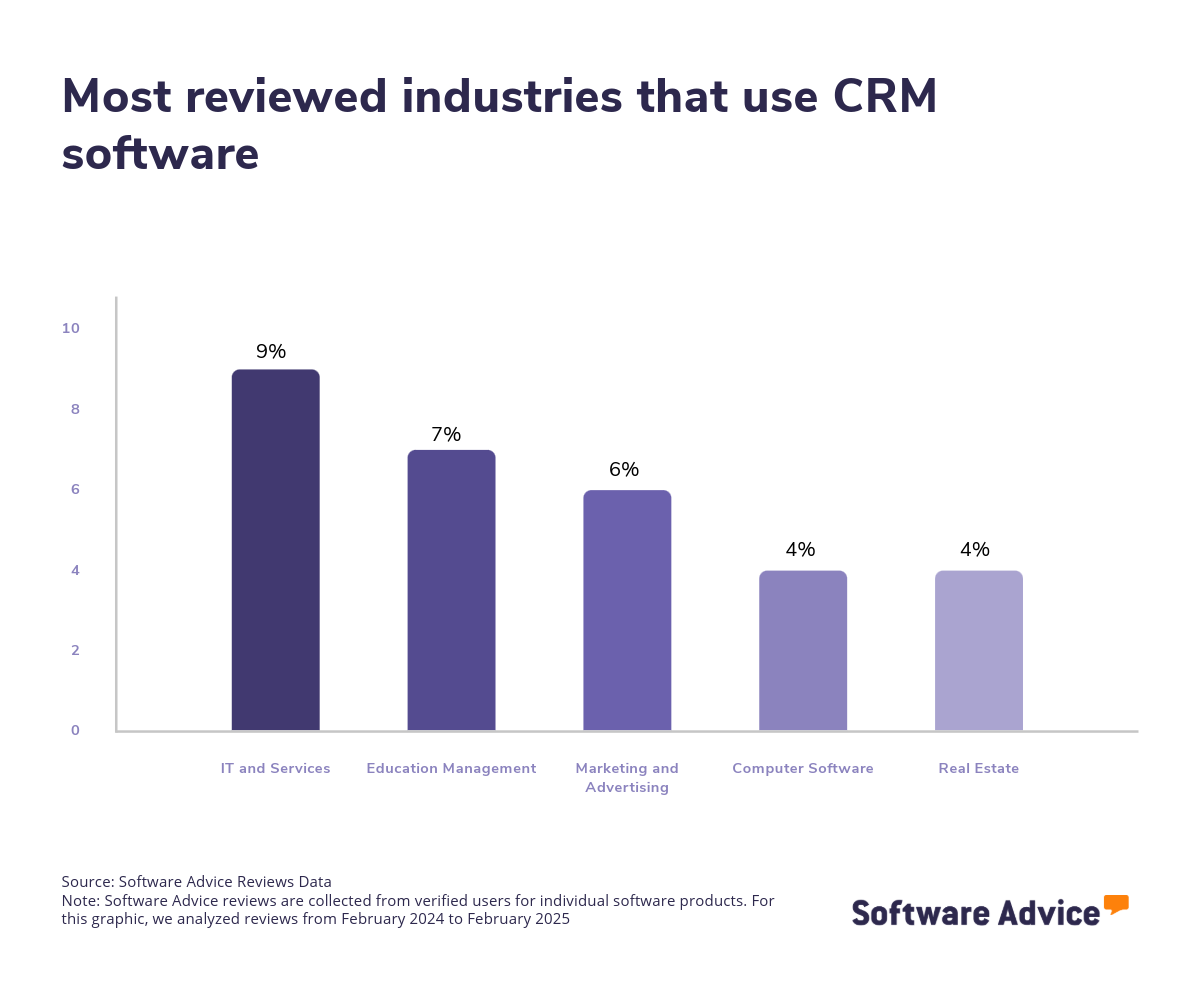
Needless to say, the CRM market is vast, with hundreds of solutions available to cater to various industries. This diversity allows organizations to find a CRM solution designed to support specific industries, whether they are in real estate, construction, finance, healthcare, insurance, nonprofit, or social industries. However, the market size and complexity can be daunting, making it essential for buyers to evaluate their options carefully.
Pricing for CRM software varies depending on the vendor, features offered, and scalability. Some solutions offer tiered pricing models based on specific organizational requirements. To put things into perspective, we’ve found that entry-level pricing averages $1,292 per month for basic functionality, while high-end plans that have advanced CRM features average $17,664 per month for more than 250 users. [3]
First-time buyers should begin evaluating with a budget, number of users, specific needs, and necessary integrations in mind. Ensure you’ve consulted with stakeholders on a list of critical questions to help you evaluate systems based on your needs, such as:
What specific features does the software offer, and how do they align with the organization's needs?
Is the software scalable to accommodate future growth?
Does the software integrate with other tools and systems your organization currently uses?
What level of customization is available to tailor the software to your specific processes?
How user-friendly is the software, and what kind of support and training is provided?
Because there are so many CRM systems available, choosing the right option can be a long process. In this guide, you’ll learn about the essential components of CRM software, get step-by-step guidance on how to choose the right solution for your business, and tap into the expertise of our experienced CRM software advisors, James McKechnie, and Marty Moore. To get expert guidance, schedule a free consultation or start a chat with us today.
What is CRM software?
CRM software is a digital tool that helps businesses efficiently manage their interactions with both current and potential customers. It offers a centralized platform that allows companies to store, organize, and access customer data and interaction histories. This streamlines processes such as lead management, interaction tracking, and contact management.
In addition to these core functions, CRM software solutions often come equipped with robust reporting and analytics capabilities. These features provide valuable insights into customer behavior, sales performance, and the effectiveness of marketing strategies, enabling businesses to make data-driven decisions.
CRM systems are closely related to contact management systems and are commonly deployed via the cloud, offering flexibility and scalability to meet the needs of businesses of all sizes.
Essential features of CRM software
When comparing CRM software systems, it's important to know what features you can expect to see and which features are more advanced add-ons or uncommon. Some functionalities, like contact management, interaction tracking, and lead management, are core features that will be available in every CRM software. Other features, such as reporting/analytics, sales pipeline management, and customer journey mapping, are still common. We analyzed thousands of reviews to determine what we believe are CRM software's core features.
Core CRM software features
Contact management | Manages, organizes, and stores contact information. This feature helps businesses maintain a comprehensive and up-to-date database of customer and prospect details, facilitating efficient communication and personalized customer service. 90% of our reviewers rate this feature as critical or highly important. |
Interaction tracking | Tracks interaction history by documenting conversations for contacts. It ensures that all team members have access to a complete record of past interactions, enabling consistent and informed communication with customers and prospects, and enhancing relationship-building efforts. 84% of our reviewers rate this feature as critical or highly important. |
Lead management | Stores information about leads or contacts and tracks, manages, and nurtures them throughout the sales process. This feature is essential for optimizing the sales pipeline, ensuring that no potential opportunities are overlooked, and systematically guiding leads through the buying journey to conversion. 84% of our reviewers rate this feature as critical or highly important. |
Common CRM software features
Email management | Manage, store, and organize emails within the system or via third-party applications. This feature centralizes communication, ensuring that all email interactions are easily accessible and integrated with other customer data. 85% of our reviewers rate this feature as critical or highly important. |
Reporting/analytics | View and track pertinent metrics to find patterns and gain insights from data. This feature helps organizations make informed decisions by providing a clear understanding of customer behaviors, sales trends, and marketing effectiveness. 83% of our reviewers rate this feature as critical or highly important. |
Sales pipeline management | Pipeline view and tracking lead status. This feature enables sales teams to visualize the entire sales process, monitor the progress of leads through different stages, and prioritize efforts on high-potential opportunities. 82% of our reviewers rate this feature as critical or highly important. |
Workflow management | Create, design, and manage workflows for repetitive tasks. This feature streamlines operations by automating routine processes, reducing manual effort, and minimizing errors. 82% of our reviewers rate this feature as critical or highly important. |
Task management | Create, manage, and track all task activities and progression. This feature ensures that all team members are aligned on their responsibilities and deadlines, promoting accountability and enhancing productivity. 79% of our reviewers rate this feature as critical or highly important. |
Lead capture | Score a lead on their quality or likelihood to buy based on certain behaviors. This feature benefits organizations by allowing them to focus their resources on the most promising leads, improving the efficiency of the sales process, and increasing the chances of successful conversions. 77% of our reviewers rate this feature as critical or highly important. |
“Many buyers mistakenly believe that lead generation systems are comprehensive software solutions. In reality, they often function more as services. When buyers search for lead generation, they frequently encounter CRM systems, which are designed for lead tracking rather than generating new leads”, says Moore.
Benefits and competitive advantages of using CRM software
CRM software buyers are seeking to move away from using Excel spreadsheets for tracking names, numbers, emails, and addresses. “They desire a centralized system for easier access and organization”, says McKechnie. Moore adds, “They also aim to monitor sales more effectively and a shared system provides clear visibility, akin to navigating a queue.”
Our analysis of over 9,500 user reviews from the past year shows that team collaboration, sales management, email marketing automation, and customer service are the top-rated benefits of CRM software. These features directly address the core needs of CRM, including communication and coordination across teams, optimal use of time and resources for promising leads, and tracking interactions with automated email marketing.
Enhanced collaboration: CRM software fosters enhanced collaboration by providing a centralized platform where team members can access and share up-to-date customer information, communication histories, and task statuses.
Improved sales: CRM software improves sales by offering tools that help sales teams manage leads, track opportunities, and streamline the sales process. By providing insights into customer behavior and preferences, CRM systems enable sales teams to tailor their approaches and prioritize high-potential leads.
Automation of repetitive tasks: CRM software automates repetitive tasks such as data entry, follow-up emails, and scheduling, freeing up valuable time for employees to focus on more strategic activities. Automation reduces the risk of human error, ensures consistency in processes, and enhances productivity.
Increased client satisfaction: CRM software increases client satisfaction by enabling businesses to deliver personalized and timely customer service. With access to comprehensive customer data and interaction histories, teams can anticipate needs, address concerns promptly, and provide tailored solutions.
How to choose the best CRM software for your business
Choosing the right CRM software can be quite overwhelming, with so many options offering varying features and capabilities. Here are some steps that can make this process more streamlined and successful.
1. Define your requirements
When defining your business's requirements for CRM software, it's important to consider several key factors to ensure that you get the solution that aligns with your organizational needs and goals.
Evaluate your business goals and objectives
First, clearly outlining your business goals and how CRM software can achieve them is the best place to start. Ask yourself what is slowing down your business operations and what solutions you need to solve those issues. Consider whether you need to improve team collaboration, enhance client satisfaction, or optimize resource utilization for effective lead tracking.
Take into account your business size and scalability
It’s important to identify the size of your business and which software is appropriate for your needs. Is your business undergoing exponential growth or do you plan to invest in CRM software that will grow with your business? Consider the scalability of the software and ensure that it can grow with your business and accommodate an increasing number of users, or advanced reporting and customer tracking functionality without sacrificing performance.
Identify budget constraints
Next, consider how much you want to spend on CRM software. While the price of CRM software is difficult to generalize because of varying individual needs and other factors that can affect price, a good starting point is to identify how many users your business requires and the features you need to fulfill your business objectives. With that in mind, consider initial costs, subscription fees, and any other additional expenses for training and support. Additionally, some vendors may offer unbundled costs which means that while their prices may seem competitive in comparison, additional costs may place constraints on your original budget.
2. Make a shortlist of CRM software
After carefully defining your requirements, it's time to start narrowing down your options to create a shortlist and seek professional help in making an informed choice.
Get qualified help from an advisor
At Software Advice, our advisors have experience helping hundreds of businesses identify solutions that suit their business needs. If you need guidance on how to make a shortlist or have any doubts regarding your business requirements, you can chat online now with an advisor or schedule a phone consultation.
Explore our list of CRM FrontRunners
If you’re not ready to speak to an advisor just yet, you can also start compiling your shortlist of CRM software with our FrontRunners report. Only products that earn top user ratings make this list. Check out our full methodology description for more details on how the report is compiled.
For more help creating a shortlist and a free, downloadable comparison chart, check out The Ultimate Software Vendor Evaluation Guide. This guide and comparison chart will help you compare software evaluation criteria for each prospective vendor by tracking functionalities, training and support offerings, costs, and deployment options.
3. Pick your best option
Now that you have your curated shortlist, it's time to pick the best option. But how? Picking the best option means you need to try to get hands-on experience with the chosen software to ensure that it can fulfill a set of criteria before making your final choice. Here are a few things to consider before committing to a vendor.
Schedule a vendor demo
Vendor demos are sessions provided by the vendor to help get you familiar with the features of the product and its capabilities and understand their pricing. Here, you have the chance to learn more about the product and ask questions to ensure that it aligns with your business needs. Be sure to ask about what is included in the price and whether technical support and training resources are available.
Evaluate your integration needs
Check the software’s ability to integrate with your existing systems and tools, such as email marketing software, website builder software, and project management software. A software solution with seamless integration is vital to streamlined workflows and improved data consistency across platforms.
Determine customizable options
When making your final choice, it's also important to determine the level of customization the software offers to meet your specific business processes and requirements. A customizable software solution can enhance the software's relevance and effectiveness for your business.
4. Make the most of your CRM software
Finally, once you’ve shortlisted and selected the CRM software that fits your business needs, it's important to take steps to ensure successful implementation and maximize its benefits. Here are a few things to consider to make the most of your chosen CRM software.
Develop an implementation plan
When onboarding a new software solution, having a detailed implementation plan should include installation, configuration, data migration, and testing to ensure a smooth transition. Additionally, an implementation plan should outline the timeline, key milestones, and responsibilities. Key stakeholders from different departments should also be engaged to gather input to help tailor the software and ensure alignment with business goals.
Provide comprehensive training
Offer thorough training sessions for all users to ensure they understand how to effectively use the software. The training should cover an explanation of the core features of the software, best practices, and any customizable functionalities specific to your organization.
Monitor and evaluate performance
Monitor the software's performance regularly and evaluate its impact on your business operations. Collect user feedback to understand their experiences and challenges with the software. Use this feedback to fine-tune the software so that it continues to meet evolving needs. Finally, use analytics and reporting features to track key metrics and identify areas for improvement.
Purchasing CRM software will generate a solid return on investment (ROI) for your business. You can use this ROI as a selling point when trying to justify the purchase price, as we explain in detail in our article, “How to Build a Business Case for CRM Software.”
Software related to CRM
Depending on which CRM software you choose, you may need to supplement some features with related software systems in order to support sales, lead generation, contact management, or marketing. Some types of software that are closely related to CRM software, but may or may not be included in your CRM system, include:
Contact management software: Enables the storage, tracking, and management of contact information throughout an organization.
Lead management software: Enables the forecasting, collection and tracking of sales leads. Through the use of lead management solutions, organizations can automate and manage their prospect database as well as share and distribute leads throughout the enterprise.
Marketing automation software: Allows organizations to automate their marketing functions including campaign creation, marketing workflows, and outcome analysis.
Sales force automation software: Sales force automation (SFA) software helps manage and automate an organization's sales processes, which can include contact management, customer relationship management, sales activity tracking, and more. SFA systems may also provide insights for pipeline management, opportunity management, and forecasting.
Sales tracking software: Enables businesses and sales teams to monitor pipelines, analyze all steps throughout the sales process and track key performance metrics.
More resources for your CRM journey
About our contributors
Author
Andrew Blair is a content analyst at Software Advice, covering marketing, cybersecurity, and emerging technologies across industries. He leverages his technical expertise and business acumen, acquired from experience as a web developer in the eCommerce industry, to deliver data-driven insights on market and business operations, empowering businesses to embrace the right technology.
Andrew’s research and analysis are informed by more than 150,000 authentic user reviews on Software Advice and nearly 3,000 interactions between Software Advice software advisors and software buyers. Andrew also regularly analyzes market sentiment by conducting surveys of IT and marketing leaders so he can provide the most up-to-date and helpful information to small and midsize businesses purchasing software or services.
His research and data insights for small and midsize businesses have been featured in SBS Media, IT Brief Australia, and Technology Decisions media publications. Andrew’s commentary on tech trends is published in various content forms, including podcasts, videos, and written interviews. In his free time, he enjoys sports and spending time outdoors.
Editor
Caroline Rousseau is a senior content editor at Software Advice. A former content analyst, Caroline has, for the past five years, built, written, and edited research reports about technological trends, opportunities, and challenges with an SMB audience in mind. Her content has been featured in French Tier 1 media including Le Monde, L’Express, and Le Figaro, among other publications. Her previous experience as a graphic designer, translator, and LQA specialist in various industries converged into a skill set that allows her to create compelling content about today’s business matters.
Caroline’s personal interests include literature and art and she has a passion for Albert Camus, graphic novels, and drawing.
Advisor
Marty Moore is a senior software advisor. He joined Software Advice in 2014 as a software advisor, and he is based in Austin, TX.
As part of the software advisor team, Marty helps a wide range of industry professionals who are seeking construction, field service, CRM, and project management software. He provides a short list of personalized technology recommendations based on budget, business goals, and other specific needs.
Marty’s favorite part of being a software advisor is talking to buyers and helping them understand how software works for them and can really help their business.
Sources
Software Advice advisor call notes: Findings are based on data from telephonic conversations that Software Advice’s advisor team had with small-to-midsize businesses seeking professional services automation tools. Read the complete methodology.
Software Advice reviews data: Software Advice reviews are collected from verified users for individual software products. Read the complete methodology.
Software Advice software pricing data: Only products with publicly available pricing information and qualified software products within the category, are included in the pricing analysis. Read the complete methodology.
CRM FAQs
- What is CRM software?
CRM (Customer Relationship Management) software is a tool that enables businesses to handle interactions with both existing and prospective customers. It offers a unified platform for storing, organizing, and assessing customer information and communication history. It streamlines processes like sales, marketing, and customer service, and provides insights through analytics.
- What are the 3 types of CRM?
The three types of CRM are analytical, operational, and collaborative. Analytical CRM focuses on analyzing customer data for insights, while operational CRM focuses on automating customer-facing processes, such as chatbots. Lastly, collaborative CRM facilitates information sharing across departments to improve customer service.
- What is the best free CRM?
According to our analysis of products with high market demand and reviews, Capsule has the highest overall rating for “best free” from verified reviewers on Software Advice. It offers features such as contact management, task tracking, and sales pipeline visualization at no cost.
- What is the best CRM tool?
According to our analysis of products with high market demand and reviews, Less Annoying CRM has the highest overall rating from verified reviewers on Software Advice. It offers features like contact management, calendar integration, and task tracking.
- What are some examples of CRM?
Examples of CRM software include Less Annoying CRM, Thryv, HubSpot CRM, Zoho CRM, and Pipedrive to name a few. Each product offers unique features catering to different business sizes, needs, and industries, such as real estate, consulting, and insurance. Our FrontRunners research can help you find the best CRM software based on our verified reviews.
