Summary: in this tutorial, you will learn how to use the SQLite GROUP_CONCAT() function to concatenate non-null values in a column.
Introduction to SQLite GROUP_CONCAT() function
The GROUP_CONCAT() function is an aggregate function that concatenates all non-null values in a column.
The following shows the syntax of the GROUP_CONCAT() function:
GROUP_CONCAT(expression [,separator])
Code language: SQL (Structured Query Language) (sql)
In this syntax:
-
expressionis a column or an expression that will be used for concatenation. - separator: all values will be separated by the separator. If you skip the separator, the
GROUP_CONCAT()function uses a comma (“,”) by default.
SQLite GROUP_CONCAT() function demonstration
First, create a new table named t for the demonstration:
CREATE TABLE t(
    id INTEGER PRIMARY KEY,
    val TEXT
);
Code language: SQL (Structured Query Language) (sql)
Second, insert three strings into the t table
INSERT INTO t(val)
VALUES('A'),('B'),(NULL),('C');
Code language: SQL (Structured Query Language) (sql)
Third, query data from the t table:
SELECT
    id,
    val
FROM
    t;
Code language: SQL (Structured Query Language) (sql)
Here is the output:
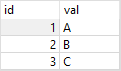
Fourth, the following statement uses the GROUP_CONCAT() function to concatenate all values in the val column of the t table:
SELECT
    GROUP_CONCAT(val)
FROM
    t;
Code language: SQL (Structured Query Language) (sql)
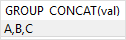
In this example, we did not use the separator, therefore, the GROUP_CONCAT() function uses a comma by default.
The following picture shows the output:
Fifth, if you don’t want to use a comma as the separator, you can use another string, for example, a semicolon (“;”):
SELECT
    GROUP_CONCAT(val,';')
FROM
    t;
Code language: SQL (Structured Query Language) (sql)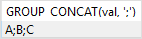
SQLite GROUP_CONCAT() function example
The following statement gets the album id and a list of comma-separated track names for each album:
SELECT
    Title,
    GROUP_CONCAT(name,';') track_list
FROM
    tracks t
INNER JOIN albums a on a.AlbumId = t.AlbumId
GROUP BY
    Title
ORDER BY
    Title;
Code language: SQL (Structured Query Language) (sql)
The output is shown as follows:

In this example:
- First, the
GROUP BYclause divides the tracks by album into groups. - Then, the
GROUP_CONCAT()function applies to each group to concatenate track names.
In this tutorial, you have learned how to use the SQLite GROUP_CONCAT() function to concatenates all non-null values in a column.


