
Screenshots
App details
- Updated
- August 22, 2024
- Requires
- Chrome
- License
- Full
- Developer
- Zzzcode
- Category
- Web Apps
About Zzzcode
Download Zzzcode – AI Coding Assistant, Code Generation, Debugging Tool
Overview of Zzzcode
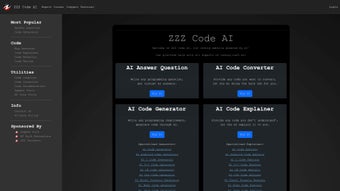
Zzzcode is a cutting‑edge AI‑powered platform that brings a full‑stack coding companion right to your desktop or browser. Designed for developers, students, and tech enthusiasts, Zzzcode supports a wide spectrum of programming languages—including Python, C#, C++, CSS, Excel Formula, HTML, Java, and SQL—so you can write, convert, debug, and optimize code without juggling multiple tools. The core engine leverages large language models trained on millions of code snippets, enabling instant answers to programming questions, automatic code generation from plain‑English requirements, and intelligent code reviews that highlight potential bugs or performance bottlenecks. Whether you’re building a simple Excel macro or a complex multi‑tier web application, Zzzcode offers a single, secure environment where you can experiment, learn, and ship code faster.
Security and privacy are baked into the platform: all user prompts and generated code are processed in encrypted sessions, and no data is stored permanently unless you explicitly save it to your local workspace. Regular updates ensure compatibility with the latest language standards and frameworks, making Zzzcode a reliable, future‑proof ally in the ever‑evolving world of software development. The interface is built around a clean two‑pane layout that reduces visual clutter, while the underlying AI continuously learns from community feedback to improve accuracy over time. For teams, Zzzcode provides role‑based access controls, allowing administrators to restrict sensitive project data while still granting developers the freedom to experiment. In short, Zzzcode combines the speed of an AI assistant with the robustness of an enterprise‑grade development environment, positioning itself as a versatile tool for both rapid prototyping and long‑term project maintenance.
Key Features That Set Zzzcode Apart
- AI Answer Question: Type a programming problem in natural language and receive a ready‑to‑use code snippet instantly.
- AI Code Converter: Seamlessly translate code between supported languages (e.g., Python to JavaScript, C# to Java) while preserving logic.
- Code Generation from Requirements: Describe the functionality you need, and Zzzcode will generate a complete, syntactically correct implementation.
- Code Explanation: Paste any block of code and get a clear, line‑by‑line explanation, ideal for learning or code reviews.
- Bug Detection & Refactoring: The AI scans your code for common bugs, security flaws, and inefficiencies, offering refactored alternatives.
- Integrated Code Review: Receive a structured review report highlighting style violations, potential performance issues, and best‑practice recommendations.
- Specialized Generators: Tailored templates for web development (HTML/CSS), data analysis (Python, Excel), and enterprise apps (C#, Java, SQL).
- Multi‑Platform Access: Available as a web app, Windows desktop client, and macOS version, with mobile‑friendly interfaces for Android and iOS.
- Version Control Friendly: Export generated code directly to Git, GitHub, or GitLab repositories with automatic commit messages.
- Learning Mode: Turn on step‑by‑step guidance to watch the AI build code in real time, perfect for classroom settings.
Beyond the headline capabilities, Zzzcode also supports collaborative sessions where multiple users can edit the same workspace, making pair‑programming and remote code reviews smoother than ever. The platform’s extensible plugin architecture lets you add custom linters, style guides, or third‑party APIs, ensuring that it can adapt to niche development stacks without sacrificing the core AI experience. For organizations with strict compliance requirements, Zzzcode can be deployed behind a corporate firewall using the on‑premises Docker image, providing the same AI features while keeping all data within the private network. Additionally, the AI model is continuously updated with the latest language specifications, so developers never have to worry about deprecated syntax. Whether you’re a solo freelancer looking to speed up repetitive tasks or a large engineering team seeking a unified code‑assist platform, Zzzcode’s feature set scales to meet diverse needs while maintaining a low learning curve.
Installation, Usage, and Compatibility
Getting Started – Simple Download and Installation
Downloading Zzzcode is straightforward. Visit the official website, click the Download for Windows or Download for macOS button, and the installer (an .exe for Windows or .dmg for macOS) will begin downloading. For Linux users, a Docker image is provided, allowing you to spin up the service with a single docker run command. Mobile users can find Zzzcode in the Google Play Store and Apple App Store; the mobile app syncs with your cloud workspace, ensuring continuity across devices.
After the installer finishes, launch Zzzcode and create a free account using your email or an OAuth provider (Google, GitHub, or Microsoft). The onboarding wizard guides you through setting up your first project, selecting a primary programming language, and choosing whether you’d like to enable the “Learning Mode” feature. All settings are stored locally and in the encrypted cloud, so you can switch between devices without losing your preferences. The installer also checks for required system libraries (e.g., .NET runtime on Windows, Homebrew on macOS) and offers to install missing dependencies automatically, reducing friction for less‑technical users.
How to Use Core Functions Effectively
Once inside the main dashboard, you’ll see a clean, two‑pane layout: the left pane hosts the prompt area, and the right pane displays the AI‑generated output. To ask a question, type something like “How do I read a CSV file in Python and plot the first column?” and press Enter. Within seconds, Zzzcode returns a ready‑to‑run script, complete with comments explaining each step. If you need a conversion, select a code block, click the “Convert” button, and choose the target language from the dropdown.
The “Generate” tab lets you input high‑level requirements such as “Create a REST API in Node.js that supports CRUD operations for a product catalog.” The AI then builds the folder structure, necessary dependencies, and sample endpoints. You can edit any part of the generated code, re‑run the AI for refinements, or export the entire project to a Git repository with a single click. For more advanced usage, Zzzcode’s CLI tool enables you to pipe prompts directly from your terminal, integrate code generation into CI pipelines, or automate bulk refactoring across multiple repositories.
System Requirements and Supported Operating Systems
Zzzcode runs on Windows 10 or later (64‑bit), macOS 11 (Big Sur) or later, and Linux distributions that support Docker. Mobile versions require Android 8.0 (API 26) or iOS 13 and later. Minimum hardware specifications include a dual‑core CPU, 4 GB RAM, and 200 MB of free disk space for the core application; however, for optimal performance—especially when handling large code bases—4 CPU cores and 8 GB RAM are recommended. An active internet connection is required for AI processing, but the platform also offers an offline mode for previously cached models (available in the premium tier).
Regular automatic updates keep the AI models current with the latest language specifications. Users can opt into beta releases to test upcoming features before they are rolled out to the general audience. For enterprises, a self‑hosted option is available via the Docker image, allowing the AI engine to run behind corporate firewalls while still receiving model updates through a secure, scheduled pull.
Pros, Cons, Frequently Asked Questions, and Final Verdict
Pros & Cons
- Pros
- Supports a broad range of programming languages and frameworks.
- Instant code generation and conversion saves valuable development time.
- Integrated bug detection and refactoring improves code quality.
- Secure, encrypted sessions protect proprietary code.
- Cross‑platform availability (Windows, macOS, Linux, Android, iOS).
- Collaboration features and Git integration streamline team workflows.
- Free tier available with generous usage limits.
- CLI and API enable automation and CI/CD integration.
- Self‑hosted Docker option for strict compliance environments.
- Learning Mode makes it a powerful teaching aid.
- Cons
- Heavily reliant on internet connectivity for AI processing.
- Premium subscription required for offline model access and larger code bases.
- Learning curve for advanced customization and plugin development.
- Occasional inaccuracies in generated code for very niche libraries.
- Resource usage can spike during large batch generation tasks.
FAQ – Your Zzzcode Questions Answered
Can Zzzcode replace a traditional IDE?
Zzzcode complements, rather than fully replaces, a full‑featured IDE. It excels at rapid prototyping, code generation, and debugging assistance, but you may still prefer a dedicated IDE for complex projects, extensive refactoring, or deep integration with specific toolchains.
Is my code data safe when processed by Zzzcode’s AI?
Yes. All communication between your client and Zzzcode’s servers is encrypted with TLS 1.3. The platform does not store any code unless you explicitly save it to your cloud workspace, and all saved data is encrypted at rest.
What languages can I convert code between?
Zzzcode currently supports conversion among Python, JavaScript, Java, C#, C++, and TypeScript. Future updates will expand this list to include Go, Rust, and Kotlin.
How does the free tier limit usage?
The free tier offers up to 50 AI queries per month, a maximum of 5 MB of generated code per query, and cloud storage for up to three projects. This is sufficient for learning, small scripts, and occasional debugging.
Can I integrate Zzzcode with my existing CI/CD pipeline?
Yes. Zzzcode provides a CLI tool and REST API that can be invoked from build scripts, allowing you to generate code snippets, run automated code reviews, or enforce style guidelines as part of your CI/CD workflow.
Conclusion & Call to Action
Overall, Zzzcode delivers a compelling blend of AI‑driven assistance, multi‑language support, and collaborative features that make it a valuable addition to any developer’s toolkit. Its ability to answer questions instantly, convert code on the fly, and highlight bugs reduces the time spent on repetitive tasks, freeing you to focus on architecture and innovation. While a stable internet connection and a modest subscription are required for heavy‑duty use, the free tier offers enough power for students and hobbyists to explore the platform’s capabilities risk‑free.
If you’re looking to accelerate development, improve code quality, or simply learn new languages faster, download Zzzcode today and experience the future of AI‑enhanced programming. Click the button below to get the latest version for your operating system, create a free account, and start generating flawless code within minutes.
Zzzcode impresses with its breadth of language support and real‑time code generation. The UI is intuitive, and the AI’s suggestions are often spot‑on. Minor connectivity hiccups can interrupt workflow, but the premium offline mode mitigates this. Ideal for rapid prototyping and learning.
Guides & Tutorials
How to install Zzzcode
- Click the Download button above.
- Once redirected, accept the terms and click Install.
- Wait for the Zzzcode download to finish on your device.
How to use Zzzcode
This software is primarily used for its core features described above. Open the app after installation to explore its capabilities.
User Reviews
No reviews yet. Be the first to share your experience.
You may also like
more
3D AI Studio
3D AI Studio Overview 3D AI Studio is a web-based AI-powered tool developed by S...

3D textures by Polycam
Generate Realistic 3D Textures Effortlessly 3D Textures by Polycam is an innovat...

3DAiLY
Customizable 3D Modeling Tool: 3DAiLY 3DAiLY is an online platform that harnesse...

3DFY
Revolutionizing 3D Model Creation: 3DFY Review 3DFY is an AI-powered service, de...

AI Dungeon
AI Dungeon: Deep Learning Text Adventure AI Dungeon is an artificial intelligenc...

Alpha3D
A subscription-based program for Web apps, by alpha3d. Alpha3D is a subscription...
