Plurk API 2.0

Plurk API 2.0 introduces OAuth to protect user's privacy. It provides a standard way of accessing and implementing applications on top of the Plurk platform. With OAuth, application can access user's timeline and post plurks on behalf of user without keeping user's password.
Sign up to create your own Plurk App now! Manage your created Plurk Apps here.
Plurk API 2.0 is stateless (no login is required), and each requests should be signed using OAuth Core 1.0a standard.
Plurk API 2.0 applications must obtain user's access token using OAuth before invoking the API. Most APIs use three-legged OAuth which require the request to be signed using consumer key/secret and access token key/secret. A few APIs also support two-legged OAuth which the request can be signed by simply consumer key/secret.
If you're bot developer and/or do not intend to provide service to other users, you can obtain your own permanent token (access token) simply using our test console. You don't need to write code to obtain request and access tokens yourself.
The API returns JSON encoded data. You should use a JSON library to decode the data returned.
Useful resources
Tools:
- Plurk OAuth test console
- Developer can examine the Apps he created at: https://www.plurk.com/PlurkApp/
- User can review the Apps he installed at: https://www.plurk.com/settings/sessions
- bug report: [email protected]
Plurk API 2.0 libraries:
- Python: plurk-oauth by clsung
- PHP: plurkoauth by clsung
- Perl: Net::Plurk by clsung
- Java: JPlurk-OAuth by qrtt1
- Ruby: PlurkOAuth by rascov
- Lua: LuaPlurk by ykhuang
- JavaScript: plurkjs by clsung
- C#: rsPlurkLib by rschiang
- Go: plurgo by clsung
OAuth libraries:
- Python: python-oauth2
- PHP: oauth-php
- Perl: Net::OAuth
- Lua: LuaOAuth
- More OAuth libraries: https://oauth.net/1/
OAuth flow and endpoints
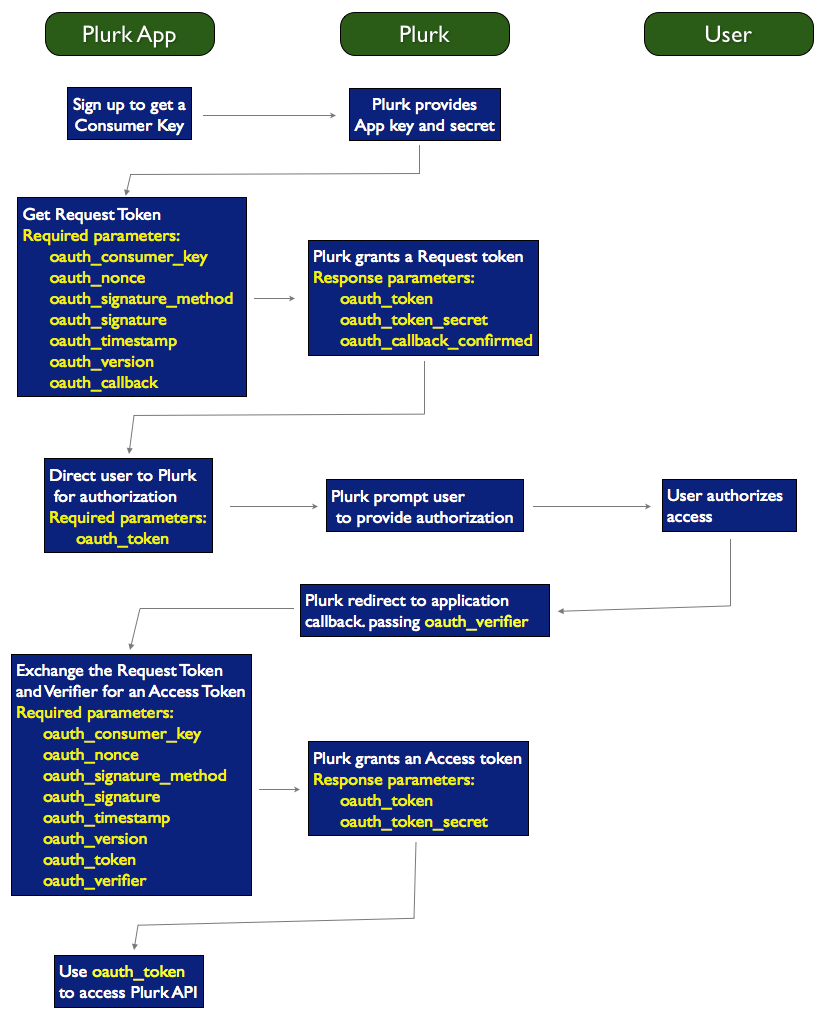
Typically, applications must proceed the following steps to obtain user's access token.
- Sign up here to get plurk app key/secret (OAuth consumer key/secret)
- request a temporary token (OAuth request token)
- redirecting user to Plurk for authorizing the access permission
- receiving the OAuth verifier on the callback
- request a permanent user token (OAuth access token)
After obtaining user's access token, application can then sign the request to invoke any Plurk API 2.0 functions
Plurk OAuth service endpoints:
- obtain request token: https://www.plurk.com/OAuth/request_token (HTTPS GET/POST)
- authorization page: https://www.plurk.com/OAuth/authorize
- authorization page for mobile: https://www.plurk.com/m/authorize
- obtain access token: https://www.plurk.com/OAuth/access_token (HTTPS GET/POST)
Multiple-devices support
You can also pass an optional argument "deviceid" to the authorization page which enable your app be installed on multiple devices using the same Plurk account. The previous access token using the same "deviceid" will be overwritten. Another optional argument "model" can be passed as well, for a meaningful model name to identify user's device. ex:
https://www.plurk.com/OAuth/authorize?oauth_token=ReqKMrVIjOLI&deviceid=efa9183a839f421821dc5c&model=Apple+iPhone+4S
The maximum length of deviceid is 32 chars and the default value is empty (""). You should use an unique id such as UUID to identify user's device, for example: ab21862c272bbd703ef9d5b35458b78d. The model or deviceid will be shown in user's Sessions page. Using a meaningful model name helps user identifying his access tokens easily.
Plurk OAuth specification:
- Signature method: HMAC-SHA1 (?)
- OAuth parameters should be passed in: HTTP Authorization header (?)
- [Timestamp + Nonce] pair should be unique for each request, and timestamp should be very close to current time (?)
- After requesting a request (temporary) token, user must authorize the request in 30 minutes,
and Plurk App must obtain the access (permanent) token in 60 minutes - Plurk API 2.0 paramenters can be passed in: GET or POST (recommended)
Plurk OAuth data flow
Python example
Sample codes of using Plurk API 2.0 from Python.
import oauth2 as oauth
import urlparse

OAUTH_REQUEST_TOKEN = 'https://www.plurk.com/OAuth/request_token'
OAUTH_ACCESS_TOKEN = 'https://www.plurk.com/OAuth/access_token'

def get_request_token(app_key, app_secret):
    consumer = oauth.Consumer(app_key, app_secret)
    client = oauth.Client(consumer)
    response = client.request(OAUTH_REQUEST_TOKEN, method='GET')
    return urlparse.parse_qs(response)

def get_access_token(app_key, app_secret, oauth_token, oauth_token_secret, oauth_verifier):
    consumer = oauth.Consumer(app_key, app_secret)
    token = oauth.Token(oauth_token, oauth_token_secret)
    token.set_verifier(oauth_verifier)
    client = oauth.Client(consumer, token)
    response = client.request(OAUTH_ACCESS_TOKEN, method='GET')
    return urlparse.parse_qs(response)

def getOwnProfile(app_key, app_secret, oauth_token, oauth_token_secret):
    apiUrl = 'https://www.plurk.com/APP/Profile/getOwnProfile'
    consumer = oauth.Consumer(app_key, app_secret)
    token = oauth.Token(oauth_token, oauth_token_secret)
    client = oauth.Client(consumer, token)
    response = client.request(apiUrl, method='GET')
    return response
Plurk data
A plurk and it's data
A plurk is encoded as a JSON object. The dates used will be UTC and you are expected to post UTC to the Plurk server as well. You should render the time in user's local time. Typically it will be returned as following:
{"responses_seen": 0, "qualifier": "thinks", "plurk_id": 90812, "response_count": 0, "limited_to": null,
"no_comments": 0, "is_unread": 1, "lang": "en", "content_raw": "test me out", "user_id": 1, "plurk_type": 0,
"content": "test me out", "qualifier_translated": "thinks", "posted": "Fri, 05 Jun 2009 23:07:13 GMT", "owner_id": 1,
"favorite": false, "favorite_count": 1, "favorers": [3196376],
"replurkable": true, "replurked": true, "replurker_id": null, "replurkers": [1], "replurkers_count": 1}
{"lang": "en", "posted": "Fri, 05 Jun 2009 23:07:13 GMT", "qualifier": "thinks", "plurk_id": 90812, "owner_id": 1, "content": "test me out", "user_id": 1, "is_unread": 1, "no_comments": 0, "plurk_type": 0}
- Plurk attributes:
- plurk_id: The unique Plurk id, used for identification of the plurk.
- qualifier: The English qualifier, can be "says", show all:
- qualifier_translated: Only set if the language is not English, will be the translated qualifier. Can be "siger" if plurk.lang is "da" (Danish).
- is_unread: Specifies if the plurk is read, unread or muted.
- plurk_type: Specifies what type of plurk it is and if the plurk has been responded by the user. The value of plurk_type is only correct when calling getPlurks with "responded" filter (this is done for perfomance and caching reasons).
- user_id: Which timeline does this Plurk belong to.
- owner_id: Who is the owner/poster of this plurk. For anonymous plurk, this will be overrided by user "anonymous" (uid: 99999).
- posted: The date this plurk was posted.
- no_comments: If set to 1, then responses are disabled for this plurk.
If set to 2, then only friends can respond to this plurk.- content: The formatted content, emoticons and images will be turned into IMG tags etc.
- content_raw: The raw content as user entered it, useful when editing plurks or if you want to format the content differently.
- response_count: How many responses does the plurk have.
- responses_seen: How many of the responses have the user read. This is automatically updated when fetching responses or marking a plurk as read.
- limited_to: If the Plurk is public limited_to is
null. If the Plurk is posted to a user's friends then limited_to is[0]. If limited_to is[1,2,6,3]then it's posted only to these user ids.- favorite: True if current user has liked given plurk.
- favorite_count: Number of users who liked given plurk.
- favorers: List of ids of users who liked given plurk (can be truncated).
- replurkable: True if plurk can be replurked.
- replurked: True if plurk has been replurked by current user.
- replurker_id: ID of a user who has replurked given plurk to current user's timeline.
- replurkers_count: Number of users who replurked given plurk.
- replurkers: List of ids of users who replurked given plurk (can be truncated).
- qualifier: The English qualifier, can be "says", show all:
User data
A user and the data
Depending on what kind of request it is the data returned varies. For responses and plurks, the data returned is minimal and will look like this:
{"display_name": "amix3", "gender": 0, "nick_name": "amix", "has_profile_image": 1, "id": 1, "avatar": null}
For other type of requests, such as viewing a friend list or a profile, the data returned will be larger:
{"display_name": "Alexey", "is_channel": 0, "nick_name": "Scoundrel", "has_profile_image": 1, "location": "Canada", "date_of_birth": "Sat, 19 Mar 1983 00:00:00 GMT", "relationship": "not_saying", "avatar": 3, "full_name": "Alexey Kovyrin", "gender": 1, "recruited": 6, "id": 5, "karma": 33.5}
- User attributes:
- id: The unique user id.
- nick_name: The unique nick_name of the user, for example
amix. - display_name: The non-unique display name of the user, for example
Amir S. Only set if it's non empty. - premium: Boolean on whether the user currently has plurk coins.
- has_profile_image: If 1 then the user has a profile picture, otherwise the user should use the default.
- avatar: Specifies what the latest avatar (profile picture) version is.
- location: The user's location, a text string, for example
Aarhus Denmark. - default_lang: The user's profile language.
- date_of_birth: The user's birthday. Note that the birthday is always stored in UTC timezone. You should not convert it to local time zone, otherwise you may get the wrong date of user's birthday.
- bday_privacy: 0: hide birthday, 1: show birth date but not birth year, 2: show all
- full_name: The user's full name, like
Amir Salihefendic. - gender: 1 is male, 0 is female, 2 is not stating/other.
- karma: User's karma value.
- recruited: How many friends has the user recruited.
- relationship:
Can be
not_saying,single,married,divorced,engaged,in_relationship,complicated,widowed,unstable_relationship,open_relationship
About birth date privacy
If user selects to hide his birthday (bday_privacy=0), the returneddate_of_birth will be null. If user selects to hide his age (bday_privacy=1), the returned date_of_birth will be altered by updating the birth year to 1904.
How to render the avatar
One needs to construct the avatar URL.user_id specifies user's id while avatar specifies the profile image version.
If has_profile_image == 1 and avatar == null then the avatar is:
https://avatars.plurk.com/{user_id}-small.gif


https://avatars.plurk.com/{user_id}-medium.gif


https://avatars.plurk.com/{user_id}-big.jpg
https://avatars.plurk.com/{user_id}-small{avatar}.gif


https://avatars.plurk.com/{user_id}-medium{avatar}.gif


https://avatars.plurk.com/{user_id}-big{avatar}.jpg
https://www.plurk.com/static/default_small.jpg


https://www.plurk.com/static/default_medium.jpg


https://www.plurk.com/static/default_big.jpg
Users
/APP/Users/me requires user's access token
(previously /APP/Users/currUser)Returns information about current user, including page-title and user-about.
- Required parameters:
- none
- Successful return:
- user data as described above
/APP/Users/update requires user's access token
Update a user's information (such as display name, email or privacy).- Required parameters:
- none
- Optional parameters:
- full_name: Change full name.
- email: Change email.
- display_name: User's display name, can be empty and full unicode. Must be shorter than 15 characters.
- privacy: User's privacy settings. The option can be
world(whole world can view the profile) oronly_friends(only friends can view the profile). - date_of_birth: Should be
YYYY-MM-DD, example1985-05-13. - Successful return:
- HTTP 200 OK with a JSON object with updated user info
{"id": 42, "nick_name": "frodo_b", ...} - Error returns:
- HTTP 400 BAD REQUEST with
{"error_text": "Email invalid"}as body - HTTP 400 BAD REQUEST with
{"error_text": "Email already found"}as body - HTTP 400 BAD REQUEST with
{"error_text": "Display name too long, should be less than 15 characters long"}as body - HTTP 400 BAD REQUEST with
{"error_text": "Internal service error. Please, try later"}as body
/APP/Users/updateAvatar requires user's access token
Update a user's profile picture. You can read more about how to render an avatar via user data. You should do a multipart/form-data POST request to/APP/Users/updateAvatar.
The picture will be scaled down to 3 versions: big, medium and small. The optimal size of profile_image should be 195x195 pixels.
- Required parameters:
- profile_image: The new profile image.
- Successful return:
- HTTP 200 OK with a JSON object with updated user info
{"id": 42, "nick_name": "frodo_b", ...} - Error returns:
- HTTP 400 BAD REQUEST with
{"error_text": "Not supported image format or image too big"}as body
/APP/Users/getKarmaStats requires user's access token
Returns info about current user's karma, including current karma, karma growth, karma graph and the latest reason why the karma has dropped.- Required parameters:
- none
- Successful return:
- HTTP 200 OK with a JSON object with karma stats
{'karma_trend': ['1282046402-97.85', '1282060802-97.86', '1282075202-97.87', '1282089602-97.88', ...], 'current_karma': 97.88, 'karma_graph': 'http://chart.apis.google.com/...'} - karma_trend:
- Returns a list of 30 recent karma updates. Each update is a string
'[[unixtimestamp]]-[[karma_value]]', e.g. a valid entry is'1282046402-97.85'
Profile
/APP/Profile/getOwnProfile requires user's access token
Returns data that's private for the current user. This can be used to construct a profile and render a timeline of the latest plurks.- Required parameters:
- none
- Successful return:
- Returns a JSON object with a lot of information that can be used to construct a user's own profile and timeline.
- Error returns:
/APP/Profile/getPublicProfile support two-legged OAuth without access token
Fetches public information such as a user's public plurks and basic information. Fetches also if the current user is following the user, are friends with or is a fan.- Required parameters:
- user_id: The
user_idof the public profile. Can be integer (like 34) or nick name (like amix). - Successful return:
- Returns a JSON object with a lot of information that can be used to construct a user's public profile and timeline.
- Error returns:
- HTTP 400 BAD REQUEST with
{"error_text": "Invalid user_id"}as body - HTTP 400 BAD REQUEST with
{"error_text": "User not found"}as body
Real time notifications
Get instant notifications when there are new plurks and responses on a user's timeline. This is much more efficient and faster than polling so please use it!
This API works like this:
- A request is sent to
/APP/Realtime/getUserChanneland in it you get an unique channel to the specified user's timeline - You do requests to this unqiue channel in order to get notifications
/APP/Realtime/getUserChannel requires user's access token
- Required parameters:
- none
- Successful return:
-
Return's a JSON object with an URL that you should listen to, e.g.
{"comet_server": "https://comet03.plurk.com/comet/1235515351741/?channel=generic-4-f733d8522327edf87b4d1651e6395a6cca0807a0",


"channel_name": "generic-4-f733d8522327edf87b4d1651e6395a6cca0807a0"}
Comet channel specification
You'll get an URL from /APP/Realtime/getUserChannel and you do GET requests to this URL to get new data.
Your request will sleep for about 50 seconds before returning a response if there is no new data added to your channel.
You won't get notifications on responses that the logged in user adds, but you will get notifications for new plurks.
- Required parameters:
- channel: You get this from
/APP/Realtime/getUserChannelchannel_name parameter. - Optional parameters:
- offset: Only fetch new messages from a given offset. You'll get offset when a response is returned, it's returned as
new_offset. - Successful returns, but no new data:
- Waiting for data to be posted:
{"new_offset": -1}
- No data has been posted to the channel and the offset is 3:
{"new_offset": 3}
- Successful returns, with data:
- New responses has been added and the new offset is 21 (notice "type":"new_response"):
{"new_offset": 21, "data": [{"plurk_id": 241392217, "response_count": 12, "type": "new_response", "response": {"lang":"en", "content_raw":"@Zap: (cozy)", ...},"user": {"5737406": {"display_name":"","uid":5737406, ...}}, "_cid": 21}]}
- New plurk has been added and the new offset is 26 (notice "type":"new_plurk"):
{"new_offset": 27, "data": [{"lang":"en", "content":"test another", "content_raw":"test another", "user_id":1, "plurk_type":1, "plurk_id":241403675, "type":"new_plurk", "response_count":0, "favorite":false, "qualifier":"says", "id":241403675, "is_unread":0, "responses_seen":0, "posted":"Tue, 02 Mar 2010 16:21:29 GMT", "limited_to":"|1||1|", "no_comments":0, "favorite_count":0, "owner_id":1, "_cid":27}]}
- Error returns:
- Your offset is wrong and you need to resync your data:
{"new_offset": -3}
Polling
/APP/Polling/getPlurks requires user's access token
You should use this call to find out if there any new plurks posted to the user's timeline.
It's much more efficient than doing it with /APP/Timeline/getPlurks, so please use it :)
- Required parameters:
- offset: Return plurks newer than offset, formatted as
2009-6-20T21:55:34. - Optional parameters:
- limit: The max number of plurks to be returned (default: 20)
- favorers_detail, limited_detail and replurkers_detail: See /APP/Timline/getPlurks for details
- Successful return:
- Returns a JSON object of plurks and their users, e.g.
{"plurks": [{"plurk_id": 3, "content": "Test", "qualifier_translated": "says", "qualifier": "says", "lang": "en" ...}, ...], "plurk_users": {"3": {"id": 3, "nick_name": "alvin", ...}} - Error returns:
/APP/Polling/getUnreadCount requires user's access token
Use this call to find out if there are unread plurks on a user's timeline.
- Required parameters:
- none
- Successful return:
- Returns a JSON object of counts,
e.g.
{"all": 2, "my": 1, "private": 1, "responded": 0} - Error returns:
Timeline
/APP/Timeline/getPlurk requires user's access token
- Required parameters:
- plurk_id: The unique id of the plurk. Should be passed as a number, and not base 36 encoded.
- Optional parameters:
- favorers_detail: If true, detailed users information about all favorers of this plurk will be included into "plurk_users"
- limited_detail: If true, detailed users information about recepients of this plurk will be included into "plurk_users" (if this plurk is private)
- replurkers_detail: If true, detailed users information about all replurkers of this plurk will be included into "plurk_users"
- limited_detail: If true, detailed users information about recepients of this plurk will be included into "plurk_users" (if this plurk is private)
- Successful return:
- Returns a JSON object of the plurk and the owner, e.g.
{"plurks": {"plurk_id": 3, "content": "Test", "qualifier_translated": "says", "qualifier": "says", "lang": "en" ...}, ...], "user": {"id": 3, "nick_name": "alvin", ...}} - Error returns:
- HTTP 400 BAD REQUEST with
{"error_text": "Plurk owner not found"}as body - HTTP 400 BAD REQUEST with
{"error_text": "Plurk not found"}as body - HTTP 400 BAD REQUEST with
{"error_text": "No permissions"}as body
/APP/Timeline/getPlurks requires user's access token
- Required parameters:
- none
- Optional parameters:
- offset: Return plurks older than offset, formatted as
2009-6-20T21:55:34.- limit: How many plurks should be returned? Default is
20.- filter: Can be my, responded, private, favorite, replurked or mentioned; mentioned is only available for users with user.premium = true.
- favorers_detail: If true, detailed users information about all favorers of all plurks will be included into "plurk_users"
- limited_detail: If true, detailed users information about all private plurks' recepients will be included into "plurk_users"
- replurkers_detail: If true, detailed users information about all replurkers of all plurks will be included into "plurk_users"
- limit: How many plurks should be returned? Default is
- Successful return:
- Returns a JSON object of plurks and their users, e.g.
{"plurks": [{"plurk_id": 3, "content": "Test", "qualifier_translated": "says", "qualifier": "says", "lang": "en" ...}, ...], "plurk_users": {"3": {"id": 3, "nick_name": "alvin", ...}} - Error returns:
/APP/Timeline/getUnreadPlurks requires user's access token
- Required parameters:
- none
- Optional parameters:
- offset: Return plurks older than offset, formatted as
2009-6-20T21:55:34.- limit: Limit the number of plurks that is returned
- filter: Limit the plurks returned, could be 'my', 'responded', 'private', 'favorite', 'replurked' or 'mentioned' (default: 'all'); 'mentioned' is only available for users with user.premium = true.
- favorers_detail, limited_detail and replurkers_detail: See /APP/Timline/getPlurks for details
- limit: Limit the number of plurks that is returned
- Successful return:
- Returns a JSON object of unread plurks and their users, e.g.
{"plurks": [{"plurk_id": 3, "content": "Test", "qualifier_translated": "says", "qualifier": "says", "lang": "en" ...}, ...], "plurk_users": {"3": {"id": 3, "nick_name": "alvin", ...}} - Error returns:
/APP/Timeline/getPublicPlurks requires user's access token
- Required parameters:
- user_id: The user_id of the public plurks owner to get. Can be integer (like 34) or nick name (like amix).
- Optional parameters:
- offset: Return plurks older than offset, formatted as
2009-6-20T21:55:34.- limit: Limit the number of plurks that is retunred (default: 20)
- favorers_detail, limited_detail and replurkers_detail: See /APP/Timline/getPlurks for details
- limit: Limit the number of plurks that is retunred (default: 20)
- Successful return:
- Returns a JSON object of public plurks and user information, e.g.
{"plurks": [{"plurk_id": 3, "content": "Test", "qualifier_translated": "says", "qualifier": "says", "lang": "en" ...}, ...], "plurk_users": {"3": {"id": 3, "nick_name": "alvin", ...}} - Error returns:
/APP/Timeline/plurkAdd requires user's access token
- Required parameters:
- content: The Plurk's text.
- qualifier: The Plurk's qualifier, must be in English. Can be following:
- Optional parameters:
- limited_to: Limit the plurk only to some users (also known as private plurking).
limited_toshould be a JSON list of friend ids, e.g. limited_to of[3,4,66,34]will only be plurked to these user ids. If limited_to is[0]then the Plurk is privatley posted to the poster's friends.- no_comments: If set to 1, then responses are disabled for this plurk.
If set to 2, then only friends can respond to this plurk.- lang: The plurk's language. Can be following:
- no_comments: If set to 1, then responses are disabled for this plurk.
- Successful return:
- Returns a JSON object of the new plurk, e.g.
{"plurk_id": 3, "content": "Test", "qualifier_translated": "says", "qualifier": "says", "lang": "en" ...} - Error returns:
- HTTP 400 BAD REQUEST with
{"error_text": "Invalid data"}as body - HTTP 400 BAD REQUEST with
{"error_text": "Content is empty"}as body - HTTP 400 BAD REQUEST with
{"error_text": "no-permission-to-comment"}as body - HTTP 400 BAD REQUEST with
{"error_text": "anti-flood-same-content"}as body - HTTP 400 BAD REQUEST with
{"error_text": "anti-flood-spam-domain"}as body - HTTP 400 BAD REQUEST with
{"error_text": "anti-flood-too-many-new"}as body
/APP/Timeline/plurkDelete requires user's access token
- Required parameters:
- plurk_id: The id of the plurk.
- Successful return:
{"success_text": "ok"}if the plurk is deleted- Error returns:
- HTTP 400 BAD REQUEST with
{"error_text": "Plurk not found"}as body - HTTP 400 BAD REQUEST with
{"error_text": "No permissions"}as body
/APP/Timeline/plurkEdit requires user's access token
- Required parameters:
- plurk_id: The id of the plurk.
- content: The content of plurk.
- Successful return:
- Returns a JSON object of the updated plurk, e.g.
{"plurk_id": 3, "content": "Test", "qualifier_translated": "says", "qualifier": "says", "lang": "en" ...} - Error returns:
- HTTP 400 BAD REQUEST with
{"error_text": "Plurk not found"}as body - HTTP 400 BAD REQUEST with
{"error_text": "No permissions"}as body
/APP/Timeline/toggleComments requires user's access token
- Required parameters:
- plurk_id: The id of the plurk.
- no_comments: new no_comments value (0, 1 or 2)
- Successful return:
- latest no_comments value
{"no_comments": 1} - Error returns:
- HTTP 400 BAD REQUEST with
{"error_text": "Plurk not found"}as body
/APP/Timeline/mutePlurks requires user's access token
- Required parameters:
- ids: The plurk ids, formated as JSON, e.g.
[342,23242,2323] - Successful return:
{"success_text": "ok"}if the plurks are muted- Error returns:
/APP/Timeline/unmutePlurks requires user's access token
- Required parameters:
- ids: The plurk ids, formated as JSON, e.g.
[342,23242,2323] - Successful return:
{"success_text": "ok"}if the plurks are unmuted- Error returns:
/APP/Timeline/favoritePlurks requires user's access token
- Required parameters:
- ids: The plurk ids, formated as JSON, e.g.
[342,23242,2323] - Successful return:
{"success_text": "ok"}if the plurks are favorited- Error returns:
/APP/Timeline/unfavoritePlurks requires user's access token
- Required parameters:
- ids: The plurk ids, formated as JSON, e.g.
[342,23242,2323] - Successful return:
{"success_text": "ok"}if the plurks are unfavorited- Error returns:
/APP/Timeline/replurk requires user's access token
- Required parameters:
- ids: The plurk ids, formated as JSON, e.g.
[342,23242,2323] - Returns:
{"success": true, "results": {342: {"success": true, "error":""}}}where top-level success is true if all plurks has been replurked- Error returns:
/APP/Timeline/unreplurk requires user's access token
- Required parameters:
- ids: The plurk ids, formated as JSON, e.g.
[342,23242,2323] - Returns:
{"success": true, "results": {342: {"success": true, "error":""}}}where top-level success is true if all plurks has been unreplurked- Error returns:
/APP/Timeline/markAsRead requires user's access token
- Required parameters:
- ids: The plurk ids, formated as JSON, e.g.
[342,23242,2323] - Optional parameters:
- note_position: If
trueresponses_seen of the plurks will be updated as well (to match response_count). - Successful return:
{"success_text": "ok"}if the plurks are marked as read- Error returns:
/APP/Timeline/uploadPicture requires user's access token
To upload a picture to Plurk, you should do a multipart/form-data POST request to /APP/Timeline/uploadPicture. This will add the picture to Plurk's CDN network and return a image link that you can add to /APP/Timeline/plurkAdd
Plurk will automatically scale down the image and create a thumbnail.
- Required parameters:
- image: The image file.
- Successful return:
- Returns a JSON object of the links, e.g. like this
{"full": "https://images.plurk.com/3466076_9b41abf90c623ba18f6ada5c1d37156f.jpg", "thumbnail": "https://images.plurk.com/tn_3466076_9b41abf90c623ba18f6ada5c1d37156f.gif"}. - Error returns:
- HTTP 400 BAD REQUEST with
{"error_text": "Invalid file"}as body
/APP/Timeline/reportAbuse requires user's access token
- Required parameters:
- plurk_id: The plurk id to be reported as abuse.
- categoty: type of abuse. should be one of the following: porn, spam, privacy, violence, others.
- Successful return:
{"success_text": "ok"}if the plurk is being reported successfully.- Error returns:
porn:       Nudity and Pornography (Nudity and Pornography)
spam:       Spam and Phishing (Spam and Phishing)
privacy:    Privacy and Identity (Privacy and Identity)
violence:   Violence and Threats (Violence and Threats)
others:     Others (Others)
Responses
/APP/Responses/get support two-legged OAuth without access token
Fetches responses for plurk withplurk_id and some basic info about the users.
- Required parameters:
- plurk_id: The plurk that the responses belong to.
- Optional parameters:
- from_response: Only fetch responses from an offset - could be 5, 10 or 15 (default: 0)
- minimal_data: Return minimal data for responses (default: false)
- count: Maximum number of responses to return in this request (default: 0 - all)
- minimal_data: Return minimal data for responses (default: false)
- Anonymous responses:
- Anonymous plurk may contains anonymous response. In that case, the user_id will be overrided by 99999 (anonymous). And additional value "handle" will be attached to each response, which represents user's anonymous identify and can be used to distinct different responder in the responses. If "handle" is provided, it should be displayed as the responder's display name of the response. And another value "my_anonymous" will be provided as true if the corresponding response was posted by current user.
- Successful return:
- Returns a JSON object of responses, friends (users that has posted responses) and responses_seen (the last response that the logged in user has seen) e.g.
{"friends": {"3": ...}, "responses_seen": 2, "responses": [{"lang": "en", "content_raw": "Reforms...}} - Error returns:
- HTTP 400 BAD REQUEST with
{"error_text": "Invalid data"}as body - HTTP 400 BAD REQUEST with
{"error_text": "Plurk not found"}as body - HTTP 400 BAD REQUEST with
{"error_text": "No permissions"}as body
/APP/Responses/responseAdd requires user's access token
Adds a responses toplurk_id. Language is inherited from the plurk.
- Required parameters:
- plurk_id: The plurk that the responses should be added to.
- content: The response's text.
- qualifier: The Plurk's qualifier, must be in English. Can be following:
- content: The response's text.
- Successful return:
- Returns a JSON object of the new responses, e.g.
{"id": 3, "content": "Test", "qualifier_translated": "says", "qualifier": "says", ...} - Error returns:
- HTTP 400 BAD REQUEST with
{"error_text": "Invalid data"}as body - HTTP 400 BAD REQUEST with
{"error_text": "Content is empty"}as body - HTTP 400 BAD REQUEST with
{"error_text": "Plurk not found"}as body - HTTP 400 BAD REQUEST with
{"error_text": "No permissions"}as body - HTTP 400 BAD REQUEST with
{"error_text": "anti-flood-same-content"}as body - HTTP 400 BAD REQUEST with
{"error_text": "anti-flood-too-many-new"}as body
/APP/Responses/responseDelete requires user's access token
Deletes a response. A user can delete own responses or responses that are posted to own plurks.- Required parameters:
- response_id: The id of the response to delete.
- plurk_id: The plurk that the response belongs to.
- Successful return:
{"success_text": "ok"}if the response has been deleted.- Error returns:
- HTTP 400 BAD REQUEST with
{"error_text": "Invalid data"}as body - HTTP 400 BAD REQUEST with
{"error_text": "No permissions"}as body
Friends and fans
/APP/FriendsFans/getFriendsByOffset support two-legged OAuth without access token
Returnsuser_id's friend list in chucks of 10 friends at a time.
- Required parameters:
- user_id
- Optional parameters:
- offset: The offset, can be 10, 20, 30 etc.
- limit: The max number of friends to be returned (default 10).
- Successful return:
- Returns a list of JSON objects users, e.g.
[{"id": 3, "nick_name": "alvin", ...}, ...]
/APP/FriendsFans/getFansByOffset support two-legged OAuth without access token
Returnsuser_id's fans list in chucks of 10 fans at a time.
- Required parameters:
- user_id
- Optional parameters:
- offset: The offset, can be 10, 20, 30 etc.
- limit: The max number of fans to be returned (default 10).
- Successful return:
- Returns a list of JSON objects users, e.g.
[{"id": 3, "nick_name": "alvin", ...}, ...]
/APP/FriendsFans/getFollowingByOffset requires user's access token
Returnsusers that the current logged in user follows as fan - in chucks of 10 fans at a time.
- Required parameters:
- none
- Optional parameters:
- offset: The offset, can be 10, 20, 30 etc.
- limit: The max number of followings to be returned (default 10).
- Successful return:
- Returns a list of JSON objects users, e.g.
[{"id": 3, "nick_name": "alvin", ...}, ...]
/APP/FriendsFans/becomeFriend requires user's access token
Create a friend request tofriend_id. User with friend_id has to accept a friendship.
- Required parameters:
- friend_id: The ID of the user you want to befriend.
- Successful return:
{"success_text": "ok"}if a friend request has been made.- Error returns:
- HTTP 400 BAD REQUEST with
{"error_text": "User can't be befriended"}as body - HTTP 400 BAD REQUEST with
{"error_text": "User already befriended"}as body
/APP/FriendsFans/removeAsFriend requires user's access token
Remove friend with IDfriend_id. friend_id won't be notified.
- Required parameters:
- friend_id: The ID of the user you want to remove
- Successful return:
{"success_text": "ok"}iffriend_idhas been removed as friend.
/APP/FriendsFans/becomeFan requires user's access token
Become fan offan_id. To stop being a fan of someone, user /APP/FriendsFans/setFollowing?fan_id=FAN_ID&follow=false.
- Required parameters:
- fan_id: The ID of the user you want to become fan of
- Successful return:
{"success_text": "ok"}if the current logged in user is a fan offan_id.
/APP/FriendsFans/setFollowing requires user's access token
Update following ofuser_id. A user can befriend someone, but can unfollow them. This request is also used to stop following someone as a fan.
- Required parameters:
- user_id: The ID of the user you want to follow/unfollow
- follow:
trueif the user should be followed, andfalseif the user should be unfollowed. - follow:
- Successful return:
{"success_text": "ok"}if following information is updated.- Error returns:
- HTTP 400 BAD REQUEST with
{"error_text": "User must be befriended before you can follow them"}as body
/APP/FriendsFans/getCompletion requires user's access token
Returns a JSON object of the logged in users friends (nick name and full name). This information can be used to construct auto-completion for private plurking. Notice that a friend list can be big, depending on how many friends a user has, so this list should be lazy-loaded in your application.- Required parameters:
- none
- Successful return:
{"2": {"nick_name": "kan", "full_name": "Kan Kan"}, "4": {"nick_name": "mitsuhiko", ...}, ...}
Alerts
General data structures
The data returned by getActive and getHistory can be of following nature: Friendship request: (requires action from the user)
{"type": "friendship_request", "from_user": {"nick_name": ...}, "posted": ...}
Friendship pending: (requires action from the user)
{"type": "friendship_pending", "to_user": {"nick_name": ...}, "posted": ...}
New fan notification:
{"type": "new_fan", "new_fan": {"nick_name": ...}, "posted": ...}
Friendship accepted notification:
{"type": "friendship_accepted", "friend_info": {"nick_name": ...}, "posted": ...}
New friend notification:
{"type": "new_friend", "new_friend": {"nick_name": ...}, "posted": ...}
New private plurk:
{"type": "private_plurk", "owner": {"nick_name": ...}, "posted": ..., "plurk_id": ...}
User's plurk got liked:
{"type": "plurk_liked", "from_user": {"nick_name": ...}, "posted": ..., "plurk_id": ..., "num_others": ...}
User's plurk got replurked:
{"type": "plurk_replurked", "from_user": {"nick_name": ...}, "posted": ..., "plurk_id": ..., "num_others": ...}
User got mentioned in a plurk:
{"type": "mentioned", "from_user": {"nick_name": ...}, "posted": ..., "plurk_id": ..., "num_others": ..., "response_id": ...}
response_id may be null if user was mentioned in the plurk and not in a response.
User's own plurk got responded:
{"type": "my_responded", "from_user": {"nick_name": ...}, "posted": ..., "plurk_id": ..., "num_others": ..., "response_id": ...}
/APP/Alerts/getActive requires user's access token
Return a JSON list of current active alerts.- Required parameters:
- none
- Successful return:
[{"id": 42, "nick_name": "frodo_b", ...}, ...]JSON object of all the active alerts- Error returns:
/APP/Alerts/getHistory requires user's access token
Return a JSON list of past 30 alerts.- Required parameters:
- none
- Successful return:
[{"nick_name": "frodo_b", ...}, ...]JSON object of all the history alerts- Error returns:
/APP/Alerts/addAsFan requires user's access token
Acceptuser_id as fan.
- Required parameters:
- user_id: The user_id that has asked for friendship.
- Successful return:
{"success_text": "ok"}- Error returns:
/APP/Alerts/addAllAsFan requires user's access token
Accept all friendship requests as fans.- Required parameters:
- none
- Successful return:
{"success_text": "ok"}- Error returns:
/APP/Alerts/addAllAsFriends requires user's access token
Accept all friendship requests as friends.- Required parameters:
- none
- Successful return:
{"success_text": "ok"}- Error returns:
/APP/Alerts/addAsFriend requires user's access token
Acceptuser_id as friend.
- Required parameters:
- user_id: The user_id that has asked for friendship.
- Successful return:
{"success_text": "ok"}- Error returns:
/APP/Alerts/denyFriendship requires user's access token
Deny friendship touser_id.
- Required parameters:
- user_id: The user_id that has asked for friendship.
- Successful return:
{"success_text": "ok"}- Error returns:
/APP/Alerts/removeNotification requires user's access token
Remove notification to user with iduser_id.
- Required parameters:
- user_id: The user_id that the current user has requested friendship for.
- Successful return:
{"success_text": "ok"}- Error returns:
Search
/APP/PlurkSearch/search support two-legged OAuth without access token
Returns the latest 20 plurks on a search term.- Required parameters:
- query: The query after Plurks.
- Optional parameters:
- offset: Page offset, like 10, 20, 30 etc.
- Successful return:
- A JSON list of plurks that the user have permissions to see:
[{"id": 3, "content": "Test", "qualifier_translated": "says", "qualifier": "says", ...}, ...]
/APP/UserSearch/search support two-legged OAuth without access token
Returns 10 users that matchquery, users are sorted by karma.
- Required parameters:
- query: The query after users.
- Optional parameters:
- offset: Page offset, like 10, 20, 30 etc.
- Successful return:
- A JSON list of plurks that the user have permissions to see:
[{"id": 3, "content": "Test", "qualifier_translated": "says", "qualifier": "says", ...}, ...]
Emoticons
/APP/Emoticons/get support two-legged OAuth without access token
Emoticons are a big part of Plurk since they make it easy to express feelings. Check out current Plurk emoticons. This call returns a JSON object that looks like:
{"karma": {"0": [[":-))", "https:\/\/s.plurk.com\/xxxxx.gif"], ...], ...},

"recruited": {"10": [["(bigeyes)", "https:\/\/s.plurk.com\/xxxxx.gif"], ...], ...}
}
emoticons["karma"][25] denotes that the user has to have karma over 25 to use these emoticons. emoticons["recruited"][10] means that the user has to have user.recruited >= 10 to use these emoticons. It's important to check for these things on the client as well, since the emoticon levels are checked in the models.
emoticons["custom"] contains user's customized emoticions if this API is called using three-legged OAuth with user's access token.
Blocks
/APP/Blocks/get requires user's access token
- Required parameters:
- none
- Optional parameters:
- offset: What page should be shown, e.g. 0, 10, 20.
- Successful return:
- A JSON list of users that are blocked by the current user, e.g.
{"total": 12, "users": {"display_name": "amix3", "gender": 0, "nick_name": "amix", "has_profile_image": 1, "id": 1, "avatar": null}, ...]}
/APP/Blocks/block requires user's access token
- Required parameters:
- user_id: The id of the user that should be blocked.
- Successful return:
{"success_text": "ok"}
/APP/Blocks/unblock requires user's access token
- Required parameters:
- user_id: The id of the user that should be unblocked.
- Successful return:
{"success_text": "ok"}
Cliques
/APP/Cliques/getCliques requires user's access token
- Required parameters:
- none
- Successful return: Returns a JSON list of users current cliques, e.g.
["Homies", "Coders", ...] /APP/Cliques/getClique requires user's access token
- Required parameters:
- clique_name: The name of the new clique
- Successful return:
- Returns the users in the clique, e.g.
[{"display_name": "amix3", "gender": 0, "nick_name": "amix", "has_profile_image": 1, "id": 1, "avatar": null}, ...]
/APP/Cliques/createClique requires user's access token
- Required parameters:
- clique_name: The name of the new clique
- Successful return:
{"success_text": "ok"}
/APP/Cliques/renameClique requires user's access token
- Required parameters:
- clique_name: The name of the clique to rename
- new_name: The name of the new clique
- Successful return:
{"success_text": "ok"}
/APP/Cliques/add requires user's access token
- Required parameters:
- clique_name: The name of the clique
- user_id: The user to add to the clique
- Successful return:
{"success_text": "ok"}- Error returns:
- HTTP 400 BAD REQUEST with
{"error_text": "Clique not created"}as body
/APP/Cliques/remove requires user's access token
- Required parameters:
- clique_name: The name of the clique
- user_id: The user to remove from the clique
- Successful return:
{"success_text": "ok"}- Error returns:
- HTTP 400 BAD REQUEST with
{"error_text": "Clique not created"}as body
OAuth Utilities
/APP/checkToken requires user's access token
Check if current access token is valid and return information for this token- Required parameters:
- none
- Successful return:
- app_id: application id of this access token
- user_id: user id of this access token
- issued: the date/time when this token is issued
- deviceid: deviceid used to authorize this token
/APP/expireToken requires user's access token
Expire current access token- Required parameters:
- none
- Successful return:
- app_id: application id of this access token
- user_id: user id of this access token
- issued: the date/time when this token is issued
- deviceid: deviceid used to authorize this token
/APP/checkTime support two-legged OAuth without access token
Check current time of plurk servers- Required parameters:
- none
- Successful return:
- now: current time of plurk servers
- timestamp: current time of plurk servers (as UNIX timestamp)
- app_id: application id of this access token
- user_id: user id of this access token (null for two-legged OAuth)
/APP/echo support two-legged OAuth without access token
Test for argument passing.- Required parameters:
- data
- Successful return:
- data: same as the data passing in
- length: length of data
