The PHP continue statement skips the rest of the loop in the current cycle. It jumps to the next cycle in the loop.
Table of Content
Developers use it to skip invalid input. They also use it to filter data without extra conditions. It also helps avoid deep nesting.
Understand the continue Statement in PHP
The PHP continue statement forces the loop to move to the next cycle. It stops the current cycle early.
Here is the syntax:
continue;You can write it like this to move on to the next loop cycle.
You can also use a numeric argument.
continue 2;This is used to jump out of nested loops.
Here is how to jump based on the number of loops:
continue;— This skips the rest of the current iteration and starts the next iteration of the same loop.continue 2;— This skips the rest of this iteration and continues at the next iteration of the outer loop.continue 3;— The skips rest here and continue the next iteration three levels up in nested loops.

It starts when you check a condition. It stops the current loop if true, then moves to the next cycle.
Here is a quick example:
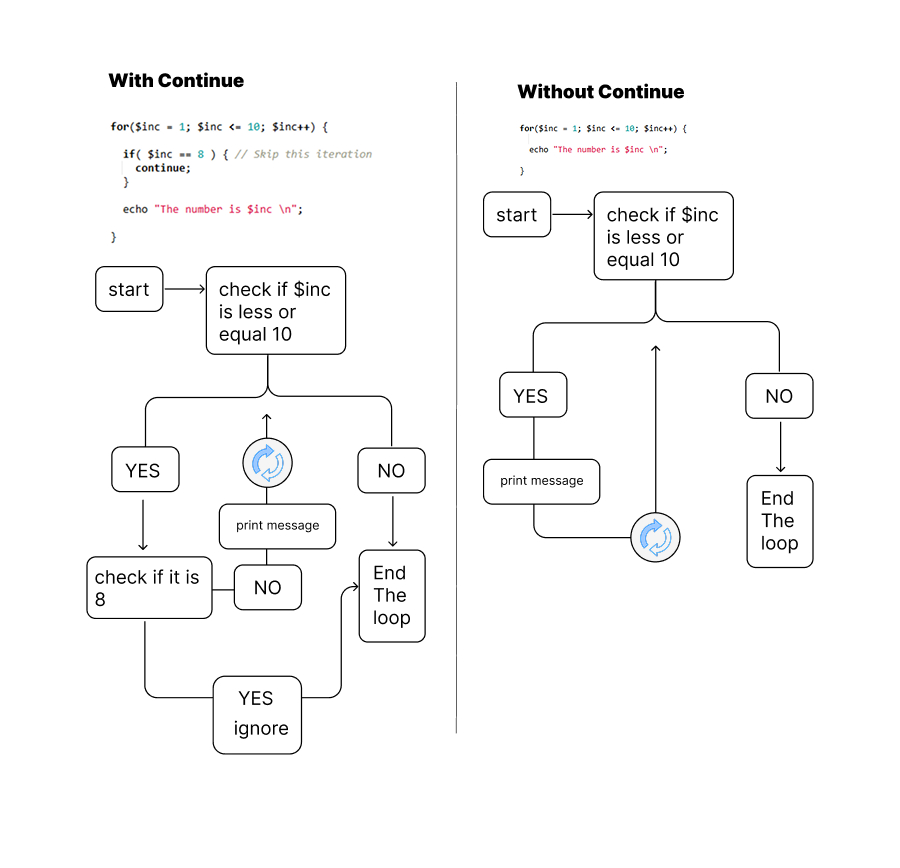
for($inc = 1; $inc <= 10; $inc++) {

  if( $inc == 8 ) { // Skip this iteration
    continue;
  }

  echo "The number is $inc \n";

}
Here is the output:
The number is 1
The number is 2
The number is 3
The number is 4
The number is 5
The number is 6
The number is 7
The number is 9
The number is 10
This figure shows the difference between loops with the continue statement and loops without it.
The continue 2 statement is used to skip the rest of the current cycle in two nested loops. It tells the outer loop to move to its next cycle.
for ($i = 0; $i < 3; $i++) {
    for ($j = 0; $j < 3; $j++) {
        if ($j == 1) {
            // Skip this iteration for the two loops
            continue 2;
        }
        echo "$i, $j\n";
    }
}
The output:
0, 0
1, 0
2, 0
This skips the inner loop and moves the outer loop to the next cycle.
Here are the use cases:
- You skip over unwanted values in a loop.
- It avoids extra nested checks.
- It stops the current iteration early and moves execution to the next loop cycle.
Use the continue Statement with Other Loops
You can use continue in for loops to skip cycles that do not meet a rule. For example:
for ($i = 0; $i < 5; $i++) {
    // Skip this iteration
    if ($i == 2) {
        continue;
    }
    echo $i;
}
Output:
0134
It skips 2.
Use continue in foreach loops to skip over unwanted values. Here is an example:
For example:
$items = [1, 2, 3, 4];
foreach ($items as $item) {
    if ($item == 3) { // Skip this iteration
        continue;
    }
    echo $item;
}
Here is the output:
124
It skips 3.
You can use continue in while loops to control flow without extra nesting. Here is an example:
$i = 0;
while ($i < 5) {
    $i++;
    if ($i == 3) { // Skip this iteration
        continue;
    }
    echo $i;
}
Output:
1245
It skips 3.
You use continue in do…while loops the same way. For example:
$i = 0;
do {
    $i++;
    if ($i == 4) { // Skip this iteration
        continue;
    }
    echo $i;
} while ($i < 5);
The output:
1235
It skips 4.
Examples
Skip even numbers in a for loop:
for ($i = 1; $i <= 5; $i++) {
    if ($i % 2 == 0) { // Skip this iteration
        continue;
    }
    echo $i;
}
The output:
135
This prints only odd numbers. It checks if $i is even. It uses continue to skip even numbers.
Skip null values in an array:
$values = [1, null, 2, null, 3];
foreach ($values as $value) {
    if ($value === null) { // Skip this iteration
        continue;
    }
    echo $value;
}
This prints 1, 2, 3. It skips null.
Nested loop with continue 2:
for ($i = 0; $i < 3; $i++) {
    for ($j = 0; $j < 3; $j++) {
        if ($j == 1) {
            continue 2;
        }
        echo "$i, $j\n";
    }
}
The output:
0, 0
1, 0
2, 0
It skips the inner and outer loop cycles. The outer loop moves ahead. It avoids unwanted pairs.
Filter strings in a list:
$words = ["apple", "", "banana", " ", "cherry"];
foreach ($words as $word) {
    if (trim($word) === "") { // Skip this iteration
        continue;
    }
    echo $word;
}
Here is the output:
applebananacherry
It removes empty or space-only strings by using trim().
Skip invalid CSV rows:
$rows = [
    ["id" => 1, "name" => "John"],
    ["id" => null, "name" => ""], // invalid
    ["id" => 2, "name" => "Sara"],
];

foreach ($rows as $row) {
    if (empty($row['id']) || empty($row['name'])) {
        continue; // skip invalid rows
    }
    echo "ID: {$row['id']} Name: {$row['name']}\n";
}
This code skips the invalid row in the array because the property ‘name’ has an empty value.
Wrapping Up
In this article, you learned what the PHP continue statement does and how it works in different loops.
Here is a quick recap.
- The PHP continue statement lets a loop skip the rest of the current cycle and move to the next one.
- You can use it for loop control to skip bad data like null values, empty strings, or failed responses.
- It helps a loop skip cycle steps inside
for,foreach,while, ordo…whileloops. - In nested loops,
continue 2;orcontinue 3;moves control to an outer loop and skips deeper levels. - Real uses include skip invalid CSV rows, blank form fields, or failed API calls before more work.
- The PHP continue statement with conditions stops extra checks after a loop cycle.
FAQs
What does the PHP continue statement do?
continue;How does continue 2 work in PHP?
Can I use continue in all loops?
for, foreach, while, and do...while loops.
What is the syntax for the continue statement?
Why use the PHP continue statement?
Similar Reads
You may need to cut the last character from a string if it shows by mistake in PHP. That may…
The PHP OR operator has two renditions: either || or or. Both of these are useful logical operators when you want to introduce…
PHP gives us the ability to work with MongoDB, highlighting the importance of CRUD (Create, Read, Update, Delete) operations for…
The abs() function in PHP gives you a number without its sign — it always returns a positive value. That…
Connecting PHP to MySQL is not just a technical step—it is the basic part of how data-driven websites work. From…
The PHP logical operators are operands that can be used to check two or more expressions together. For examples (…
PHP static method lets you call functions without an object. In this article, we will cover the following topics: The…
In this tutorial, I will explain what does mean the PHP resource and we are going to cover all PHP…
PHP and MySQL have become an inseparable pair for web developers. One handles the logic, while the other stores the…
The array_combine function in PHP creates a new array with one array for keys and another for values. It needs…