Before the spread operator, PHP developers had to pass array items to a function using extra steps. They often had to loop through the array or use call_user_func_array().
Table of Content
- Understanding the PHP Spread Operator
- Merge and Expand Arrays with PHP Spread Syntax
- Why Objects Cannot Use the Spread Syntax in PHP
- How to Use Traversable Objects with the Spread Operator
- Understand How a Function Works with the PHP Spread Operator
- Spread Operator with Associative Arrays in PHP 8.1+
- References in the Spread Syntax
- How to Use Type Hinting with the PHP Spread Operator
- The Differences Between the Spread Operator and Other PHP Functions (compact and array_merge)
- Wrapping Up
- FAQ’s
Understanding the PHP Spread Operator
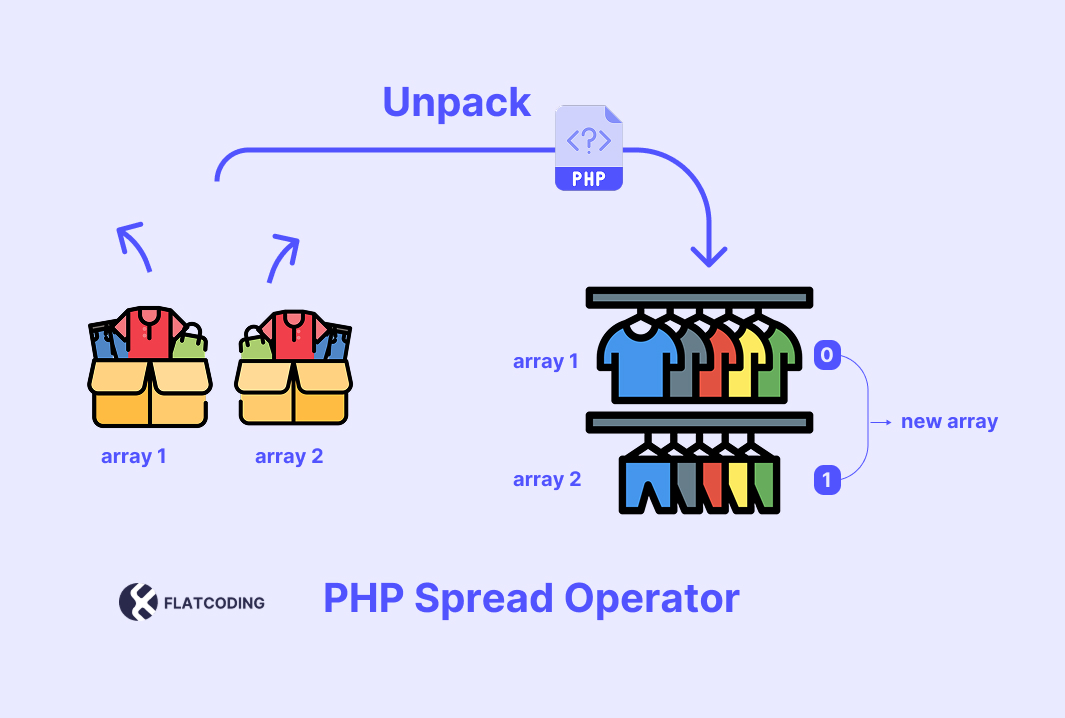
The spread operator in PHP is a feature that allows you to unpack elements of an array or Traversable object into individual values. That is using the three dots (...). It is also called the splat operator.
Here is its syntax:
...ARRAYPHP 5.6 spread operator:
PHP 5.6 introduced this feature to unpack arrays into function arguments. This allows you to treat an array as individual arguments.
PHP 7.4 spread operator:
The spread operator was extended to work in array expressions within PHP 7.4. It allows you to include the elements of one array into another array without needing to loop through or manually merge them.
Here is a quick example:
$newArray = [...$array1, ...$array2];Let’s move on to the following section to see examples of how to expand and merge arrays in PHP within other inputs using the spread operator syntax.
Merge and Expand Arrays with PHP Spread Syntax
In the following example, we will take an array and expand its elements into another one.
$array = [1, 2, 3];
$newArray = [...$array, 4, 5, 6];
The $newArray will contain all elements of the $array alongside the values 4, 5, and 6. Its output would be like this:
[1, 2, 3, 4, 5, 6]
Developers used built-in functions such as call_user_func_array() to merge two arrays:
$array1 = [0, 100, 56];
$array2 = [41, 200, 96];

function custom_merge($array1, $array2) {
    $mergedArray = [];

    foreach ($array1 as $item) {
        $mergedArray[] = $item;
    }

    foreach ($array2 as $item) {
        $mergedArray[] = $item;
    }

    return $mergedArray;
}

$mergedArray = call_user_func('custom_merge', $array1, $array2);

print_r($mergedArray);
This can be simplified into a smaller and cleaner code with the spread operator:
$array1 = [0, 100, 56];
$array2 = [41, 200, 96];

$mergedArray = [...$array1, ...$array2];

print_r($mergedArray);
Here, the $mergedArray will take all elements of $array1 and $array2 and then create a new array with both. Its output will be the same result as the previous example:
Array
(
    [0] => 0
    [1] => 100
    [2] => 56
    [3] => 41
    [4] => 200
    [5] => 96
)
In the following part, you will understand why we cannot use the spread operator with objects.
Why Objects Cannot Use the Spread Syntax in PHP
PHP does not support the direct use of the spread operator with objects. Let’s see what happens if we try to use the spread operator with objects.
class Machine {
    public $ram = "8GB";
    public $screen = "30 Inch";
    protected function play() {
      echo "The machinery is working!";
   }
}

$computer = new Machine();
$laptop = ["Touchable Mouse", "On Keyboard"];

$combine = [...$computer, ...$laptop];  // fatal error
print_r($combine);
This will produce a fatal error. Here is the output:
Fatal error: Uncaught TypeError: Only arrays and Traversables can be unpacked in /test/index.php:12
So, why can’t we use objects with the spread operator?
Objects in PHP have access modifiers such as public, protected, and private. If PHP allowed the spread operator to unpack objects, it would violate encapsulation by unintentionally exposing protected and private properties.
Objects are not just collections; they may have methods, behaviour, and an internal state.
But you can use the spread operator with objects indirectly through get_object_vars function.
It converts the object into an array, which you can then unpack as needed. Here’s how:
class Machine {
    public $ram = "8GB";
    public $screen = "30 Inch";
    protected function play() {
      echo "Welcome to FlatCoding Tutorials";
   }
}

$computer = get_object_vars(new Machine());
$laptop = ["Touchable Mouse", "On Keyboard"];

$combine = [...$computer, ...$laptop];
print_r($combine);
The output:
Array
(
    [ram] => 8GB
    [screen] => 30 Inch
    [0] => Touchable Mouse
    [1] => On Keyboard
)
Let’s move on to the following section to learn how to use it with traversable objects.
How to Use Traversable Objects with the Spread Operator
The class must implement the Traversable interface. To do that, implement either the Iterator or IteratorAggregate interface.
Here is an example:
class Numbers implements IteratorAggregate {
    private $numbers;

    public function __construct(...$numbers) {
        $this->numbers = $numbers;
    }

    public function getIterator(): Traversable {
        return new ArrayIterator($this->numbers);
    }
}

$numbers = new Numbers(1, 2, 3, 4, 5);
$array = [...$numbers];

print_r($array);
You can also use #[\ReturnTypeWillChange] instead of implementing the Traversable interface, like this:
Array
(
    [0] => 1
    [1] => 2
    [2] => 3
    [3] => 4
    [4] => 5
)
Let’s move on to the following section to understand how to pass multiple arguments into a function with the spread operator.
Understand How a Function Works with the PHP Spread Operator
You can use the spread operator to pass an array as individual arguments to a function.
Here is an example:
function greet($name1, $name2, $name3) {
    echo "Hello, $name1, $name2, and $name3!";
}

$names = ['Alice', 'Bob', 'Charlie'];
greet(...$names);
Output:
Hello, Alice, Bob, and Charlie!
The function greet expects three arguments. Here, it allows you to pass the three arguments through an array, which should have three elements that match the number of arguments in the function.
You can also mix regular and spread parameters, but the spread parameter must come last:
function boxing_players($greeting, ...$names) {
    foreach ($names as $name) {
        echo "$greeting, $name!\n";
    }
}

boxing_players("Hello", "Muhammad Ali Clay", "Mike Tyson", "Jake Paul");
Output:
Hello, Muhammad Ali Clay!
Hello, Mike Tyson!
Hello, Jake Paul!
Update: PHP 8.1 and later can work with assoc arrays. Let’s see how we can use it in the following section.
Spread Operator with Associative Arrays in PHP 8.1+
The splat operator (...) works with associative arrays in PHP 8.1+. This lets you merge key-value arrays.
Here is an example:
$defaults = ['theme' => 'light', 'layout' => 'grid'];
$userSettings = ['theme' => 'dark', 'showSidebar' => true];

$finalConfig = [...$defaults, ...$userSettings];

print_r($finalConfig);
Output:
Array
(
    [theme] => dark
    [layout] => grid
    [showSidebar] => 1
)
The theme key from $userSettings overrides the one in $defaults.
The spread operator doesn’t work directly with the reference symbol (&). Let’s see why in the following section.
References in the Spread Syntax
You are not allowed to use the & flag of reference within the array directly. So, this [...&$array, 4, 5] will cause an error.
Here is an example:
Parse error: syntax error, unexpected token "&" in index.php
The PHP spread operator can work with a reference through a middle variable, but that will not affect the original array.
Here is an example:
$origin_array = [1, 2, 3];
$ref =& $origin_array;
$newArray = [...$ref, 4, 5];
print_r($origin_array);
print_r($newArray);
Output:
Array
(
    [0] => 1
    [1] => 2
    [2] => 3
)

Array
(
    [0] => 1
    [1] => 2
    [2] => 3
    [3] => 4
    [4] => 5
)
In the following section, you will learn how to use type hinting alongside the spread operator.
How to Use Type Hinting with the PHP Spread Operator
The PHP spread operator supports type hinting, which lets a function require a specific data type for arguments passed with (...).
Here is an example:
function addNumbers(int ...$numbers) {
  return array_sum($numbers);
}

$nums = [1, 2, 3, 4];
echo addNumbers(...$nums);
Output:
10
Here is another example with an object:
class User {
    public string $name;
    public function __construct($name) {
        $this->name = $name;
    }
}

function greetUsers(User ...$users) {
    foreach ($users as $user) {
        echo "Hello, $user->name!\n";
    }
}

greetUsers(new User("Alice"), new User("Bob"));
Output:
Hello, Alice!
Hello, Bob!
Let’s move on to the following section to look at the difference between the spread operator and some other built-in functions in PHP.
The Differences Between the Spread Operator and Other PHP Functions (compact and array_merge)
The spread operator works only with numeric arrays. It unpacks values into a new array or function call.
It does not preserve keys and will reindex numeric keys. This makes it useful when you need to unpack values or merge simple indexed arrays.
While the “array_merge()” function supports both numeric and associative arrays.
It preserves associative keys but reindexes numeric keys. It is a good tool for combining multiple arrays into one.
Later values overwrite earlier ones if the same string keys exist in multiple arrays.
The “compact()” function works differently. It doesn’t merge arrays. Instead, it takes variable names as strings and creates an associative array where the keys are the variable names and the values are their actual values.
The “compact()” preserves all keys and doesn’t reindex. It’s best for building associative arrays from a list of variables, especially in view templates or JSON responses.
Wrapping Up
You learned how the PHP spread operator helps you unpack arrays and pass values to functions.
Here is a quick recap of what you saw:
- The spread operator (
...) was added in PHP 5.6 for function arguments. - PHP 7.4 extended it to arrays, so now you can merge arrays with
[...$array1, ...$array2]. - You saw how it replaces longer merge functions with simpler syntax.
- You cannot use the spread operator directly on objects. It only works with arrays and Traversable classes.
- You can unpack an object with
get_object_vars()or useIteratorAggregateto make a class unpackable. - You learned how to use the spread operator in function arguments and mix it with regular values.
- You saw how it works with type hinting to enforce data types in functions.
- You also saw how
array_merge()andcompact()differ from the spread operator. The spread operator works only with numeric arrays, whilearray_merge()supports both. Thecompact()function builds arrays from variable names.
FAQ’s
What is the spread operator in PHP?
When was the spread operator introduced in PHP?
$newArray = [...$array1, ...$array2];Can I merge two arrays using the PHP spread operator?
$mergedArray = [...$array1, ...$array2];Can I use the PHP spread operator with objects?
How can I unpack an object with the spread operator in PHP?
get_object_vars() function. It turns an object’s public properties into an array, which you can then unpack. Example:
$computer = get_object_vars(new Machine());
$combined = [...$computer, ...$laptop];
What is a Traversable object in PHP and how does it work with the spread operator?
class Numbers implements IteratorAggregate {
    // code here
}
$array = [...new Numbers(1, 2, 3)];
Can I pass an array to a function using the spread operator in PHP?
$names = ['Alice', 'Bob', 'Charlie'];
greet(...$names);
Does the PHP spread operator support type hinting?
function addNumbers(int ...$numbers) { ... }Similar Reads
PHP array_unshift helps you add new elements to appear before the existing ones. Understand the array_unshift function in PHP The…
The function_exists() function in PHP checks whether a given function is defined or not. The function_exists() function works for both…
When you start working with PHP, you’ll soon need access to variables from multiple places in your code. For this,…
PHP array_flip swaps keys with values. It works well when you need values as keys in fast lookups. What is…
Traditional relational databases like MySQL often take center stage. However, with the rise of NoSQL databases, MongoDB has emerged as…
The PHP switch statement is multiple conditions to only execute one block if its condition generating a true boolean value.…
Actually, PHP has a built-in function that doesn’t get the spotlight—fclose(). It ends the file manipulation code. Let’s break down…
PHP arrays serve as powerful tools for storing multiple values in a single variable. To manipulate arrays efficiently, PHP provides…
Understanding PHP syntax is like the basics of any language—PHP syntax defines the rules for writing code that a server…
A complex web application needs proper organization and maintenance to keep your code structured. This is where PHP Object-Oriented Programming…