

Περιγραφή
Make it easy for your readers and users to copy code snippets directly from your website. The Code Block Copy Button plugin adds a handy copy button to all code blocks, helping developers, tech writers, and educators improve user experience.
Features:
– Automatically adds a Copy button to all <pre> code blocks, including Gutenberg Code and Preformatted blocks.
– Customize the button text (e.g., “Copy”, “Copy Code”).
– Change the button color to match your site’s theme.
– Clean, modern SVG icon included in the button.
– Simple settings panel under Settings > Code Block Copy.
– Works with both Classic and Gutenberg editors.
– Includes an optional promotional banner in the admin panel.Live Demo
Make it easy for your readers and users to copy code snippets directly from your website. The Code Block Copy Button plugin adds a handy copy button to all code blocks, helping developers, tech writers, and educators improve user experience.
Features:
– Automatically adds a Copy button to all <pre> code blocks, including Gutenberg Code and Preformatted blocks.
– Customize the button text (e.g., “Copy”, “Copy Code”).
– Change the button color to match your site’s theme.
– Clean, modern SVG icon included in the button.
– Simple settings panel under Settings > Code Block Copy.
– Works with both Classic and Gutenberg editors.
– Includes an optional promotional banner in the admin panel.Live Demo
Make it easy for your readers and users to copy code snippets directly from your website. The Code Block Copy Button plugin adds a handy copy button to all code blocks, helping developers, tech writers, and educators improve user experience.
Features:
– Automatically adds a Copy button to all
<
pre> code blocks.
– Customize the button text (e.g., “Copy”, “Copy Code”).
– Change the button color to match your site’s theme.
– Simple settings panel under Settings > Code Block Copy.
– No coding required – just install, configure, and you’re done.
– Includes an optional affiliate link banner in the admin to help support development.
License
This plugin is licensed under the GPL2 license. See https://www.gnu.org/licenses/gpl-2.0.html for details.
Add a customizable copy button to code blocks for fast, one-click copying.
License
This plugin is licensed under the GPL2 license. See https://www.gnu.org/licenses/gpl-2.0.html for details.
Add a customizable copy button to code blocks for fast, one-click copying.
License
This plugin is licensed under the GPL2 license. See https://www.gnu.org/licenses/gpl-2.0.html for details.
Στιγμιότυπα

Example of the Copy button in action. 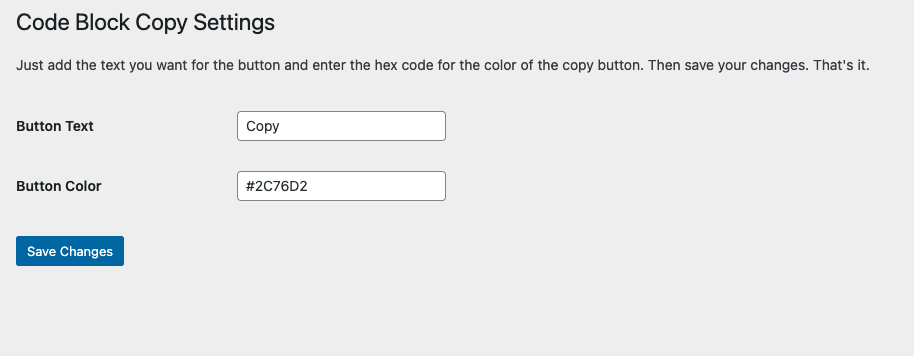
Admin settings page with customization options.1. Example of the Copy button in action.


Εγκατάσταση
- Upload the plugin files to the
/wp-content/plugins/code-block-copy-buttondirectory, or install it directly through the WordPress plugins screen. - Activate the plugin through the ‘Plugins’ screen in WordPress.
- Navigate to Settings > Code Block Copy to configure the button text and color.1. Upload the plugin files to the
/wp-content/plugins/code-block-copy-buttondirectory, or install it directly through the WordPress plugins screen. - Activate the plugin through the ‘Plugins’ screen in WordPress.
- Navigate to Settings > Code Block Copy to configure the button text and color.1. Upload the plugin files to the /wp-content/plugins/code-block-copy-button directory, or install it directly through the WordPress plugins screen.
- Activate the plugin through the ‘Plugins’ screen in WordPress.
- Navigate to Settings > Code Block Copy to configure the button text and color.
Συχνές Ερωτήσεις
-
How do I use this plugin?
-
Simply install and activate it. The Copy button will appear automatically on all
<pre>code blocks. Use the settings page to customize the button text and color. -
At this time, the button is automatically placed above the code block. Future updates may include position customization.
-
Does this plugin support Gutenberg blocks?
-
Yes! It works with the Gutenberg Code block and any manually added
<
pre> tags.
Κριτικές
Δεν υπάρχουν αξιολογήσεις για αυτό το πρόσθετο.
Συνεισφέροντες & Προγραμματιστές
“Code Block Copy Button” είναι λογισμικό ανοιχτού κώδικα. Οι παρακάτω έχουν συνεισφέρει στη δημιουργία του.
Συντελεστές
Το “Code Block Copy Button” έχει μεταφραστεί σε 1 γλώσσα. Ευχαριστούμε τους μεταφραστές για τις συνεισφορές τους.
Μεταφράστε το “Code Block Copy Button” στην γλώσσα σας.
Ενδιαφέρεστε για την ανάπτυξη;
Περιηγηθείτε στον κώδικα, ανατρέξτε στο αποθετήριο SVN ή εγγραφείτε στο αρχείο καταγραφής αλλαγών ανάπτυξης μέσω RSS .
Σύνοψη αλλαγών
1.5.4
- Updated button functions and plugin description.
1.5.3
- Changed admin settings ad link to point to CopyMyIP.dev
1.4
- New admin settings, SVG icon added, duplicate button fix, and improved copy functionality.
1.3
- Finalized admin settings with instructions and promotional banner.
- Cleaned up SVG icon for modern display.
- Prepared for WordPress repository submission.
1.2
- Added admin settings page.
- Included options for button text and color customization.
1.1
- Added Settings link directly from the Plugins page.
1.0
- Initial release. Copy button automatically added to code blocks.= 1.4 =
- Improved compatibility with Gutenberg Preformatted blocks.
- Fixed JavaScript to handle both
<code>and<pre>content. - Restored SVG icon in the Copy button.
- Addressed Plugin Check warnings for asset loading and URL escaping.
- Updated readme and bumped version for release.
1.3
- Finalized admin settings with instructions and promotional banner.
- Cleaned up SVG icon for modern display.
- Prepared for WordPress repository submission.
1.2
- Added admin settings page.
- Included options for button text and color customization.
1.1
- Added Settings link directly from the Plugins page.
1.0
- Initial release. Copy button automatically added to code blocks.= 1.3 =
- Finalized admin settings with instructions and promotional banner.
- Cleaned up SVG icon for modern display.
- Prepared for WordPress repository submission.
1.2
- Added admin settings page.
- Included options for button text and color customization.
1.1
- Added Settings link directly from the Plugins page.
1.0
- Initial release. Copy button automatically added to code blocks.
