
Описание
Woody Code Snippets is a WordPress plugin that helps you insert code into your site without editing theme files.
Many WordPress users still add PHP, JavaScript, CSS, tracking pixels, or ad scripts directly into functions.php, header.php, or footer.php. This approach breaks easily when themes update and becomes hard to manage as your site grows.
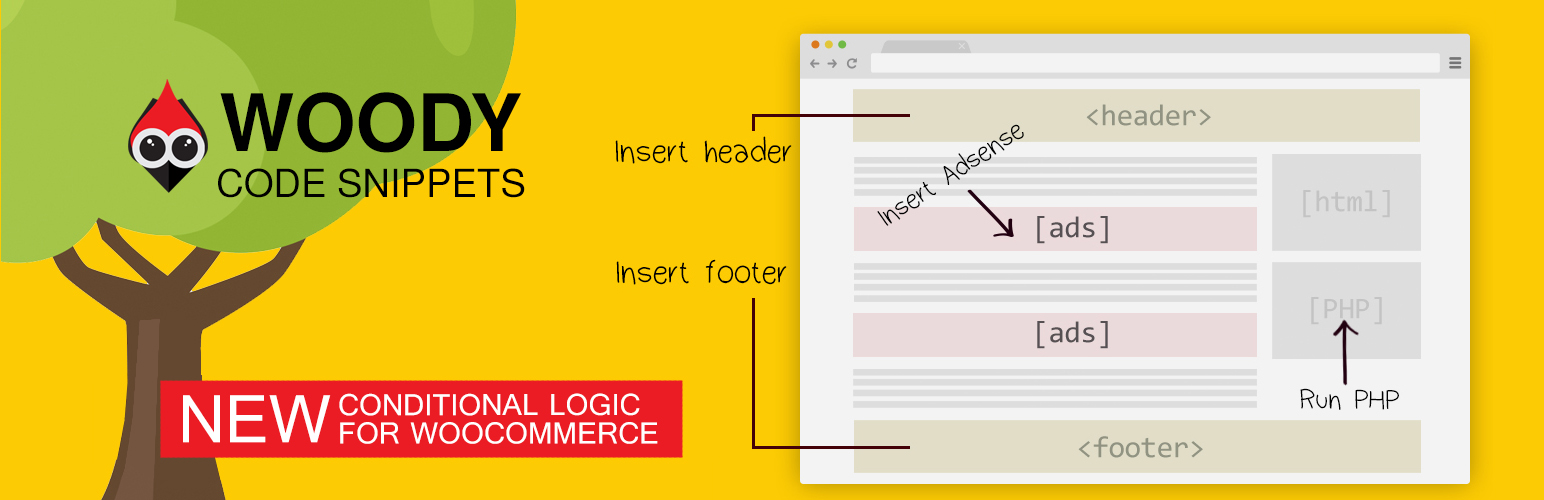
Woody solves this by giving you a centralized code snippet manager where you can safely add header scripts, footer scripts, PHP snippets, custom CSS, JavaScript, and HTML from the WordPress admin.
You can use Woody as a header and footer code manager, a PHP snippet plugin, or a way to reuse content and scripts across your site using shortcodes or automatic insertion.
Each snippet can be enabled or disabled instantly, placed in specific locations like before content or after paragraphs, and shown only when certain conditions are met.
Quick Links
📘 Documentation – Complete setup and configuration guide
💬 Support Forum – Community help and expert support
⭐ Go Pro – Unlock advanced features and priority support
What Problems Does Woody Solve?
Woody is built for real WordPress workflows. It helps you:
- Insert code into headers and footers without editing theme files
- Add analytics scripts, tracking pixels, and ad code safely
- Manage PHP snippets without touching functions.php
- Reuse scripts and content across pages using shortcodes
- Control where code runs using placement rules and conditions
- Enable, disable, or roll back snippets without breaking your site
Whether you are building client sites, running marketing experiments, or maintaining your own project, Woody gives you control without unnecessary complexity.
How It Works
Woody lets you create code snippets and control where and when they run, all from the WordPress admin.
Пример №1
Create a JavaScript snippet and add your analytics or tracking code.
Place it in the site header and add a condition to exclude administrators so your own visits are not tracked.
Пример №2
Create a text snippet with reusable content or a shortcode.
Add conditions to show it only to logged-in users, then insert it anywhere using the snippet shortcode or automatic placement rules.
This makes it easy to manage repeated logic and content without editing theme files.
Who Should Use Woody Code Snippets
Woody is designed for:
- Developers who want a structured way to manage custom code
- Marketers adding analytics, ads, and tracking scripts
- Solopreneurs who want flexibility without editing theme files
- Agencies managing multiple sites and shared snippets
If you regularly need to insert code into WordPress, Woody fits naturally into your workflow.
Supported Snippet Types
Woody supports multiple snippet types, so you can manage all custom code in one place. You can create:
- PHP snippets for functions, hooks, classes, and global variables
- JavaScript snippets for analytics, integrations, and interactive features
- CSS snippets to add custom styles without editing theme files
- HTML snippets for markup and layout elements
- Text snippets using the WordPress editor for reusable content
- Ad snippets for ads and banners
- Universal snippets that combine PHP, HTML, CSS, and JavaScript
Зачем вам нужен этот плагин?
- Вы можете подключить Google AdSense, разместить Яндекс. Директ, Media.net и контекстную рекламу Amazon Native Shopping.
- Insert Google Analytic Tracking code, Yandex Metrika Tracking Code, Yandex Counter to Header, Footer.
- Добавляйте сниппеты PHP кода и выполняйте их на сайте. Регистрируйте РНР функции, классы, глобальные переменные в любом месте.
- Вы можете добавить виджеты соцсетей и внешних ресурсов.
- Вам доступна вставка кода в WordPress: пиксели Facebook, VK, конверсии Google, скрипты Facebook и теги og:image в Facebook.
Header and Footer Code Management
Woody works as a full header and footer code manager.
You can insert snippets:
— Into the site header before the closing tag
— Into the site footer before the closing tag
Common examples include analytics scripts, tracking pixels, verification tags, and global JavaScript or CSS.
Advanced Placement Options
Beyond headers and footers, Woody lets you insert snippets into specific locations.
You can place code:
- Before or after post or page content
- Before or after a specific paragraph
- Before or after a post
- Inside archives, categories, and taxonomy pages
- Between posts on archive pages
WooCommerce Pages
Woody supports automatic snippet placement on WooCommerce pages.
You can insert snippets:
- Before or after the product list
- Before or after a single product
- Before or after the single product summary
- After the product title, price, or excerpt
Common use cases include conversion tracking, promotional banners, custom JavaScript, and trust notices.
Shortcodes and Reusable Content
Woody supports shortcodes so you can insert snippets exactly where you need them. You can place snippets inside posts, pages, widgets, and page builders.
With Pro, you can define custom shortcode names that are readable and portable across sites.
Conditional Logic for Code Snippets
Woody allows you to control when a snippet is displayed.
[FREE] Available in the free version:
— User role and registration date
— Page, post type, or taxonomy
— Referrer or cookie value
[PRO] Advanced conditions available in Pro:
— Device type, browser, and operating system
— JavaScript availability or ad blocker detection
— User country, visit depth, time of day, and total visits
Conditions can be combined using AND and OR logic.
Unlock advanced conditions with Woody Pro.
Snippet Management and Organization
Woody includes features to keep snippets organized and easy to manage.
You can:
— Enable or disable snippets instantly
— Control execution order using priorities
— Tag and clone snippets
— Import and export snippets between sites
Code Revisions and Rollback [PRO]
With Pro, Woody automatically saves snippet revisions. You can view previous versions, compare changes, and restore earlier revisions if something goes wrong.
This adds an extra layer of safety when working with custom code.
Cloud Templates and Sync [PRO]
Woody Pro includes cloud-based snippet templates.
You can save snippets as templates and reuse them across multiple sites, which is especially useful for agencies and developers managing repeated setups.
Settings and Developer Options
Woody includes advanced settings for fine-grained control.
You can:
- Preserve HTML entities without automatic conversion
- Execute shortcodes inside snippets
- Enable error email notifications
- Automatically activate snippets on save
- Fully remove plugin data on uninstall
Code Editor
The built-in editor includes:
— Syntax highlighting and line numbers
— Configurable indentation and tab size
— Optional line wrapping
— Automatic bracket and quote closing
— Highlighting of matching variables and functions
Use This Plugin Responsibly
Woody allows you to run custom PHP, JavaScript, and CSS on your site. Always make sure you understand the code you add. Using unverified or outdated scripts may affect site security or stability. On multisite installations, only trusted administrators should have access to snippet creation.
Woody includes safeguards such as snippet disabling, revisions, and error notifications, but it cannot validate third-party code you choose to run.
Support
Need help? Open a new thread in the WordPress support forum, and we will be happy to assist.
Documentation
Learn how to make the most of Woody with our detailed and user-friendly documentation.
Woody is backed by Themeisle, trusted by over 1 million WordPress users worldwide.
Скриншоты
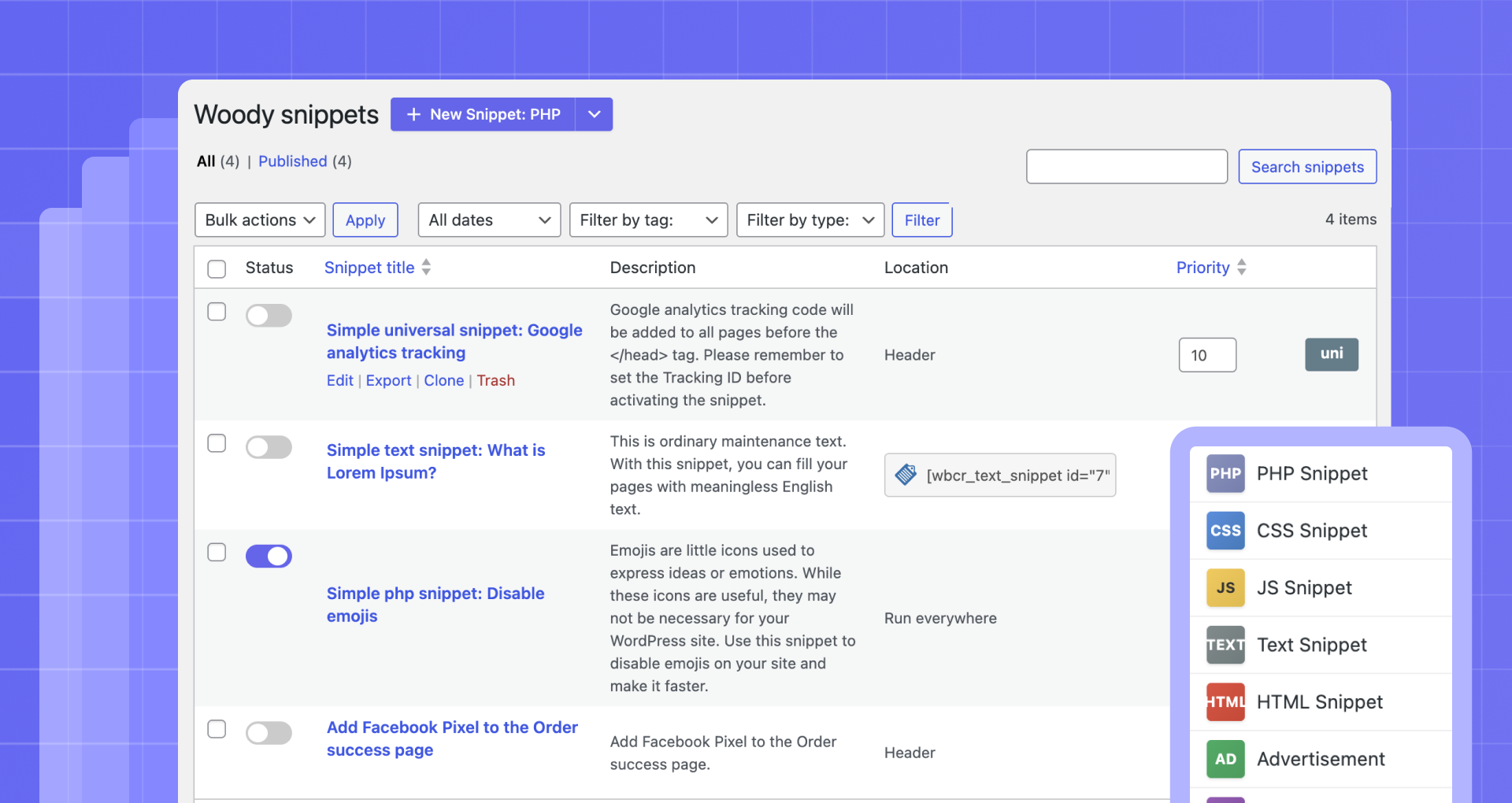
Manage all snippets from one dashboard 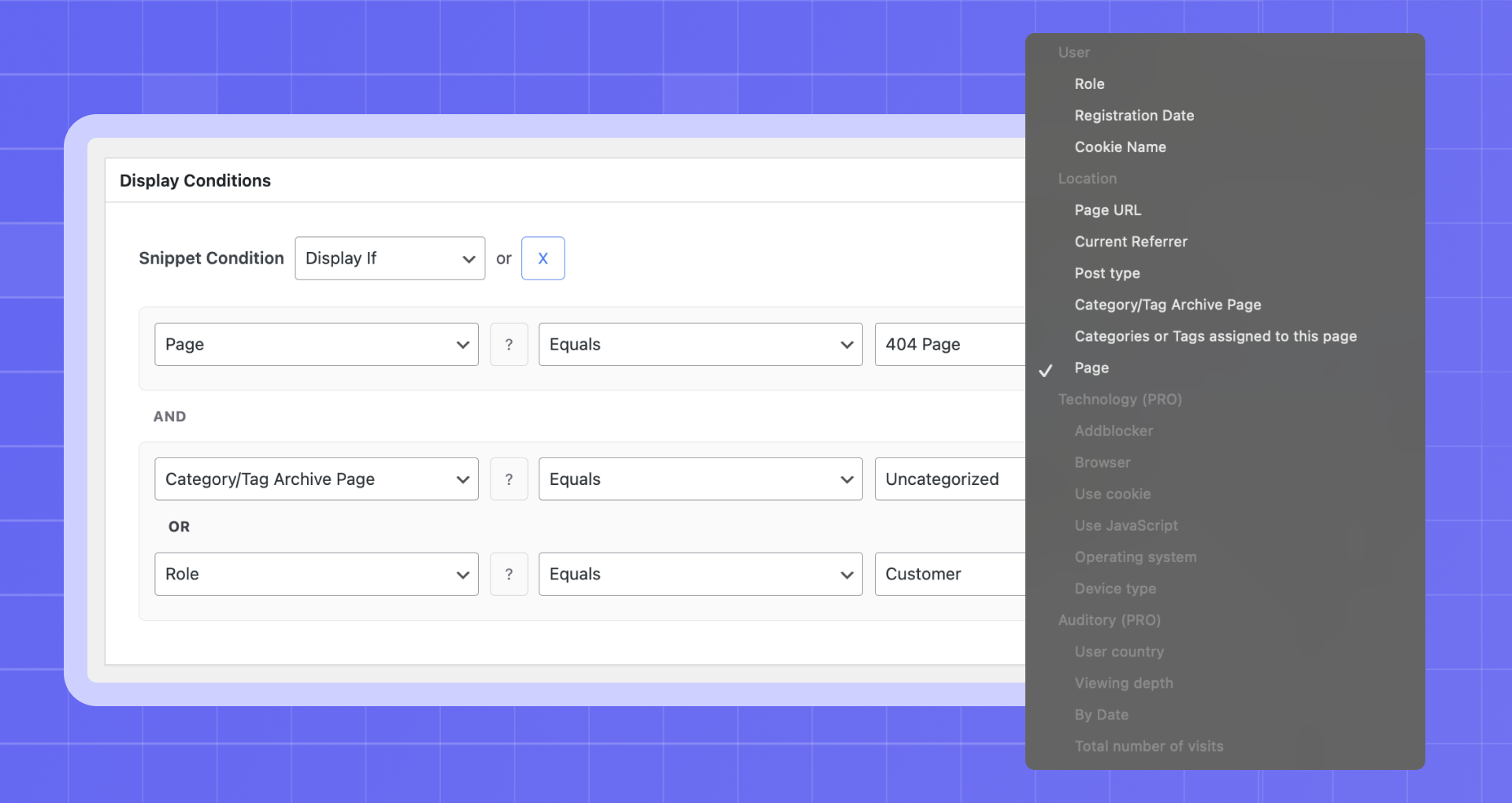
Set conditions to control when snippets load 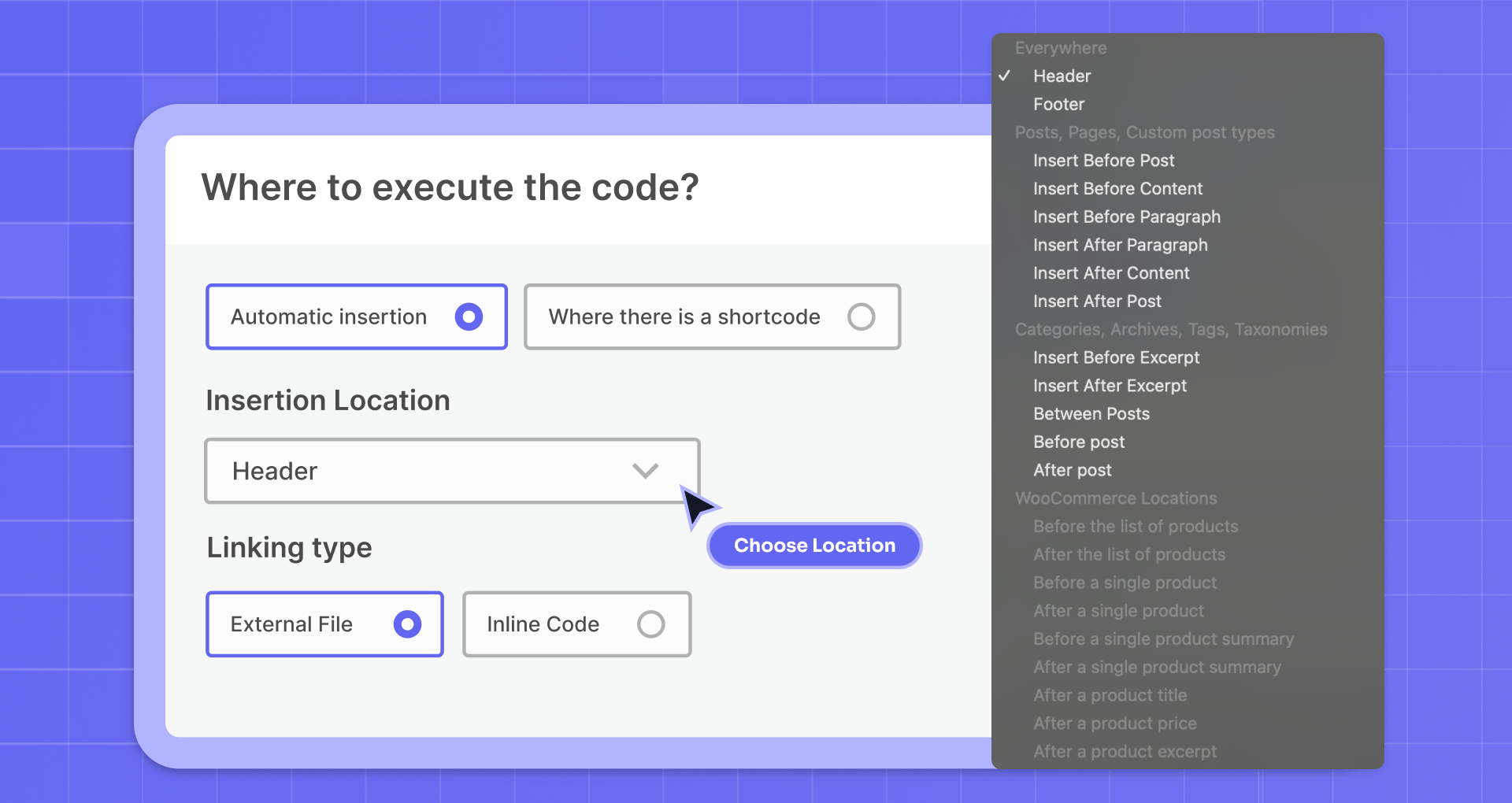
Choose the exact location where the code runs 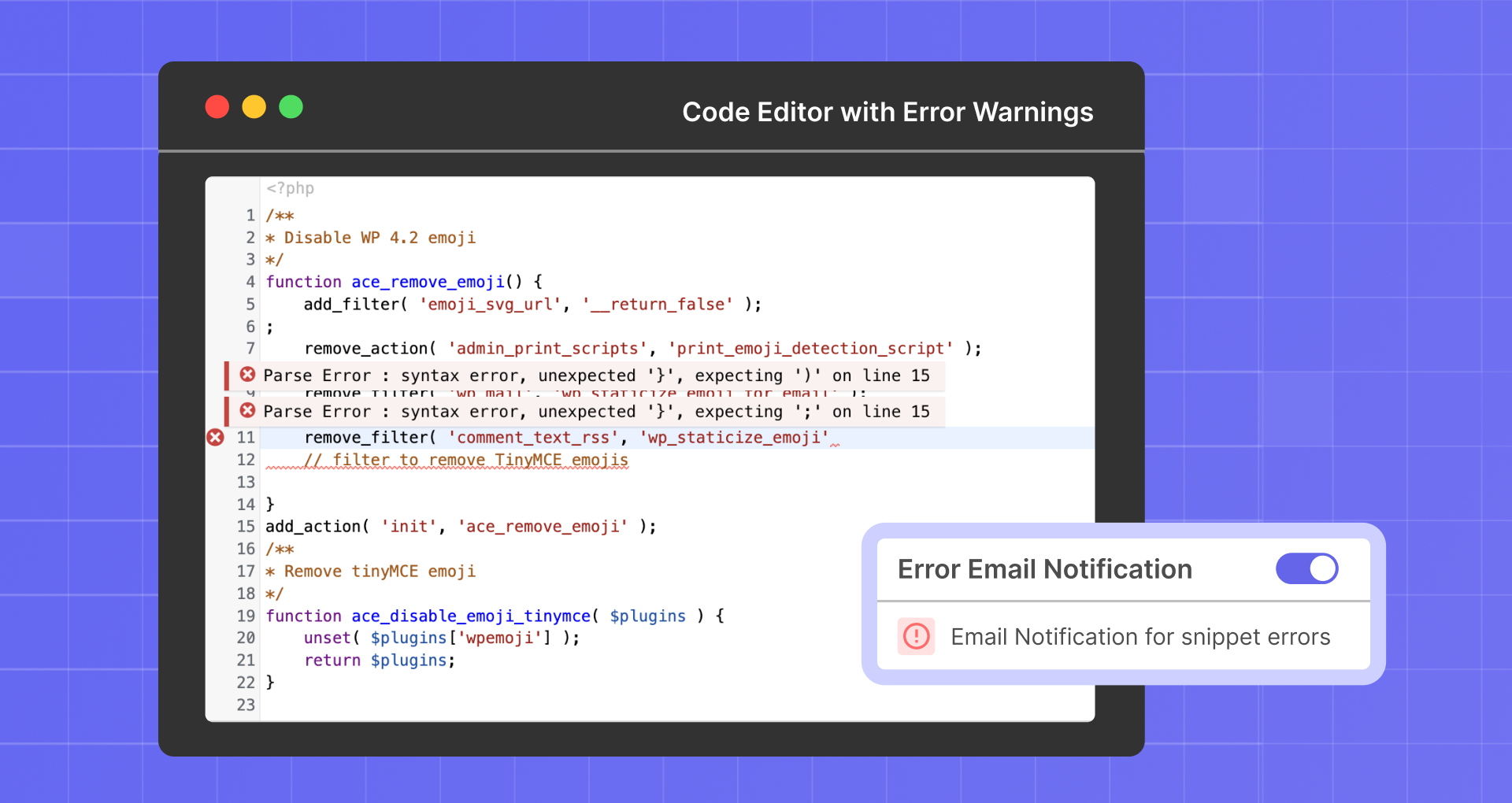
Catch code errors before they affect your site 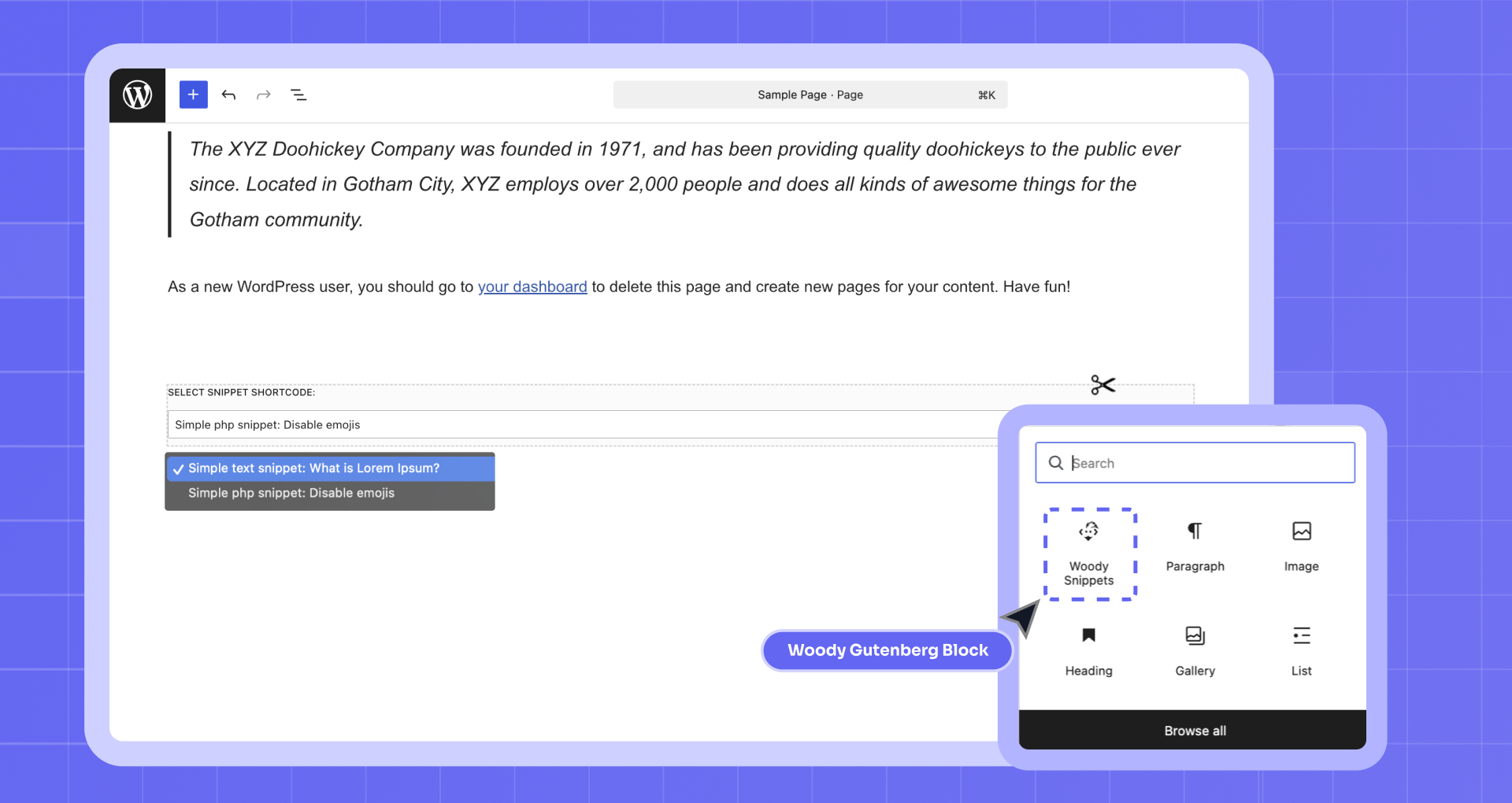
Insert snippets directly inside the editor 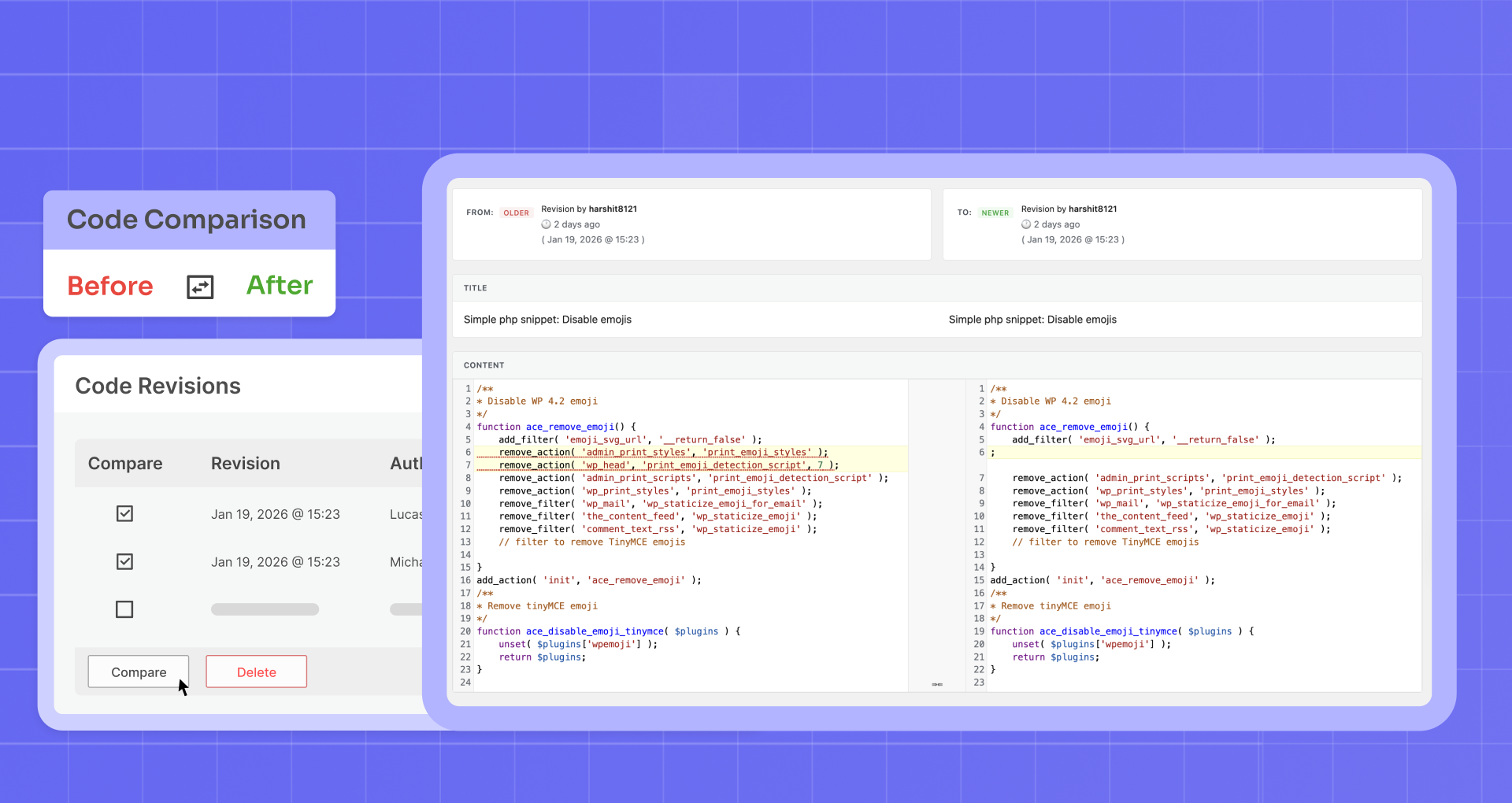
Compare changes and restore previous versions 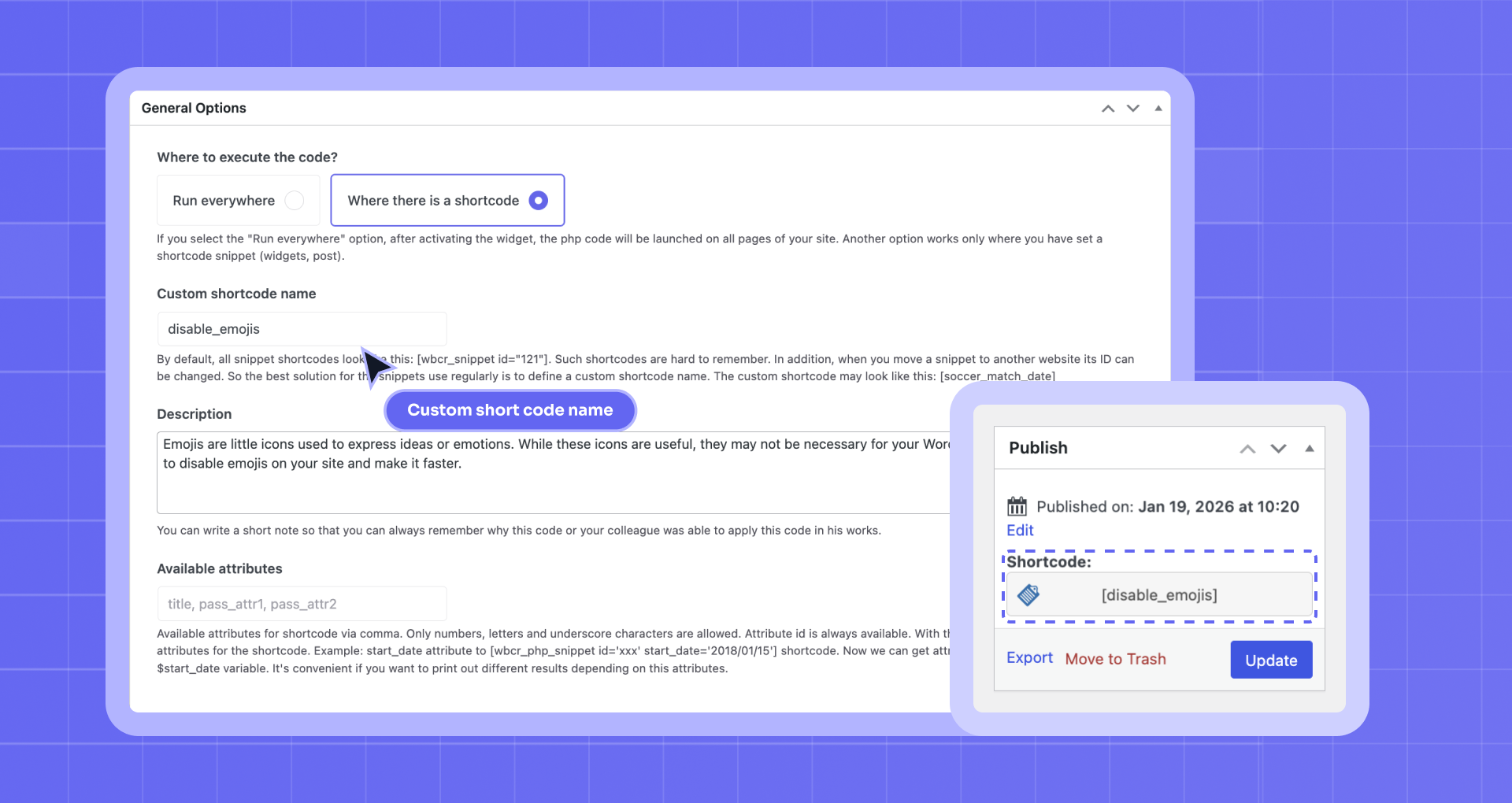
Use custom shortcode names for reusing snippets


Блоки
Этот плагин предоставляет 1 блок.
- Woody Snippets Executes PHP code, uses conditional logic to insert ads, text, media content and external service's code. Ensures no content duplication.
Установка
- Загрузите файлы плагина в папку
/wp-content/plugins/plugin-name, либо установите его из меню «Плагины» в WordPress. - Активируйте плагин из меню «Плагины» в WordPress
- Пользуйтесь PHP сниппетами -> Добавить сниппет для создания нового
Часто задаваемые вопросы
-
Как передать атрибуты в сниппет через шорткод?
-
Add a new attribute “simple” to the shortcode [wbcr_php_snippet id=”xx” simple=”example”].
The attribute “simple” is available in the snippet as the $simple variable. The attribute name can contain Latin letters and lowercase digits. You can also use underscore. -
Код сниппета выполнился с ошибкой, и я не могу его изменить. Что делать?
-
Don’t worry. Mistakes can happen, even with experienced users. Woody includes a Safe Mode that temporarily disables snippet execution so you can fix the issue.
- Перейдите в безопасный режим по ссылке http://your-site-name.dev/wp-admin/?wbcr-php-snippets-safe-mode
- Измените сниппет с ошибками;
- Покиньте безопасный режим по ссылке: http://your-site-name.dev/wp-admin/?wbcr-php-snippets-disable-safe-mode
Отлично! Теперь не должно быть никаких проблем!
-
Как передать содержимое страницы в сниппет?
-
Довольно часто мы хотим скрыть часть текста или форму на странице и задать условия отображения. Оберните содержимое, которые вы передаете в сниппет, в шорткоды [wbcr_php_snippet id=”xx” simple=”example”]page content[/wbcr_php_snippet]. Содержимое страницы в сниппете находится внутри переменной $content.
-
Поддерживает ли плагин редактор Gutenberg?
-
Да, конечно. Вы можете добавить специальные блоки из плагина.
-
Я пользовался старым плагином Insert php 1.3.0. К чему готовиться в версии 2.х.х?
-
The old version of Insert php 1.3.0 worked this way: you wrapped PHP code with shortcodes [insert_php]php code[/insert_php]. Starting from version 2.x.x and higher, you need to create special snippets to place PHP code. Use a snippet shortcode [wbcr_php_snippetid=”xx”] instead of shortcodes [insert_php][/insert_php] to execute PHP code on pages.
We recommend you to move all your code from the post editor to snippets.
Important! TinyMCE converts double quotes to special characters. So if you place this code on the snippet editor, it may not work. To avoid this problem, replace all special symbols of double quotes in your PHP code with classic double quotes. -
Есть ли документация по плагину?
-
You can find the detailed documentation in here.
-
Совместим ли плагин с GDPR?
-
Да, плагин полностью совместим с GDPR.
-
Можно ли полностью удалить плагин?
-
Go to the settings page and enable the «Complete uninstall» option. Than, when you delete Woody Code Snippets using the ‘Plugins’ menu in WordPress it will clean up the database table and a few other bits of data. Be careful not to remove Woody Code Snippets by deleting it from the Plugins menu unless you want this to happen.
-
Как удалить плагин через FTP клиента?
-
You have to delete the folder with the plugin, which is located here: wp-content/plugins/insert-php
This will not clear the plugin data from the database. You have to remove the plugin through the admin panel with the «Full Uninstall» option enabled in order to completely clear the plugin data. -
Потеряются ли сниппеты, если обновить WordPress или редактировать функции темы?
-
Нет, сниппеты хранятся в базе данных WordPress, не зависят от темы и не затрагиваются обновлениями WordPress.
-
Работает ли плагин с мультисайтами?
-
The plugin doesn’t support multi-sites setup.
Отзывы


Участники и разработчики
«Woody Code Snippets – Insert PHP, CSS, JS, and Header/Footer Scripts» — проект с открытым исходным кодом. В развитие плагина внесли свой вклад следующие участники:
Участники
«Woody Code Snippets – Insert PHP, CSS, JS, and Header/Footer Scripts» переведён на 3 языка. Благодарим переводчиков за их работу.
Перевести «Woody Code Snippets – Insert PHP, CSS, JS, and Header/Footer Scripts» на ваш язык.
Заинтересованы в разработке?
Посмотрите код, проверьте SVN репозиторий, или подпишитесь на журнал разработки по RSS.
Журнал изменений
Version 2.7.1 (2026-01-21)
- Added a compatibility check for the Woody Pro version during activation to prevent fatal errors.
Version 2.7.0 (2026-01-19)
New Features
- Export and clone functionality now available in free version
- Active snippets menu item for better snippet management
- New feature to receive emails during fatal error caused by snippets
- New Improved Plugin UI.
- Non-premium snippets can now be accessed via API
- Use IPHub as Geolocation Tool. [PRO]
Enhancements
- Improved PHP code validation before saving
- Better Location terminology for improved clarity
- Added save hotkey support
- Enhanced snippet labels in library for easier identification
- Improved Add Snippet button UI for better user experience
- Updated license management system (SDK-based approach)
Bug Fixes
- Fixed translation and deprecation errors
- Fixed safe mode functionality
- Fixed location number field not appearing with certain conditions
- Fixed inactive snippets not being exported
- Fixed RTL (right-to-left) issues in toggle controls
- Fixed sync modal not appearing for advert type snippets
- Fixed license message display issues
- Fixed critical error with export logs tool permission checking
- Fixed trashing posts from removing associated metadata
Version 2.6.1 (2025-10-21)
- fix error with missing asset files
Version 2.6.0 (2025-10-20)
Woody Snippets plugin has been acquired by Themeisle 🎉
We’re happy to announce that Themeisle is now the new owner of Woody Snippets. This acquisition will help ensure the plugin’s continued development, better support, and exciting new updates in the future.
Your existing setup will continue to work as usual — no action is required on your part.
2.5.1
- Fixed: [insert_php] shortcodes are no longer supported due to the security risk to your site.
- Fixed: Compatibility with WordPress 6.5
- Fixed: Compatibility with php 8.3
2.5.0
- Fixed: Compatibility with WordPress 6.4
- Fixed: Compatibility with php 8.2
2.4.10
- Minor fixes
- New API for Snippets Library
2.4.9
- WP 6.2 compatibility
2.4.8
- Fixed: Reset priority when saving snippet
2.4.7
- Fixed: Some bugs and issues
2.4.6 (31.05.2022)
- Fixed: Compatibility with WordPress 6.0
- Fixed: Some bugs and issues
2.4.4 (23.03.2022)
- Fixed: Compatibility with WordPress 5.9
- Added: Compatibility with premium plugin
2.4.4 (23.03.2022)
- Allow post editors to use snippet shortcodes
- Fixed a bug in TinyMCE
2.4.3
- Updated plugin framework
- Added warning notice that using the plugin may be dangerous
- Added additional security measures for multisites
2.4.2
- Fix: Snippets library not load
- Turn off redirect after activate
2.4.1
- Fix: Snippets not working after updating to version 2.4.0, if Woocommerce is activated
2.4.0
- Add: Insertion locations for Woocommerce (PRO)
- Add: Snippet conditional execution logic for Woocommerce
- Tweak: Improved performance
- Up the minimum version of PHP -> 7.0
2.3.10
- Fixed: Hot fix
2.3.9
- Fixed: jQuery.fn.load() and other bugs after update to WordPress 5.5
2.3.8
- Added: «Execute shortcodes in snippets» option in plugin settings. OFF by default!
2.3.7
- FIX: WPML compatibility
2.3.6
- Add WPML compatibility
- Fix snippet switch
2.3.5
- Fixed «Warning: filter_var()». The attributes of the snippets work
2.3.2
- Fixed: compatibility with PHP 7.4.
- Added: JS snippets support attributes
- Added: Filter by type of the snippet.
- Added: Priority of snippets execution.
- Added: Sorting by priority.
- Added: Sorting by name.
- Added: New Advertisement snippet type.
- Added: Conditional logic for current page taxonomies
2.3.1 (26.11.2019)
- Fixed: Bug with images on the about page.
2.3.0 (19.11.2019)
- Fixed: Minor bugs
- Fixed: Import/Export. When user selected some files and clicked to submit, he could be get error «No files selected!»
- Added: Video preview for every snippets in the library.
2.2.9 (16.09.2019)
- Fixed: Due to a problem with WPML, we were forced to cancel the added WPML compatibility in the previous version.
- Fixed: Security issue
2.2.8 (13.09.2019)
- Added: Compatibility with WPML proposed in the support forum
- Fixed: Security issue
- Fixed: Some users saw the code in the plugin description column. This could lead to JavaScript execution, which led to problems using the plugin Issue #1, Issue #2.
- Fixed: Conditional logic for taxonomies worked only inside singular posts. In taxonomies, tags, and categories, this did not work Issue #3
2.2.7
- Fixed: Critical php errors
2.2.6
- Fixed: Some issues with plugin security.
- Fixed: After save JS snippets, the html tags in javascript code were cut out in compiled code.
- Fixed: Minor bugs
2.2.5
- Fixed: Some issues with plugin security.
- Fixed: When you save the php snippet (running everywhere), there is a conflict with himself.
- Fixed: A notification to install the premium version did not hidden, even if the premium plugin was installed.
- Fixed: Removed spaces in beginning and end of the universal snippets. Please make fix your snippets if you have missing spaces at the beginning and end of the universal snippet.
2.2.4
- Fixed: Php error (Cannot declare class Post)
- Fixed: Some hooks did not work, when using php snippet with space to run everywhere.
- Fixed: Slashes removed in css snippet: \f058 becomes f058
2.2.2
- Fixed: Disabled wpautop for snippets
- Fixed: Added compatibility with plugin Robin image optimizer
2.2.1
- Warning: Support for the old shortcodes ([insert_php]) has been discontinued for new users. Users who have upgraded from version 1.3.0 still have support [insert_php].
- Fixed: Removed warnings about support for old shortcodes for new users.
- Fixed: Сkeditor editor over the code editor, the issue is related to The Rex theme
- Fixed: Warning Invalid argument supplied for foreach(). (It’s the warning in plugin insert-php (method getMetaOption) because get_post_meta could return non-array value if $single is true.)
- Fixed: Some users lost the code editor
- Fixed: Infinite redirect after updating or installing a plugin
- Fixed: Infinite redirect on multisites
- Added: New snippet type: Html. Perfect for you if you do not use php code.
- Added: New snippet type: JavaScript
- Added: New snippet type: Css
- Added: JS and CSS snippets can be asset as external files
- Added: Compatible with WordPress 5.2
- Added: Multisite support
- Added: Premium plugin support added
- Added: Added setting: «Complete Uninstall». When the plugin is deleted from the Plugins menu, also delete all snippets and plugin settings.- Added: Added setting: «Complete Uninstall». When the plugin is deleted from the Plugins menu, also delete all snippets and plugin settings.
- Added: Added setting: «Support old shortcodes [insert_php]». If you used our plugin from version 1.3.0, then you could use the old shortcodes [insert_php][/insert_php]; from version 2.2.0 we disabled this type of shortcodes by default, as their use is not safe. If you still want to execute your php code via [insert_php][/insert_php] shortcodes, you can enable this option.
- Added: Added setting: «Keep the HTML entities, don’t convert to its character». If you want to use an HTML entity in your code (for example > or «), but the editor keeps on changing them to its equivalent character (> and » for the previous example), then you might want to enable this option.
2.1.91
- Исправлено: некоторых пользователей постоянно перенаправляло на страницу About
- Исправлено: не работал безопасный режим, поскольку мог запускаться только после сниппета
- Добавлено: php lint в редакторе кода
- Добавлено: хук wbcr/factory/bootstrap/cache_enable для отключения кэширования функционала Woody. Функция полезна пользователям с CDN.
2.1.9
- Исправлено: демо-сниппеты создавались несколько раз, что причиняло неудобства
- Исправлено: не получалось скрыть метабокс с рекламой
- Исправлено: некоторых пользователей постоянно перенаправляло на страницу About
2.1.7
- Исправлено: небольшие ошибки в мультисайтах
2.1.6
- Исправлено: не работали шорткоды в плагине No Cache Ajax Widget
- Исправлено: при создании блока в Gutenberg не сохранялась выбранная опция в выпадающем списке
- Исправлено: не показывалось меню в мультисайтах
- Исправлено: баг с PHP функцией import_upload_size_limit в мультисайтах
2.1.5
- Исправлено: не менялся стиль темы в редакторе кода
- Исправлено: после обновления плагина удалялось форматирование в редакторе кода
- Исправлено: безопасный режим не работал для скриптов, работающих с шорткодом [insert_php].
2.1.4
- Исправлено: конфликт с do_shortcode, когда плагин пытается обработать шорткоды в PHP коде
- Исправлено: добавлена совместимость с Visual Composer
2.1.3
- Исправлено: ошибка с escape-кодом HTML в редакторе сниппетов. При добавлении тега textarea, отваливался редактор.
2.1.2
- Добавлено: 3 новых типа сниппета. Можете пользоваться текстовыми, PHP и универсальными сниппетами.
- Добавлено: экспорт/импорт сниппетов.
- Добавлено: Условная логика для текстовых и универсальных плагинов. Можете скрывать/показывать сниппеты, в зависимости от условий.
- Добавлено: поддержка Gutenberg. Добавлен новый блок для Gutenberg. В нем можно выбирать доступные сниппеты. Еще можно отправлять содержимое из редактора в сниппет.
- Доработано: поддержка атрибутов, которые посылаются сниппетам через шорткоды. Теперь можно пользоваться атрибутами шорткода для отправки дополнительных значений внутри сниппетов. Можно ограничить количество поддерживаемых атрибутов.
- Добавлено: поддержка WordPress 5.x.x.
- Доработано: поддержка редактора кода. Теперь в нем автоматическая подсветка синтаксиса и автодополнение.
- Добавлено: редактор TinyMCE для текстовых сниппетов.
- Добавлено: авто-добавление сниппета на весь сайт. Вы можете автоматически размещать код в header или footer всех страниц. Либо можете добавлять код во все записи (подробнее — в документации).
- Добавлено: создание демо-сниппета при установке плагина.
- Добавлено: специальная опция для удаления плагина. При активации все сниппеты и данные плагина также удаляются.
- Исправлено: ошибка в значения, отправляемых через атрибуты шорткода.
- Исправлено: ошибка в визуальном представлении блока в Gutenberg.
- Исправлено: счетчик сниппета для тегов.
- Изменено: название плагина.
- Изменено: иконки плагина.
- Изменено: описание плагина.
2.0.6
- Изменена процедура безопасного сохранения сниппетов. Теперь при возникновении ошибки вы не потеряете изменения в сниппетах. Более того, теперь не требуется проверка сниппетов для шорткодов, из-за которой многие пользователи не могли сохранить старый код.
- Значения переменных вы можете получить из атрибутов шорткода. Например, если атрибутом шорткода [wbcr_php_snippet id=»2864″ my_type=»button»] вы ставите my_type attribute, то значение my_type attribute вы можете получить в сниппете через переменную $my_type var.
- Добавлена опция для установки тегов в сниппетах
- Добавлена инструкция по экспорту и импорту сниппетов
- Исправлены некоторые ошибки.
2.0.4
- Исправлена серьезная ошибка с $wp_query. Она вызывала конфликт с другими плагинами, которые перезаписывали глобальную переменную $wp_query.
- Все автоматически созданные и обновленные сниппеты теперь активированы.
2.0.2
Исправлена ошибка, при которой не хватало разрешений для просмотра страницы.
2.0.1
Внимание! Это версия 2.0. В ней можно добавлять PHP код через сниппеты. По сравнению с использованию шорткодов [insert_php] code execute [/ insert_php], это более удобный и безопасный способ работы с PHP кодом. Для расширенной совместимости мы сохранили поддержку шорткодов [insert_php], но в следующих версиях плагина она будет удалена.
Мы настоятельно рекомендуем перенести весь PHP код в сниппеты и вызывать их в записях/страницах/виджетах через шорткоды [wbcr_php_snippet id = «000»].
1.3
Исправлена проблема с str_replace(), когда в стеке содержался символ «/».
1.2
Изменена обработка содержимого.
1.1
Исправлена ошибка. Во избежание конфликтов с пользовательским PHP кодом, добавлен ob_end_flush(); и изменены названия переменных.
1.0
Первая открытая версия.
