









Data Analysis

Chat with Your Data Using Multiple AI Models

TeamAI’s Data Analysis plugin enables AI-powered data analysis through natural conversation. Whether you seek to extract insights or identify patterns, leverage artificial intelligence for data exploration without leaving your collaboration platform.
 
Launch Your Workspace Today

Image

Powered by

Image
Image
Image
Image
Image
Image

Trusted by 1,000+ Businesses

Use AI for Data Analysis Within TeamAI

ImageData Quality Review

Upload CSV files and chat with AI to identify patterns, outliers, and data quality issues across your datasets.

ImageBlend data sources

Bring in data from multiple file types (CSV, Excel, PDF, text files) to create a unified view and chat with it using AI in one place.

ImageTeam collaboration

Share AI-generated insights, charts, and discoveries with your team through TeamAI’s collaboration features.

Image

Businesses Using AI to Chat with Documents Are More Efficient

Image

Businesses Using AI to Chat with Documents Are More Efficient

Nutshell Superpowers it’s Marketing Team

“TeamAI is like a superpowered ChatGPT. It gave our team a way to work together using tools like GPT-4 and Claude 2.”

Why TeamAI’s AI Data Analysis Plugin Delivers Superior Results

ImageData Quality Review

Upload CSV, Excel, or Google Sheets files and chat with AI to identify patterns, outliers, and data quality issues across your datasets.

ImageAI-powered visualization

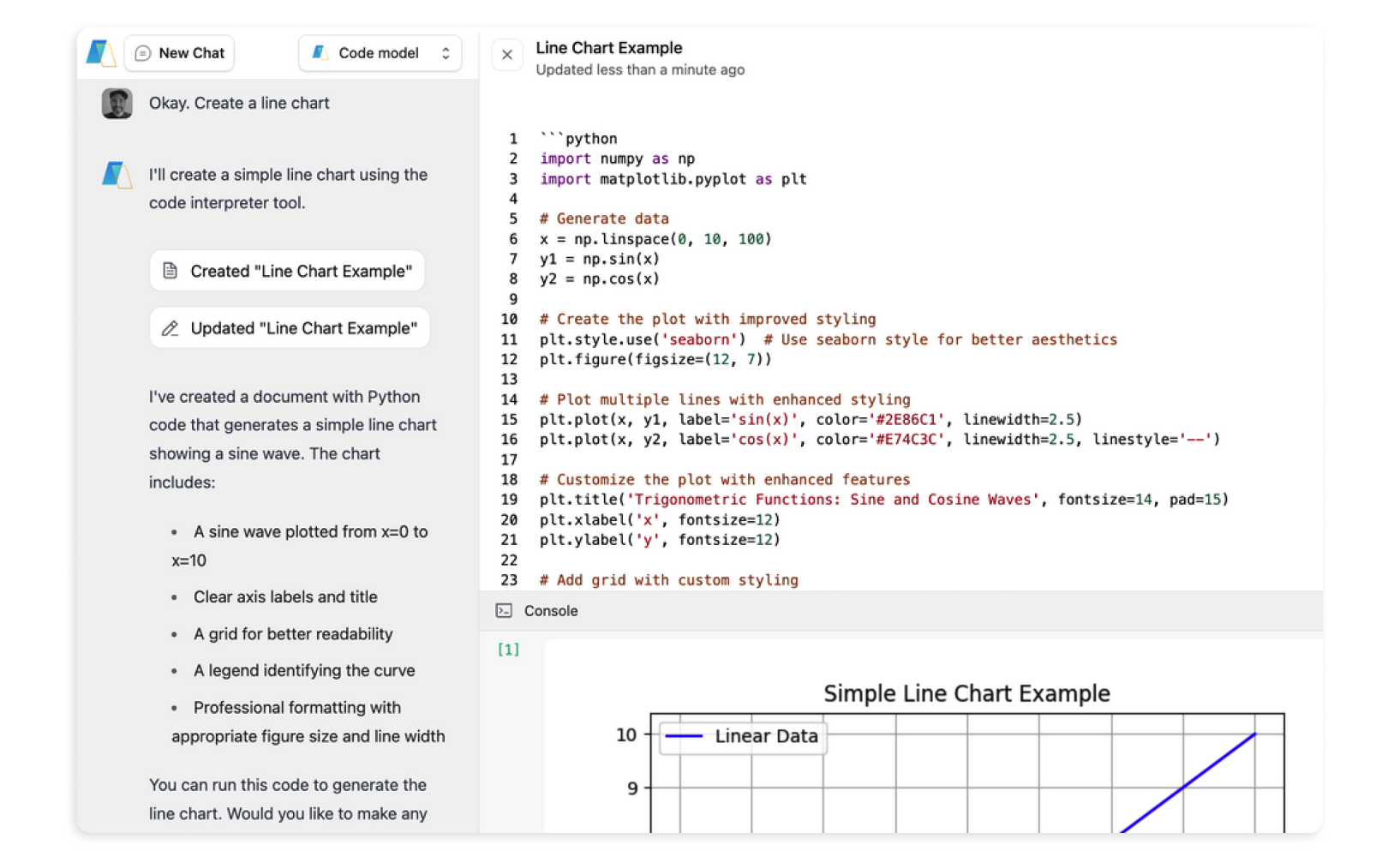
Generate charts (line, bar, scatter) directly from your data using Code mode with natural conversation – no coding required.

ImageBlend data sources

Bring in data from multiple file types (CSV, Excel, PDF, text files) to create a unified view and chat with it using AI in one place.

ImageTeam collaboration

Share AI-generated insights, charts, and discoveries with your team through TeamAI’s collaboration features.

Image

Built-In Plugin + Verified File Support

Image10+ supported file formats: CSV, PDF, text files, JSON, and more

ImageSupports common file formats and moderate-to-large datasets. For very large files, splitting or exporting to CSV may be required.

ImageGoogle Sheets integration: Paste a Google Sheets link that’s published to the web (or a CSV export link), or paste a direct CSV file link.

ImageQuick upload feature: Add multiple files per analysis session

Image

Try TeamAI Today

Create your AI-driven workspace in just 30 seconds

Create a Workspace

Data insights for every team

Image Marketing
Image

Analyze customer data with AI

Upload your customer details and use AI to divide the information into distinct segments for more targeted marketing campaigns.

Image

Use AI for trend insights

Leverage AI analysis of past figures from your industry or business to understand patterns for more effective marketing techniques.

Image
Image Design
Image

AI-assisted test result interpretation

Synthesize the data you collect during A/B testing and use TeamAI to determine the most practical combination of design elements.

Image

AI-powered user interaction analysis

Using AI to process customer feedback input, identify pain points to improve design elements.

Image
Image HR & hiring
Image

AI insights from employee feedback

Submit current employee feedback and engagement surveys for AI analysis to gauge workplace success and identify improvement opportunities.

Image

AI-enhanced candidate evaluation

Use AI to analyze past hiring details and understand patterns for better recruitment decisions while meeting diversity goals.

Image
Image Sales
Image

AI lead scoring

Use AI to rank your lead data based on conversion likelihood patterns so you can prioritize sales efforts.

Image

AI-powered performance monitoring

Import individual and team sales performance metrics and use AI to analyze your effectiveness patterns.

Image
Image Business Development
Image

AI risk assessment

Use AI to evaluate the risks of a new partnership or business venture by analyzing your gathered data.

Image

AI competitive intelligence

Leverage AI to process competitor intelligence and inform your strategic decisions to make your business stand out.

Image
Slanted BG
Image

Complete Multi-AI Data Analysis for Teams

While other platforms limit you to one AI model and individual work sessions, TeamAI gives you access to 4 specialized AI models, support for 10+ file formats, and seamless team collaboration – all in one integrated workspace.

Start Using Multiple AI Models for Data Analysis Today

Any paid TeamAI subscription gives you access to this built-in AI data analysis plugin with full access to multiple AI models. To activate it, simply toggle it on in the Chat Controls sidebar of the Chat window under Built-In Plugins.

Once activated, you can:

ImageChoose your AI model

Select Fast, Smart, Code, or Reasoning based on your analysis needs

ImageUpload your data

Files up to 50MB or paste links to Google Sheets/CSV

ImageGenerate insights

Upload up to 20 files per chat session for comprehensive analysis

ImageCollaborate with your team

Share insights and build on each other’s AI-generated analysis.

Image

Complete Multi-AI Data Analysis for Teams

Try TeamAI Today

Whether you need to analyze customer data with the Smart Model, create visualizations with the Code Model, or conduct complex reasoning with our most advanced AI, do it all with files up to 50MB while collaborating with your entire team.

Try TeamAI Today