
In Java, classes and objects form the foundation of Object-Oriented Programming (OOP). They help model real-world entities and organize code in a structured way.
- A class is a blueprint used to create objects that share common properties and behavior.
- An object is an instance of a class. It represents a specific entity created from the class template.
For Example, Dog is a class, Tommy is an object of that class.
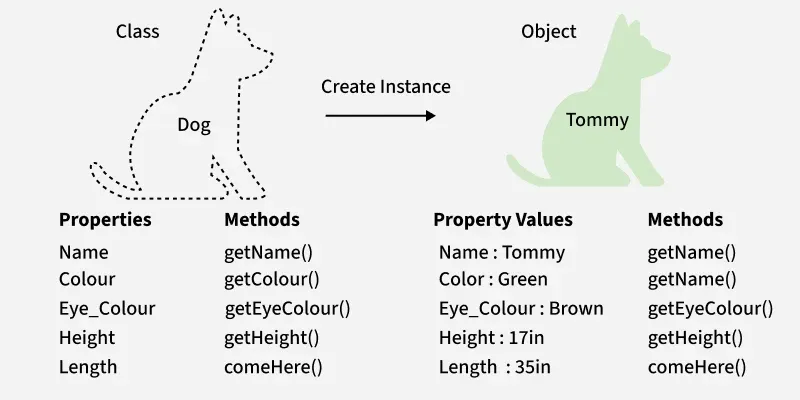
Java Class
A class is a blueprint that defines data and behavior for objects. It groups related fields and methods in a single unit. Memory for its members is allocated only when an object is created.
- Acts as a template to create objects with shared structure.
- Does not occupy memory for fields until instantiation.
- Can contain fields, methods, constructors, nested classes and interfaces.
class Student {
    int id;
    String n;

    public Student(int id, String n) {
        this.id = id;
        this.n = n;
    }
}

public class Main {
    public static void main(String[] args) {
        Student s1 = new Student(10, "Alice");
        System.out.println(s1.id);
        System.out.println(s1.n);
    }
}
Output
10
Alice
Explanation: This code defines a Student class as a blueprint with data members and a constructor to initialize them. An object s1 is created in main(), which allocates memory and accesses the class fields to display values.
Java Objects
An object is an instance of a class created to access its data and operations. Each object holds its own state.
- State: Values stored in fields.
- Behavior: Actions defined through methods.
- Identity: Distinguishes one object from another.
Objects mirror real-world items such as customer, product or circle. Non-primitive objects are stored on the heap while their references remain on the stack.

Object Instantiation
Creating an object is known as instantiation. All instances of a class share structure and behavior while storing different state values.

Declaration:
Dog tuffy;
This only declares a reference. The object is not created and the reference holds null.
Initialization:
tuffy = new Dog("Tuffy", "Papillon", 5, "White");
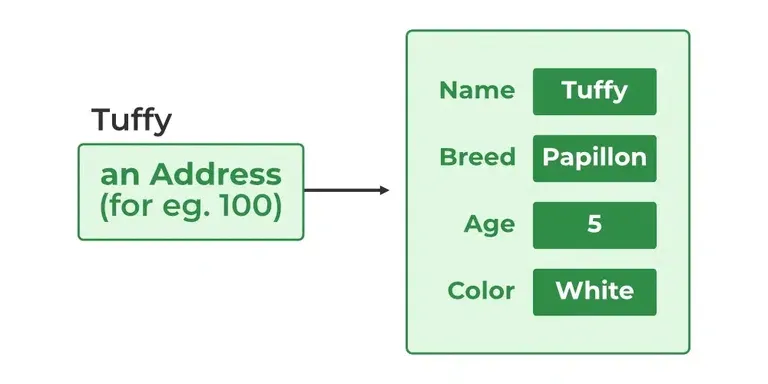
The new operator allocates memory and invokes the constructor.
Example: Defining and Using a Class
public class Dog {

    String name;
    String breed;
    int age;
    String color;

    public Dog(String name, String breed, int age, String color) {
        this.name = name;
        this.breed = breed;
        this.age = age;
        this.color = color;
    }

    public String getName() { return name; }
    public String getBreed() { return breed; }
    public int getAge() { return age; }
    public String getColor() { return color; }

    @Override
    public String toString() {
        return "Name is: " + name
             + "\nBreed age and color are: "
             + breed + " " + age + " " + color;
    }

    public static void main(String[] args) {
        Dog tuffy = new Dog("tuffy", "papillon", 5, "white");
        System.out.println(tuffy);
    }
}
Output
Name is: tuffy
Breed age and color are: papillon 5 white
Explanation: This creates a Dog object named tuffy using the Dog constructor inside main(), which initializes name, breed, age, and color. When System.out.println(tuffy) is executed, the overridden toString() method is called to display the object’s data.
Note: Every class has at least one constructor. If none is defined Java provides a default no-argument constructor that calls the parent constructor.
Example: Initialize Object by using Method/Function
public class Geeks {

    static String name;
    static float price;

    static void set(String n, float p) {
        name = n;
        price = p;
    }

    static void get() {
        System.out.println("Software name is: " + name);
        System.out.println("Software price is: " + price);
    }

    public static void main(String[] args) {
        Geeks.set("Visual Studio", 0.0f);
        Geeks.get();
    }
}
Output
Software name is: Visual Studio
Software price is: 0.0
Explanation: This code initializes class data using the static set() method, which assigns values to the static variables name and price. The get() method is then called from main() to access and display those initialized values.
Ways to Create Object in Java
Java supports four standard approaches.
1. Using new Keyword
new Keyword is most direct way to create an object.
// creating object of class Test
Test t = new Test();
2. Using Reflection
Used for dynamic class loading as seen in frameworks like Spring.
class Student {
    public Student() {}
}

public class Main {
    public static void main(String[] args) {
        try {
            Class<?> c = Class.forName("Student");
            Student s = (Student) c.getDeclaredConstructor().newInstance();
            System.out.println(s);
        } catch (Exception e) {
            e.printStackTrace();
        }
    }
}
Output
Student@1dbd16a6
3. Using clone() method
clone() creates a copy of an existing object. The class must implement Cloneable.
class Geeks implements Cloneable {
    String name = "GeeksForGeeks";

    @Override
    protected Object clone() throws CloneNotSupportedException {
        return super.clone();
    }

    public static void main(String[] args) {
        try {
            Geeks g1 = new Geeks();
            Geeks g2 = (Geeks) g1.clone();
            System.out.println(g2.name);
        } catch (Exception e) {
            e.printStackTrace();
        }
    }
}
Output
GeeksForGeeks
Explanation: Here, creates a new Geeks object g2 by cloning the existing object g1 using the overridden clone() method. The cloned object copies the field values of g1, which is confirmed by printing g2.name.
4. Using Deserialization
De-serialization is a technique of reading an object from the saved state in a file. Object is recreated from a stored byte stream.
import java.io.*;

class Student implements Serializable {
    private String name;
    public Student(String name) { this.name = name; }
    public String toString() { return "Student: " + name; }
}

public class Main {
    public static void main(String[] args) {
        try (ObjectOutputStream out =
                new ObjectOutputStream(new FileOutputStream("student.ser"))) {
            out.writeObject(new Student("Alice"));
        } catch (IOException e) { e.printStackTrace(); }

        try (ObjectInputStream in =
                new ObjectInputStream(new FileInputStream("student.ser"))) {
            Student s = (Student) in.readObject();
            System.out.println(s);
        } catch (Exception e) { e.printStackTrace(); }
    }
}

Output
Student: Alice
Explanation: This first serializes a Student object to the file student.ser using ObjectOutputStream. It then deserializes the object using ObjectInputStream, recreating the Student object and printing it via the toString() method.
Anonymous Objects
Anonymous objects are created without a reference and used immediately for one-time operations.
- No reference variable: Cannot reuse the object.
- Created & used instantly, saves memory for short-lived tasks.
- Common in event handling (e.g., button clicks).
new Dog("Max", "Labrador", 3, "Black").getName();

