
Logging is the process of keeping a record of what a program is doing while it runs, which helps developers understand program behavior and easily find and fix errors like invalid inputs or system failures.
import logging
name = 'GFG'
logging.error('%s raised an error', name)
Output
ERROR:root:GFG raised an error
Explanation:
- import logging: Imports the logging module.
- name = 'GFG': Stores the string GFG in a variable.
- logging.error('%s raised an error', name): Logs an error message: “GFG raised an error”.
Python Logging Levels
There are five built-in levels of the log message.
- Debug: Detailed information for diagnosing problems.
- Info: Confirms things are working as expected.
- Warning: Indicates unexpected issues or potential future problems.
- Error: A serious problem that prevents a function from running.
- Critical: A severe error that may stop the program from running.
If required, developers have the option to create more levels but these are sufficient enough to handle every possible situation.
Useful Handlers
Below are some useful logging handlers in Python that help control where and how log messages are output.
Handler | Description |
|---|---|
StreamHandler | Sends messages to streams (file-like objects). |
FileHandler | Sends messages to disk files. |
RotatingFileHandler | Sends messages to disk files, with support for maximum log file sizes and log file rotation. |
Below example shows how to log messages directly to a file using Python’s FileHandler.
import logging

logger = logging.getLogger("SimpleLogger")
logger.setLevel(logging.DEBUG)

file_handler = logging.FileHandler("app.log")
logger.addHandler(file_handler)

logger.info("This is an info message")
logger.error("This is an error message")
Output: The code writes the log messages to the file app.log.
This is an info message
This is an error message
Explanation:
- FileHandler("app.log"): Sends log messages to the file app.log.
- logger.addHandler(file_handler): Attaches the handler to the logger.
- logger.info() and logger.error(): Write messages of different types of importance to the file.
Steps on Logging
Logging in Python lets you record messages while your program runs. Follow these simple steps:
- Import the logging module: Python has a built-in module called logging for this.
- Create and configure a logger: Set the filename, message format, and log level.
- Choose the file mode: By default, logs are added to the file (append), but you can overwrite (write) if needed.
- Set the log level: Decide which messages to record: debug, info, warning, error, or critical.
- Create a logger object: Use it to write messages with methods like info(), error(), etc.program runs, which helps track how data changes, debug issues, and understand program behavior step by step.
Logging a Variable
Logging a variable means recording the value of a variable while a program runs, which helps track how data changes, debug issues, and understand program behavior step by step.
import logging

logging.basicConfig(level=logging.INFO, format='%(levelname)s: %(message)s')
age = 25
logging.info("The value of age is %d", age)
Output
INFO: The value of age is 25
Explanation:
- logging.basicConfig(...): Sets the log level and message format.
- %d: Placeholder for the integer variable age.
- logging.info(...): Records the value of age in the log.
Logging of all the levels
Python allows you to record messages with different importance levels. For example, you can log simple information, warnings, errors, or critical problems, which helps beginners track what’s happening in a program step by step.
import logging

logging.basicConfig(filename="newfile.log",
                    format='%(asctime)s %(levelname)s: %(message)s',
                    filemode='w')

logger = logging.getLogger()
logger.setLevel(logging.DEBUG)

logger.debug("Harmless debug message")
logger.info("Just an information")
logger.warning("Its a warning")
logger.error("Did you try to divide by zero?")
logger.critical("Internet is down")
The above code will generate a file with the provided name (newfile.log) and if we open the file, the file contains the following data.
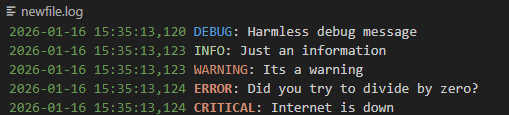
Explanation:
- logging.basicConfig(...): Configures the log file (newfile.log), message format, and file mode (w to overwrite).
- logger = logging.getLogger(): Creates a logger object to record messages.
- logger.setLevel(logging.DEBUG): Sets the minimum log level to record all messages from DEBUG and above.
- logger.debug("..."): Logs a debug-level message (used for development details).
- logger.info("..."): Logs an informational message.
- logger.warning("..."): Logs a warning message (something to watch out for).
- logger.error("..."): Logs an error message (indicates a problem occurred).
- logger.critical("..."): Logs a critical message (very serious problem, e.g., system down).
Logging Exceptions
Logging exceptions helps indicate errors or unusual conditions in a program. Raising an exception stops normal execution and notifies the caller or logging system about the issue.
In this code, we are raising an Exception that is being caught by the logging.exception.
import logging

logging.basicConfig(level=logging.DEBUG,
                    format='%(asctime)s - %(levelname)s - %(message)s')


def fun(val):
    if val < 0:
        raise ValueError("Invalid value: Value cannot be negative.")
    else:
        logging.info("Operation performed successfully.")


try:
    v1 = int(input("Enter a value: "))
    fun(v1)
except ValueError as ve:
    logging.exception("Exception occurred: %s", str(ve))
Output
Enter a value: -1
2023-06-15 18:25:18,064 - ERROR - Exception occurred: Invalid value: Value cannot be negative.
ValueError: Invalid value: Value cannot be negative.
Explanation:
- def fun(val): Defines a function that performs an operation.
- if val < 0: raise ValueError(...): Checks for invalid input and raises an exception if negative.
- logging.info("Operation performed successfully."): Logs a message when the operation is successful.
- try: ... except ValueError as ve: Handles exceptions caused by invalid input.
- logging.exception("Exception occurred: %s", str(ve)): Logs the error with traceback if an exception occurs.
Why Not Use print() Statements?
While print() can help in simple scripts, it is not reliable for complex programs. Python’s built-in logging module is more flexible:
- Records which part of the code runs.
- Logs errors and warnings.
- Can store logs in files or output streams.
- Supports different log levels to filter messages.
