Implementing rolling cache in Azure DevOps

Keep rollin’ rollin’ rollin’ rollin’.
— William Frederick Durst

Image

Azure DevOps provides a handy Cache task which can improve build performance by caching files between pipeline runs. The documentation has plenty if examples to get you started.

The save/restore mechanism is based on the “keys”, which are used to compute an unique hash based on strings and/or file contents. This works fine for dependencies, where you can target dependecy-describing file(s) and the task will update cache only if they change. For npm this would be package-lock.json, for NuGetpackages.lock.json and so on. You can also have “fallback” keys, where cache will be restored on partial match in hope that it can be at least partially re-used.


# Example from Cache task documentation for npm
variables:
npm_config_cache: $(Pipeline.Workspace)/.npm
steps:
task: Cache@2
inputs:
key: 'npm | "$(Agent.OS)" | package-lock.json'
restoreKeys: |
npm | "$(Agent.OS)"
path: $(npm_config_cache)
displayName: Cache npm
script: npm ci

But what if you need to cache build output and keep this cache fresh, updating it each time pipeline runs?

Continue reading

Write-Host with ANSI colors

Whoa, that’s a full rainbow all the way. Double rainbow, oh my god. It’s a double rainbow, all the way.
— Paul “Bear” Vasquez

PowerShell’s Write-Host cmdlet can be used to enhance your user-facing scripts with colored output. Alas, Write-Host doesn’t use ANSI escape codes to do its job and that means that your build scripts in the CI system will display everything in a dull gray. To fix this, I’ve created a drop-in replacement for Write-Host that will allow builds to fully express themselves.

GitHub icon Write-Host.ps1 | GitHub
Image

Write-Host with ANSI colors in Azure DevOps


P.S. If you’re looking for something more advanced, give https://github.com/PoshCode/Pansies a try!

Merged my first PR into the PowerShell Core!

My first PR into the PowerShell Core just got merged!

GitHub icon Add parameter SchemaFile to Test-Json cmdlet

It adds ability to validate JSON files against the schema from file that includes definitions from other files. This is something that I was missing while working on the one of my pet projects, where the data is stored in JSONs.

I use JSON Schema to validate that data files are up to standards and I really missed the possibility to split schema definitions into the separate files. It didn’t looked like a daunting task, so decided to try to implement it myself – and it worked!

P.S. Here is the pet project itself, where I try to keep the telemetry in the software projects at bay:

GitHub icon beatcracker/toptout: 📡 Easily opt-out from telemetry collection
Image

Null values in Terraform v0.11.x

What has been set, cannot be unset.

Terraform is an awesome infrastructure-as-code tool, but it’s been always love/hate relationship for me. At first it works and you’re soaring high and mighty and then you face one of the notorious HCL processing limitations and spend several days devising hacks to make the damned thing work.

One of the major issues is that there is no idea of null value in terraform. You can’t conditionally “unset” attribute value – passing empty string/map/list is not the same and it’s up to provider to how to treat them. This is going to be fixed in the v0.12, alongside with other improvements but if you don’t want to use beta versions to manage your infra, you’re stuck with 0.11.x for now.

So can you teach the old dog new tricks?

Continue reading

Create clustered MSMQ role using PowerShell

Windows Server Failover Clustering : when failure is an option.

Recently I’ve been working on porting our application deployment to the Failover Cluster for increased resiliency. This particular application uses Microsoft Message Queuing (MSMQ), so I needed to create clustered MSMQ role for it. This is pretty easy, using Failover Cluster Manager snap-in and High Availability Wizard that comes with it – it already has predefined template for you to use.

But since our deployments are automated, I had to come up with solution that is using PowerShell. Unfortunately, while FailoverClusters module has cmdlets to create specific clustered roles, such as Add-ClusterFileServerRole or Add-ClusterVirtualMachineRole, there is not such cmdlet for MSMQ. Googling told me that it can be created by using generic Add-ClusterServerRole cmdlet. This cmdlet does heavy lifting for you, by creating IP resources, moving the disk resource to the target group and setting dependencies between the network name resource and the IP resources. After that, you need to add MSMQ cluster resource to the new group and set up cluster disk and resource name dependencies.

“That’s it,” he cried excitedly. “There was something missing — and now I know what it is.”
— Catch-22

Alas, there is a catch. By using Add-ClusterServerRole, your MSMQ service will have a Generic Service icon and “Manage MSMQ” menu item will be absent if you right click on it. This is because Add-ClusterServerRole doesn’t give you ability to specify the group type and sets it to Unknown by default. Previously you could change the group type by using SetGroupType WMI method, but it’s not supported starting with Windows Server 2012 and higher and if you try to use it you’ll get Generic Failure Error. Changing group type in the registry HKLM\ClusterGroups\GroupType doesn’t work too.

Back to square one.

Since easy way didn’t work out, I was forced do to heavy lifting by my own. It means creating cluster group, adding cluster resources, configuring IP addresses, dependencies and so on. I’ve ended up writing a custom function that does all this stuff and produces the result which is indistinguishable from what High Availability Wizard does. Plus, it can add Windows services that use MSMQ to this cluster group.

GitHub icon Add-ClusterMsmqRole

The day was saved, our application got it’s fully automated deployment and as usual, my reward for work well done was the opportunity to do more. But that’s a story for another time.

PSDockerHub is back!

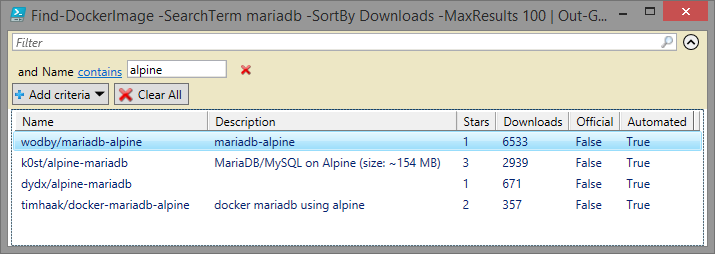
Couple of years ago I’ve got so annoyed with DockerHub search UI that I made PowerShell module that I could use instead:

GitHub icon PSDockerHub
'mariadb' | Find-DockerImage -SortBy Downloads -MaxResults 100 | ? Name -Like '*alpine*'

Name                 Description                             Stars Downloads Official Automated
----                 -----------                             ----- --------- -------- ---------
wodby/mariadb-alpine mariadb-alpine                              1      6533    False      True
k0st/alpine-mariadb  MariaDB/MySQL on Alpine (size: ~154 MB)     3      2939    False      True
dydx/alpine-mariadb                                              1       671    False      True
timhaak/docker-maria docker mariadb using alpine                 2       357    False      True
db-alpine                                                                                      

Then, there was a period of time when I didn’t use Docker much and this module just sat there, collecting the dust. Until recently, when I needed it again and found that DockerHub made some (strange) API changes, which broke PSDockerHub. So I’ve fixed it, added some tests and pushed updated version to the PowerShell Gallery.

So give it a try (it works with PowerShell Core too!) and leave feedback here or on the GitHub. Cheers!

Yet another Using statement

If I have seen further it is by standing on ye sholders of Giants.
— Isaac Newton

I haven’t been blogging for a while and to get back on a track I’ve decided to start with something simple.

Have you ever found a code sample online which shows, you how to do something useful? In my case, it usually ends being improved in some way over original concept. I call this “standing on the shoulders of giants”, hence the quote in the beginning.

So by this post, I’m opening a new series of notes where I’ll be writing about something that I’ve found online and ended (hopefully) improving on.

What’s exactly is a Using?

Using is a C# statement that helps you to ensure that the object is disposed as soon as it goes out of scope, and it doesn’t require explicit code to ensure that this happens. Please note that there is also a using directive which has its PowerShell counterpart since v5.0. It allows to indicate which namespaces are used in the session. This is not the using we’re looking for.

Continue reading

Building PowerShell modules with Swagger Codegen

A word of warning. This was written some time ago and I did’t have time to actually publish it till now. It’s probably rendered obsolete by the release of PSSwagger, but I decided to post it anyway.
APIs. APIs EVERYWHERE

Web API’s are everywhere. They provide cross-platform interface for applications to communicate with each other enabling dev/ops people to create highly automated interconnected systems. But there is a catch: to use the API you need to write an API client in the language of your choice.

For PowerShell this means that you need to read API spec, write code that send correct POST/GET requests and transform raw XML/JSON responces to the .NET/PowerShell friendly objects. And don’t forget tests!

As it happens, this problem was solved a long ago for other languages by Swagger:

Swagger is the world’s largest framework of API developer tools for the OpenAPI Specification(OAS), enabling development across the entire API lifecycle, from design and documentation, to test and deployment.

Basically Swagger allows you to design and document web-API and share it with the world by using OpenAPI specification:

The OpenAPI Specification creates the RESTful contract for your API, detailing all of its resources and operations in a human and machine readable format for easy development, discovery, and integration.

Moreover, once you got your hands on the someone’s API spec, you can build a fully featured client in your programming language for this spec automatically, using Swagger Codegen:

Build APIs quicker and improve consumption of your Swagger-defined APIs in every popular language with Swagger Codegen. Swagger Codegen can simplify your build process by generating server stubs and client SDKs from your Swagger specification, so your team can focus better on your API’s implementation and adoption.

Sounds good, huh?

Continue reading

Visualizing PowerShell pipeline

A picture1 is worth a thousand words.

Occasionally, I see people having issues while trying to understand how PowerShell pipeline is executed. Most of them have no problems when Begin/Process/End blocks are in the single function. And if in doubt, I can always point them to the Don Jones’ The Advanced Function Lifecycle article. But when multiple cmdlets are chained into the one single pipeline, things become a little less clear.

Consider this example.

function Use-Begin {
    Begin {
        Write-Host 'Begin'
    }
}

function Use-End {
    End {
        Write-Host 'End'
    }
}

Let’s try to pipe one function into another:

PS C:\Users\beatcracker> Use-Begin | Use-End

Begin
End

So far, so good, nothing unexpected. The Begin block of the Use-Begin function executes first, and the End block of the Use-End function executes last.

But what happens if we swap the functions in our pipeline?

Continue reading