Notion

Notion is a productivity and note-taking web application. With the Notion app in Make, you can manage the database items, pages, and page content in your Notion account.
Requirements
To use the Notion app in Make you must have a Notion account. Your Notion account must have admin permissions to establish the connection in Make.
Connect Notion and Make
Make provides two ways to connect to the Notion app:
- Internal connectionNotion Internal connection
- Public connectionNotion Public connection
Notion API update
Starting September 3, 2025, Notion introduced a new API version (2025-09-03) that supports databases with multiple data sources.
Existing integrations
If you already have an existing integration and add a new data source, the old integration will stop working. To continue using the existing integration, delete the newly added data source.
Module compatibility
The new Notion modules work with both single-source and multi-source databases.
- For any new setups, use the new modules (not the ones marked as Legacy). This ensures your connection stays compatible with future Notion updates.
- Notion API v1 will be deprecated at an unspecified date in the future. To ensure continuity, it is strongly recommended to migrate to the latest version as soon as possible.
Parent identifiers
You can use both old and new modules together as long as they reference the same source database. However, be aware that they require different parent identifiers:
- Use database_id for old modules
- Use data_source_id for new modules
Module upgrade
While upgrading from old modules to new modules within an existing scenario, there are important breaking changes to account for:
- parent.type changes from database to data_source in the new module.
- If you are using a v2 module after a v1 module, you will need to map the data_source_id instead of the database_id.
- v1 modules do not output the data_source_id, so you'll need to:
- retrieve the database using the database_id from the v1 module.
- Identify and map the corresponding data_source_id to use in the v2 module.
Instant Event module update
The webhook has been automatically upgraded to the latest version.
- The value of parent.type in the webhook output has changed in some cases—from database to data_source. If you reference parent.type in filters or downstream modules, existing mappings may no longer work as expected.
- Notion has renamed the database.schema_updated event to data_soure.schema_updated. This change may impact conditions relying on the old event name and will require updates to maintain compatibility.
Add Databases to be visible in Make
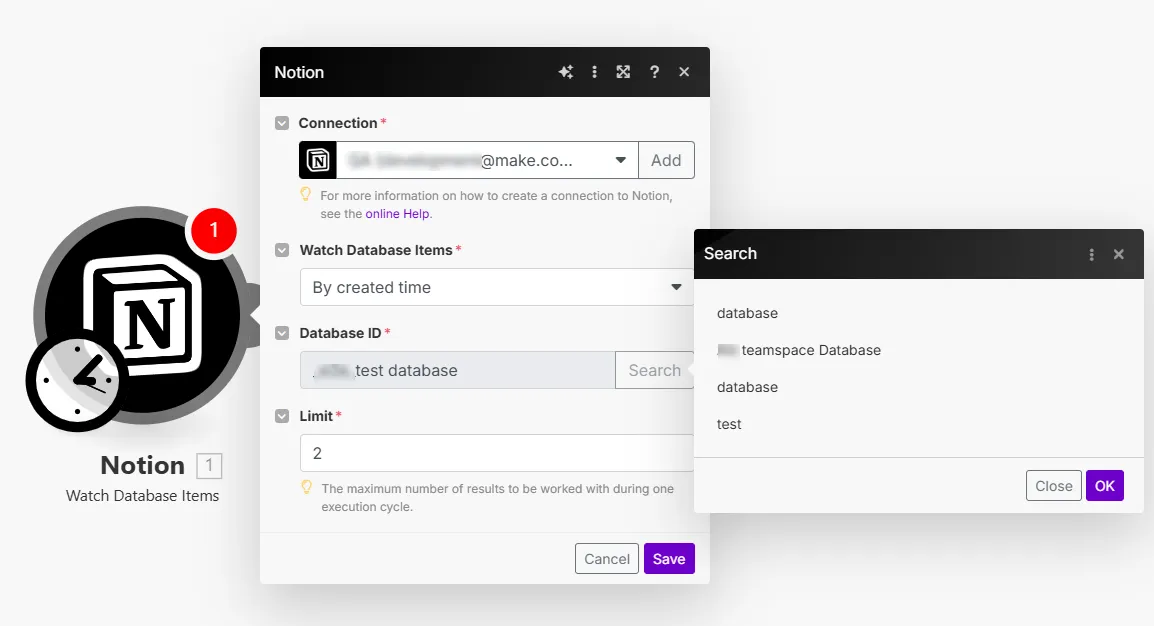
For the Notion internal connection, by default, Notion databases do not appear in the Database ID field > Search option. You must manually add them to the Notion app in Make from your Notion account.
To add databases from your Notion account to the Notion app in Make:
Log in to your Notion account.
Enter into the database you want to add to Make, click on ... in the top right corner, click Add connections, search for and click on the integration you previously created, and click Confirm.
The database is successfully shared and you can now see it in a module's Database ID > Search field.
Retrieve added databases and pages after establishing the connection
If new databases or pages are added to the Notion account, you must revoke the connection in your Notion account and reauthorize the connection in Make to retrieve the added databases or pages.
To retrieve the newly added databases and pages:
Log in to your Notion account.
Click Settings & members > Connections > ... > Disconnect all users.
Go to your Make account Connections page, search for your Notion connection, and click Reauthorize.
You can now see the newly added databases or pages in your Notion Make connection.
Notion modules
After connecting to the Notion app, you can use the following types of modules to build your scenarios.
Templates
You can look for Notion templates in Make's template gallery, where you'll find thousands of pre-created scenarios.
