
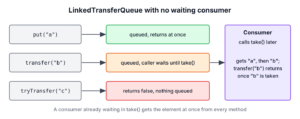
In Java, TransferQueue is a BlockingQueue in which a producer can wait until a consumer has received its element, and LinkedTransferQueue is its only implementation in the JDK. The key method is transfer(), which returns only after a consumer has taken the element, whereas put() adds the element and returns at once.
We use a TransferQueue in message passing between threads when the producer sometimes needs proof of delivery, for example an order service that must know that the notification worker picked up the order before it answers the client. In other cases, the same queue works as a normal unbounded queue.
The following example shows the three ways to hand over an element when no consumer is waiting, with the result of each line as a comment.
LinkedTransferQueue<String> messages = new LinkedTransferQueue<>();
messages.put("order-1");                        // queued, returns at once
boolean handed = messages.tryTransfer("order-2");   // false (no consumer waiting, not queued)
boolean timed = messages.tryTransfer("order-3", 50, TimeUnit.MILLISECONDS);   // false after 50 ms, not queued
int queued = messages.size();                   // 1 (only order-1)
boolean waiting = messages.hasWaitingConsumer();    // false
String head = messages.poll();                  // "order-1"
Notice that tryTransfer() never leaves the element in the queue when it fails. We start with the interface and the LinkedTransferQueue class, move on to examples with real consumers, the constructors and methods, and end with a comparison with SynchronousQueue and other blocking queues.
1. TransferQueue Interface
The TransferQueue interface was added to the Java Collections Framework in Java 7, in the java.util.concurrent package. It extends BlockingQueue, so it has put(), take(), offer() and poll(), and it adds methods that hand an element to a consumer.
// does not compile: shortened declaration from the JDK, shown for reference
public interface TransferQueue<E> extends BlockingQueue<E> {
    void transfer(E e) throws InterruptedException;
    boolean tryTransfer(E e);
    boolean tryTransfer(E e, long timeout, TimeUnit unit) throws InterruptedException;
    boolean hasWaitingConsumer();
    int getWaitingConsumerCount();
}
When a consumer is already waiting in take() or a timed poll(), transfer() gives it the element at once. When no consumer is waiting, transfer() adds the element at the tail and blocks until a consumer takes it.

| Method | Consumer is waiting | No consumer is waiting |
|---|---|---|
| put(e), offer(e), add(e) | Element goes to the consumer | Element is queued, the call returns |
| transfer(e) | Element goes to the consumer, the call returns | Element is queued, the call waits until it is taken |
| tryTransfer(e) | Element goes to the consumer, returns true | Returns false, element is not queued |
| tryTransfer(e, timeout, unit) | Element goes to the consumer, returns true | Waits up to the timeout, returns false and removes the element |
2. LinkedTransferQueue Class
The LinkedTransferQueue class implements TransferQueue with linked nodes and non-blocking compare-and-set updates instead of locks. Its rules are short.
- The queue is unbounded, so put() and offer() never block and remainingCapacity() returns Integer.MAX_VALUE.
- It orders elements FIFO with respect to any given producer.
- Adding null throws a NullPointerException.
- It is thread-safe, and its iterator is weakly consistent.
- The method size() is not a constant-time operation, because it walks the nodes, and the result can be out of date while other threads change the queue.
- Bulk operations such as addAll() and removeAll() are not atomic.
In the JDK 25 source code, SynchronousQueue is built on the internal code of LinkedTransferQueue, so both classes share the same handoff mechanism.
3. Java LinkedTransferQueue Example
The examples hand order confirmations from an order service to a notification worker. Each worker runs as a virtual thread, and the main thread waits for it with join(), so the results do not depend on timing.
3.1. Non-blocking Insertion and Removal
Without transfer(), a LinkedTransferQueue works like any unbounded FIFO queue. The methods offer() and poll() return at once.
LinkedTransferQueue<String> outbox = new LinkedTransferQueue<>(List.of("order-1"));
boolean offered = outbox.offer("order-2");      // true
String next = outbox.poll();                    // "order-1"
String last = outbox.poll();                    // "order-2"
String none = outbox.poll();                    // null
3.2. Blocking Transfer and Retrieval
In this example, the producer calls transfer() for three orders. Each call returns only after the worker has taken the order with take(), so the producer is never more than one order ahead of the worker.
LinkedTransferQueue<String> handoff = new LinkedTransferQueue<>();
List<String> notified = new CopyOnWriteArrayList<>();

Thread worker = Thread.ofVirtual().start(() -> {
    try {
        for (int i = 0; i < 3; i++) {
            notified.add(handoff.take());       // waits for the next order
        }
    } catch (InterruptedException e) {
        Thread.currentThread().interrupt();
    }
});
handoff.transfer("order-1");                    // returns after the worker took order-1
handoff.transfer("order-2");
handoff.transfer("order-3");
int afterTransfers = handoff.size();            // 0 (every order was received)
worker.join();
List<String> received = List.copyOf(notified);  // [order-1, order-2, order-3]
The method tryTransfer() succeeds only when a consumer is already waiting. In the next snippet, the main thread waits until the worker blocks in take(), which hasWaitingConsumer() reports, before it tries the handoff.
LinkedTransferQueue<String> direct = new LinkedTransferQueue<>();
Thread listener = Thread.ofVirtual().start(() -> {
    try {
        direct.take();
    } catch (InterruptedException e) {
        Thread.currentThread().interrupt();
    }
});
while (!direct.hasWaitingConsumer()) {
    Thread.onSpinWait();                        // wait until the listener blocks in take()
}
int consumers = direct.getWaitingConsumerCount();   // 1
boolean delivered = direct.tryTransfer("order-9");  // true
listener.join();
4. Creating LinkedTransferQueue Instance
The class has two constructors, and neither takes a capacity.
- LinkedTransferQueue() creates an empty queue.
- LinkedTransferQueue(Collection c) creates a queue that contains the elements of the collection in iteration order.
When the code only needs the interface methods, we use TransferQueue<E> as the variable type, so the code reads as “a queue that supports transfer” and not as a specific class.
5. LinkedTransferQueue Methods
Besides the transfer methods in section 1, the class has the usual BlockingQueue methods. Only the retrieval methods wait, since an unbounded queue always has room.
| Method | What it does |
|---|---|
| take() | Removes the head, waits while the queue is empty |
| poll(timeout, unit) | Removes the head, waits up to the timeout, returns null after it |
| poll(), peek() | Return the head or null at once; poll() also removes it |
| hasWaitingConsumer() | Returns true when at least one thread waits in take() or a timed poll() |
| getWaitingConsumerCount() | Returns an estimate of the number of waiting consumers |
| drainTo(c), drainTo(c, max) | Moves the queued elements into a collection |
| size() | Counts the nodes, takes linear time |
The count from getWaitingConsumerCount() is a snapshot that can change right after the call, so we use it for monitoring and not to decide whether a later transfer() will block.
6. Delivery With a Timeout and a Fallback
An order service answers the client within 200 ms. It tries to hand the confirmation to the notification worker, and when no worker takes it in time, it stores the confirmation in a retry list instead of blocking the request thread forever. The timed tryTransfer() fits that need.
TransferQueue<String> notifications = new LinkedTransferQueue<>();
List<String> retryLater = new ArrayList<>();
String confirmation = "order-42";
boolean pickedUp = notifications.tryTransfer(confirmation, 200, TimeUnit.MILLISECONDS);   // false (no worker running)
if (!pickedUp) {
    retryLater.add(confirmation);
}
List<String> retries = retryLater;              // [order-42]
int stuckInQueue = notifications.size();        // 0
The timed tryTransfer() removes the element when the timeout passes, so we keep our own copy for the retry. A plain transfer() has no timeout, so we use it only in background threads that may wait as long as the consumer needs.
7. LinkedTransferQueue vs SynchronousQueue vs LinkedBlockingQueue
The three classes cover a range from pure handoff to pure buffering. The LinkedTransferQueue sits in the middle, because each call decides whether to wait for a consumer.
| Aspect | SynchronousQueue | LinkedTransferQueue | LinkedBlockingQueue |
|---|---|---|---|
| Capacity | None | Unbounded | Optional bound |
| put() waits for a consumer | Always | Never | Only when full |
| Wait for delivery per call | Every call | With transfer() | Not available |
| size() | Always 0 | Linear time | Constant time |
| Typical use | Direct handoff, thread pools | Mixed handoff and buffering | Classic producer-consumer buffer |
For a bounded buffer with backpressure, the ArrayBlockingQueue is the simpler choice. All of these classes implement the Queue interface, so code that only offers and polls can switch between them.
8. TransferQueue FAQs
Most questions about TransferQueue compare its methods with put() or ask how it differs from SynchronousQueue.
8.1. What Is the Difference Between transfer() and put()?
The method put() queues the element and returns, whereas transfer() returns only after a consumer has received the element. On a LinkedTransferQueue, put() never blocks, because the queue is unbounded.
8.2. What Does tryTransfer() Return When No Consumer Is Waiting?
The method returns false, and the element is not added to the queue. The timed version waits up to the timeout first and also leaves nothing in the queue when it fails, as the example in section 6 shows.
8.3. Is LinkedTransferQueue Bounded?
No. There is no capacity limit, so a producer that uses only put() or offer() can fill memory if consumers are slow. Using transfer() limits each producer thread to one element in flight.
8.4. When Should I Use LinkedTransferQueue Instead of SynchronousQueue?
We use LinkedTransferQueue when some messages need a handoff and others can wait in the queue. A SynchronousQueue forces a handoff for every element, while a LinkedTransferQueue lets each call choose between transfer() and put().
9. Conclusion
A TransferQueue adds delivery confirmation to a BlockingQueue. The method transfer() waits until a consumer has the element, tryTransfer() succeeds only with a waiting consumer, and the timed tryTransfer() gives up after a timeout without leaving the element behind.
The LinkedTransferQueue class is unbounded, lock-free and FIFO per producer, so it doubles as a normal queue when we call put(). We count on size() and getWaitingConsumerCount() only for monitoring, because both are estimates under concurrent use.
10. References
- TransferQueue Javadoc (Java 25)
- LinkedTransferQueue Javadoc (Java 25)
- SynchronousQueue Javadoc (Java 25)
Happy Learning !!

