
In previous post, we have seen a very simple angularjs hello world example. In this post, we are going to see about controllers.
AngularJS tutorial:
- AngularJs hello world example
- AngularJs controller examples
- AngularJs ng-repeat example
- AngularJs Built-in filter example
- AngularJs custom filter example
- AngularJs ajax example using $http
- AngularJS RESTful web service JAXRS CRUD example using $http
What are controllers
You can consider controllers as main driver for model view changes. It is a main part of angular js application and It is javascript functions or objects which actually performs ui operation. It controls data of angularjs applications.
What is $scope?
Scope is an object which is glue between model and view. So if you want to pass data from model to view and view to model, it is done through scopes object.
How controllers and scope are related?
Actually controllers passes scope object as constructor parameter and initialise model values and functions. Please don’t worry if it sounds very confusing, once we see simple example, you will be able to relate.
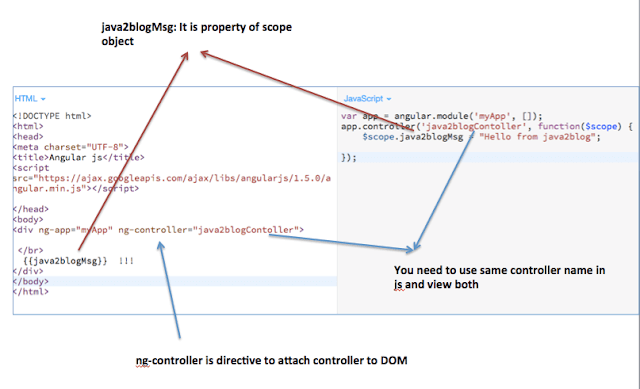
Declaration of controller syntax :
You need declare module before creating controller. We will learn about module in our next tutorial.
So we use module’s controller method to declare controller.
var app = angular.module('myApp', []);
app.controller('java2blogContoller', function($scope) {
    $scope.java2blogMsg = "Hello from java2blog";

});
Simple example:
Copy below text , open notepad , paste it and save it as angularJSControllerExample.html and open it in the browser.
Angular js


  {{java2blogMsg}}  !!!
app.js
var app = angular.module('myApp', []);
app.controller('java2blogContoller', function($scope) {
    $scope.java2blogMsg = "Hello from java2blog";

});
Live Demo:
What if you don’t want to use $scope?
Yes, you can use controller as option too if you do not want to use $scope variable.
so you need to use
Advantages of using controller as options are:
- Code becomes more readable.
- It removes dealing with this scope and bindings.
- There is no dependency on alias used in view(.html) and javascript
Lets take an example:
Copy below text , open notepad , paste it and save it as angularJSControllerExample.html and open it in the browser.
Angular js


  {{con.java2blogMsg}}  !!!
app.js
var app = angular.module('myApp', []);
app.controller('java2blogContoller', function() {
    var cont= this;
    cont.java2blogMsg = "Hello from java2blog with controller as option";

});

