
In this tutorial, we will see how to separate an object from the background in the image using python open-cv, which exists as cv2 (computer vision) library.
[toc]
You can use threshold() method of cv2 library to separate an object from the background in the image. To use cv2 library, you need to import cv2 library using import statement.
Now let’s see the syntax and return value of cv2 threshold() method first, then we will move on the examples.
Syntax
cv2.threshold(src, thresholdValue, maxVal, thresholdingTechnique)
Parameters
You need to pass four parameters to cv2 threshold() method.
src:Input Grayscale Image array.thresholdValue:Mention that value which is used to classify the pixel values.maxVal:The value to be given if pixel value is more than (sometimes less than) the threshold value.thresholdingTechnique:The type of thresholding to be applied.cv2.THRESH_BINARY:If pixel intensity is greater than the set threshold, value set to 255, else set to 0 (black).cv2.THRESH_BINARY_INV:Inverted or Opposite case of cv2.THRESH_BINARY.<li.cv2.THRESH_TRUNC:If pixel intensity value is greater than threshold, it is truncated to the threshold. The pixel values are set to be the same as the threshold. All other values remain the same.cv2.THRESH_TOZERO:Pixel intensity is set to 0, for all the pixels intensity, less than the threshold value.cv2.THRESH_TOZERO_INV:Inverted or Opposite case of cv2.THRESH_TOZERO.
There are 5 different simple thresholding techniques are :
Return Value
This method return a tuple of 2 values in which 1st value is given threshold value and 2nd value is modified image array.
cv2 threshold() Method examples
Now Let’s see the Python code :
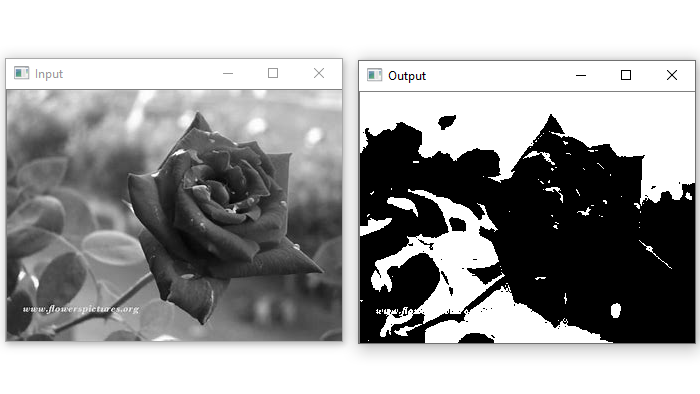
Example 1: Using cv2.THRESH_BINARY thresholding technique.
# import computer vision library(cv2) in this code
import cv2

# main code
if __name__ == "__main__" :

    # mentioning absolute path of the image
    img_path = "C:\\Users\\user\\Desktop\\flower.jpg"

    # read/load an image in grayscale mode
    grey_img = cv2.imread(img_path,0)

    # show the Input image on the newly created image window
    cv2.imshow('Input',grey_img)

    # applying cv2.THRESH_BINARY thresholding techniques
    ret, thresh_img = cv2.threshold(grey_img, 128, 255, cv2.THRESH_BINARY)

    # show the Output image on the newly created image window
    cv2.imshow('Output',thresh_img)
Output:
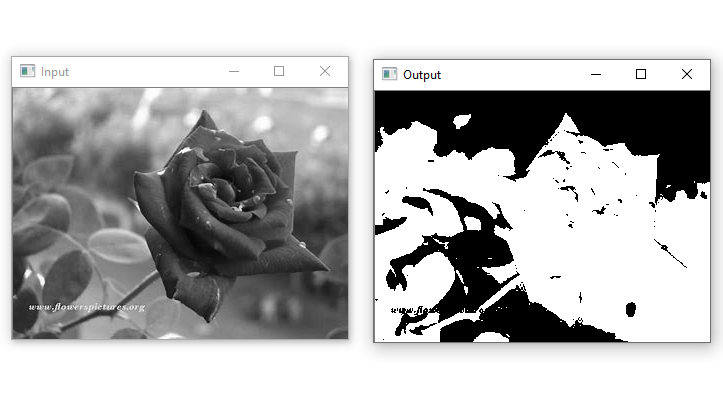
Example 2 : Using cv2.THRESH_BINARY_INV thresholding technique.
# import computer vision library(cv2) in this code
import cv2

# main code
if __name__ == "__main__" :

    # mentioning absolute path of the image
    img_path = "C:\\Users\\user\\Desktop\\flower.jpg"

    # read/load an image in grayscale mode
    grey_img = cv2.imread(img_path,0)

    # show the Input image on the newly created image window
    cv2.imshow('Input',grey_img)

    # applying cv2.THRESH_BINARY_INV thresholding techniques
    ret, thresh_img = cv2.threshold(grey_img, 128, 255, cv2.THRESH_BINARY_INV)

    # show the Output image on the newly created image window
    cv2.imshow('Output',thresh_img)
Output:
Similarly, you can apply other given thresholding techniques and see their results.
That’s all about cv2 threshold() Method.

